Kubernetes, Trident and SolidFire configuration visibility
- Introduction
- Mapping applications to Kubernetes PVCs with kubectl
- Mapping PVCs to storage with tridentctl
- Mapping Trident to SolidFire with scripts or SQL queries
- SolidFire API vs. external database
- Using the SolidFire API to enhance configuration mapping
- Using a database to assist in configuration mapping
- Assembling replicated iSCSI target names for Trident import
- Conclusion
- Appendix A - tridentctl output for volumes and backends
This series of posts has several parts:
- Part 1 - this post
- Part 2 - Kubernetes, Trident and SolidFire configuration - part 2
Introduction
Recently I realized that in 2021 intended to publish Kubernetes failover and failback scripts for SolidFire with NetApp Trident, but never got to it.
No one asked, so I forgot to finish those PowerShell scripts. But the post that deep dives into how to do it seems clear and it's not too hard to follow it, I would hope.
I know that many enterprise users are very good at automation so I'm not surprised that no one asked. If you can't do it yourself you probably don't want to use a script from Github either. I mean this for enterprise users.
Still, there are other users who have simpler requirements such as storage and configuration replication, without BC requirements (the ability to switch over and provide services at the remote site).
They can get away by simply configuring volume replication on SolidFire - as long as data is replicated and you upload your Kubernetes backup to S3, that's enough.
But maybe even those users want simple tools to make it easier to see what's going on in their VM or Kubernetes environment, so I'll add some content about that in this post.
Anyway, this post will not provide a solution for anything, but will look at where to get the information required to build it.
I may use this information to enhance SolidFire Collector and also to write another post that will "connect the dots" from this post, perhaps into a workflow or a script.
Mapping applications to Kubernetes PVCs with kubectl
To get a list of PVCs use standard kubectl or or Kubernetes API. For example, to get PVCs:
kubectl get pvc -n ${NS}
Let's see an example (with just Name and Source parts of output shown for brevity).
$ kubectl describe pv pvc-4fb5d7f5-4d98-429e-ab36-1b2118b7e55c -n important
Name:            pvc-4fb5d7f5-4d98-429e-ab36-1b2118b7e55c
...
Source:
    Type:              CSI (a Container Storage Interface (CSI) volume source)
    Driver:            csi.trident.netapp.io
    FSType:            xfs
    VolumeHandle:      pvc-4fb5d7f5-4d98-429e-ab36-1b2118b7e55c
    ReadOnly:          false
    VolumeAttributes:      backendUUID=b3680925-a9c1-4552-a1b4-1e4a0a273e8e
                           internalName=pvc-4fb5d7f5-4d98-429e-ab36-1b2118b7e55c
                           name=pvc-4fb5d7f5-4d98-429e-ab36-1b2118b7e55c
                           protocol=block
                           storage.kubernetes.io/csiProvisionerIdentity=1711014850727-2146-csi.trident.netapp.io
This is the simplest case, where name and internalName are the same.
Once we have a list of volumes (PVs can be queried as well), we can move to Trident.
Mapping PVCs to storage with tridentctl
I wrote a post about using the Trident API here. If you want to use the API directly, check out that post for some examples and then the Trident repository on Github, since the API isn't static.
In these examples I'll use the CLI because it's easier.
Each SolidFire cluster is a separate backend in Trident configuration. Here we have one such backend.
~$ ./trident-installer/tridentctl -n trident get backend
+--------------------------+----------------+--------------------------------------+--------+------------+---------+
|           NAME           | STORAGE DRIVER |                 UUID                 | STATE  | USER-STATE | VOLUMES |
+--------------------------+----------------+--------------------------------------+--------+------------+---------+
| solidfire_192.168.105.30 | solidfire-san  | b3680925-a9c1-4552-a1b4-1e4a0a273e8e | online | normal     |       5 |
+--------------------------+----------------+--------------------------------------+--------+------------+---------+
If there are volumes on the backend, we can view them like this:
$ ./trident-installer/tridentctl -n trident get volumes
+------------------------------------------+---------+---------------+----------+--------------------------------------+-------+---------+
|                   NAME                   |  SIZE   | STORAGE CLASS | PROTOCOL |             BACKEND UUID             | STATE | MANAGED |
+------------------------------------------+---------+---------------+----------+--------------------------------------+-------+---------+
| pvc-14a51322-16c8-4b95-a7e4-28d9963450b3 | 2.0 GiB | silver        | block    | b3680925-a9c1-4552-a1b4-1e4a0a273e8e |       | true    |
| pvc-4fb5d7f5-4d98-429e-ab36-1b2118b7e55c | 2.0 GiB | silver        | block    | b3680925-a9c1-4552-a1b4-1e4a0a273e8e |       | true    |
| pvc-a5f21571-e002-493f-b2dc-df01f40c1fa1 | 2.0 GiB | silver        | block    | b3680925-a9c1-4552-a1b4-1e4a0a273e8e |       | true    |
| pvc-d793176f-2484-48ea-9255-f70215a7c5f7 | 2.0 GiB | silver        | block    | b3680925-a9c1-4552-a1b4-1e4a0a273e8e |       | true    |
| pvc-fec78b61-a216-4825-a709-a24069cfadc7 | 4.7 GiB | silver        | block    | b3680925-a9c1-4552-a1b4-1e4a0a273e8e |       | false   |
+------------------------------------------+---------+---------------+----------+--------------------------------------+-------+---------+
One of the more interesting details is MANAGED (in one case false).
When a volume is natively created through Trident, it's managed. When it's imported, it can be put under Trident management or not (in which case you'd see false there). That's useful if you import volumes for temporary purposes such as backup from Kubernetes, or maybe data masking and whatnot.
This may be easier to do using the Trident API, but for simple reporting tridentcli is good enough.
We can have it output JSON responses like this, which may be how a storage admin might actually get this output from Kubernetes admins - they could upload output of this command to an off-site S3 bucket, for example, so that we don't need to access the Kubernetes or Trident API or CLI.
./trident-installer/tridentctl -n trident get volume pvc-4fb5d7f5-4d98-429e-ab36-1b2118b7e55c -o json
You may see a sample of "get volume(s)" and "get backend(s)" output in Appendix A. That contains all the information we need from Trident.
Next, we want to map Trident volumes to SolidFire.
Mapping Trident to SolidFire with scripts or SQL queries
You may say "I don't need to map anything here, I already have internalName(s)". Maybe. But maybe you also want to get more details about the accounts or other details from tridentctl output.
As you can see in Appendix A, each volume has the following groups of parameters:
- Config: volume-related info
- backend: needs to be extracted when you have multiple SolidFire clusters, or multiple sites
- backendUUID: unique UUID (randomly generated every time a backend is added) for
backend - pool: usually not relevant to SolidFire and identical to storage class
- orphaned: as the name says, something's wrong… Maybe check this and spit out some warning if not empty.
In the key part, Config, we find name and internalName.
I wrote about those in the post at the top so I won't write again, but I'll say for new volumes they're identical, but if you replicate a volume and import it from a different SolidFire using the same Kubernetes cluster, they'll diverge.
Anyway, back to the names: we can easily extract those values.
>>> for v in tv['items']:
...   print(v['Config']['name'])
...
pvc-14a51322-16c8-4b95-a7e4-28d9963450b3
pvc-4fb5d7f5-4d98-429e-ab36-1b2118b7e55c
pvc-a5f21571-e002-493f-b2dc-df01f40c1fa1
pvc-d793176f-2484-48ea-9255-f70215a7c5f7
pvc-fec78b61-a216-4825-a709-a24069cfadc7
Since relying purely on name isn't 100% reliable - a SolidFire volume may be named the same as your PVC, but after some trouble such as failing over to another array, that may change - we'll also extract other attributes.
We can loop through that list and extract additional items of interest.
For example, I've collected top 3 interesting properties from that Trident output: name, internal name, and target IQN (sample for 2 volumes).
[
    {'name': 'pvc-14a51322-16c8-4b95-a7e4-28d9963450b3',
     'name_internal': 'pvc-14a51322-16c8-4b95-a7e4-28d9963450b3',
     'tgt_iqn': 'iqn.2010-01.com.solidfire:wcwb.pvc-14a51322-16c8-4b95-a7e4-28d9963450b3.112'},
    {'name': 'pvc-fec78b61-a216-4825-a709-a24069cfadc7',
     'name_internal': 'velero-vol-136-202404090816z',
     'tgt_iqn': 'iqn.2010-01.com.solidfire:wcwb.velero-vol-136-202404090816z.140'}
]
- name: PVC name
- name_internal: "storage name". The second volume's internal name is different from the Kubernetes name because this volume was imported. (I think some time in the past I restored a Velero backup to a new volume and then imported that volume to Kubernetes with Trident CSI.)
- target IQN: this is what connects any PVC name to SolidFire cluster and volume ID
If you use SolidFire Collector, you'll have Target IQNs in the database, or you can get them off SolidFire at any time (for presently available targets, of course).
With a database that keeps track of that over time you can look it up for yesterday or last week.
Going back to that target IQN, we can use it to identify the volume details without looking it up elsewhere:
# iqn.2010-01.com.solidfire:wcwb.velero-vol-136-202404090816z.140
# iqn.2010-01.com.solidfire:wcwb.pvc-14a51322-16c8-4b95-a7e4-28d9963450b3.112
(?:iqn.2010-01.com.solidfire)\:([a-z0-9]{4})\.(.*).(\d+)
With this I have detailed SolidFire-related properties of my iSCSI targets:
- SolidFire cluster UUID (
wcwb) - SolidFire volume name (which should be equal to nameInternal in tridentctl output, but may be different from Kubernetes or Trident *name).
- SolidFire volume ID (140, 112) - these alone are enough to setup replication, snapshots, etc.
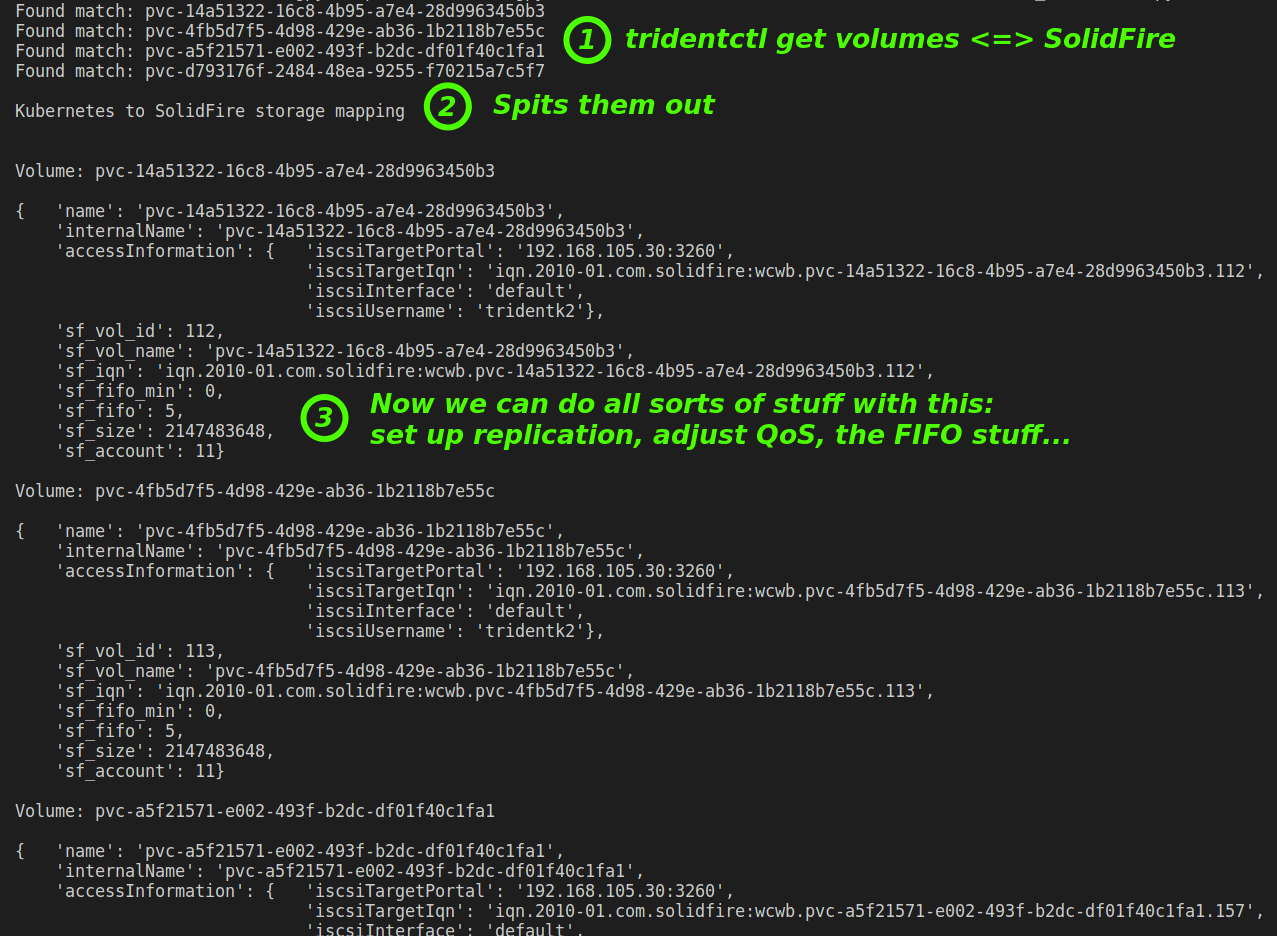
We simply query these volume IDs and create detailed reports or even use these to set up SolidFire storage replication to another cluster. Something like this:
| PVC | PV | SF UUID | SF vName | SF vID |
|---|---|---|---|---|
| pvc-ab12 | pvc-int12 | wcwb | pvc-int12 | 140 |
(Here I have to say that I'm not 100% sure if internalName and SF volume name are always identical, but it should be that way. We know SolidFire iSCSI Target doesn't change, so the way it was named when it was created is the way it stays as long as the volume is round.)
With two SolidFire clusters (with replication between them), it would be trivial to create a wider table with end-to-end mapping for two sites, each with its own K8s-SolidFire stack:
- Kubernetes #1 <==> SolidFire #1
- SolidFire #1 <==> SolidFire #2
- SolidFire #2 <==> Kubernetes #2
The bidirectional arrows signify we can create PVCs on K8s #1, replicate volumes to site #2, failover storage to site #2 if we need to, create more Kubernetes volumes on K8s on site #2, setup replication for those new volumes from site #2 to #1, and failback when ready. All without a lot of hassle or effort.
SolidFire API vs. external database
Before we move on, I just want to reiterate we have a choice here:
- We can choose to query SolidFire or a database with SolidFire information in it
- The first choice is easier, but:
- No history
- No way to query if SolidFire or network are down or a site disconnected from the site where you're at
Neither is wrong, but having a small database in a $10 VM on Digital Ocean and a script that posts SolidFire information to it can be a low-cost Plan B even if you prefer to query SolidFire directly.
Grafana has a free tier in their cloud service, by the way.
Using the SolidFire API to enhance configuration mapping
Assuming SolidFire is usable and reachable (which may not be the case for the SolidFire at a disconnected remote site), you can query your cluster or both clusters using the API or CLI.
This is easy, of course, given a list of volume IDs we can query them, set up or reverse replication relationships and more.
But there's another interesting detail, which is that Trident uses SolidFire volume attributes to store its metadata.
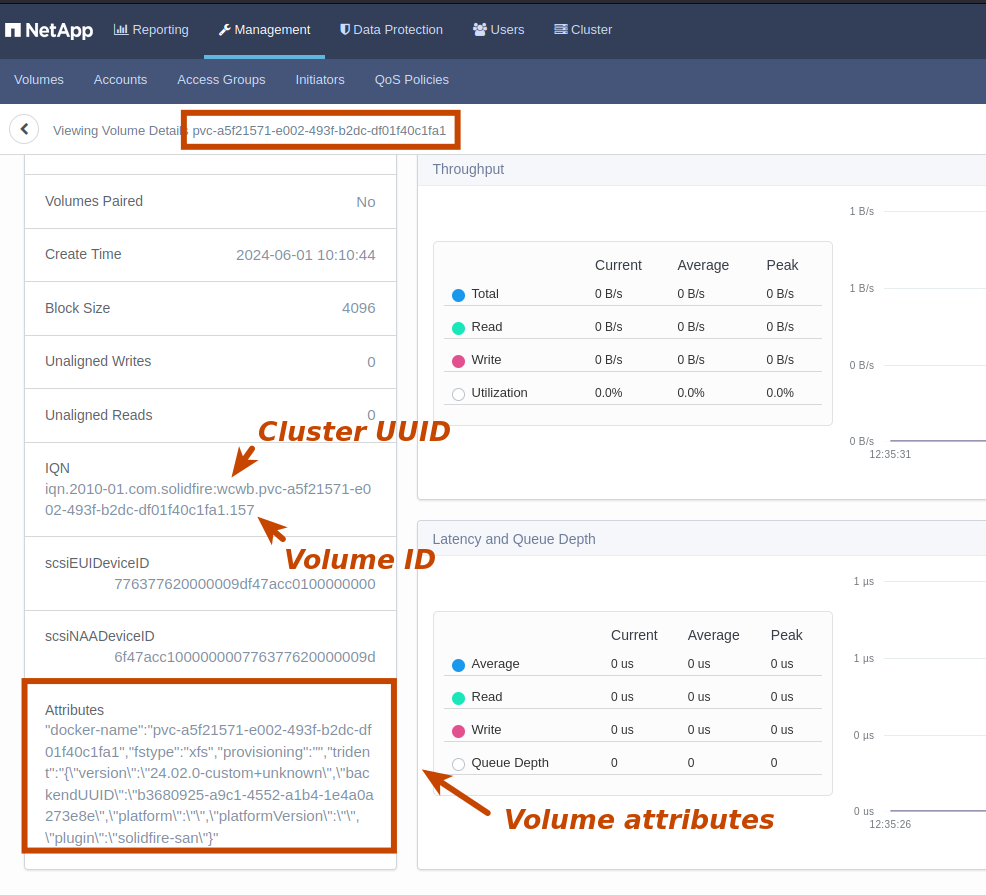
When SolidFire returns volume details, volume['attributes'] may have additional details (it may be empty if it's not a Trident volume, though).
For a single Trident volume, these details look like this:
{'docker-name': 'pvc-ba3213cd-01bc-4920-b1c7-708ed89e5730', 'fstype': 'xfs', 'provisioning': '', 'trident': '{"version":"23.07.0-custom+e2344922b27d1aec8c2574153962ef7ea49e390d","backendUUID":"f069f7c4-759a-4758-9b90-564d290e76a4","platform":"kubernetes","platformVersion":"v1.25.14-rc1+k3s1","plugin":"solidfire-san"}'}
Again, a volume may have attributes, but not Trident attributes.
We can look for 'docker-name' and 'trident' to see if there are Trident attributes present, and since Trident attribute is e string we convert it to JSON and extract Trident-related information such as backendUUID, etc.
How is that information useful? Here's an example from two volumes named "pvc-*": while listing Backend UUIDs, I found there were two different backends, indicating these were different Trident instances, likely from two different Kubernetes clusters on the same site (I do have multiple small Kubernetes in my environment).
- f069f7c4-759a-4758-9b90-564d290e76a4
- 6ebdc64a-76bd-4e2e-969f-64bcd575e288
Even 'fstype' from those volume attributes (you can see it above, its value is 'xfs') is useful. Based on 'fstype' we can decide if we want to clone, mount and backup that volume to S3, for example.
We can also query all other volume or backend properties that you're already familiar with.
Using a database to assist in configuration mapping
If the volumes are gone or the cluster unreachable, you wont be able to find more about them (i.e. by extracting attributes) by querying the SolidFire API, but you can regularly query SolidFire and store output over time and query such a database if you have it.
SolidFire Collector aka SFC is a tool that gathers volume (and other) information and stores them in a database, but NetApp Cloud Insights or your in-house tools can be used as well (even Splunk, etc.).
SFC currently does not extract volume attributes, but it stores to InfluxDB a lot of other useful information about volumes, accounts, QoS settings and such. (Attributes may be gathered in a future release - this post, in fact, is partially a blueprint for that feature.)
Currently SFC collects the following, and I'll give a few examples.
> show measurements
name: measurements
name
----
account_efficiency
accounts
cluster_capacity
cluster_faults
cluster_performance
cluster_version
drive_stats
histogram_below_min_iops_percentages
histogram_min_to_max_iops_percentages
histogram_read_block_sizes
histogram_target_utilization_percentage
histogram_throttle_percentages
histogram_write_block_sizes
iscsi_sessions
node_performance
sfc_metrics
volume_efficiency
volume_performance
volumes
For volume 140, did we see it recently? It's supposed to exist but if it doesn't, then you may have not replicated it to DR site.
> SELECT time,id,qos_policy_id FROM volumes WHERE "id" = '140' ORDER BY time DESC LIMIT 1
My volume 140 does not exist on SolidFire. Maybe I deleted it by mistake, but no one has complained because it hasn't been used lately.
From the volumes measurement we can find volumes by ID and "last seen" time. This can help you determine if a PVC is used or just abandoned because of poorly configured retention policy in Storage Class, in which case you may want to ask your Kubernetes admin to check, rather than replicate this volume because simply because it exists.
> SELECT time,id,qos_policy_id FROM volumes WHERE "name" = 'iqn.2010-01.com.solidfire:wcwb.velero-vol-136-202404090816z.140' AND time > now() - 60m LIMIT 1
name: volumes
time                 id  qos_policy_id
----                 --  -------------
2024-06-01T11:30:45Z 140 0
When was a volume last accessed (2024-05-31T15:13:45Z)? We can get that answer from the iscsi_sessions measurements in SFC.
> SELECT "ms_since_last_iscsi_pdu", "target_name" FROM "iscsi_sessions" ORDER BY time DESC LIMIT 2
name: iscsi_sessions
time                 ms_since_last_iscsi_pdu target_name
----                 ----------------------- -----------
2024-05-31T15:13:45Z 45665                   iqn.2010-01.com.solidfire:wcwb.velero-vol-136-202404090816z.140
2024-05-31T15:13:45Z 45671                   iqn.2010-01.com.solidfire:wcwb.pvc-14a51322-16c8-4b95-a7e4-28d9963450b3.112
The volumes measurement has other details, such as FIFO related settings that are important for snapshot replication (which is why SFC now collects them).
> SELECT * FROM volumes ORDER BY desc LIMIT 1
name: volumes
time                 access    account_id block_size cluster enable_512e fifo_size id min_fifo_size name                                     qos_policy_id scsi_naa_dev_id                  total_size vol_cg_group_id
----                 ------    ---------- ---------- ------- ----------- --------- -- ------------- ----                                     ------------- ---------------                  ---------- ---------------
2024-06-01T11:30:45Z readWrite 8          4096       PROD    True        5         59 0             pvc-ba3213cd-01bc-4920-b1c7-708ed89e5730 0             6f47acc100000000776377620000003b 2147483648 cc9e9aa0-e194-4eb6-a25e-0d816553c2c1
Find all volumes named pvc- and seen on SolidFire within last 15 minutes:
> SELECT time,id,qos_policy_id FROM volumes WHERE "name" =~ /pvc-/ AND time > now() - 15m
name: volumes
time                 id  qos_policy_id
----                 --  -------------
2024-06-01T11:40:45Z 111 0
2024-06-01T11:40:45Z 112 0
2024-06-01T11:40:45Z 113 0
2024-06-01T11:40:45Z 115 0
2024-06-01T11:40:45Z 116 0
Some comments about qos_policy_id in the query above:
- qos_policy_id appears because InfluxDB must query some value - InfluxQL won't let you query just tags
- the SolidFire API can't have QoS policy 0; QoS policy IDs start at 1, but when there's no policy setting (but instead just manual QoS settings) then the API returns nothing. SFC stores that as 0, that's why it's expected to be 0 for Kubernetes volumes - Trident applies QoS settings, but not through policy ID, but based on Trident's configuration file. You can see how Trident stores types (i.e. Storage Class definitions) in
get backendoutput given in Appendix A.
If Trident account is ID 6 and replication is set up, check FIFO settings on volumes for that account.
> SELECT /fifo/ FROM volumes WHERE time > now() - 15m AND account_id = '6' group by account_id
name: volumes
tags: account_id=6
time                 fifo_size min_fifo_size
----                 --------- -------------
2024-06-01T16:30:45Z 5         0
...
The FIFO setting specifies the minimum and maximum number of snapshots to retain. The idea is that for snapshot replication, if the network gets flakey no more than "FIFO size" number of snapshots will be retained. Sometimes it's easier to limit FIFO size than to communicate network issues to Kubernetes users. Also see ensureSerialCreation here. So the above query can help you perform automated checks and you can raise alerts in Grafana if something doesn't check out.
Even though SFC doesn't (yet) gather volume attributes, we can learn a lot about our storage configuration and it can also help us watch for deviations from best practices.
Similarly, you can get this information with SolidFire Exporter (for Prometheus), and probably NetApp Cloud Insights.
Assembling replicated iSCSI target names for Trident import
With storage configuration from Kubernetes (I mean JSON output from Trident, although we could also store Kubernetes PVC output as well) and SolidFire from both sites available for querying, it's easy to figure out which volumes should be imported even if we did not prepare for that in advance.
Simply by querying SolidFire's replication relationship for the volume we know that Cluster UUID abcd should be swapped for wcwb, and the same for volume name and volume ID.
- iqn.2010-01.com.solidfire:abcd.pvc-abc-111.33 <=> iqn.2010-01.com.solidfire:wcwb.pvc-xyz-222.44
Trident import is then easy, because on site #2 we look for pvc-abc-111 from site #2, and import pvc-xyz-222 on site #2.
There's only one problem and that is Trident doesn't make failback easy. I wrote about that in the posted linked at the top: if you have a stretched Kubernetes cluster (across two sites), failing back doesn't work well because Trident can't handle it, so my workaround for that is to uninstall Trident on site #1 and import all volumes. That's why this external juggling of names, IDs and replication relationships is important. If Trident didn't get confused, it would be much less necessary.
It may be different for ONTAP (especially if you use the non-free version of Trident), but I don't think they've ever improved it for SolidFire. One interesting exception to this is Kubernetes on OpenStack with SolidFire because that can use SolidFire's Cinder driver (rather than Trident) and then you don't have to use Trident and it works fine. You can read about that here.
If you have a Kubernetes and a SolidFire cluster at each site, then you just leave Trident on each site alone.
Conclusion
In my opinion SolidFire is still the best NetApp block storage array for Kubernetes. It's effortless to manage, works well in two- and three-site configurations, and generally just gets out of your way. And that's despite just 1-2 major features added to it between the early 2016 and late 2022 (when NetApp stopped actively developing it; end-of-sale was in late 2023).
iSCSI will be fine for 90% of general workloads years from now, so I think users with two or more SolidFire clusters shouldn't hesitate to use them with Kubernetes in multi-site deployments with and without storage replication.
These workflows aren't complicated, nothing in here relies on paid Trident features, so you may want to be in charge of your own DR workflow. The free Trident needs to continue supporting solidfire-san driver and new Kubernetes releases, which I think is expected for as long as SolidFire is supported (until late 2028, if I'm not mistaken).
We've seen how we can connect kubectl to tridentctl and further to SolidFire cross-site APIs to make sometimes complicated relationships easy to manage even in multi-site environments.
This post gives most, if not all, high-level steps one needs to implement reliable monitoring and site failover without getting lost in hundreds of volumes and replication relationships.
Edit: before finalizing this blog I decided to spend some extra time and write a script, to finish this part of my PoC. You can find the script in my Awesome SolidFire repository. Permissively licensed, of course. The script does not include volume attributes mentioned above, but they're not strictly necessary and take only a minute to add.
Appendix A - tridentctl output for volumes and backends
This example shows a single item (volume). Note that iscsiTargetSecret and iscsiInitiatorSecret appear in plain text in this output!
If you output this information from Trident, this must be removed before it's shared or posted to a DB or a bucket. Command:
$ ./trident-installer/tridentctl -n trident get volume -o json
Response:
{
  "items": [
    {
      "Config": {
        "version": "1",
        "name": "pvc-4fb5d7f5-4d98-429e-ab36-1b2118b7e55c",
        "internalName": "pvc-4fb5d7f5-4d98-429e-ab36-1b2118b7e55c",
        "size": "2147483648",
        "protocol": "block",
        "spaceReserve": "",
        "securityStyle": "",
        "storageClass": "silver",
        "accessMode": "ReadWriteOnce",
        "volumeMode": "Filesystem",
        "accessInformation": {
          "iscsiTargetPortal": "192.168.105.30:3260",
          "iscsiTargetIqn": "iqn.2010-01.com.solidfire:wcwb.pvc-4fb5d7f5-4d98-429e-ab36-1b2118b7e55c.113",
          "iscsiInterface": "default",
          "useCHAP": false,
          "iscsiUsername": "tridentk2",
          "iscsiInitiatorSecret": "xxxxxxxxxxxxxxxxx",
          "iscsiTargetSecret": "xxxxxxxxxxxxxxxxx"
        },
        "blockSize": "",
        "fileSystem": "xfs",
        "encryption": "",
        "cloneSourceVolume": "",
        "cloneSourceVolumeInternal": "",
        "cloneSourceSnapshot": "",
        "cloneSourceSnapshotInternal": "",
        "splitOnClone": "",
        "readOnlyClone": false,
        "type": "silver",
        "mountOptions": "discard",
        "shareSourceVolume": ""
      },
      "backend": "",
      "backendUUID": "b3680925-a9c1-4552-a1b4-1e4a0a273e8e",
      "pool": "silver",
      "orphaned": false,
      "state": ""
    }
  ]
}
We could ask the Trident administrator to output information like this:
- All volumes as JSON file volumes-${time}.json
- No secrets included
Command:
$ ./trident-installer/tridentctl -n trident get volume -o json | jq '[.items[] | del(.Config.accessInformation.iscsiTargetSecret) | del(.Config.accessInformation.iscsiInitiatorSecret) | del(.Config.accessInformation.useCHAP) | {name: .Config.name, internalName: .Config.internalName, backend: .backend, backendUUID: .backendUUID, state: .state, accessInformation: .Config.accessInformation}]'
Output (one per volume):
[[
  {
    "name": "pvc-14a51322-16c8-4b95-a7e4-28d9963450b3",
    "internalName": "pvc-14a51322-16c8-4b95-a7e4-28d9963450b3",
    "backend": "",
    "backendUUID": "b3680925-a9c1-4552-a1b4-1e4a0a273e8e",
    "state": "",
    "accessInformation": {
      "iscsiTargetPortal": "192.168.105.30:3260",
      "iscsiTargetIqn": "iqn.2010-01.com.solidfire:wcwb.pvc-14a51322-16c8-4b95-a7e4-28d9963450b3.112",
      "iscsiInterface": "default",
      "iscsiUsername": "tridentk2"
    }
  },
  {
    "name": "pvc-4fb5d7f5-4d98-429e-ab36-1b2118b7e55c",
    "internalName": "pvc-4fb5d7f5-4d98-429e-ab36-1b2118b7e55c",
    "backend": "",
    "backendUUID": "b3680925-a9c1-4552-a1b4-1e4a0a273e8e",
    "state": "",
    "accessInformation": {
      "iscsiTargetPortal": "192.168.105.30:3260",
      "iscsiTargetIqn": "iqn.2010-01.com.solidfire:wcwb.pvc-4fb5d7f5-4d98-429e-ab36-1b2118b7e55c.113",
      "iscsiInterface": "default",
      "iscsiUsername": "tridentk2"
    }
  },
  {
    "name": "pvc-a5f21571-e002-493f-b2dc-df01f40c1fa1",
    "internalName": "pvc-a5f21571-e002-493f-b2dc-df01f40c1fa1",
    "backend": "",
    "backendUUID": "b3680925-a9c1-4552-a1b4-1e4a0a273e8e",
    "state": "",
    "accessInformation": {
      "iscsiTargetPortal": "192.168.105.30:3260",
      "iscsiTargetIqn": "iqn.2010-01.com.solidfire:wcwb.pvc-a5f21571-e002-493f-b2dc-df01f40c1fa1.157",
      "iscsiInterface": "default",
      "iscsiUsername": "tridentk2"
    }
  },
  {
    "name": "pvc-d793176f-2484-48ea-9255-f70215a7c5f7",
    "internalName": "pvc-d793176f-2484-48ea-9255-f70215a7c5f7",
    "backend": "",
    "backendUUID": "b3680925-a9c1-4552-a1b4-1e4a0a273e8e",
    "state": "",
    "accessInformation": {
      "iscsiTargetPortal": "192.168.105.30:3260",
      "iscsiTargetIqn": "iqn.2010-01.com.solidfire:wcwb.pvc-d793176f-2484-48ea-9255-f70215a7c5f7.139",
      "iscsiInterface": "default",
      "iscsiUsername": "tridentk2"
    }
  },
  {
    "name": "pvc-fec78b61-a216-4825-a709-a24069cfadc7",
    "internalName": "velero-vol-136-202404090816z",
    "backend": "",
    "backendUUID": "b3680925-a9c1-4552-a1b4-1e4a0a273e8e",
    "state": "",
    "accessInformation": {
      "iscsiTargetPortal": "192.168.105.30:3260",
      "iscsiTargetIqn": "iqn.2010-01.com.solidfire:wcwb.velero-vol-136-202404090816z.140",
      "iscsiInterface": "default",
      "iscsiUsername": "tridentk2"
    }
  }
]
Then we'd also want the state (not sure what states there are, but if it's not empty, I'd raise a warning) and backendUUID (at least that one is present, whereas backend name is missing in tridentctl output, but that doesn't affect us as we can get that separately from get backend output).
This reminds me - let's check get backend in JSON as well. Command:
~$ ./trident-installer/tridentctl -n trident get backend -o json
Response (serialNumbers contains VMware volume ID because this is a SolidFire Demo VM):
{
  "items": [
    {
      "name": "solidfire_192.168.105.30",
      "backendUUID": "b3680925-a9c1-4552-a1b4-1e4a0a273e8e",
      "protocol": "block",
      "config": {
        "AccessGroups": null,
        "DefaultBlockSize": 0,
        "EndPoint": "https://\u003cREDACTED\u003e@192.168.1.30/json-rpc/11.0",
        "InitiatorIFace": "",
        "LegacyNamePrefix": "",
        "SVIP": "192.168.105.30:3260",
        "TenantName": "tridentk2",
        "Types": [
          {
            "QOS": {
              "burstIOPS": 1000,
              "maxIOPS": 600,
              "minIOPS": 200
            },
            "Type": "bronze"
          },
          {
            "QOS": {
              "burstIOPS": 1000,
              "maxIOPS": 800,
              "minIOPS": 601
            },
            "Type": "silver"
          },
          {
            "QOS": {
              "burstIOPS": 1500,
              "maxIOPS": 1500,
              "minIOPS": 801
            },
            "Type": "gold"
          }
        ],
        "UseCHAP": true,
        "backendName": "",
        "backendPools": [
          "eyJhY2NvdW50SUQiOiIxMSIsInRlbmFudE5hbWUiOiJ0cmlkZW50azIifQ=="
        ],
        "credentials": {
          "name": "\u003cREDACTED\u003e",
          "type": "\u003cREDACTED\u003e"
        },
        "debug": false,
        "debugTraceFlags": null,
        "defaults": {
          "size": "1G"
        },
        "disableDelete": false,
        "labels": null,
        "limitVolumeSize": "",
        "region": "",
        "serialNumbers": [
          "VMware-56 4d 2e 3e c7 7b ca d2-2d 79 85 d5 fb 05 16 43"
        ],
        "storage": null,
        "storageDriverName": "solidfire-san",
        "storagePrefix": {},
        "supportedTopologies": null,
        "type": "",
        "version": 1,
        "zone": ""
      },
      "storage": {
        "bronze": {
          "name": "bronze",
          "storageAttributes": {
            "IOPS": {
              "max": 600,
              "min": 200
            },
            "backendType": {
              "offer": [
                "solidfire-san"
              ]
            },
            "clones": {
              "offer": true
            },
            "encryption": {
              "offer": false
            },
            "labels": {
              "offer": {}
            },
            "media": {
              "offer": [
                "ssd"
              ]
            },
            "provisioningType": {
              "offer": [
                "thin"
              ]
            },
            "replication": {
              "offer": false
            },
            "snapshots": {
              "offer": true
            }
          },
          "storageClasses": [],
          "supportedTopologies": null
        },
        "gold": {
          "name": "gold",
          "storageAttributes": {
            "IOPS": {
              "max": 1500,
              "min": 801
            },
            "backendType": {
              "offer": [
                "solidfire-san"
              ]
            },
            "clones": {
              "offer": true
            },
            "encryption": {
              "offer": false
            },
            "labels": {
              "offer": {}
            },
            "media": {
              "offer": [
                "ssd"
              ]
            },
            "provisioningType": {
              "offer": [
                "thin"
              ]
            },
            "replication": {
              "offer": false
            },
            "snapshots": {
              "offer": true
            }
          },
          "storageClasses": [],
          "supportedTopologies": null
        },
        "silver": {
          "name": "silver",
          "storageAttributes": {
            "IOPS": {
              "max": 800,
              "min": 601
            },
            "backendType": {
              "offer": [
                "solidfire-san"
              ]
            },
            "clones": {
              "offer": true
            },
            "encryption": {
              "offer": false
            },
            "labels": {
              "offer": {}
            },
            "media": {
              "offer": [
                "ssd"
              ]
            },
            "provisioningType": {
              "offer": [
                "thin"
              ]
            },
            "replication": {
              "offer": false
            },
            "snapshots": {
              "offer": true
            }
          },
          "storageClasses": [
            "silver"
          ],
          "supportedTopologies": null
        }
      },
      "state": "online",
      "userState": "normal",
      "online": true,
      "StateReason": "",
      "volumes": [
        "pvc-a5f21571-e002-493f-b2dc-df01f40c1fa1",
        "pvc-14a51322-16c8-4b95-a7e4-28d9963450b3",
        "pvc-4fb5d7f5-4d98-429e-ab36-1b2118b7e55c",
        "pvc-d793176f-2484-48ea-9255-f70215a7c5f7",
        "pvc-fec78b61-a216-4825-a709-a24069cfadc7"
      ],
      "configRef": ""
    }
  ]
}
So, the bug with the missing backendName in get volumes output is that the name is only included as a top-level name, not as .Config.name (which is empty).
Other than that, we want all the "interesting parts" as well. Perhaps something like this.
- name
- backendUUID
- protocol
- config
- storage
- state
- userState
- online
- StateReason
- volumes
- configRef
Storage Classes should be pre-agreed and changed in a planned manner, so we don't need those details.
./trident-installer/tridentctl -n trident get backend -o json | jq '[.items[] | {name: .name, backendUUID: .backendUUID, EndPoint: .config.EndPoint, tenantName: .config.TenantName, state: .state, online: .online, userState: .userState, stateReason: .stateReason, volumes: .volumes[]}]'
That produces one item per managed volume, as volumes are included at the end. If you need just a list of volumes, exclude the rest or extract from the below after you get the JSON file, or ask Trident administrator to generate it separately:
[
  {
    "name": "solidfire_192.168.105.30",
    "backendUUID": "b3680925-a9c1-4552-a1b4-1e4a0a273e8e",
    "EndPoint": "https://<REDACTED>@192.168.1.30/json-rpc/11.0",
    "tenantName": "tridentk2",
    "state": "online",
    "online": true,
    "userState": "normal",
    "stateReason": null,
    "volumes": "pvc-a5f21571-e002-493f-b2dc-df01f40c1fa1"
  },
  {
    "name": "solidfire_192.168.105.30",
    "backendUUID": "b3680925-a9c1-4552-a1b4-1e4a0a273e8e",
    "EndPoint": "https://<REDACTED>@192.168.1.30/json-rpc/11.0",
    "tenantName": "tridentk2",
    "state": "online",
    "online": true,
    "userState": "normal",
    "stateReason": null,
    "volumes": "pvc-14a51322-16c8-4b95-a7e4-28d9963450b3"
  },
  {
    "name": "solidfire_192.168.105.30",
    "backendUUID": "b3680925-a9c1-4552-a1b4-1e4a0a273e8e",
    "EndPoint": "https://<REDACTED>@192.168.1.30/json-rpc/11.0",
    "tenantName": "tridentk2",
    "state": "online",
    "online": true,
    "userState": "normal",
    "stateReason": null,
    "volumes": "pvc-4fb5d7f5-4d98-429e-ab36-1b2118b7e55c"
  },
  {
    "name": "solidfire_192.168.105.30",
    "backendUUID": "b3680925-a9c1-4552-a1b4-1e4a0a273e8e",
    "EndPoint": "https://<REDACTED>@192.168.1.30/json-rpc/11.0",
    "tenantName": "tridentk2",
    "state": "online",
    "online": true,
    "userState": "normal",
    "stateReason": null,
    "volumes": "pvc-d793176f-2484-48ea-9255-f70215a7c5f7"
  },
  {
    "name": "solidfire_192.168.105.30",
    "backendUUID": "b3680925-a9c1-4552-a1b4-1e4a0a273e8e",
    "EndPoint": "https://<REDACTED>@192.168.1.30/json-rpc/11.0",
    "tenantName": "tridentk2",
    "state": "online",
    "online": true,
    "userState": "normal",
    "stateReason": null,
    "volumes": "pvc-fec78b61-a216-4825-a709-a24069cfadc7"
  }
]
EndPoint value has the password for SolidFire already redacted, so that's fine.