On-prem Platform9 Managed Kubernetes with SolidFire
Introduction
As I set out to do some K8s work that was a good chance to try another Kubernetes distribution with SolidFire.
Platform9 Managed Kubernetes (PMK) has a free offering for on-premises Kubernetes clusters that works similar to how NetApp Kubernetes Service used to work (while in beta). You can read about PMK here.
The user needs to register and for VM-based Kubernetes downloads a VM image, deploy it and runs a script that registers the node with PMK. Pay attention to step 2 - "run node-prep first".
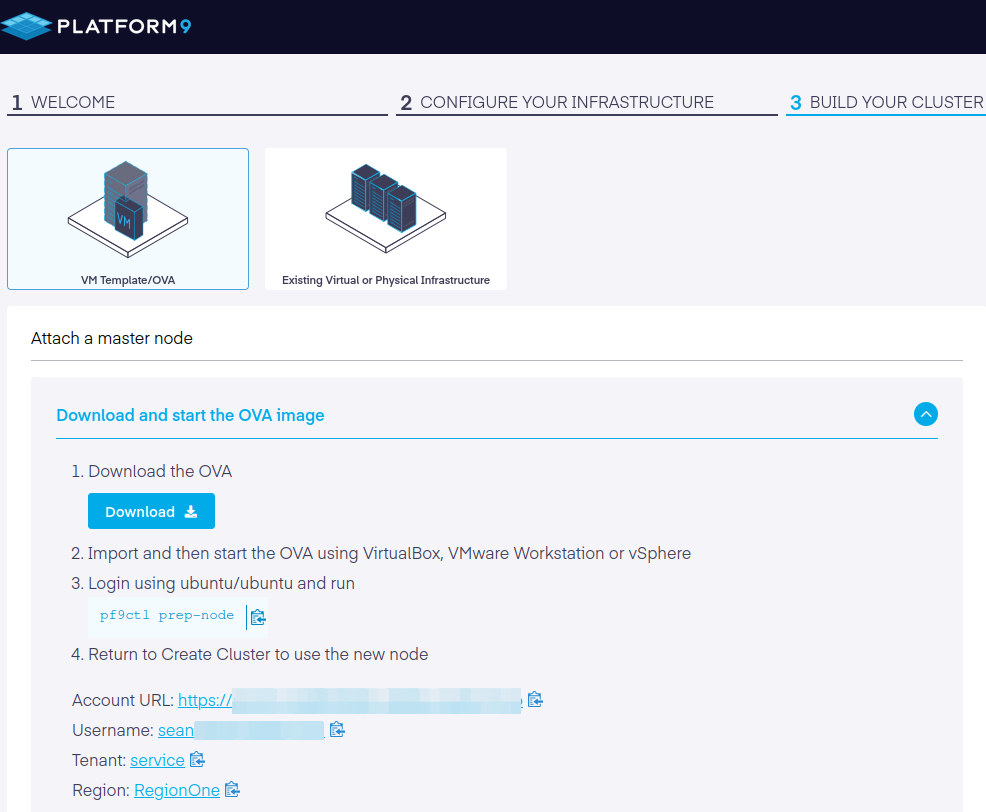
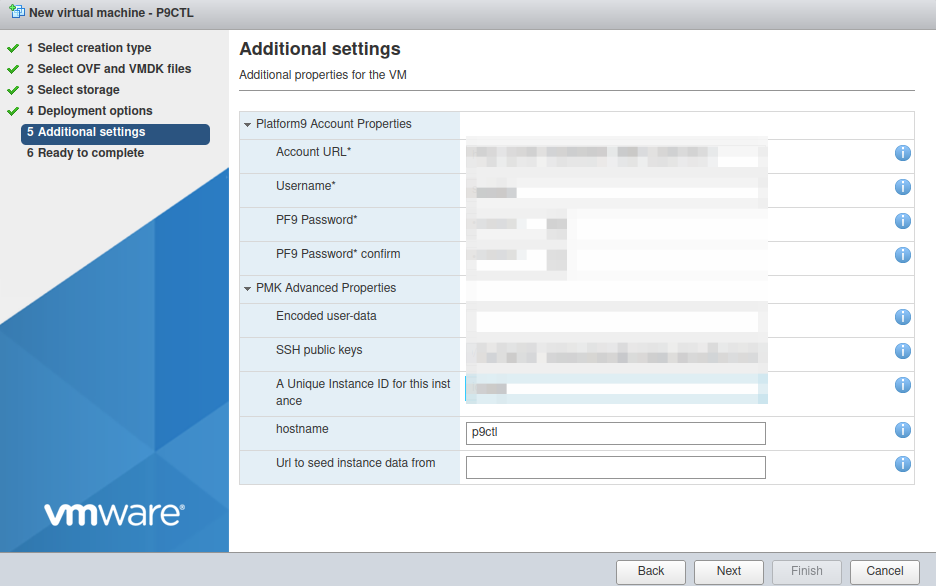
I entered the same into the VMs properties when deploying the OVA.
The VM showed in the PMK Web UI as "Type: BareOS" which makes me wonder if bare metal also uses the same type - BareOS - or there's BareMetalOS…
Anyway, that part of onboarding went smoothly (for the most part; there's still some confusion betwen registration Web page - where username is different from your email address, and in PMK dashboard and OVA settings, where your email is your username).
Rocky start
No, PMK doesn't run on Rocky Linux. It's that other thing.
I downloaded a base VM in the OVA format. I was concerned that vCenter (vSphere) would be required like it was with NetApp NKS, because I recently eliminated vCenter from my home lab environment and now have just an ESXi server.
Thankfully, that wasn't a problem for PMK - the OVA popped up in node registration page and I was able to move on to the step where a script that links this node to the mothership runs.
It failed.
All nodes must meet minimum resource requirement of 4 CPUs, 16 GB RAM, 30 GB Disk
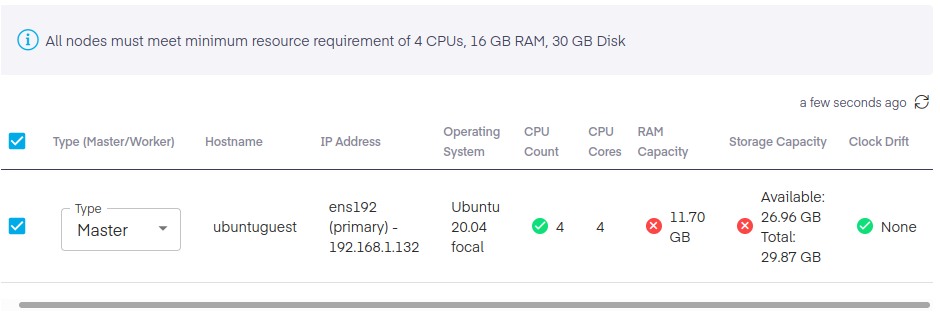
Thanks for letting me know after your OVA created a filesystem that undersized /dev/sda1 and left me with a < 10G filesystem partition on a 30G disk!
$ sudo fdisk /dev/sda

Welcome to fdisk (util-linux 2.34).
Changes will remain in memory only, until you decide to write them.
Be careful before using the write command.

GPT PMBR size mismatch (20971519 != 65011711) will be corrected by write.

Command (m for help): p

Disk /dev/sda: 31 GiB, 33285996544 bytes, 65011712 sectors
Disk model: Virtual disk
Units: sectors of 1 * 512 = 512 bytes
Sector size (logical/physical): 512 bytes / 512 bytes
I/O size (minimum/optimal): 512 bytes / 512 bytes
Disklabel type: gpt
Disk identifier: 03B0B7DA-D25B-4CCC-A50A-46988E78EA8B

Device      Start      End  Sectors  Size Type
/dev/sda1  227328 20971486 20744159  9.9G Linux filesystem
/dev/sda14   2048    10239     8192    4M BIOS boot
/dev/sda15  10240   227327   217088  106M EFI System

Partition table entries are not in disk order.
After some fiddling around with that (recreate /dev/sda1, resize2fs) I also noticed that the VM didn't have enough RAM. Hmmm… It wasn't I who picked the wrong amount of RAM!
I shut down the VM, reconfigured it with more RAM, and during that step I also added another NIC for iSCSI - to be able to connect to SolidFire targets once I install CSI driver.
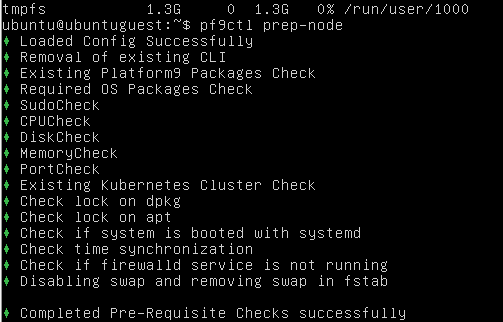
All clear, let's go!
Not so fast…
Node preparation script failed to complete successfully because of some agent failed to start or something. After serveral attempts and added --verbose I found that further up in the log there were some Python-related errors. Okay, then.
Obviously, I could have upgraded all OS packages right away, but the dashboard said to run "pf9ctl prep-node" upon login, not to update OS and then run pf9ctl.
It is logical to not randomly upgrade packages and then run the prep-node script. The script should upgrade (or not) whatever packages need to be upgraded. If it can't do that, who's to say it can downgrade packages newer that it can handle?
But still, Platform9 at least chose to build on Ubuntu 20.04. Not everyone can make the right decision.
Given that NFS and iSCSI client packages are included and standard Ubuntu LTS, this doesn't add compatibility concerns or force you to build your own packages. Ubuntu 20.04 uses Netplan and Platform9 just sticks with that, so configuring the second interface (for iSCSI) was done following the same procedure we'd usually use on any other Ubuntu 20.04.
After an apt-get upgrade, the script worked.
...
✓ Host successfully attached to the Platform9 control-plane
2022-03-31T05:25:24.7842Z	DEBUG	Enabling unattended-upgrades
2022-03-31T05:25:24.7939Z	DEBUG	Ran command sudo "bash" "-c" "systemctl start unattended-upgrades"
2022-03-31T05:25:24.7941Z	DEBUG	stdout:stderr:
2022-03-31T05:25:24.7941Z	DEBUG	Enabled unattended-upgrades
2022-03-31T05:25:24.7942Z	DEBUG	==========Finished running prep-node==========
PMK (currently) uses the following default settings (good decisions regarding default MTU size and netmask, by the way). Luckily the two networks didn't conflict with my home networks so I was able to proceed without any changes or doubts.
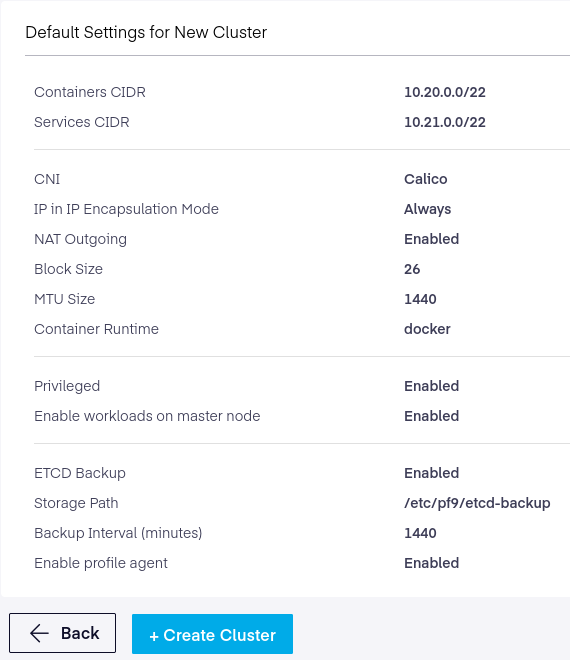
This went without any glitches. It took several minutes until configuration "converged" and the API was up.
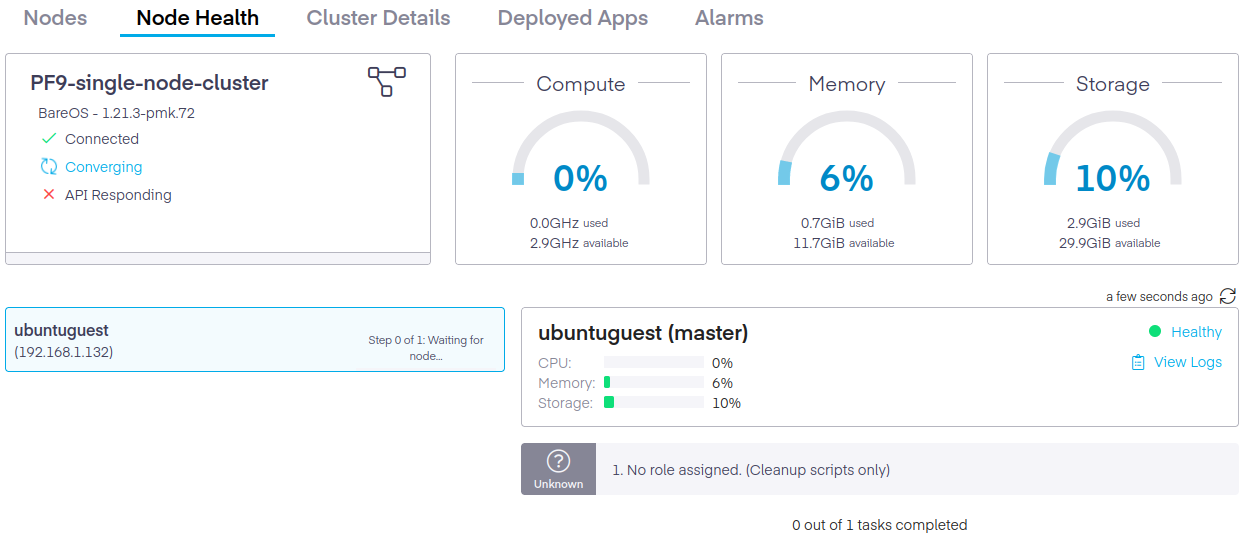
PMK deployed Kubernetes version 1.21.3-pmk.72. My final network settings on the VM were: ens192 as primary interface and API endpoint, ens224 as iSCSI interface, and tunl0 as tunel to Platform9.
ens192 (primary) - 192.168.1.132
ens224 - 192.168.103.132
tunl0 - 10.20.3.64
Another issue was the Kubernetes config file. I just couldn't get it to work from outside of the cluster, no matter what I tried. I think it's something to do with the fact that client also needs to connect to platform9.io (which should have worked, but didn't - maybe that needs PMK credentials set, which wasn't the case on the other client). It did work from inside of the managed Kubernetes cluster (node), so I was able to proceed.
One last comment about base OS is that next time I rebooted and executed apt-get upgrade, a bunch of packages (mostly Docker-related) were held (by the OS, I think).
I force-upgraded to whatever is latest on Ubuntu 20.04 and rebooted. Fortunately that didn't break anything. In the Web dashboard the cluster was converging for a few minutes, and finally settled. Same as earlier, pf9ctl prep-node should take care of this stuff:
- when user logs in, tell them what to do first (upgrade OS or run
pf9ctl prep-node); I'm in favor of the latter because pf9ctl can make some decisions for me and the Web UI already suggests to run that upon first login - when prep-node is executed, check what packages need or can to be upgraded, and offer to upgrade them
- if there are known incompatible versions of packages or packages known to break services, hold them
pf9ctl could also improve its pointers to PMK own KB articles - it has them, but not enough. And I think URLs it shows (such as the link to http://pf9.io/cli_clprep) should be HTTPS, not HTTP.
CSI
Platform9 includes HostPath CSI driver in their online Helm repo. The UI lets you add own repositories, but I simply downloaded trident-installer v22.01.1, decompressed it, changed to that directory where I installed Trident CSI manually using tridentctl and created a SolidFire backend.
$ ./tridentctl install --silence-autosupport -n trident
$ ./tridentctl create backend -n trident -f ../back-end.json
There's nothing Platform9-specific in this process. Of course, before that I installed and configured iSCSI client and a SolidFire storage account on my SolidFire cluster. I did make a stupid typo in back-end JSON (the SolidFire storage tenant name was off by one letter, and because it wasn't consistent with what I had iscsid.conf, I spent 30 minutes troubleshooting that typo).
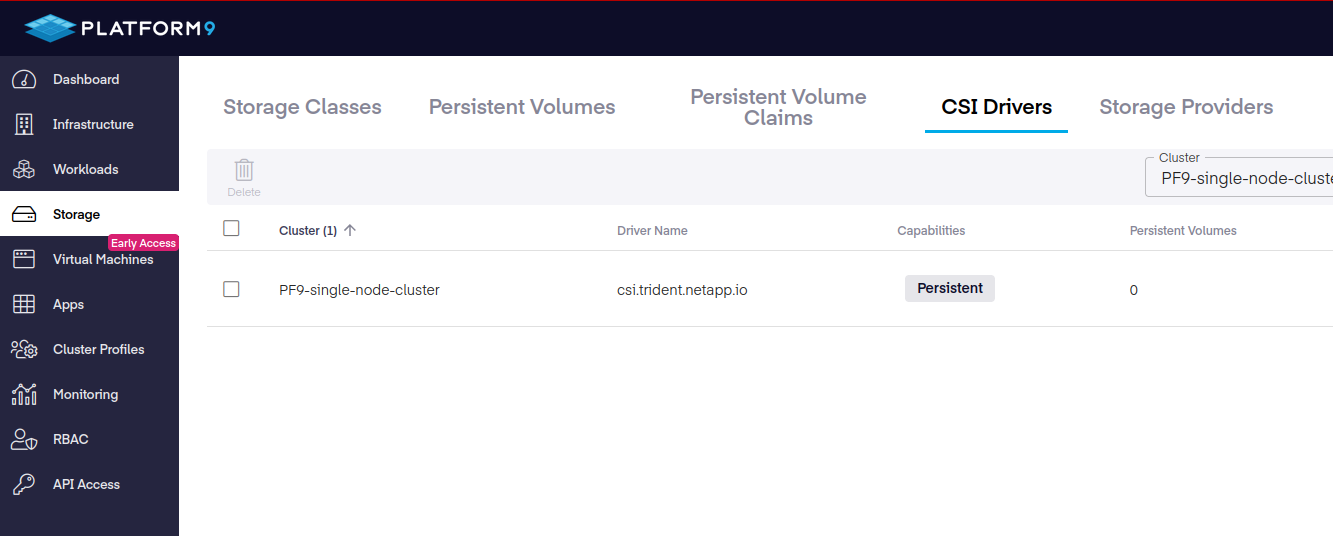
In the dashboard, because I installed this stuff "out of band" so to speak, I had to go to Storage menu and refresh CSI Driver tab which resulted in Trident showing up. Good!
Following that created some storage classes.
$ kubectl get sc
NAME                         PROVISIONER             RECLAIMPOLICY   VOLUMEBINDINGMODE   ALLOWVOLUMEEXPANSION   AGE
solidfire-bronze             csi.trident.netapp.io   Delete          Immediate           false                  7s
solidfire-silver (default)   csi.trident.netapp.io   Retain          Immediate           false                  10s
They showed up when I went to "Storage Classes" tab to check.
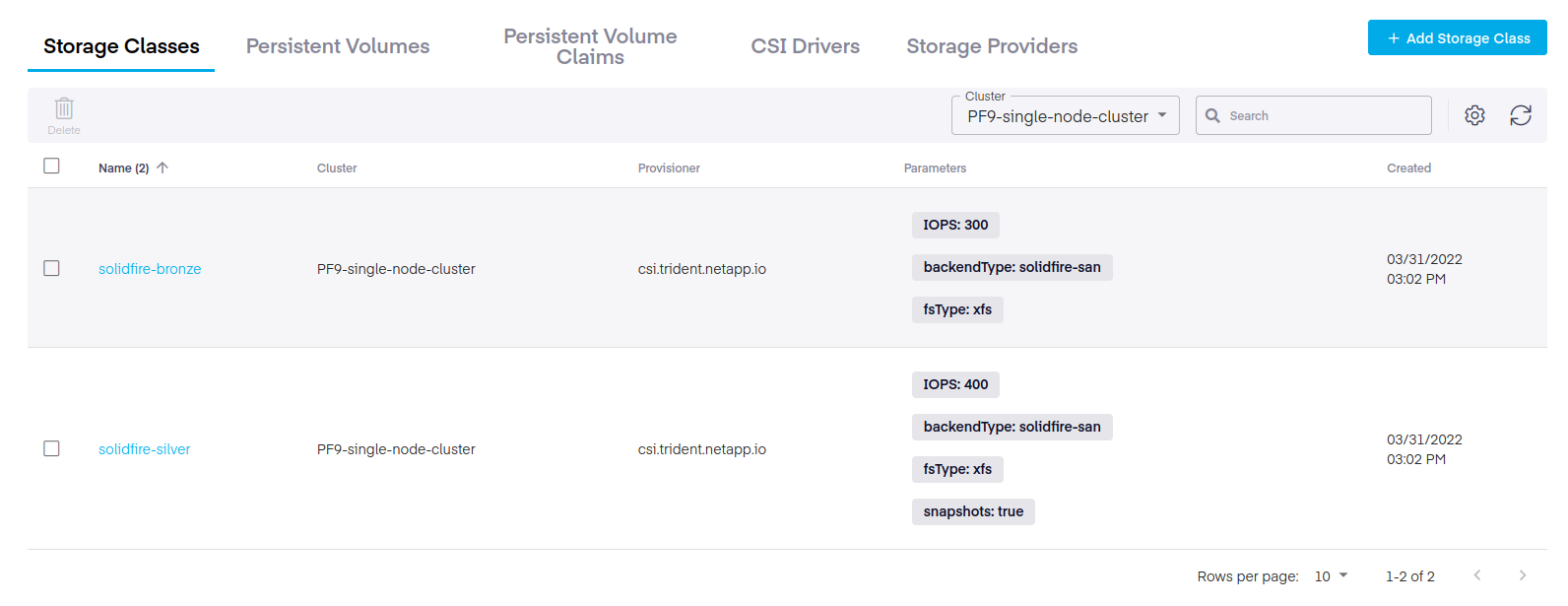
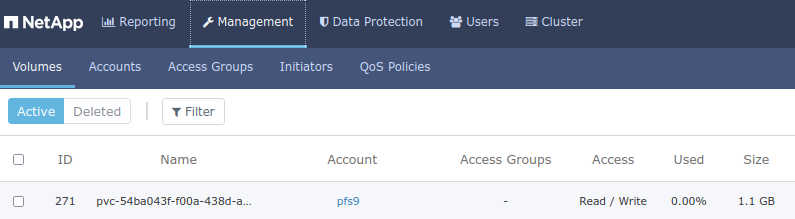
All good! The final step in Persistent Volume creation was to create a PVC, which also worked.
In Solidire Web UI:
In PMK Web UI:
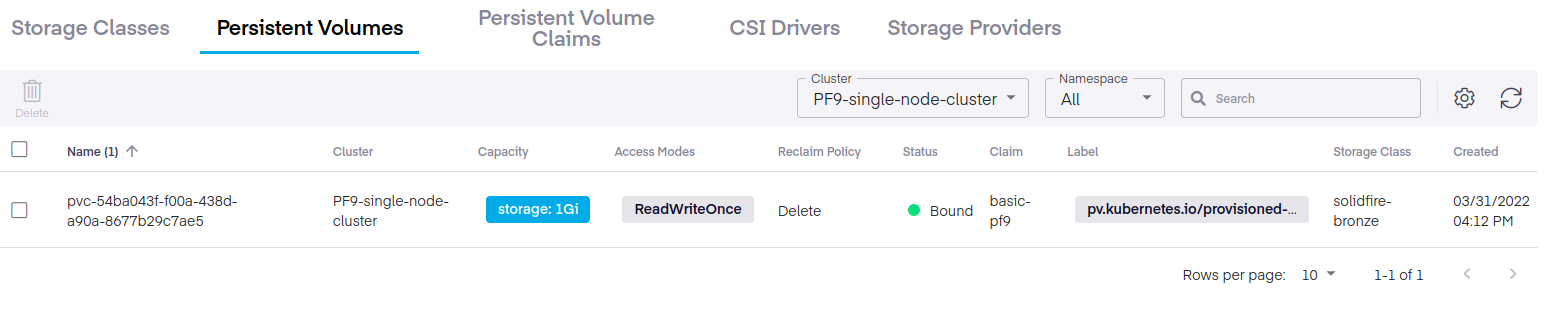
This concluded my initial setup of a singleton PMK on-premises Kubernetes cluster on VMware ESXi 7 (ESXi-7.0U1d).
I won't record a demo because everything Kubernetes-related just worked.
Those interested in Cinder CSI can find notes in the Platform9 Community repo. This would be useful if you were to use PMK running in Nova VMs (OpenStack) with SolidFire. See this post for additional details.
Networking
I don't have enough resources to setup a multi-VM cluster and I have just one ESXi in the first place, but if ESXi-only environments are supported, I suspect it would be up to the user to ensure that vSwitch and other ESXi network-related settings are consistent across the cluster.
If I had more than one ESXi node and wanted to run PMK across them, I'd setup PowerShell or Ansible or other script to make it easy to make those settings consistent across all ESXi hosts.
Again, kudos to Platform9 to not requiring vCenter and vDS here!
CSI storage in hybrid-cloud
If you run PMK both on-premises and in the public cloud, how can you replicate volumes to the public cloud?
SolidFire supports NetApp SnapMirror which can be used to replicate volumes to NetApp CVO which should happen over VPN.
For synchronization to non-NetApp storage, an RPO of 6 hours is probably realistic if you don't have many TBs of data - you can achieve that with Velero, Commvault/Metallic and Kasten K10, for example. See this blog's archive for additional posts on the topic of Kubernetes data protection.
Other stuff
The PMK Web UI is good and responsive (of course, not all parts of it if your VM is unreachable) and an improvement over generic Kubernetes dashboard. And good job on not going crazy on white space in PMK dashboard, which adds scroling to almost every workflow.
In it you can easily register your cloud accounts (Amazon Web services, Microsoft Azure, and Google Cloud) which makes it possible to use Platform9 CLI to create Kubernetes clusters in the cloud as well and import existing clusters.
There's RBAC, API access, Cluster Profiles and other details that make it easier to use and manage multiple clusters.
PMK offers Early Access Virtual Machines (kubevirt) service from the same dashboard. Because it's EA, you can't enable it directly on existing GA nodes such as the VM I have deployed, so I'll try that next time.
Take aways
I didn't take screenshots of some details that I really like because I'd like people to discover them on their own.
PMK needs to improve that initial VM/OVA experience, but other than that it works well and I recommend to evaluate it if you're looking for some help and a way to get this done in a hybrid multi-cloud environment without the bloat and extreme lock-in common to some other solutions.
As long as you mind those workarounds above, PMK takes less than one hour from registration to using the cluster. The free offering allows a pair of clusters (which I think differs from what the Web site says), which is good enough for evaluation and casual use.
This concludes my short review - or rather installation notes, really - and I can continue working on the next thing for which I installed this Kubernetes cluster.