Kubernetes with Cinder CSI on Openstack and SolidFire - Part 2
NOTICE: all credentials and tokens on this page are samples, not leaked.
Posts in "Kubernetes with Cinder CSI Plugin on Openstack Yoga/Xena with SolidFire 12.3" series
- Kubernetes with Cinder CSI Plugin on Openstack Yoga/Xena with SolidFire 12.3 - Part 1
- (this post) Kubernetes with Cinder CSI Plugin on Openstack Yoga/Xena with SolidFire 12.3 - Part 2
Table of Content for Part 2
- Current status
- Next steps
- Deploy VMs for Kubernetes
- Install and configure Kubernetes
- Install and configure Cinder CSI
- Create PVs using Cinder CSI from within Kubernetes
- Other notes
- Closing thoughts
- Video walk-through
- Appendix A - Map Kubernetes PVC and PV to Openstack Volume Name to SolidFire Volume Name
- Appendix B - Install, configure and use SolidFire CLI
Let's review what happened in Part 1 (current status) and start with these activities from Part 2!
Current status
In Part 1 we installed a SolidFire Demo VM (which customers can download and use for free), Openstack Yoga (also a VM), and confirmed that SolidFire Cinder driver works with Nova and SolidFire.
I re-provisioned Openstack for Part 2 because I needed more resources for Kubernetes. When I provisioned Openstack VM for Part 2 my configuration did not change a lot - I still had one interface for workload/management (management network is not isolated as it would be in production) and another for iSCSI traffic to SolidFire.
External, iSCSI and external bridge on my Openstack VM (the rest is not shown):
2: ens160: <BROADCAST,MULTICAST,UP,LOWER_UP> mtu 1500 qdisc mq state UP group default qlen 1000
    link/ether 00:0c:29:ef:b9:bb brd ff:ff:ff:ff:ff:ff
    inet 192.168.1.119/24 brd 192.168.1.255 scope global ens160
       valid_lft forever preferred_lft forever
    inet6 fe80::20c:29ff:feef:b9bb/64 scope link
       valid_lft forever preferred_lft forever
3: ens192: <BROADCAST,MULTICAST,UP,LOWER_UP> mtu 1500 qdisc mq state UP group default qlen 1000
    link/ether 00:0c:29:ef:b9:c5 brd ff:ff:ff:ff:ff:ff
    inet 192.168.103.119/24 brd 192.168.103.255 scope global ens192
       valid_lft forever preferred_lft forever
    inet6 fe80::20c:29ff:feef:b9c5/64 scope link
       valid_lft forever preferred_lft forever
13: br-ex: <BROADCAST,MULTICAST,UP,LOWER_UP> mtu 1500 qdisc noqueue state UNKNOWN group default qlen 1000
    link/ether 96:2d:88:42:dd:49 brd ff:ff:ff:ff:ff:ff
    inet 172.24.4.1/24 scope global br-ex
       valid_lft forever preferred_lft forever
    inet6 fe80::942d:88ff:fe42:dd49/64 scope link
       valid_lft forever preferred_lft forever
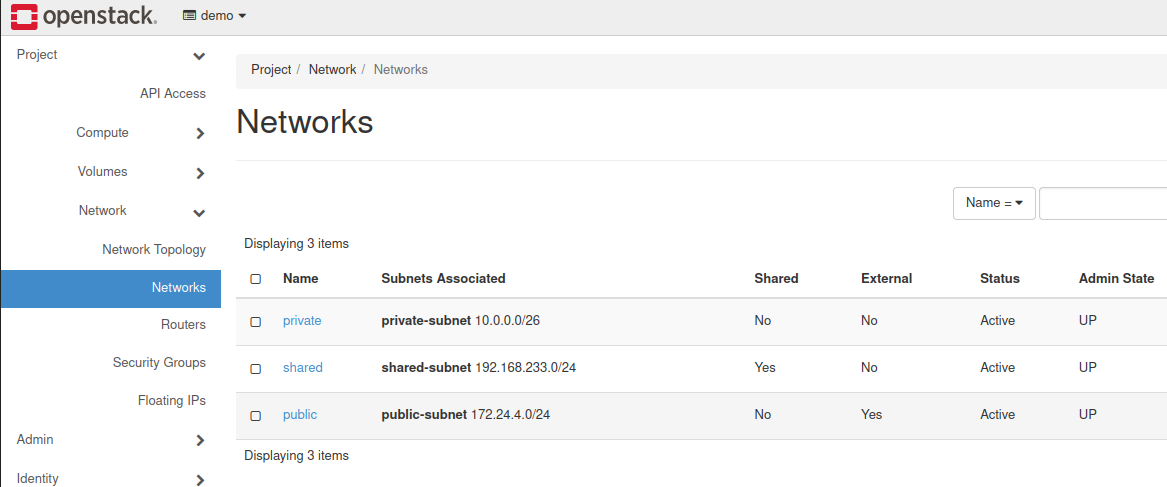
Openstack itself had its usual networks (Private, Shared, Public) leveraging Neutron/OVS.
Next steps
In order to make use of SolidFire Cinder driver from within Kubernetes, we need to do the following:
- Deploy VMs for Kubernetes
- Install and configure Kubernetes
- Install and configure Cloud Provider Openstack and Cinder CSI plugin
Deploy VMs for Kubernetes
Similar to SolidFire and Openstack itself, we can save hardware resources by provisioning just one fat VM with all Kubernetes services.
To be honest, I didn't expect this would work, but it did. But I confess I wasted 2-3 hours on dealing with the stupid OS images…. Eventually I settled for Debian 10, as you will notice in the screenshots or video demo.
I used that image to create a Kubernetes VM on Private Openstack network, and attach to it a Floating IP on "Public" network (meaning, an IP on Bridge br-ex that was connected to my default NIC on Openstack VM (ens160)). It doesn't have to be done that way, but in the case you wonder…
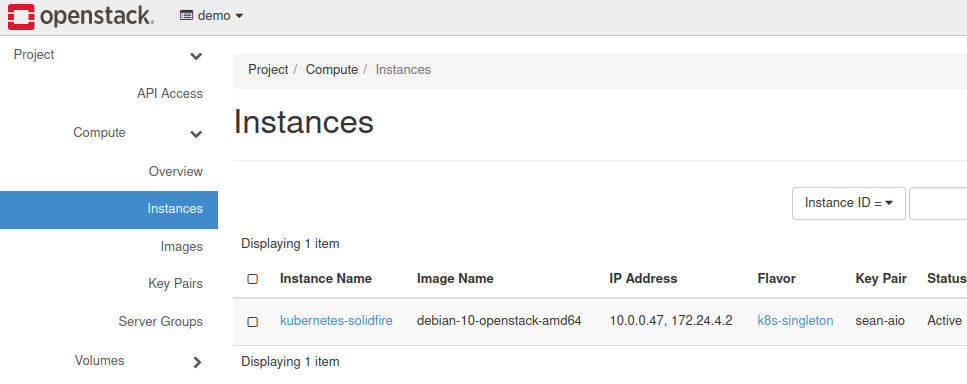
One step that I skipped in this test, but couldn't in production was Load Balancer. Because the VM's "Public" network isn't really public-public (it's only available on Openstack bridge interface, but cannot be accessed from the outside), this wouldn't work without a way to get ingress traffic in. But it was good enough for my purpose as I wasn't interested in load balancing and external access - I only wanted to examine Cinder CSI.
If you plan to test with ingress, you'd need to consider that when creating VM interfaces. Check the Openstack documentation for various network topologies they recommend.
Internally, my Kubernetes VM had just one NIC on private network. I also installed containerd.
2: eth0: <BROADCAST,MULTICAST,UP,LOWER_UP> mtu 1442 qdisc pfifo_fast state UP group default qlen 1000
    link/ether fa:16:3e:4a:b0:00 brd ff:ff:ff:ff:ff:ff
    inet 10.0.0.47/26 brd 10.0.0.63 scope global dynamic eth0
       valid_lft 42347sec preferred_lft 42347sec
    inet6 fe80::f816:3eff:fe4a:b000/64 scope link
       valid_lft forever preferred_lft forever
3: docker0: <NO-CARRIER,BROADCAST,MULTICAST,UP> mtu 1500 qdisc noqueue state DOWN group default
    link/ether 02:42:4e:8f:15:6d brd ff:ff:ff:ff:ff:ff
    inet 172.17.0.1/16 brd 172.17.255.255 scope global docker0
       valid_lft forever preferred_lft forever
    inet6 fe80::42:4eff:fe8f:156d/64 scope link
       valid_lft forever preferred_lft forever
Install and configure Kubernetes
I followed manual installation steps from Kubernetes.io - install kubectl and other required packages, run kubeadm to create a cluster, install Flannel, etc.
After I was done with these, I got additional interfaces (and later some veth* interfaces as well). This isn't a recipe, obviously, but just to say I kept it simple and probably using just one node saved me from problems.
6: flannel.1: <BROADCAST,MULTICAST,UP,LOWER_UP> mtu 1392 qdisc noqueue state UNKNOWN group default
    link/ether 86:e7:8d:47:70:44 brd ff:ff:ff:ff:ff:ff
    inet 10.244.0.0/32 scope global flannel.1
       valid_lft forever preferred_lft forever
    inet6 fe80::84e7:8dff:fe47:7044/64 scope link
       valid_lft forever preferred_lft forever
7: cni0: <BROADCAST,MULTICAST,UP,LOWER_UP> mtu 1392 qdisc noqueue state UP group default qlen 1000
    link/ether 72:c7:e6:63:21:34 brd ff:ff:ff:ff:ff:ff
    inet 10.244.0.1/24 brd 10.244.0.255 scope global cni0
       valid_lft forever preferred_lft forever
    inet6 fe80::70c7:e6ff:fe63:2134/64 scope link
       valid_lft forever preferred_lft forever
The only problem I had was that default DNS client configuration (127.0.0.1) didn't work in VM, so kubeadm init failed. I added an external DNS server from my LAN to resolv.conf.
Install and configure Cinder CSI
Next step was Cinder CSI. I expected to get stuck and never finish, especially after - while still working on Part 1 - I looked at TFM. This is required, that is required, you should pick a supported Kubernetes release (this sounded especially troublesome considering that I had a yet-to-be-released Yoga version of Openstack and latest Kubernetes (v1.23.4))… I was shocked when I got it to work!
Cloud Provider Openstack
Long story short, to get started we need Cloud Provider Openstack and for that to work you must configure the (Kubernetes) cluster with external cloud controller manager.
What that does is it lets Kubernetes link to Openstack, and then CSI Plugin from Cloud Provider Openstack can talk to Openstack and - among other things - tell its Cinder driver to do stuff.
I installed Cloud Provider Openstack without any fancy steps. I simply followed the mandatory steps and avoided any optional stuff. As mentioned earlier, I skipped the load balancer section.
Cinder CSI
The offical documentation for this part is here.
Again, I used the KISS principle and didn't do any fancy steps from this page - no ca-cert, no ignore-volume-az, no nothing.
I had issues with one of the pods (openstack-cloud-controller-manager-r9gtk) constantly crashing, probably due to insufficient resources. To fix that I added leader-elect-lease-duration=60s and leader-elect-renew-deadline=30s to /etc/kubernetes/manifests/kube-controller-manager.yaml and restarted. I can't say if that's what fixed it, but after that all pods were Running.
debian@kubernetes-solidfire:~$ kubectl get pods -n kube-system
NAME                                           READY   STATUS    RESTARTS      AGE
coredns-64897985d-j9bqp                        1/1     Running   0             15h
coredns-64897985d-rwb2v                        1/1     Running   0             15h
csi-cinder-controllerplugin-689c55c9fc-xrrq9   6/6     Running   0             15h
csi-cinder-nodeplugin-dwdbp                    3/3     Running   0             15h
etcd-kubernetes-solidfire                      1/1     Running   1             15h
kube-apiserver-kubernetes-solidfire            1/1     Running   0             15h
kube-controller-manager-kubernetes-solidfire   1/1     Running   0             15h
kube-flannel-ds-p7bsn                          1/1     Running   0             15h
kube-proxy-kz9l4                               1/1     Running   0             15h
kube-scheduler-kubernetes-solidfire            1/1     Running   1             15h
openstack-cloud-controller-manager-r9gtk       1/1     Running   8 (15h ago)   15h

debian@kubernetes-solidfire:~$ kubectl get csidrivers.storage.k8s.io
NAME                       ATTACHREQUIRED   PODINFOONMOUNT   STORAGECAPACITY   TOKENREQUESTS   REQUIRESREPUBLISH   MODES                  AGE
cinder.csi.openstack.org   true             true             false             <unset>         false               Persistent,Ephemeral   15h

debian@kubernetes-solidfire:~$ kubectl get sc
NAME                            PROVISIONER                RECLAIMPOLICY   VOLUMEBINDINGMODE   ALLOWVOLUMEEXPANSION   AGE
csi-sc-cinderplugin             cinder.csi.openstack.org   Delete          Immediate           false                  15h
csi-sc-cinderplugin-solidfire   cinder.csi.openstack.org   Delete          Immediate           false                  4h2m
Above you can see in the above output two Storage Classes, one non-SolidFire and another SolidFire. This is beacuse I wanted to be able to use both LVM (default, non-SolidFire) and SolidFire for comparison purposes.
Two things to note:
- Note that the topology stuff is enabled by default but it didn't bother me (probably because I didn't have any topology settings in my single node Openstack cluster). I also didn't set any AZ in Cinder, so ignore-volume-az wasn't necessary in Cinder CSI either. If you had SolidFire Protection Domains (which resemble AZs), you still wouldn't use any topology for storage because in Protection Domains any client can connect to any SolidFire node - there's no AZ-awareness in SolidFire volume scheduling (at least not in v12.3 and before). Maybe you could use topology for Nova, but iSCSI connections would still be all over the place.
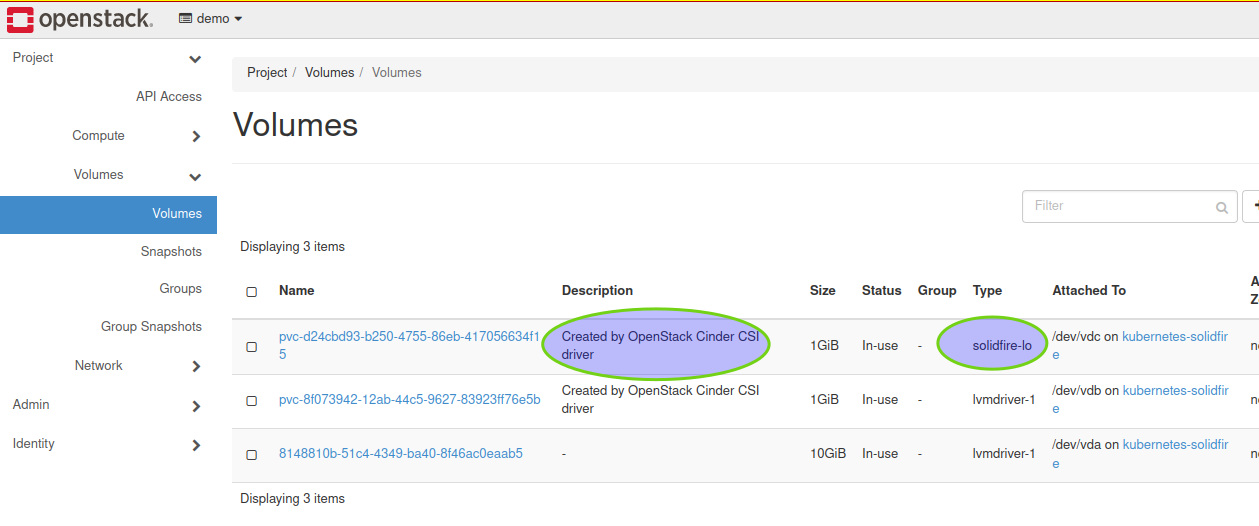
- When I created a SolidFire-aware Storage Class, I set it to use Openstack Volume Type
solidfire-lowhich is one of two Volume Types (one low, one high performance) that I created in OpenStack for Cinder configuration (see Part 1 or the demo videos if you can't figure it out)
apiVersion: storage.k8s.io/v1
kind: StorageClass
metadata:
  name: csi-sc-cinderplugin-solidfire
parameters:
  type: solidfire-lo
provisioner: cinder.csi.openstack.org
reclaimPolicy: Delete
volumeBindingMode: Immediate
Create PVs using Cinder CSI from within Kubernetes
Now we just create a PVC and check Openstack or SolidFire to see if SolidFire Cinder driver has succeeded to create a volume.
---
apiVersion: v1
kind: PersistentVolumeClaim
metadata:
  name: csi-pvc-cinderplugin-sf
spec:
  accessModes:
  - ReadWriteOnce
  resources:
    requests:
      storage: 3Gi
  storageClassName: csi-sc-cinderplugin-solidfire
Below we can see two PVCs. The first is on LVM (local VM disk coming from LVM driver which could be using SolidFire storage (provisioned to Openstack hosts) as well, but in this case was not), the second is on SolidFire provisioned by SolidFire Cinder driver.
$ kubectl get pvc
NAME                      STATUS   VOLUME                                     CAPACITY   ACCESS MODES   STORAGECLASS                    AGE
csi-pvc-cinderplugin      Bound    pvc-8f073942-12ab-44c5-9627-83923ff76e5b   1Gi        RWO            csi-sc-cinderplugin             14h
csi-pvc-cinderplugin-sf   Bound    pvc-013f9605-f759-44d0-be60-ac2edacab947   1Gi        RWO            csi-sc-cinderplugin-solidfire   6s
pvc-013f9605... is the SolidFire volume created for PVC csi-pvc-cinderplugin-sf.
$ kubectl get pv
NAME                                       CAPACITY   ACCESS MODES   RECLAIM POLICY   STATUS   CLAIM                             STORAGECLASS                    REASON   AGE
pvc-013f9605-f759-44d0-be60-ac2edacab947   1Gi        RWO            Delete           Bound    default/csi-pvc-cinderplugin-sf   csi-sc-cinderplugin-solidfire            7s
pvc-8f073942-12ab-44c5-9627-83923ff76e5b   1Gi        RWO            Delete           Bound    default/csi-pvc-cinderplugin      csi-sc-cinderplugin                      14h
I tried to take a snapshot of all Kubernetes volumes from Openstack, that worked. I assume that's like crash-consistent snapshot done on SolidFire or from Element Plug-in for vCenter, without cooperation from pods or VM.
Openstack Freezer requires additional services to be in place so I didn't test backup. This would be equivalent to quiesced filesystem backup for VMs.
For Kubernetes PVs we'd probably use Velero, but I didn't want to look for trouble. I tried it before and because it has a CSI and non-CSI version, I think there's a fair chance at least one of them can work.
Cinder CSI has a snapshotter which I installed but did not have time to evaluate for this article. It'd be interesting in the context of Velero or Kasten K10, for example, but that's few additional hours of experimenting and would have to be another PoC.
Screenshot of a (different) Cinder volume created by Cinder CSI:
Other notes
In Openstack, Cinder CSI volumes (PVs) are named after PVCs, which is great. But in SolidFire the volume name is different from the volume name in Openstack - it uses unique Volume ID from Openstack which is presumably safer but not as convenient.
This screenshot shows a Volume Name pvc-8e2... assigned to Volume ID dc9....
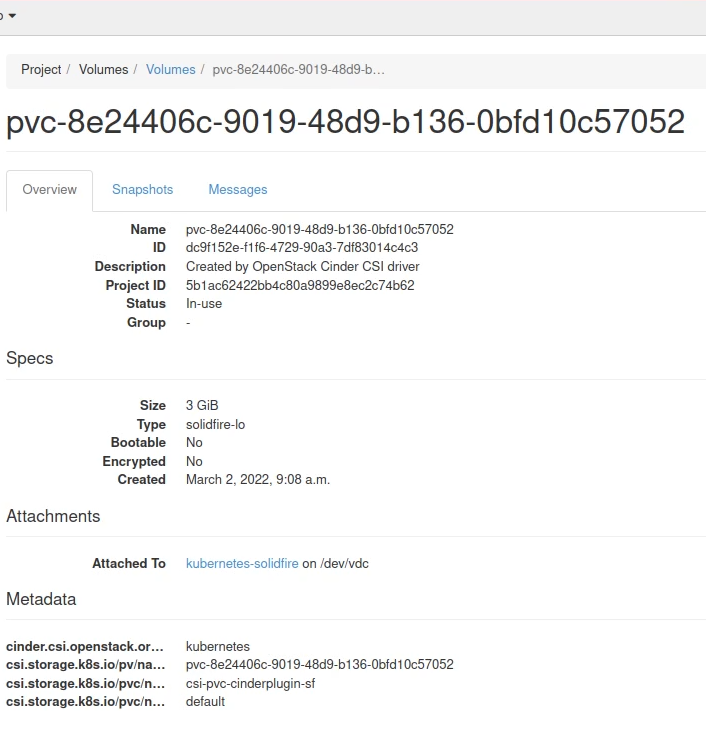
SolidFire would have its Volume Name shown as UUID-dc9....
In order to map a SolidFire volume to Openstack volume (or vice versa) we need to use a script to get a list of Cinder volumes, filter out non-SolidFire volumes, and map Openstack Volume Unique IDs to SolidFire Name to create a Openstack Name to SolidFire Name mapping.
Closing thoughts
Cinder CSI
Cinder CSI is a very interesting and useful addition to Openstack feature set.
Compared to using NetApp Trident from Kubernetes - which you certainly could do - Openstack and Cinder CSI gives you a single pane of management for both VM and Kubernetes storage at the price of having a slightly more complex storage provisioning stack. But the complexity in storage provisioning may be more than offset by having a single provisioner for both VMs and containers.
Cinder CSI also allows you to better manage security, because Openstack - similarly to vSphere - act as an intermediate between Kubernetes and storage, so all automated storage activity (VMs, containers) is recorded in Cinder logs.
In terms of other features the Cinder CSI approach is currently slightly richer than Astra Trident because (see Part 1) you get PV retyping and site fail-over, both of which are not available in solidfire-san driver in Astra Trident v21.01 or earlier. Cinder CSI users may also be able to leverage Openstack's backup and restore for data protection.
Switching back and forth
Trident CSI supports volume import (which I used and it works) and so does Cinder, but I haven't tested it.
This could be verified and then it would become relatively easy to import volumes created with the other CSI plugin and do so in-place which requires seconds.
This lowers the risk of using Cinder CSI as moving volumes from the control of Openstack SolidFire admin to Trident SolidFire admin only requires a change in storage account ownership of the volume and in-place import.
Getting support
Technical support would likely be one of key questions for Cinder CSI users.
I do not know what NetApp's position on this is, but I assume that if you use SolidFire Cinder driver in supported Openstack distribution, it's supposed to work and be supported because Cinder CSI plugin does not use any SolidFire Cinder driver features that aren't supported on Openstack.
The rest is up to Cloud Provider Openstack and Cinder CSI plugin, so if you can get support for that from your Openstack vendor, you could have a fully supported Openstack & Kubernetes solution.
OpenShift 4.9, for example, supports Cinder CSI as a Technology Preview feature and here you can find how to make Openstack Cinder CSI the default storage class. I didn't take that option because my SolidFire Demo VM has very limited capacity and performance resources.
Single pane storage provisioning for VMs and containers
Another way to get to VM & K8s nirvana is to do the opposite - run VMs on Kubernetes. I suspect that approach is currently less mature than the Openstack & Cinder CSI approach, but it may gain traction faster.
At this moment Cinder CSI seems like a safer choice, but don't forget that you can use both approaches at the same time. You could create one SolidFire cluster admin for Openstack and another for Trident on stand-alone (bare metal) or virtualized (on Openstack) Kubernetes.
Before trying Cinder CSI in production I would recommend to try it in real-life scenarios with multi-node Openstack clusters to see how it handles failures and other unusual situations.
Video walk-through
The video shows setup and use of Cinder CSI, not the entire installation procedure which would take a long time. See Part 1 for details on SolidFire Cinder driver configuration details.
Appendix A - Map Kubernetes PVC and PV to Openstack Volume Name to SolidFire Volume Name
Kubernetes:
$ kubectl get pvc
NAME                      STATUS   VOLUME                                     CAPACITY   ACCESS MODES   STORAGECLASS                    AGE
csi-pvc-cinderplugin-sf   Bound    pvc-562922ba-216f-4224-87bf-e2d634e84fd7   3Gi        RWO            csi-sc-cinderplugin-solidfire   21s

$ kubectl get pv
NAME                                       CAPACITY   ACCESS MODES   RECLAIM POLICY   STATUS   CLAIM                             STORAGECLASS                    REASON   AGE
pvc-562922ba-216f-4224-87bf-e2d634e84fd7   3Gi        RWO            Delete           Bound    default/csi-pvc-cinderplugin-sf   csi-sc-cinderplugin-solidfire            22s
Openstack (Cinder):
$ cinder list
+--------------------------------------+--------+------------------------------------------+------+----------------+--------------+----------+--------------------------------------+
| ID                                   | Status | Name                                     | Size | Consumes Quota | Volume Type  | Bootable | Attached to                          |
+--------------------------------------+--------+------------------------------------------+------+----------------+--------------+----------+--------------------------------------+
| 5e85816f-bda2-41be-a3d1-b3aecc993fc6 | in-use | pvc-562922ba-216f-4224-87bf-e2d634e84fd7 | 3    | True           | solidfire-lo | false    | 2233d97e-be53-43d4-86ed-9dd58b0aa9b0 |
| 8148810b-51c4-4349-ba40-8f46ac0eaab5 | in-use |                                          | 10   | True           | lvmdriver-1  | true     | 2233d97e-be53-43d4-86ed-9dd58b0aa9b0 |
+--------------------------------------+--------+------------------------------------------+------+----------------+--------------+----------+--------------------------------------+
Notice how Cinder Volume Name (first volume above) matches PVC name from Kubernetes, but SolidFire Name maps to Cinder Volume ID (5e85816f-bda2-41be-a3d1-b3aecc993fc6) prefixed with the string "UUID-".
Using the SolidFire Python CLI, get volume details - such as SolidFire Volume ID, size, QoS, etc - for that volume like this:
sfcli volume list --volumename UUID-5e85816f-bda2-41be-a3d1-b3aecc993fc6
Appendix B (below) has detailed output of sfcli volume list command for this volume.
Basic steps for a script that could be used to eliminate manual steps:
# from Kubernetes CLI
# we grep for SF CS - csi-sc-cinderplugin-solidfire - but this assumes just 1 PV
kube_name=`kubectl get pv | grep csi-sc-cinderplugin-solidfire | awk '{print $1}'`
# from Openstack CLI
pvc="pvc-562922ba-216f-4224-87bf-e2d634e84fd7"
cinder_id=`cinder list | grep ${pvc} | awk '{print $2}'`
# from SolidFire CLI
sf_name="UUID-"${cinder_id}
sfcli volume list --volumename "UUID-"+$cinder_id
For multiple PVs it's easier to handle that using the APIs (Kubernetes, OpenStack, and SolidFire's with SolidFire Python SDK), but SolidFire CLI you can try jq to get just the details you want:
$ sfcli volume list --volumename $sf_name | jq '.volumes | .[] | {id: .volume_id, name: .name}'
{
  "id": 111,
  "name": "UUID-5e85816f-bda2-41be-a3d1-b3aecc993fc6"
}
Maybe even Ansible could be helpful for creating nice reports of Kubernetes-Openstack-SolidFire volume mappings.
Another approach could use log forwarding to Elastic where it should be possible to cross-reference the details from Kubernetes PVC, Openstack Volume Name/ID and SolidFire Name and other properties.
Appendix B - Install, configure and use SolidFire CLI
Because Cinder and other Openstack stuff is Python-focused, let's install SolidFire CLI and get volume info with it. I installed SolidFire CLI as Openstack user, but it could be installed on any major OS that runs Python 3 and can reach SolidFire MVIP.
pip3 install --user solidfire-cli
Modify and source PATH (PATH="$PATH:~/.local/bin") to sfcli module:
$ vim .bashrc
$ source .bashrc
Now we can create a connection to SolidFire MVIP 192.168.1.34 (my username/password are admin/admin) and name it "DR" (or whatever you like).
sfcli connection push --mvip 192.168.1.34 --username admin --password admin --name "dr"
List volume details for UUID- + ${OPENSTACK_CINDER_VOLUME_ID} (obtained from Cinder above):
stack@aio:~$ sfcli volume list --volumename UUID-5e85816f-bda2-41be-a3d1-b3aecc993fc6
{
    "py/object": "solidfire.models.ListVolumesResult",
    "volumes": [
        {
            "py/object": "solidfire.models.Volume",
            "access": {
                "py/object": "solidfire.models.VolumeAccess",
                "_value": "readWrite"
            },
            "account_id": 54,
            "attributes": {
                "attach_time": null,
                "attached_to": "2233d97e-be53-43d4-86ed-9dd58b0aa9b0",
                "cinder-name": "pvc-562922ba-216f-4224-87bf-e2d634e84fd7",
                "created_at": "2022-03-02T10:42:44+00:00",
                "is_clone": false,
                "uuid": "5e85816f-bda2-41be-a3d1-b3aecc993fc6"
            },
            "block_size": 4096,
            "create_time": "2022-03-02T10:42:44Z",
            "current_protection_scheme": {
                "py/object": "solidfire.models.ProtectionScheme",
                "_value": "singleHelix"
            },
            "delete_time": "",
            "enable512e": true,
            "enable_snap_mirror_replication": false,
            "fifo_size": 5,
            "iqn": "iqn.2010-01.com.solidfire:46z9.uuid-5e85816f-bda2-41be-a3d1-b3aecc993fc6.111",
            "last_access_time": "2022-03-02T10:42:47Z",
            "last_access_time_io": null,
            "min_fifo_size": 0,
            "name": "UUID-5e85816f-bda2-41be-a3d1-b3aecc993fc6",
            "previous_protection_scheme": null,
            "purge_time": "",
            "qos": {
                "py/object": "solidfire.models.VolumeQOS",
                "burst_iops": 750,
                "burst_time": 60,
                "curve": {
                    "1048576": 15000,
                    "131072": 1950,
                    "16384": 270,
                    "262144": 3900,
                    "32768": 500,
                    "4096": 100,
                    "524288": 7600,
                    "65536": 1000,
                    "8192": 160
                },
                "max_iops": 300,
                "min_iops": 100
            },
            "qos_policy_id": null,
            "scsi_euidevice_id": "34367a390000006ff47acc0100000000",
            "scsi_naadevice_id": "6f47acc10000000034367a390000006f",
            "slice_count": 1,
            "status": "active",
            "total_size": 3221225472,
            "virtual_volume_id": null,
            "volume_access_groups": [],
            "volume_consistency_group_uuid": {
                "py/object": "uuid.UUID",
                "hex": "b6674869a461487eaf202b6ab113615f"
            },
            "volume_id": 111,
            "volume_pairs": [],
            "volume_uuid": {
                "py/object": "uuid.UUID",
                "hex": "160d37f190a44333bb2624733e35992d"
            }
        }
    ]
}