HashiCorp Nomad with NetApp SolidFire-backed iSCSI volumes
- Introduction
- Deploy Nomad with SolidFire Host Volumes
- Backup and restore
- Host Volumes vs. dynamic provisioning (with and without CSI plugin)
- Is the approach with Host Volumes good enough for production
- Summary
- Demo
Introduction
HashiCorp Nomad doesn't yet support CSI drivers (CSI support is still in "beta"), so for now one supported way to use NetApp SolidFire iSCSI storage is to mount volumes on "worker" nodes (aka "clients").
That approach is called host volumes because host paths are usually host specific.
Can we simply mount SolidFire iSCSI volumes to hosts and use this driver? Yes.
Deploy Nomad with SolidFire Host Volumes
Step 1 is to create and mount a SolidFire volume on a client. Format it, mount it, and change ownership to the user running Nomad client. (In this specific case for MySQL I also had to create a subdirectory called "data".)
$ df
Filesystem     1K-blocks     Used Available Use% Mounted on
/dev/sdb         1998672   187120   1690312  10% /opt/mysql
Step 2 is to configure this Nomad client to be aware this volume may be used by workloads i.e. Nomad jobs.
$ nomad node status -short -self
ID              = 3f725369-2657-78ae-cd36-90346983c4dd
Name            = es1
Host Volumes    = mysql
Step 3 is to restart the client and then you can define a Nomad job that uses this host volume.
    volume "mysql" {
      type      = "host"
      read_only = false
      source    = "mysql"
    }
When this job starts Nomad will schedule it to a client where volume required by this job is available. (This could resolve to multiple clients, but you can further narrow down eligible nodes by location or other attributes.)
In my cluster topology, I have two Nomad clients, scaleoutSean (which is also a server; I dispatch jobs on this system) and es1 (which is where I intend to run jobs).
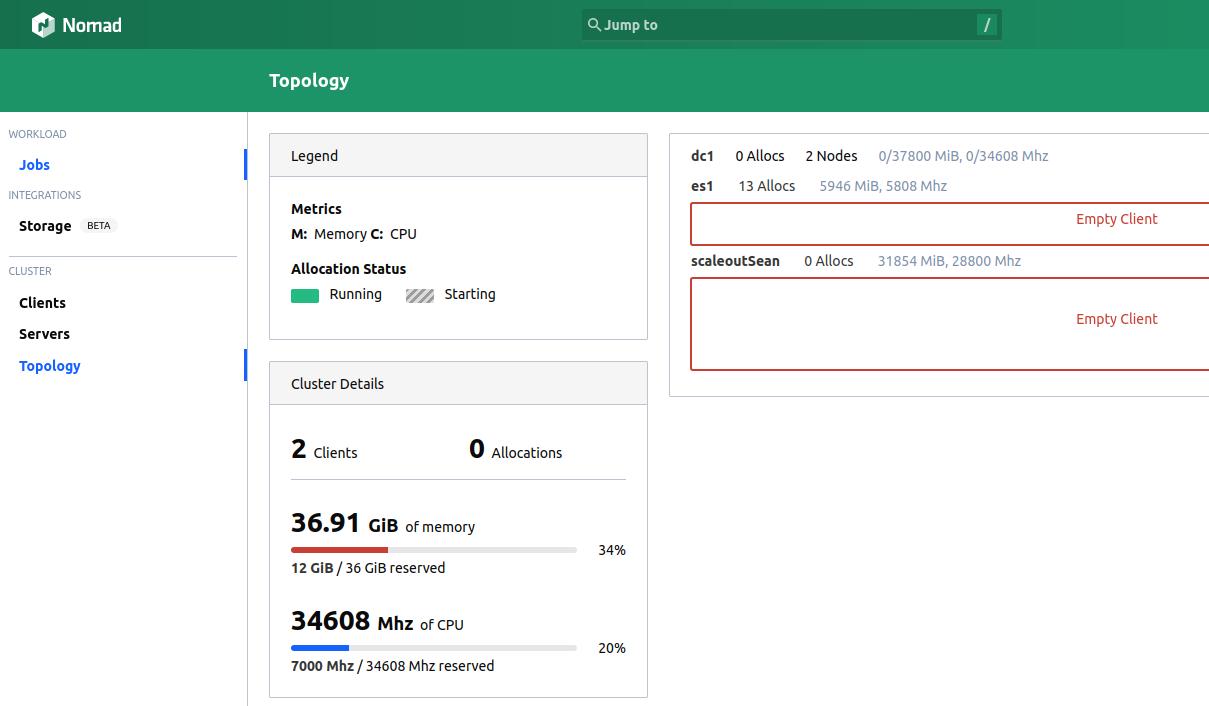
es1 has a SolidFire-based host volume.
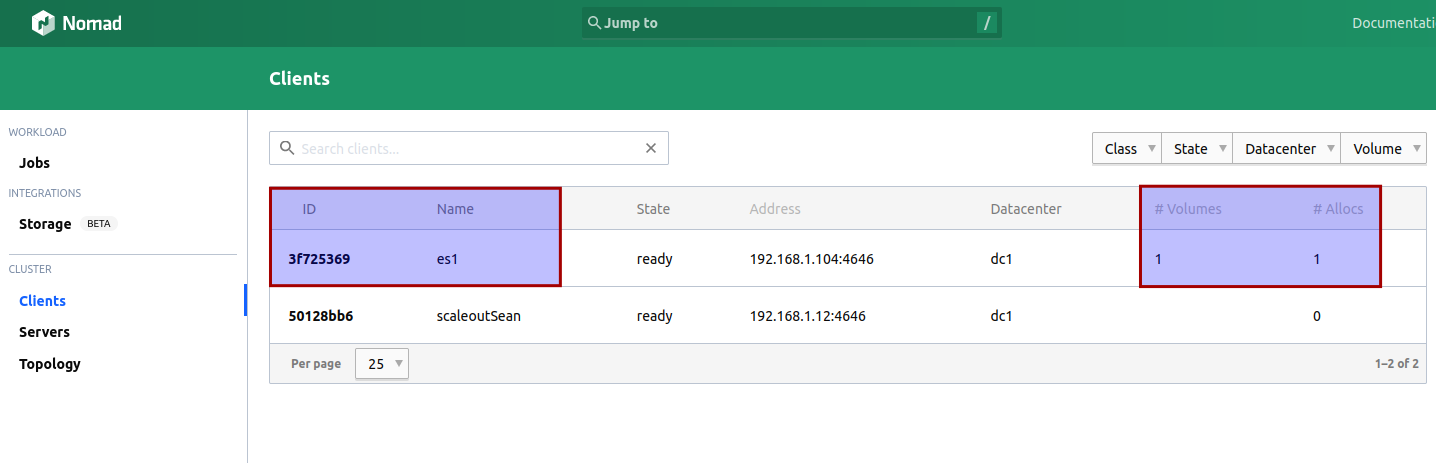
A Nomad job that requires this host volume will land on es1.
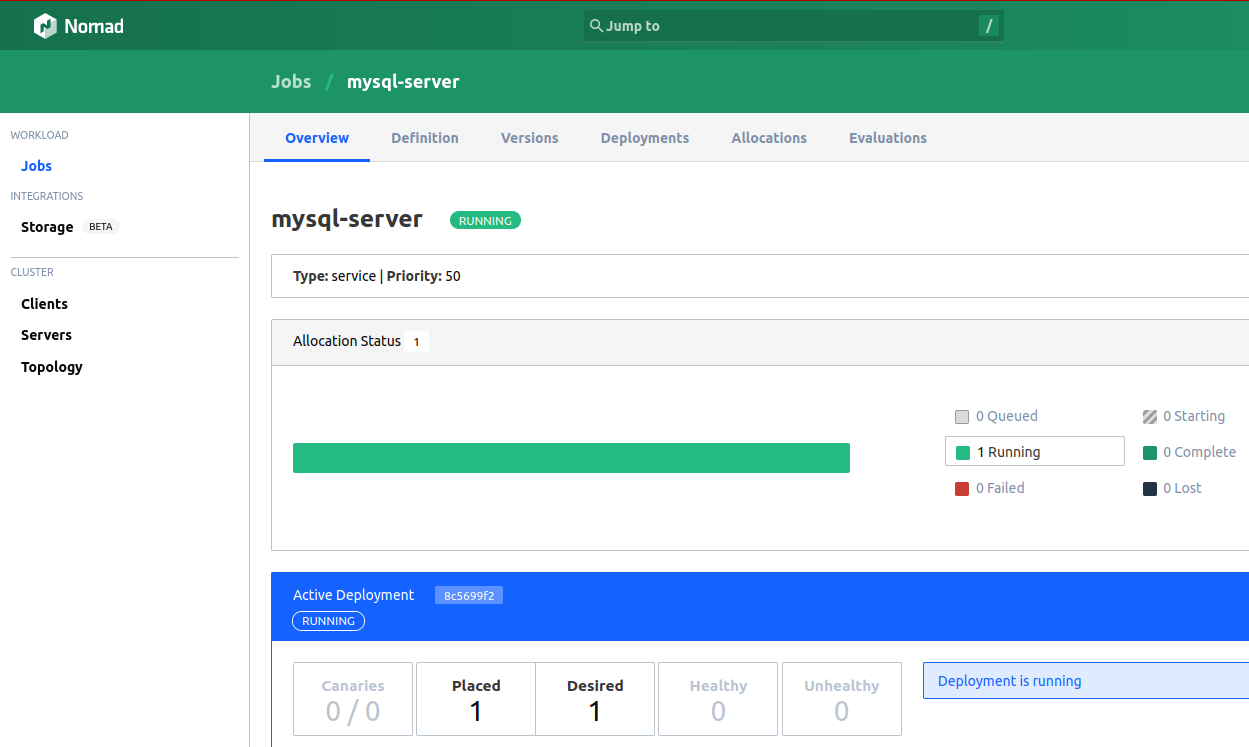
mysql-server job details indicate it's running on es1:
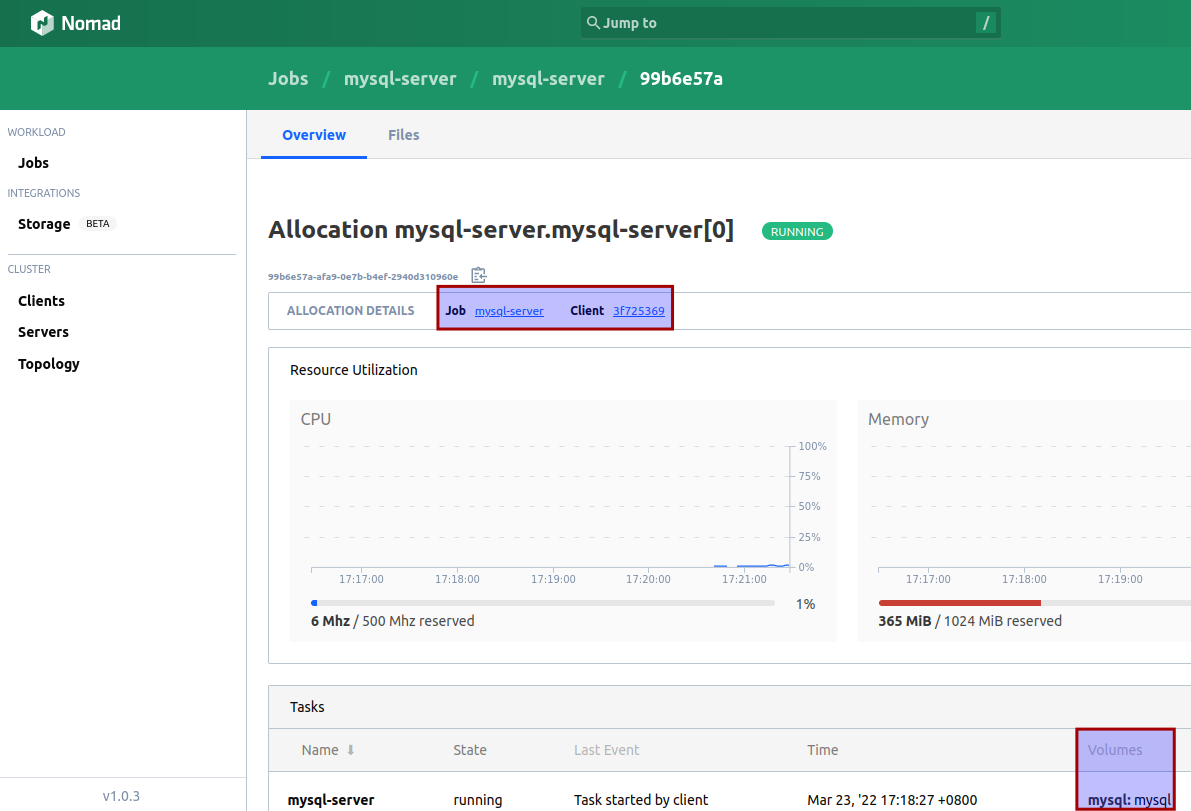
There is nothing SolidFire-specific in this process. Of course, you must ensure these host volumes are mounted and available, so iSCSI client must be configured to login automatically and OS to mount the volumes. That provisioning and mounting can be done from Terraform, Ansible, or with your own scripts.
MySQL job started and created some data on Host Volume path.
$ ll /opt/mysql/data/
total 166956
drwxr-x--- 2     999  999     4096 Mar 23 09:52 '#innodb_temp'/
drwxrwxr-x 7     999  999     4096 Mar 23 09:52  ./
drwxr-xr-x 4 vagrant root     4096 Mar 23 08:38  ../
-rw-r----- 1     999  999       56 Mar 23 08:42  auto.cnf
-rw-r----- 1     999  999  3092393 Mar 23 08:42  binlog.000001
-rw-r----- 1     999  999      178 Mar 23 08:43  binlog.000002
-rw-r----- 1     999  999      178 Mar 23 08:47  binlog.000003
-rw-r----- 1     999  999      155 Mar 23 08:49  binlog.000004
-rw-r----- 1     999  999      178 Mar 23 08:51  binlog.000005
-rw-r----- 1     999  999      178 Mar 23 09:52  binlog.000006
-rw-r----- 1     999  999       96 Mar 23 09:18  binlog.index
-rw------- 1     999  999     1680 Mar 23 08:42  ca-key.pem
-rw-r--r-- 1     999  999     1112 Mar 23 08:42  ca.pem
-rw-r--r-- 1     999  999     1112 Mar 23 08:42  client-cert.pem
-rw------- 1     999  999     1680 Mar 23 08:42  client-key.pem
-rw-r----- 1     999  999     3407 Mar 23 09:52  ib_buffer_pool
-rw-r----- 1     999  999 50331648 Mar 23 09:52  ib_logfile0
-rw-r----- 1     999  999 50331648 Mar 23 08:42  ib_logfile1
-rw-r----- 1     999  999 12582912 Mar 23 09:52  ibdata1
drwxr-x--- 2     999  999     4096 Mar 23 08:42  itemcollection/
drwxr-x--- 2     999  999     4096 Mar 23 08:42  mysql/
-rw-r----- 1     999  999 31457280 Mar 23 09:18  mysql.ibd
drwxr-x--- 2     999  999     4096 Mar 23 08:42  performance_schema/
-rw------- 1     999  999     1680 Mar 23 08:42  private_key.pem
-rw-r--r-- 1     999  999      452 Mar 23 08:42  public_key.pem
-rw-r--r-- 1     999  999     1112 Mar 23 08:42  server-cert.pem
-rw------- 1     999  999     1676 Mar 23 08:42  server-key.pem
drwxr-x--- 2     999  999     4096 Mar 23 08:42  sys/
-rw-r----- 1     999  999 12582912 Mar 23 09:52  undo_001
-rw-r----- 1     999  999 10485760 Mar 23 09:52  undo_002
Much easier and simpler than Kubernetes!
Backup and restore
You may think "all right, containers, snapshots, scheduling - that's all good, but how do I manage backup and restore"?
This is surprisingly easy compared to Kubernetes! Whether we use Host Volumes or Docker Volumes, we can create volume snapshots and from snapshots - clones or backups.
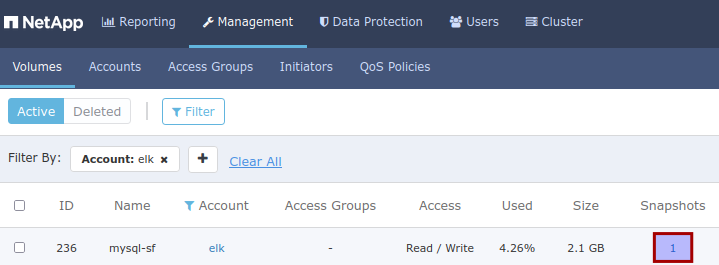
Backup data from VM with SolidFire-based as Host Volumes
- stop Nomad job that uses the volume and run backup job as you normally would (which you can do from Nomad, as another job), or
- take a snapshot and use a backup utility and script to create a temporary clone, or
- take a snapshot and use SolidFire Backup-to-S3 utility which can backup that volume snapshot to S3
- if you have application-specific backup software, perform logical backup without stopping Nomad job (MySQL service job)
Restore is done in reverse - stop Nomad job, restore from backup or snapshot.
Backup data from VM running Docker with dynamically-provisioned SolidFire volumes
This is very similar as far as SolidFire is concerned, but - because when job is stopped, dynamically provisioned Docker volume won't be mounted, so you'd access it from a Docker container or (temporarily for the purpose of backup) host.
- Cold backup:
$ # on Nomad server
$ nomad job stop mysql-server

$ # on Nomad client
$ docker volume ls | grep sql
trident:latest   mysql-sf

$ # this can be executed as a Nomad batch job, or remotely (Ansible, etc.)
$ docker run -v mysql-sf:/volume ... # tar -cvf mysql-sf.tar /volume | pipe-to-your-backup-to-S3-utility

$ # once done, on Nomad server
$ nomad job run mysql-server
- Crash-consistent backup:
- Just like MySQL Docker image mounts SolidFire volumes, so can your backup container
- Take a snapshot (if you want to run a script to quiesce application, you can do it) of MySQL volume
- Create a temporary clone from that snapshot
- Mount and backup clone volume from host
- Delete the temporary clone (or you can leave it in place, and next time just copy from latest snapshot to this clone - this approach I took in solidbackup)
- If your needs are basic, you can use SolidFire Backup to S3
- Logical backup:
- use MySQL API or MySQL client to backup your database
Docker Volume Plugin can "see" and use SolidFire volumes that were created directly on SolidFire (i.e. not with Docker using docker volume create) as long as the volume is presented to the tenant account used by Docker Volume Plugin. So a clone volume created from a SolidFire snapshot of our MySQL Host Volume could be used for a quick restore (just change job description to use its name, and restart the job). This is unlikely to be necessary - normally you'd have a snapshot and restoring from a snapshot would be easier and faster - but in the case you mistakenly delete a volume or have a clone and not a snapshot, that would be an option.
Backup to S3 and anti-ransomware measures
- Most modern backup software, including freeware, can backup data to S3 and some (Veeam, Commvault) can also enable Object Locks to prevent deletion of backup data on S3-compatible storage. NetApp StorageGRID supports Object Locks. Object Locks may be able to help SolidFire's own backup-to-S3 feature, but I haven't investigated that yet
- Some object storage supports "append-only" writes, which SolidFire's backup-to-S3 feature should support without issues. We'd configure two things on StorageGRID: one is to allow append-only writes on backup bucket, and another is to expire (delete) objects older than x days (e.g. 90). It would probably be wise to configure multiple buckets and give each team exclusive control over it to make that a self-service. If you need that to work well, I'd suggest to get a commercial backup product with Object Lock support
Backup and restore test
I created a simple backup and restore workflow that uses the Docker volume mount approach to backup both the MySQL Host Volume and dynamically provisioned volume used by Apache. To backup a Host Volume we wouldn't need to mount an already mounted volume inside of Docker (we could back it up from Docker, with sufficient access to MySQL data path), but it can be done and because Apache data was on a Docker volume, I did the both backups the same way by mounting them from Docker as explained above.
A Nomad job mounts named Docker volumes (Host Volume and also the Web volume that was created by Trident; volume names were hard-coded, but could be parametric) and copies data to S3. Before I executed it I stopped services using these volumes (MySQL and Apache).
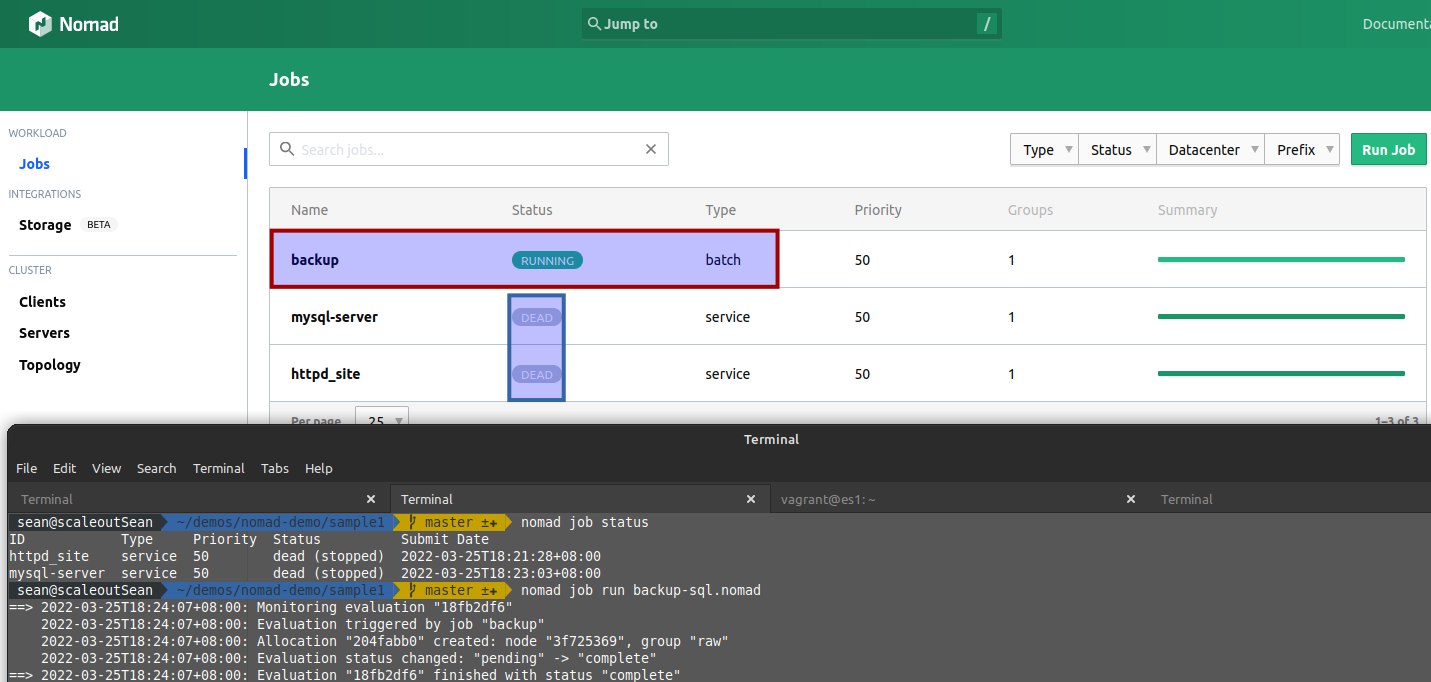
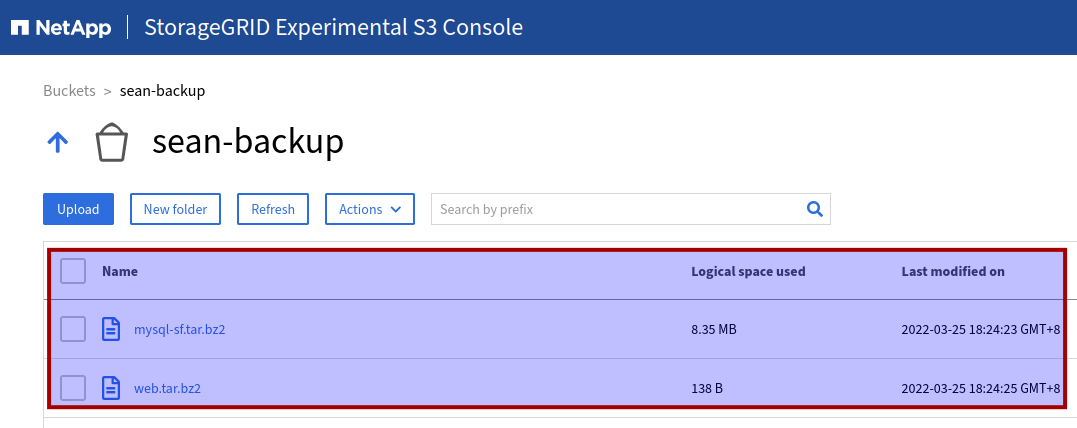
Minutes later I had my backup in S3 (additional details in archive file name, such as date and time, would have been helpful):
After that backup job finished I simply started the stopped MySQL and Web jobs. If I wanted to shorten planned downtime required to run backup I could have taken a snapshot of two volumes first, restart service jobs seconds later, and then run a backup job off temporary clone volumes created from those snapshots. Or just do the same without even stopping two services (crash-consistent backup).
To test restore, I destroyed data of one service (MySQL) by deleting MySQL data on Host Volume, and successfully restored MySQL data directory from S3 backup archive. MySQL started without any issues (you can see that in the longer video below).
This can work equally well with SolidFire clones created from SolidFire volume snapshots. It takes seconds of downtime to stop services, take a snapshot, and start them again. Then a backup job can run on snapshot-originated clone volumes. I didn't try this or built-in Backup to S3 because we know that works and I've blogged about it before.
Host Volumes vs. dynamic provisioning (with and without CSI plugin)
Dynamically provisioned Docker volumes
In addition to Host Volumes, Nomad can use Trident Docker Volume Plugin to have jobs create (or use available) SolidFire/Trident volumes on the fly. This lets us do everything from Nomad (without having to run "docker volume create ${NAME} -d trident"), but Trident volume deletion has to be done separately (which is the same how it works with Host Volumes, only easier).
We don't want to automatically delete a Docker volume just because a job using it was stopped (e.g. for cold backup) or purged (e.g. on-demand reporting that refreshes data every time), and this storage behavior is similar to "reclaimPolicy: Retain" in a Kubernetes Storage Class. Both Host and Docker Volumes that are no longer needed can be periodically deleted based on job specification, volume name (temp*), job tags and similar.
Note that Trident Docker Volume Plugin exists only for x86_64, but it's OSS and you can build and use it from ARM64-based Nomad clients as well.
Before I move on, here's a graphical summary of what I found to work: Host Volumes & Trident Docker Volume Plugin.
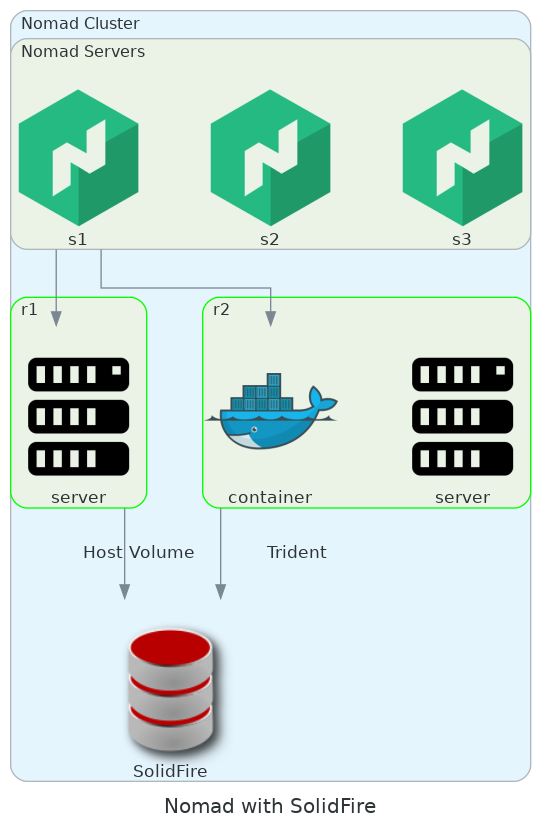
The reason high availability can't work without risk or without help of VM-level HA is we mustn't restart a job on another server if we aren't sure the node where it failed has been successfully drained and ensure it isn't still accessing block device(s) we intend to use when the job is scheduled on another client.
CSI Plugins
I didn't have a Kubernetes cluster available at the time of writing this post, so I can't tell if Trident CSI could or couldn't work for "CSI-style" Nomad storage plugin. I tried once last year, but couldn't get it to work.
Another CSI plugin that should be checked in the context of Nomad and SolidFire is Cinder CSI (recently evaluated with SolidFire here). Cinder CSI is a community driver supported by OpenStack and if Nomad ends up supporting it we'll have an end-to-end solution for Nomad on OpenStack with SolidFire. (OpenStack ships with in-tree SolidFire Cinder driver - we'd just need to add Cinder CSI in Kubernetes.)
The third CSI plugin I'd like to evaluate is BeeGFS CSI, a CSI driver for BeeGFS created and maintained by NetApp.
Is the approach with Host Volumes good enough for production
I think it is, if it does what you need it to do.
There's a lot to like about Nomad and SolidFire, whether it's used with Host Volumes or Docker Trident Plugin.
Technically there's little difference between running a Nomad-scheduled MySQL service with a SolidFire-backed host volume and running a non-orchestrated MySQL database "manually" in a VM-based Docker container (without Docker Swarm, for example).
We don't get full benefits of dynamic storage provisioning across Nomad clients (such as volume fail-over to another client), but we can get VM (and with it container) failover from VMware HA or similar feature in OpenStack where, if a VM or host is rebooted, Nomad will dispatch the job once Nomad client reconnects which will happen after the VM is again up and running, possibly on another host. The main downside is there's no dynamic provisioning (in the scenario without using Docker Volume Plugin).
Many administrators I know dislike dynamic provisioning because they think users might mess up the storage (over-provision, waste, etc.), so for them this "old school" approach may be preferred over dynamic provisioning with Docker Volume Plugin or Nomad CSI.
Another advantage (or disadvantage, if you see it that way) may be that data protection and business continuity would be done the old fashioned way:
- snapshots: snapshot the volume on SolidFire and restore it the same way
- backup: hot, warm, cold - any way you want it
- DR/BC: replicate Nomad volumes on SolidFire to another SolidFire cluster using SolidFire replication, without any of the complexity that surrounds Kubernetes (currently with SolidFire and Trident CSI we must re-install Trident CSI to fail back to cluster on Site A, for example). Here, all you need to configure is SolidFire replication and that takes less than 1 minute, either for fail over or fail back.
One area that needs additional investigation is vertical workload scaling for Nomad jobs, which could be done indirectly with VMware or OpenStack. Because without CSI volume Nomad can't move the container to another, larger or smaller VM, we'd need to run larger VMs or rely on hypervisor to help us with VM resizing. Or we could schedule such workloads as QEMU/KVM VMs with Host Volumes. Fortunately, SolidFire is easy to automate and you can create and automate new provisioning workflows in hours.
As far as Nomad storage is concerned, having a CSI-compatible driver would be nice, but considering that CSI support is still in beta and there are 62 open CSI-related Nomad issues, it's not something we could consider for production use in any case. Besides, probably 90% of what most folks need for on-prem Nomad can work with Host Volumes and Docker Volumes.
Nomad deployment is similar to Kubernetes (just a single binary), but Nomad is faster and much simpler. And you can schedule not just containers, but also VMs (QEMU/KVM) and more. Kubernetes is still catching up in the area of VM workloads, but Kubernetes is already too complicated and complex and it'll get even more complicated.
Summary
SolidFire has a CSI driver that works with Kubernetes, but most aspects of data management in a Nomad/SolidFire environment can be addressed with features built into Nomad, Docker and SolidFire and with much less complexity, cost and hassle than in a Kubernetes environment - especially if you can run Nomad workloads on VMware or OpenStack.
If you're a SolidFire admin whose team hasn't adopted Kubernetes yet, or struggling to get Kubernetes right, I recommend to try Nomad.
If you're a Nomad admin whose team is looking for iSCSI storage that doesn't fight you, consider SolidFire. SolidFire Demo VM (used in these demos) that doesn't expire can be downloaded for free.
I plan to continue exploring Nomad and once Nomad CSI support is out of beta I'd like to publish another post with driver configuration details for both Docker Volume and CSI plugins (one or more of the drivers mentioned earlier).
Demo
- Everything from this blog post in less than 10 minutes: HashiCorp Nomad & NetApp SolidFire iSCSI with Host Volumes, Dynamic Volumes, and backup-and-restore workflow - 9m24s
- Nomad and SolidFire in 80 seconds: Run HashiCorp Nomad service job which uses dynamically provisioned Docker Volume on NetApp SolidFire iSCSI storage - 1m20s