Custom embeddings for StorageGRID with Instaclustr OpenSearch based on Kompromise
- PART 1: Auto-generate vector embeddings for StorageGRID using Instaclustr OpenSearch
- Part 2 (this post): Custom Kompromise pipeline for StorageGRID and Instaclustr OpenSearch
Introduction
In Part 1 we saw how Instaclustr OpenSearch can easily and quickly create embeddings in an automated way. We also realized that, to integrate StorageGRID with this feature, we'd need customization:
- We want a custom index format to match our desired index format from StorageGRID
- We may want to create embeddings client-side, or on OpenSearch (and in the latter case, we can choose between built-in and external models)
- There's a matter of refreshing, updating and generally managing this in a way that doesn't become a mess as you add and remove stuff from StorageGRID buckets
I figure my chances of getting something useful done would be above zero only with Kompromise and/or SGII.
Workflow on Instaclustr OpenSearch
We create a pipeline for Kompromise using the model we registered (see Part 1). Make sure you use the model you want, not just because there's one that was registered.
PUT /_ingest/pipeline/kompromise-text-embedding
{
  "description": "Generate embeddings for Kompromise text chunks",
  "processors": [
    {
      "text_embedding": {
        "model_id": "hqRWMaEB62QuBhwmJD7e",
        "field_map": {
          "passage": "passage_embedding"
        },
        "if": "ctx.passage != null && ctx.passage.length() > 0",
        "skip_existing": true
      }
    }
  ]
}
Response:
{
  "acknowledged": true
}
Next, we create an index template for Kompromise. This is the "custom" part.
PUT /_index_template/kompromise-docs
{
  "index_patterns": ["kompromise-docs-*"],
  "priority": 200,
  "template": {
    "settings": {
      "index.knn": true,
      "index.default_pipeline": "kompromise-text-embedding"
    },
    "mappings": {
      "dynamic": true,
      "properties": {
        "bucket": { "type": "keyword" },
        "key": { "type": "keyword" },
        "version_id": { "type": "keyword" },
        "event_name": { "type": "keyword" },
        "event_time": { "type": "date" },
        "size": { "type": "long" },
        "etag": { "type": "keyword" },
        "content_type": { "type": "keyword" },
        "last_modified": { "type": "date" },
        "user_metadata": { "type": "flat_object" },
        "kompromise": {
          "properties": {
            "mode": { "type": "keyword" },
            "pipeline": { "type": "keyword" },
            "source": { "type": "keyword" },
            "tenant": { "type": "keyword" },
            "bucket": { "type": "keyword" },
            "received_at": { "type": "date" },
            "enriched_at": { "type": "date" }
          }
        },
        "kompromise_enrichment": {
          "properties": {
            "enrichment_status": { "type": "keyword" },
            "enrichment_attempts": { "type": "integer" },
            "enrichment_at": { "type": "date" },
            "content_type": { "type": "keyword" },
            "storage_class": { "type": "keyword" },
            "last_modified": { "type": "date" },
            "user_metadata": { "type": "flat_object" },
            "object_tags": { "type": "flat_object" }
          }
        },
        "passage": { "type": "text" },
        "passage_embedding": {
          "type": "knn_vector",
          "dimension": 768,
          "space_type": "l2"
        }
      }
    }
  }
}
Response:
{
  "acknowledged": true
}
I still managed to make a mistake: passage_embedding's dimension count is 768, but I recycled yesterday's CPU-saving model with only 384 dimensions. Which means it's ready - to not work!
Create a test index:
PUT /kompromise-docs-dev
Response:
{
  "acknowledged": true,
  "shards_acknowledged": true,
  "index": "kompromise-docs-dev"
}
Regardless of the mismatch, the model itself can be tested.
POST /_ingest/pipeline/kompromise-text-embedding/_simulate
{
  "docs": [
    { "_index": "kompromise-docs-dev", "_id": "test-1", "_source": { "passage": "A short test sentence." } }
  ]
}
Response (passage_embedding has 384 dimensions, so I'm cooked):
{
  "docs": [
    {
      "doc": {
        "_index": "kompromise-docs-dev",
        "_id": "test-1",
        "_source": {
          "passage_embedding": [
            0.05434283,
            0.025497774,
            ...
            -0.03705213
          ],
          "passage": "A short test sentence."
        },
        "_ingest": {
          "timestamp": "2026-10-14T08:07:09.689220202Z"
        }
      }
    }
  ]
}
Now I have the problem that the index itself is 768 dimensions, but the model can do only 384. The exact trap I was warning about in Part 1, I fell into in Part 2.
My pipeline now uses model_id from part 1, which is a lemon as it can do 384-dim only.
GET /_ingest/pipeline/kompromise-text-embedding
Response:
{
  "kompromise-text-embedding": {
    "description": "Generate embeddings for Kompromise text chunks",
    "processors": [
      {
        "text_embedding": {
          "model_id": "hqRWMaEB62QuBhwmJD7e",
          "field_map": {
            "passage": "passage_embedding"
          },
          "if": "ctx.passage != null && ctx.passage.length() > 0",
          "skip_existing": true
        }
      }
    ]
  }
}
If we check the UI (see Part 1) or query the model (or look it up on HF), we'll see it's game over as far as getting 768-dims is concerned.
{
  "name": "huggingface/sentence-transformers/all-MiniLM-L6-v2",
  "model_group_id": "1sVSMaEBxbvMjUqWqPfr",
  "algorithm": "TEXT_EMBEDDING",
  "model_version": "3",
  "model_format": "TORCH_SCRIPT",
  "model_state": "DEPLOYED",
  "model_content_size_in_bytes": 91789778,
  "model_content_hash_value": "25e2858993cd477936f24e412a508b005aa6b59a308301cc69690e4b90cab439",
  "model_config": {
    "model_type": "bert",
    "embedding_dimension": 384,
...
  }
}
Assuming 768 dimensions is what I want, I should deploy a 768-dim model and recreate the index template and indexes. Ouch! At least they're not populated with TBs of data and don't have applications that depend on them.
Workflow on StorageGRID
It's not just StorageGRID, it's also Kompromise (and maybe NATS/Kafka), but you get the idea:
- StorageGRID: grid admin needs to enable Platform Services and Tenant Admin needs to create an endpoint, enable bucket versioning and bucket notifications for the source bucket
- Stand-up Kompromise Lite (for example; that's a simple version that uses a local or Instacluster Kafka)
- Since the idea is that embeddings do get created, tenant who manages buckets that need indexing needs to make them accessible to on-premises or cloud workers that need to read the content. Also, expose S3 API for the tenant to those workers and create keys for them to be able to read objects you want to create embeddings for
The flow is:
- StorageGRID sends data to Kompromise Webhook from various storage nodes
- A Kompromise Webhook stores notifications in NATS (default, deployed on Kubernetes) or Kafka (Kompromise Lite on Docker)
- A Kompromise worker works on defined subject and runs a local pipeline. This is where we can choose to do everything on our own or let OpenSearch do the heavy lifting, or even "do nothing" (this still creates OpenSearch index entries if we run it, just without vectors!).
Apart from the "do nothing" scenario for vectorization pipeline, the other two approaches that do result in embeddings created need to get object content - that's the only way to create embeddings (aside from the weak use case to create them from metadata which is unlikely to be useful for most unless they manage their objects with object metadata and tags (they shouldn't)).
An operator-created durable push consumer with its own deliver NATS subject would be used here. For example, the durable consumer's deliver_subject could be deliver.<tenant>.<bucket>.embedding and its deliver_group docs-embedding-group. This is what having NATS in place enables - it's an overhead if you "don't really need it" but usually, you're one step from needing it and not having it. As a reminder:
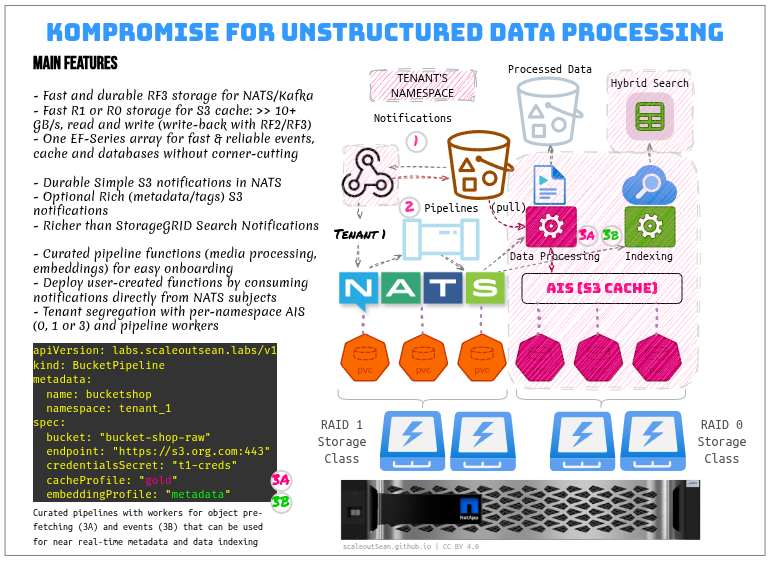
If you don't want this bloat locally, you can send notifications directly from StorageGRID to Instaclustr Kafka, but you'll have to do the same thing over there (couple-o-VMs or functions that do the same thing).
Okay, back to this worker, it'd be something like this, in Kubernetes:
python consumer.py \
  --nats-url nats://nats.example.com:4222 \
  --nats-user tenant-pepsi --nats-password "$NATS_PASSWORD" \
  --deliver-subject deliver.pepsi.docs.embedding \
  --deliver-group docs-embedding-group \
  --s3-endpoint-url https://<grid-host>:10443 \
  --s3-access-key-id "$S3_ACCESS_KEY_ID" \
  --s3-secret-access-key "$S3_SECRET_ACCESS_KEY" \
  --index-url https://<opensearch-host>:9200 \
  --index kompromise-docs-dev \
  --os-user "$OPENSEARCH_USER" --os-password "$OPENSEARCH_PASSWORD" \
  --embeddings opensearch --source passage \
  --chunk-size 2000 --chunk-overlap 200
A user can keep the source and vector mappings while removing index.default_pipeline, or explicitly bypass a default pipeline with pipeline=_none, and index vectors generated by Kompromise instead.
To create embeddings locally:
python consumer.py ... \
  --embeddings local --source passage \
  --embedding-url http://ollama:11434/v1/embeddings \
  --model nomic-embed-text
Like in the recent post for Elasticsearch (screenshot below), the end result is we get Kompromise indexes with embeddings if we choose so (local- or OpenSearch-generated):
- We're expected to have the same index layout (with
passageinstead oftext, and withpassage_embeddingsinstead ofembeddings) - Chunking (step marked with
2) has to be done for content longer than few hundred bytes, which makes each S3 object end up with a bunch of small entries (unavoidable, since we want to find the precise chunk, not just the S3 document URI)
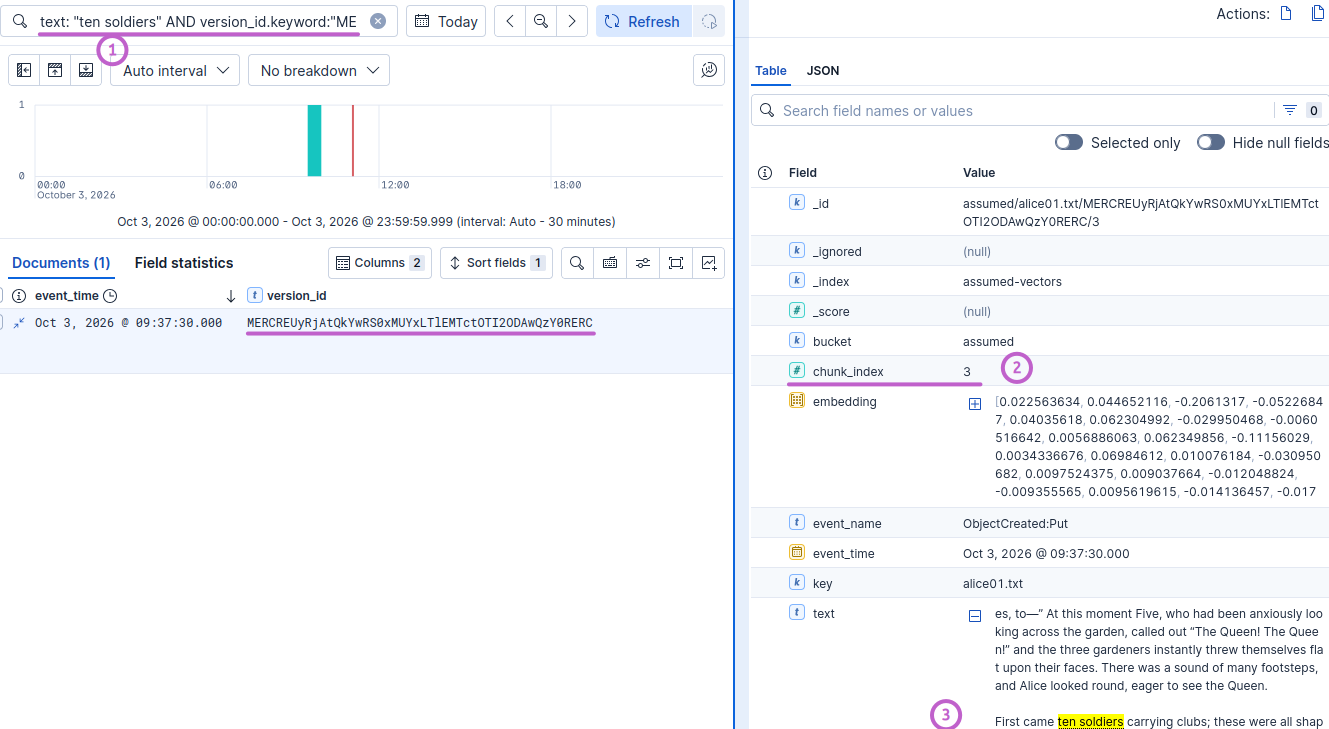
Save for the field names OpenSearch entries aren't expected to be different - that's the main point of having a recipe with conventions and defaults, being able to avoid reinventing these basics for every AI use case.
Multi-modal embeddings
I glossed over what is being vectorized. The assumption is "text", but if you start with videos or PDF files, you'll need additional steps to get from videos to text that describes a scene (or embeddings for each frame).
That part is separate from either Kompromise or OpenSearch, though.
Some AI models can be used to create embeddings for both text and non-text data. The trade-off is separate models may be better, but maybe you want one model rather than two, so that's up to you.
Chunking of text is covered in a recent post, and this walk-through shows how Kompromise can be used to prefetch videos or other large files and perform I/O-intensive processing out of box.
What about SGII?
The role of SGII is explained here:
- If you are happy with the way StorageGRID notifications work, you don't need anything else
- If you prefer to batch-upload changes, you can switch to SGII (or your own method). SGII can perform incremental updates, which means it is only the delta that needs to be enumerated and transferred
- If you prefer to use both, you can:
- Kompromise for near real-time updates
- SGII for daily or weekly reconciliation or "periodic QA checks" (even if you want to check on StorageGRID's native Search Integration)
SGII can produce lists of new/updated S3 keys, so once you get those lists (see this link just above), you can run it through the same workflow - create index entries and optionally enable embeddings.
A stand-alone SGII as "list generator" could be used in custom ways that augment StorageGRID Search Integration, but personally I don't see much value in using the schema from StorageGRID Search Integration - it's not good, and it's missing fields for passage(-equivalent), embeddings and other stuff, so you must hack it anyway. Once data is in OpenSearch, it's yours, so use what works, not what's built in and doesn't.
Conclusion
Part 2 shows end-to-end integration between StorageGRID 12 and Instacluster OpenSearch 3 for AI use cases. There's no free ready-made NetApp solution for this, but there are similar solutions and commercial products that you can consider.
Kompromise and SGII provide some semblance of structure in this custom process. I'm sure some users can do better on their own, but even if the approach is used for reference only, it can still save time. (If I use other features from the Kompromise stack (demo code hasn't been published yet), that's even more savings because it relies on the same prescriptive workflow and architecture).
The ability to use the same models on both sides (Kompromise and OpenSearch) makes it possible to optimize your AI pipeline. We can configure OpenSearch dedicated workers to create embeddings for TBs of data in a day, then remove those workers and switch to on-premises vectorization for later incremental updates on the cheap.
For maximum flexibility, use models that are supported both by OpenSearch and on-premises. Then you can run anywhere, or in both places at the same time (on different indexes, or various update/batch jobs). The list of OpenSearch-supported models is linked from Part 1 and available in their documentation.