Eke - CLI utility for smarter data management with BeeGFS on NetApp E-Series
Introduction
BeeGFS has several good data management features.
NetApp has had the BeeGFS solution with E-Series for over half a decade now, so current users have at least the following available:
- Since BeeGFS v7 - Storage Pools. I think even the earliest BeeGFS shipped had the storage pools feature because here I see it's in v7.2 (the earliest version posted on the BeeGFS documentation site)
- Since BeeGFS v8 - Hive index, Remote Storage Targets launched in v8.0. I blogged about these features when they came out last year.
I've never heard of anyone using them, which checks out considering the amount of documentation, solution and guides available for these features on the NetApp BeeGFS documentation site.
Are these features useful?
While I don't know of anyone who uses them, I still recommend them. Especially now, with SSDs priced at 10x of NL-SAS, even 3:1 efficiency won't help you avoid the cost of SSDs. But Storage Pools can, and they're simple and easy to use.
It's also very easy to build hybrid (NVMe/NL-SAS) BeeGFS clusters, so if you put 10 or 20 percent on SSD, 80 or 90% is still much cheaper than on any all-flash storage even after the huge efficiency savings advertised by some all-flash vendors.
The only part that I wish was better was the interface. There's no UI, which is "common" (for free features), while the CLI is not that easy to use. So this weekend I've built Eke, a CLI for these features that works the way I want.
It's not just a wrapper, but even if it was, I would have found it worth the trouble because it works exactly as I want.
And I'm again not releasing the source code because for the most part in these small repos it's just extra work for nothing in return (pull requests, etc.).
Eke sub-commands
The first version, v0.1, has half a dozen commands.
show-pools is an enhanced wrapper for BeeGFS pool- and target-related commands. See this:
root@b1:~# beegfs pool list
ID   ALIAS                 TARGETS      MIRRORS
s:1  storage_pool_default  s:201,s:301
s:2  archive               s:202,s:302
Eke ekes out a bit more.
$ eke show-pools
Pool utilization view

s:1 (storage_pool_default): targets=2 avg_used=53.16% max_used=53.26%
  - s:201 (target_storage_201, s:2) used=53.26% cap_pool=Emergency
  - s:301 (target_storage_301, s:3) used=53.06% cap_pool=Emergency
s:2 (archive): targets=2 avg_used=4.05% max_used=4.49%
  - s:202 (target_storage_202, s:2) used=4.49% cap_pool=Emergency
  - s:302 (target_storage_302, s:3) used=3.61% cap_pool=Emergency
Note that this isn't something the beegfs CLI can't do - it absolutely can. In fact, eke show-pools is a wrapper, so it can't do more. But here one command does what several BeeGFS CLI commands do, and I usually want to see all this stuff, so instead of running 2-3 of them, I need to run just one.
migrate-safe is also a thin wrapper for BeeGFS entry migrate sub-command. Most arguments map directly to beegfs entry migrate.
$ eke migrate-safe --help
Usage: eke migrate-safe [options]

Options:
  --manager string               SSH host to run commands on
  -m string                      Alias for --manager
  --beegfs-bin string            BeeGFS CLI binary (default "beegfs")
  --path string                  Path to migrate (required)
  --from-pool string             Source pool ID or alias (default "s:1")
  --to-pool string               Destination pool ID or alias (required)
  --recurse                      Recurse when path is a directory (default true)
  --update-directories           Update directories to use destination pool
  --filter-files string          BeeGFS file filter expression (passed through as-is)
  --rebalance                    Use background rebalancing mode (BeeGFS 8.2+, enterprise)
  --execute                      Execute migration (default is dry-run)
  --max-destination-used float   Block if destination pool max usage is >= value (default 90)
migrate-smart tries to be smart, but still stay safe.
It should be obvious what most of these do, so I'll highlight only --max-default, which keeps default pool at set percentage value, regardless of how much data could actually be migrated to archive pool.
$ eke migrate-smart --help
Usage: eke migrate-smart [options]

Options:
  --manager string        SSH host to run BeeGFS commands on
  -m string               Alias for --manager
  --beegfs-bin string     BeeGFS CLI binary (default "beegfs")
  --duckdb-bin string     DuckDB binary (default "duckdb")
  --input string          Parquet file with candidate files (required)
  --source-pool string    Source pool ID or alias (required)
  --target-pool string    Target pool ID or alias (required)
  --max-default float     Source tier target fullness in percent (default 65)
  --max-archive float     Target tier ceiling in percent (default 95)
  --filter string         Optional path/source_dir filter; plain text is treated as a prefix (evaluated against raw and rewritten paths)
  --path-rewrite-from string  Optional input path prefix to rewrite (example /mnt/index)
  --path-rewrite-to string    Optional destination path prefix (example /mnt/beegfs)
  --pending-ledger string   Optional ledger file for in-flight accounting and execute locking
  --min-move-capacity string  Optional minimum bytes to select (supports units like 1Mi, 10GiB)
  --enforce-safe-move-capacity  Treat min-move-capacity >25% of source capacity as an error
  --limit-bytes string    Optional upper bound on total bytes to move
  --limit-files int       Optional upper bound on file count to move
  --enforce-stripe-fit    Fail if estimated required file targets exceed destination pool target count
  --recurse               Recurse for directory paths in candidate list
  --update-directories    Update directories to use destination pool
  --filter-files string   BeeGFS file filter expression (passed through as-is)
  --rebalance             Use background rebalancing mode (BeeGFS 8.2+, enterprise)
  --execute               Execute migration (default is dry-run)
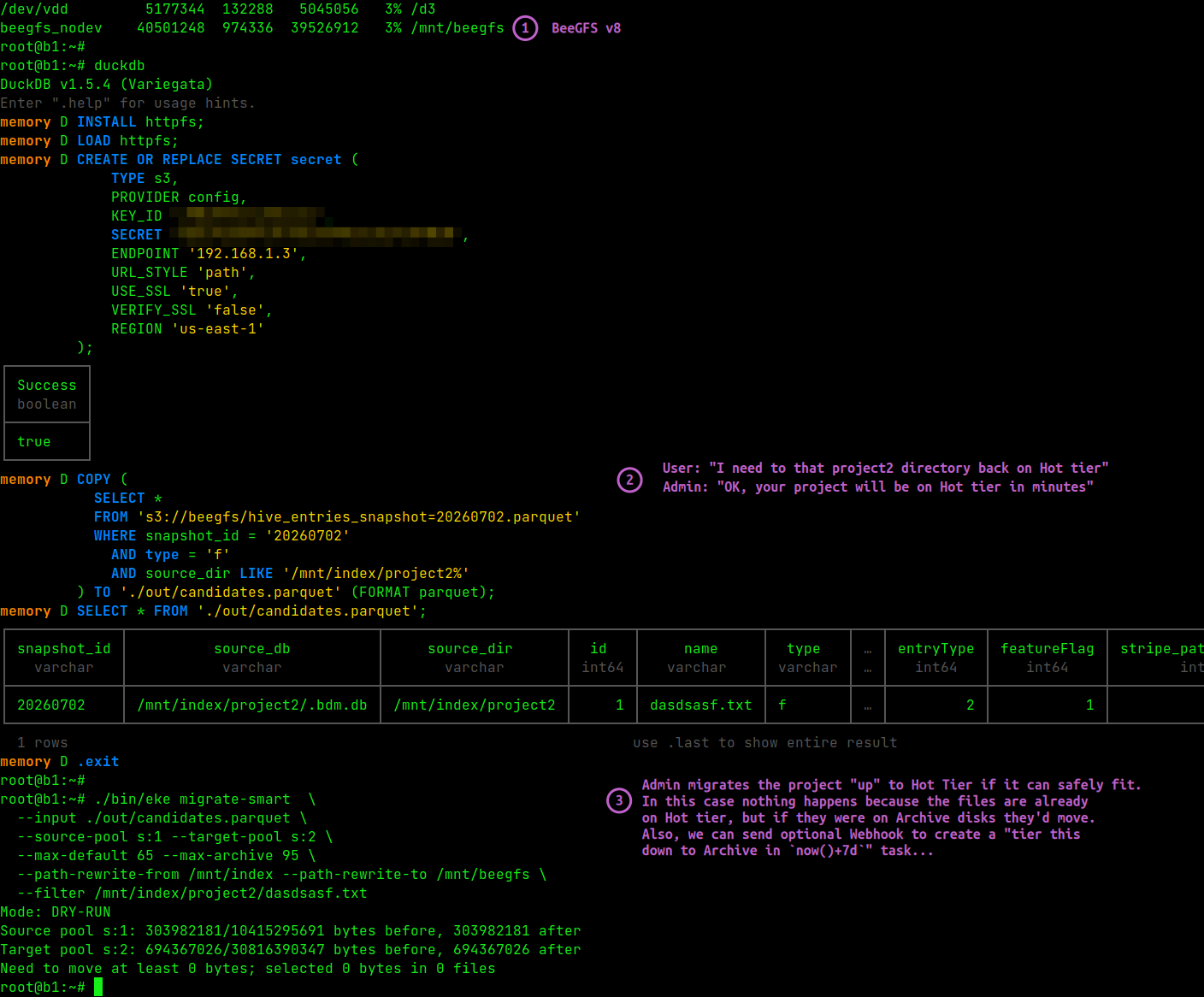
migrate-up is an "up" migrator (archive-to-default). Eke doesn't focus on "up" migration and users are expected to keep their default tier at certain level of fullness (e.g. 65%) and only tier "down" (to one or another "archive" pool). Then, as archive pool gets fuller, you just delete stuff from archive pool or push archive to S3 with beegfs remote push (and then remove it from archive pool).
The main, and justified, reason to migrate up is if one has an old project or data set that is needed on default tier, if only for a week.
While migrate-safe and migrate-smart can be used for that, there's a separate Eke sub-command - migrate up - that's should be used for tiering "up". It's slightly different from migrate-[safe|smart], but different enough to be preferred.
$ eke migrate-up --help
Usage: eke migrate-up [options]

Options:
  --manager string          SSH host to run BeeGFS commands on
  -m string                 Alias for --manager
  --beegfs-bin string       BeeGFS CLI binary (default "beegfs")
  --duckdb-bin string       DuckDB binary (default "duckdb")
  --input string            Parquet file with candidate files (required)
  --source-pool string      Source pool ID or alias (required; typically archive/cold)
  --target-pool string      Target pool ID or alias (required; typically default/hot)
  --filter string           Optional path/source_dir filter
  --path-rewrite-from string  Optional input path prefix to rewrite
  --path-rewrite-to string    Optional destination path prefix
  --limit-bytes string      Optional upper bound on bytes to migrate upward
  --limit-files int         Max files to migrate upward (default 100)
  --max-target-used float   Block when destination pool max usage is >= value (default 70)
  --enforce-stripe-fit      Fail if estimated required file targets exceed destination pool target count
  --update-directories      Update directories to use destination pool (default false)
  --pending-ledger string   Optional ledger file to record submitted upward migrations
  --notify-webhook string   Optional webhook URL to notify submission events
  --webhook-extra-payload string  Optional JSON object or @file to include as action (max 256 bytes compact)
  --webhook-no-verify-ssl   Skip TLS certificate verification for HTTPS webhook
  --webhook-no-verify-tls   Alias for --webhook-no-verify-ssl
  --execute                 Execute migration (default is dry-run)
Here's how that looks like when migrating 100 MiB from the archive pool up to default pool:
$ eke migrate-up \
  --input ./out/candidates.parquet \
  --source-pool archive \
  --limit-bytes 100MiB \
  --target-pool storage_pool_default \
  --notify-webhook http://192.168.1.13:18000/webhook \
  --execute \
  --path-rewrite-from /mnt/index --path-rewrite-to /mnt/beegfs
Mode: EXECUTE
Source pool s:2 projected used: 206174617/5153960754 bytes
Target pool s:1 projected used: 1070047231/2013265920 bytes
Candidates matched (files only): 87872
Selected 1024000 bytes in 100 files
  - /mnt/beegfs/A-0LviPKx8WBtuWJhyMHIDN2 (10240 bytes)
  - /mnt/beegfs/A-1XiqoComrlgxBc6BJcg1a1 (10240 bytes)
  - /mnt/beegfs/A-4pEqVAbSEvsShRM1qauEe8 (10240 bytes)
  - /mnt/beegfs/A-4u5HB0TNxi5BfT7U_tnhFG (10240 bytes)
  - /mnt/beegfs/A-54bjAnpucbthF2bPPj15w5 (10240 bytes)
  - /mnt/beegfs/A-5GkxH6HA5neM6RApX8U-o- (10240 bytes)
  - /mnt/beegfs/A-BP4bU5Wf-kcCsmEja9mZWe (10240 bytes)
  - /mnt/beegfs/A-BRcohUby_RO43uAHhiaT2R (10240 bytes)
  - /mnt/beegfs/A-FgzLf79A4UltL_yYGdTZB1 (10240 bytes)
  - /mnt/beegfs/A-HDVsSNclD5S5vlYGEjaFQt (10240 bytes)
  - /mnt/beegfs/A-McHudlP7CeF9fhbBJO2ilZ (10240 bytes)
  - /mnt/beegfs/A-OCkya4AHRsawSz-uGmepSP (10240 bytes)
  - /mnt/beegfs/A-Q5SGZm6s-ye778e7F76qDi (10240 bytes)
  - /mnt/beegfs/A-RkaOLgwu6J-fXhLDsvtm2w (10240 bytes)
  - /mnt/beegfs/A-VaK4bsESlrQ73LO3LcaUZ_ (10240 bytes)
  - /mnt/beegfs/A-bu8AZRitRXAcVA-0rZkuTK (10240 bytes)
  - /mnt/beegfs/A-c_Q-z9btSt5bpAtxYUU0RT (10240 bytes)
  - /mnt/beegfs/A-ff8jILPuKzFJTj5MOgLjwL (10240 bytes)
  - /mnt/beegfs/A-gzWFjQxs_XsHYsDLgb12m0 (10240 bytes)
  - /mnt/beegfs/A-jAWoK26diuHLTcMyKw98Am (10240 bytes)
  ... 80 more files
Webhook notified: http://192.168.1.13:18000/webhook
The Webhook payload that hit Webhook endpoint in this specific instance:
{
  "bytes_selected":1024000,
  "event":"eke.migrate_up.executed",
  "files_selected":100,
  "manager":"",
  "matched_candidates":87872,
  "pending_ledger_entry":null,
  "schema":"eke.webhook.v1",
  "schema_version":1,
  "source_pool":"s:2",
  "target_pool":"s:1",
  "timestamp_utc":"2026-07-05T06:13:01Z"
}
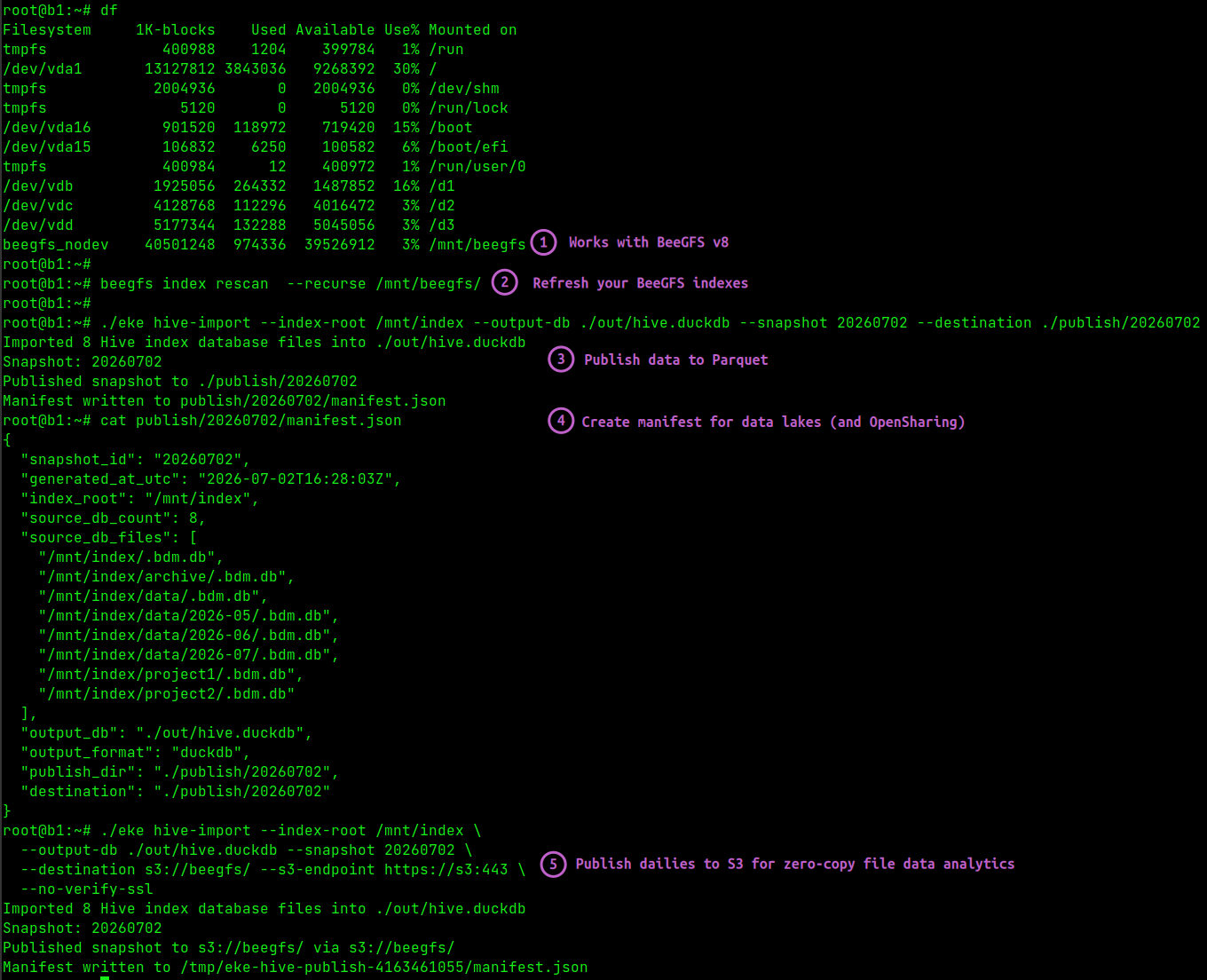
hive-import consolidates Hive index for easy reporting and analysis. You need to have a Hive index to be able to use this sub-command, but BeeGFS doesn't have an equivalent, so this one isn't a wrapper.
$ eke hive-import -h
Usage: eke hive-import [options]

Options:
  --manager string         SSH host to run import on
  -m string                Alias for --manager
  --duckdb-bin string      DuckDB binary (default "duckdb")
  --index-root string      Hive index root directory (default "/mnt/index")
  --output-db string       Output DuckDB file (default "./out/hive_snapshot.duckdb")
  --output-format string   duckdb|parquet|both (default "duckdb")
  --parquet-dir string     Parquet output directory (default "./out/parquet")
  --destination string     Optional publish destination: local path, s3://bucket/prefix, or https://host/bucket/prefix
  --post-step string       Optional shell command to run after import/publish
  --s3-region string       S3 region for publishing (default "us-east-1")
  --s3-endpoint string     Override S3 endpoint URL for S3-compatible storage
  --no-verify-ssl          Skip TLS certificate verification for S3 uploads
  --no-verify-tls          Alias for --no-verify-ssl
  --snapshot string        Snapshot ID stored in snapshot_id. Reusing the same ID replaces that snapshot's rows.
Here's how that looks like without uploading to S3:
$ eke hive-import \
  --index-root /mnt/index \
  --output-db /mnt/filesystem-analytics/out/hive.duckdb \
  --snapshot 20260702 \
  --destination /mnt/filesystem-analytics/out/publish/20260702
Depending on how it was executed, manifests will differ but generally look like this:
{
  "snapshot_id": "20260702",
  "generated_at_utc": "2026-07-02T16:28:03Z",
  "index_root": "/mnt/index",
  "source_db_count": 8,
  "source_db_files": [
    "/mnt/index/.bdm.db",
    "/mnt/index/archive/.bdm.db",
    "/mnt/index/data/.bdm.db",
    "/mnt/index/data/2026-05/.bdm.db",
    "/mnt/index/data/2026-06/.bdm.db",
    "/mnt/index/data/2026-07/.bdm.db",
    "/mnt/index/project1/.bdm.db",
    "/mnt/index/project2/.bdm.db"
  ],
  "output_db": "./out/hive.duckdb",
  "output_format": "duckdb",
  "publish_dir": "./publish/20260702",
  "destination": "./publish/20260702"
}
Alternatively, publish directly to S3.
$ eke hive-import --index-root /mnt/index \
  --output-db ./out/hive.duckdb --snapshot 20260702 \
  --destination s3://beegfs/20260702 \
  --s3-endpoint https://s3:443 \
  --no-verify-ssl
Imported 8 Hive index database files into ./out/hive.duckdb
Snapshot: 20260702
Published snapshot to s3://beegfs/20260702 via s3://beegfs/
Manifest written to /tmp/eke-hive-publish-4163461055/manifest.json
When would we upload to S3 and when keep these local?
It's simple - if you want to share, upload to S3. You can do both, of course, just copy the files from the place where they are, to the other one. hive-import just makes that seamless.
In this case we have two snapshots for July 5. Why?
$ mc ls s3/beegfs/
[2026-07-05 17:08:25 CST]     0B snapshot=20260702/
[2026-07-05 17:08:25 CST]     0B snapshot=20260703/
[2026-07-05 17:08:25 CST]     0B snapshot=20260704/
[2026-07-05 17:08:25 CST]     0B snapshot=20260705/
[2026-07-05 17:08:25 CST]     0B snapshot=202607051/
Because I ran an extra index update/rescan on July 5.
$ mc ls s3/beegfs/snapshot=20260705/
[2026-07-05 12:00:59 CST] 3.4MiB STANDARD hive_entries_snapshot=20260705.parquet
[2026-07-05 12:00:59 CST] 1.4KiB STANDARD hive_summary_counts_snapshot=20260705.parquet
[2026-07-05 12:00:59 CST]   904B STANDARD manifest.json

$ mc ls s3/beegfs/snapshot=202607051/
[2026-07-05 13:44:50 CST] 3.3MiB STANDARD hive_entries_snapshot=202607051.parquet
[2026-07-05 13:44:50 CST] 1.8KiB STANDARD hive_summary_counts_snapshot=202607051.parquet
[2026-07-05 13:44:50 CST]   876B STANDARD manifest.json
The second time around, I could have overwritten the files in /snapshot=20260705/ path, to hide the fact that I ran the workflow twice, and "keep it consistent".
But if I ignore the digits for extra runs (here: 1) and use a "date-based" path for analytics, I can still omit snapshot=202607051 in "daily" analysis and not have it impact my reports. Or I can delete the stuff I don't need (that snapshot=202607051/ path).
Either way, once we have consolidated Hive database in a datalake table format on a single-host filesystem or S3 bucket, we can perform massive analytics and create inputs to the various migrate commands.
Also notice the detail on index location:
- in-tree: this is the default, and BeeGFS creates index files on BeeGFS filesystem
- out-of-three: this is the second option, and I use that (
/mnt/indexas my selected index path)
The reason is I can keep these files on a separate E-Series LUN and query them without impacting BeeGFS. There's one related inconvenience, which is that path remapping must be done (and Eke allows you to remap) when working with out-of-tree indexes.
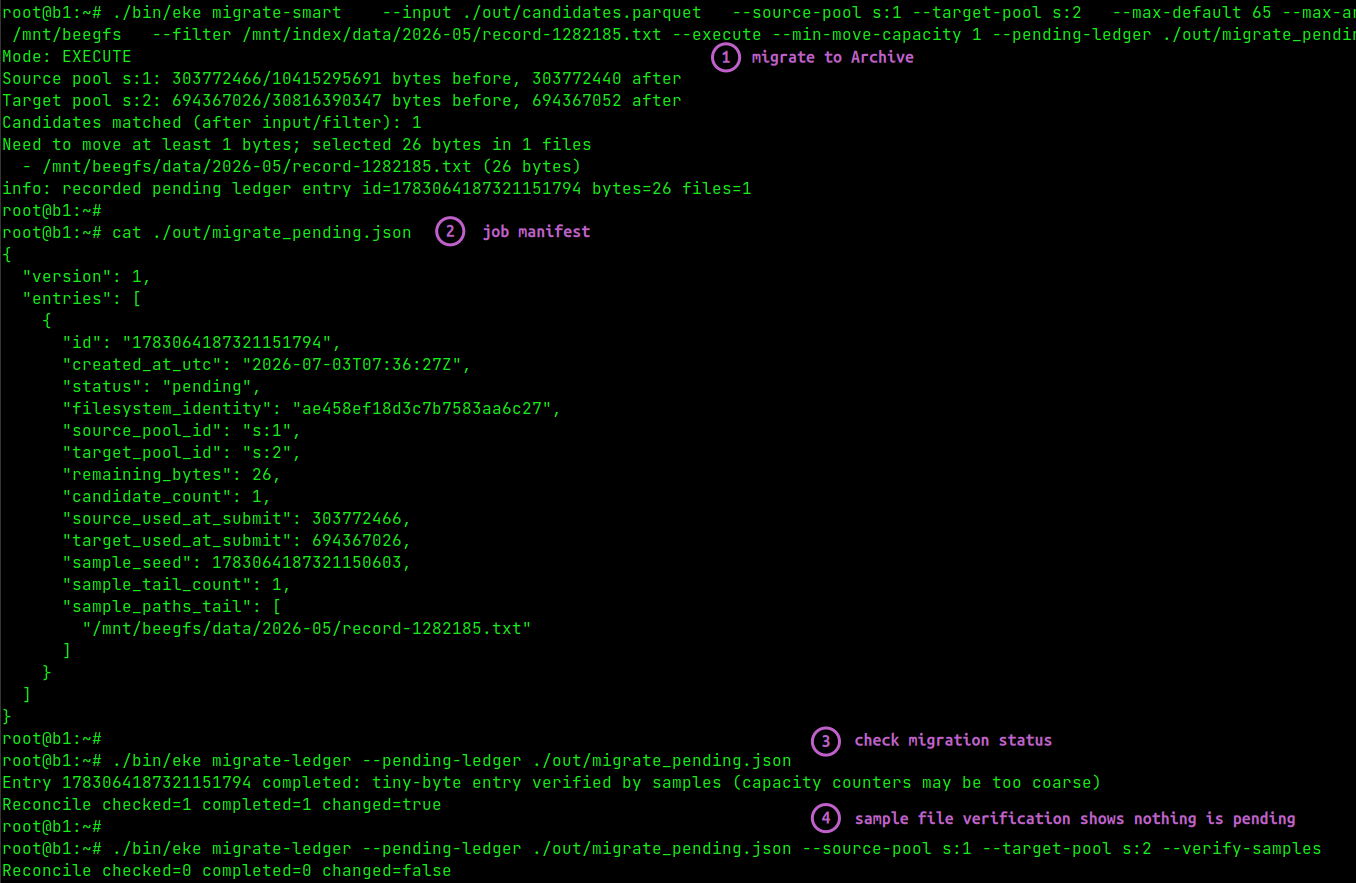
migrate-ledger checks manifest and status of migrate jobs.
$ eke migrate-ledger --help
Usage: eke migrate-ledger [options]

Options:
  --manager string        SSH host to run BeeGFS commands on
  -m string               Alias for --manager
  --beegfs-bin string     BeeGFS CLI binary (default "beegfs")
  --pending-ledger string Pending ledger file (required)
  --source-pool string    Optional source pool ID or alias filter
  --target-pool string    Optional target pool ID or alias filter
  --verify-samples        Verify sampled paths with refresh+info (default true)
  --complete-on-samples   Mark entries done when all sampled paths verify on target pool (useful when capacity counters lag)
  --notify-webhook string Optional webhook URL to notify newly completed entries
  --webhook-extra-payload string Optional JSON object or @file to include as action (max 256 bytes compact)
  --webhook-no-verify-ssl Skip TLS certificate verification for HTTPS webhook
  --webhook-no-verify-tls Alias for --webhook-no-verify-ssl
It can be executed in a loop, but the first time it spots a completed job, it can optionally fire a Webhook which looks similar to this:
{
  "id":"1783224215290151013",
  "created_at_utc":"2026-07-05T04:03:35Z",
  "completed_at_utc":"2026-07-05T05:25:41Z",
  "status":"done",
  "filesystem_identity":"ce4e4cf2407d866064b6ad18",
  "source_pool_id":"s:1",
  "target_pool_id":"s:2",
  "remaining_bytes":0,
  "candidate_count":465,
  "source_used_at_submit":1796105830,
  "target_used_at_submit":168191590,
  "sample_seed":1783224215290091453,
  "sample_tail_count":22,
  "sample_random_count":10,
  "sample_paths_tail":["/mnt/beegfs/Xct1iL1xolkaIf7T0QROeNp0/SOvawFsn7j4JaETaWQCWRrVy/ZgEh5y_F1rfTLaCSQLr7lZuX/MolgmlLiwiNvUbFyYcQs4LYJ/X2acMcuRZacBatjnk3N6QF7s","/mnt/beegfs/Xct1iL1xolkaIf7T0QROeNp0/SOvawFsn7j4JaETaWQCWRrVy"]
  ...
}
migrate-verify checks status of input files post-migration. Immediately after I run migrate-verify, I can monitor progress with beegfs stats rebalance (a native BeeGFS CLI sub-command), but I can also verify some or all migrations.
$ eke migrate-verify --help
Usage: eke migrate-verify [options]

Options:
  --manager string        SSH host to run BeeGFS commands on
  -m string               Alias for --manager
  --beegfs-bin string     BeeGFS CLI binary (default "beegfs")
  --duckdb-bin string     DuckDB binary (default "duckdb")
  --input string          Parquet file with candidate files (required)
  --expected-pool string  Expected current pool ID or alias (required)
  --filter string         Optional path/source_dir filter
  --path-rewrite-from string  Optional input path prefix to rewrite
  --path-rewrite-to string    Optional destination path prefix
  --limit-files int       Optional limit on number of candidate paths to check (0=all)
  --progress-every int    Emit progress every N checked paths (default 10000, 0 disables)
  --show-mismatches int   Number of mismatch paths to print (default 20)
  --show-missing int      Number of missing paths to print (default 20)
  --strict-missing        Fail when candidate paths are missing
Maybe there was a problem. Maybe you made a typo. Either way, migrate-verify is handy.
$ eke migrate-verify --input ./out/candidates.parquet \
  --expected-pool archive \
  --path-rewrite-from /mnt/index \
  --path-rewrite-to /mnt/beegfs \
  --limit-files 3
Verify starting: total=3 expected_pool=s:2 progress_every=10000
Verify checked=3 on_expected=0 mismatched=3 missing=0 errors=0 expected_pool=s:2
Mismatches:
  - /mnt/beegfs/A-0LviPKx8WBtuWJhyMHIDN2 (target s:201 in s:1)
  - /mnt/beegfs/A-1XiqoComrlgxBc6BJcg1a1 (target s:201 in s:1)
  - /mnt/beegfs/A-4pEqVAbSEvsShRM1qauEe8 (target s:201 in s:1)
error: verify failed: mismatched=3 missing=0 errors=0
Here it's telling me I may have screwed up. (I actually didn't, I'd tiered these files down with migrate-smart and that worked, but after that I ran a small migrate-up to migrate some of the files back to default pool and emulate a problem) as if not all files from the list made it to archive tier.
Conclusion
In my subjective opinion, Eke makes the already good data management features even easier to use.
This is currently the only deterministic way to migrate named files and directories between tiers on NetApp block storage (and between NetApp block storage and StorageGRID, if BeeGFS Remote Storage Targets are also considered).
With a small hot tier, it is important to monitor the capacity of each constituent pool because, while the filesystem may have plenty of free space, any individual pool can get full, preventing writes to the filesystem. Eke helps prevent that - you can schedule migrate sub-commands to run periodically and - because they are meant to tier only "down" - at 80-90% hard limit the free archive pool space utilization almost equals free filesystem space and so the output of the df command becomes representative enough.
Eke v0.1 lacks the sub-commands for integration with Remote Storage Targets, but I think the key for this is having BeeGFS filesystem details in datalake tables on S3 and Eke already does that. From a Parquet file to beegfs remote [push|pull] <file>, it is just one step. Maybe I'll add related sub-commands to Eke if I find BeeGFS-on-E-Series opportunities that involve StorageGRID remote targets.
The Eke v0.1 binary for BeeGFS 8.3 (x64) has been posted to the repo (without the source code, for the reason explained above).
Update: BeeGFS 8.4.0, that came shortly after this post was posted, changed the Hive Index format and some other things (including CLI commands), all of which may break the initial release of Eke.
Appendix A: Screenshots
Rescan BeeGFS and publish Hive Index in the Parquet format:
Use Hive data on S3 to create file lists for "up" and "down" migrations:
Monitor migration status: