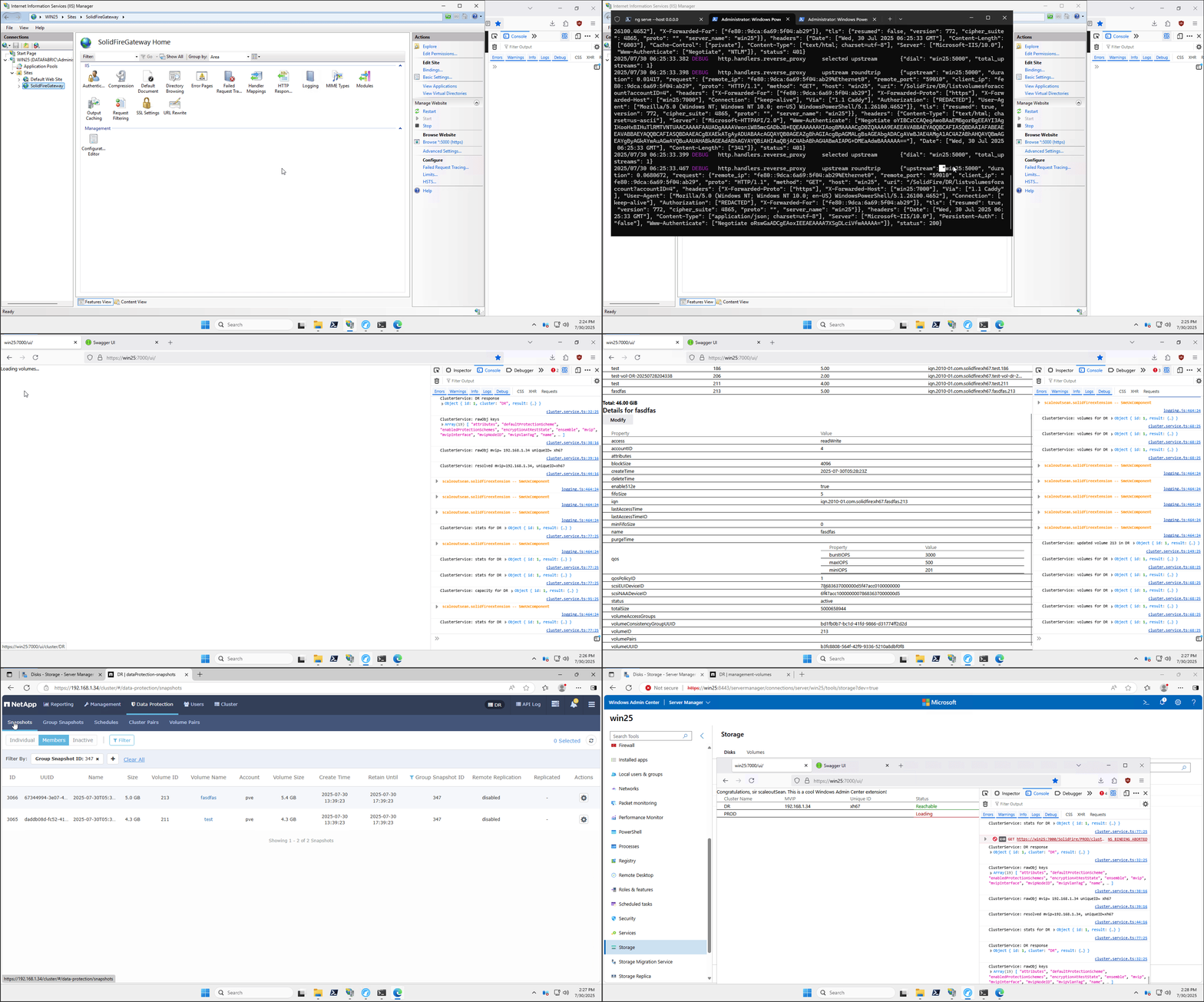
SolidFire Extension for Windows Admin Center 2025
Introduction
Continuing our "Dumb & Dumber in Tech" series, I'm pleased to report that I can add another episode following that SolidFire WAC Gateway post.
I've kept cracking and have something to share.
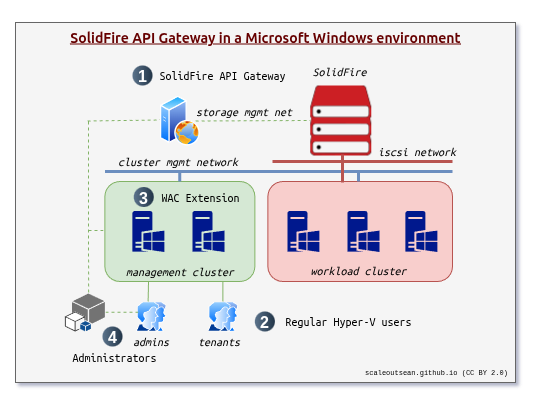
As a reminder, the previous post was about the gateway thing at (1), whereas this one is more about (2) and (3) in this diagram.
Walk-through
I am not sure what's better - video or screenshots - so I'll do it all: images, animated images (that appear like a video) and a video.
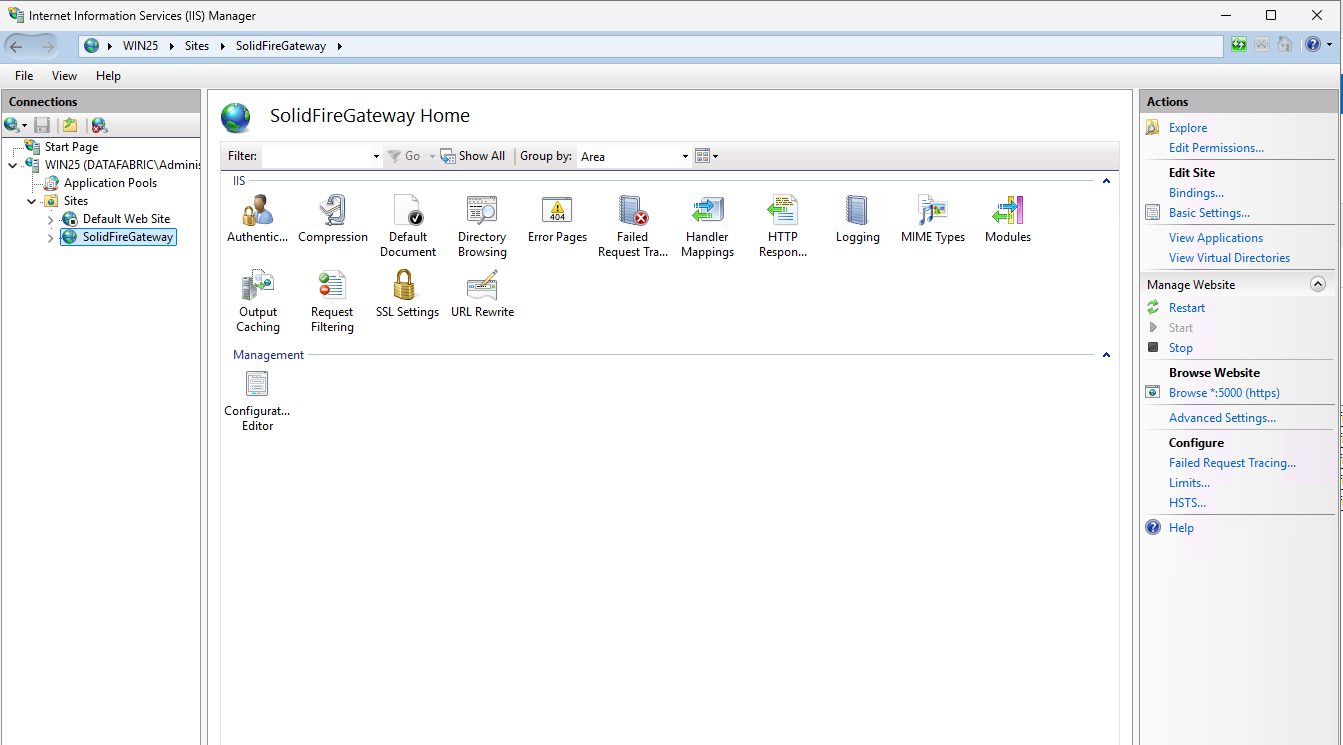
You saw the Windows Admin Center gateway thing in the other post. In this environment it's running:
- On IIS server (Windows Server 2025)
- On port HTTPS 5000 (right-hand side in the screenshot)
- It is configured for Windows authentication only, which is the key point (it's "hidden" in Authentication settings, but you can see it in the animated GIF or video demo shared at the bottom)
The API gateway application:
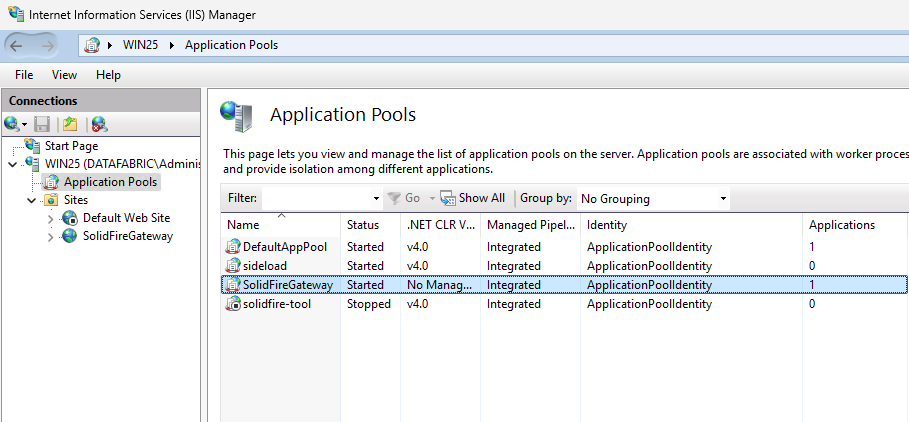
With that we get:
- Windows authentication to easily solve what had to be done years ago (RBAC/ABAC). See the previous post (on WAC Gateway) for more
- An improved SolidFire API (or you could say "additional custom" API methods as the original ones remain available to users with direct access to the SolidFire MVIP) because I can now fix and improve API. Also should have been done almost 10 years ago
- The proper API audit logs (that, too, should have been done years ago). SolidFire-bound JSON-RPC requests are logged (thin and thick version).
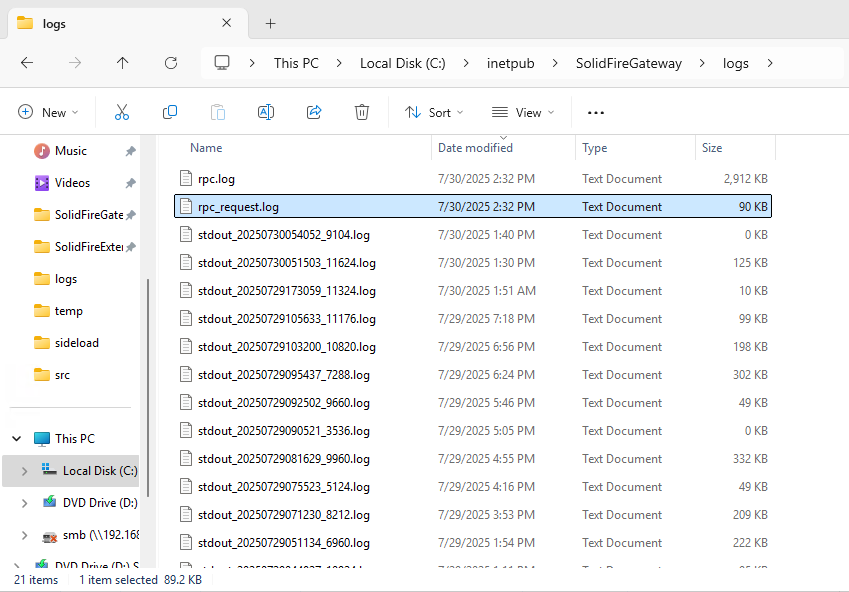
Thin log:
{"method":"ListGroupSnapshots","params":{"volumes":[165,186,206,211,213]},"id":1}
{"method":"GetClusterInfo","params":{},"id":1}
{"method":"GetClusterStats","params":{},"id":1}
{"method":"GetClusterCapacity","params":{},"id":1}
{"method":"GetClusterInfo","params":{},"id":1}
{"method":"GetClusterStats","params":{},"id":1}
{"method":"ListVolumesForAccount","params":{"accountID":4,"includeVirtualVolumes":false},"id":1}
{"method":"ListVolumesForAccount","params":{"accountID":4,"includeVirtualVolumes":false},"id":1}
Thick log:
{"id":1,"result":{"snapshots":[{"attributes":{"hyper-v":true,"volumeID":206},"checksum":"0x0","createTime":"2025-07-28T13:51:34Z","enableRemoteReplication":false,"expirationReason":"None","expirationTime":"2025-07-30T07:52:34Z","groupID":0,"groupSnapshotUUID":"00000000-0000-0000-0000-000000000000","instanceCreateTime":"2025-07-28T13:51:34Z","instanceSnapshotUUID":"d2b1de80-47bb-4a5d-8a73-9df5797043bc","name":"2025-07-28T13:51:34Z","snapMirrorLabel":null,"snapshotID":2538,"snapshotUUID":"d2b1de80-47bb-4a5d-8a73-9df5797043bc","status":"done","totalSize":1073741824,"virtualVolumeID":null,"volumeID":206,"volumeName":"test-vol-DR-20250728204338"},{"attributes":{"hyperv":true,"volumeID":206},"checksum":"0x0","createTime":"2025-07-28T14:08:20Z","enableRemoteReplication":false,"expirationReason":"None","expirationTime":"2025-07-30T14:08:20Z","groupID":0,"groupSnapshotUUID":"00000000-0000-0000-0000-000000000000","instanceCreateTime":"2025-07-28T14:08:20Z","instanceSnapshotUUID":"dd17ed12-1977-4ee8-b838-927593e6ceb6","name":"2025-07-28T14:08:20Z","snapMirrorLabel":null,"snapshotID":2543,"snapshotUUID":"dd17ed12-1977-4ee8-b838-927593e6ceb6","status":"done","totalSize":1073741824,"virtualVolumeID":null,"volumeID":206,"volumeName":"test-vol-DR-20250728204338"},{"attributes":{"hyperv":true,"volumeID":206},"checksum":"0x0","createTime":"2025-07-28T14:09:10Z","enableRemoteReplication":false,"expirationReason":"None","expirationTime":"2025-07-30T14:09:10Z","groupID":0,"groupSnapshotUUID":"00000000-0000-0000-0000-000000000000","instanceCreateTime":"2025-07-28T14:09:10Z","instanceSnapshotUUID":"2c4f6c6a-ae09-4e96-9e4a-a5388b673652","name":"2025-07-28T14:09:10Z","snapMirrorLabel":null,"snapshotID":2544,"snapshotUUID":"2c4f6c6a-ae09-4e96-9e4a-a5388b673652","status":"done","totalSize":1073741824,"virtualVolumeID":null,"volumeID":206,"volumeName":"test-vol-DR-20250728204338"}]}}
Before, there was no good way to do it. This was probably as good as it gets…. I don't know what would have been the next best thing if I didn't write that post.
My setup isn't how you'd necessarily run it in your environment, but I'll share it here for anyone who wants to try:
- HTTPS reverse proxy on front-end -
https://win25:7000/- Anything with
/uigoes to a Web server with SolidFire Extension UI (no auth required) which you'll see shortly - The rest (API calls to SolidFir API gateway) goes to my SolidFire WAC Gateway on IIS at
https://win25:5000(auth from IIS/Windows and authz from our WAC API Gateway)- SolidFire API Gateway passes native API requests to SolidFire cluster(s), e.g. the cluster
DRhas its MVIP athttps://192.168.1.34/json-rpc/12.5()
- SolidFire API Gateway passes native API requests to SolidFire cluster(s), e.g. the cluster
- Anything with
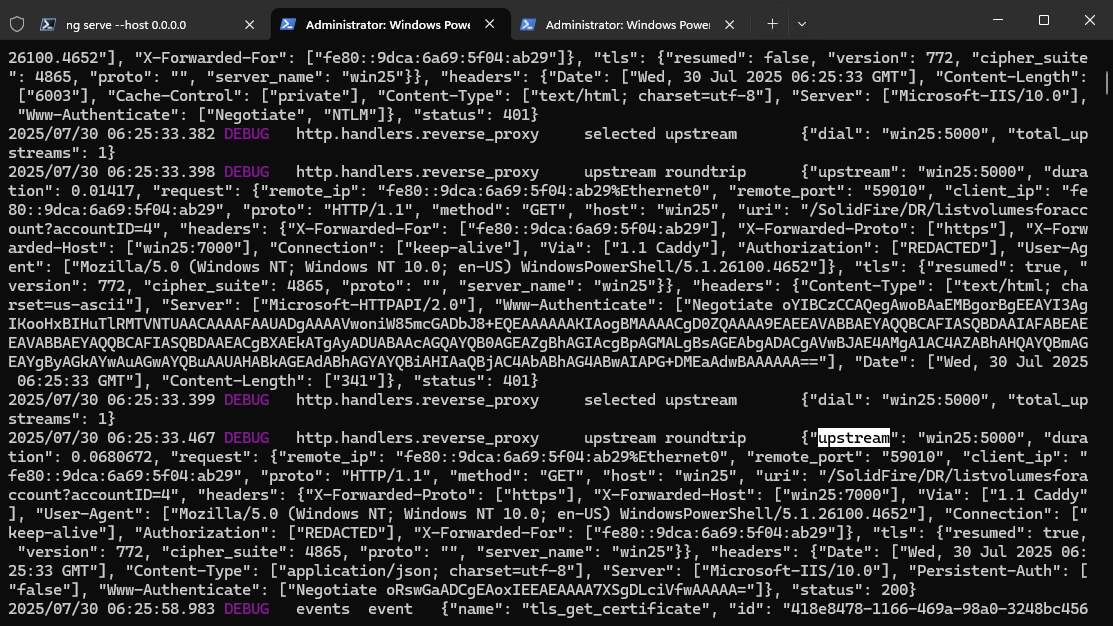
The WAC gateway is upstream from secure Web proxy, at win25:5000, as you can see above.
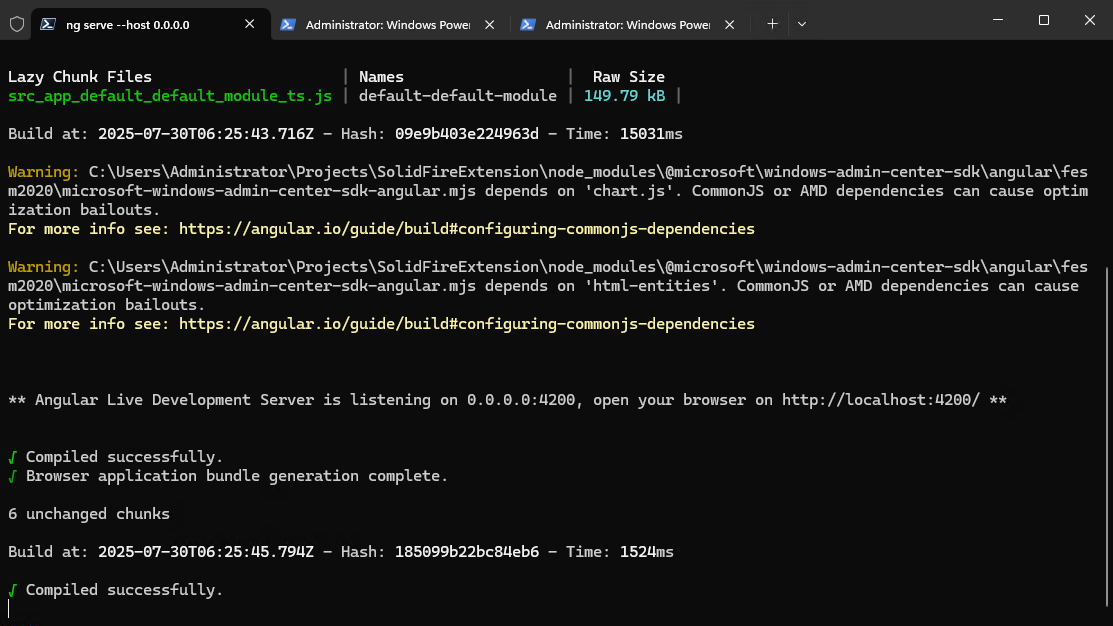
The other upstream we have is win25:4200 which is the SolidFire WAC Extension i.e. Angular Web app running on NodeJS (standard development environment for Windows Admin Center).
We have two preferred routes to SolidFire WAC Gateway (if we don't limit access on IIS or otherwise):
- via Angular UI app (i.e. from our extension in Windows Admin Center)
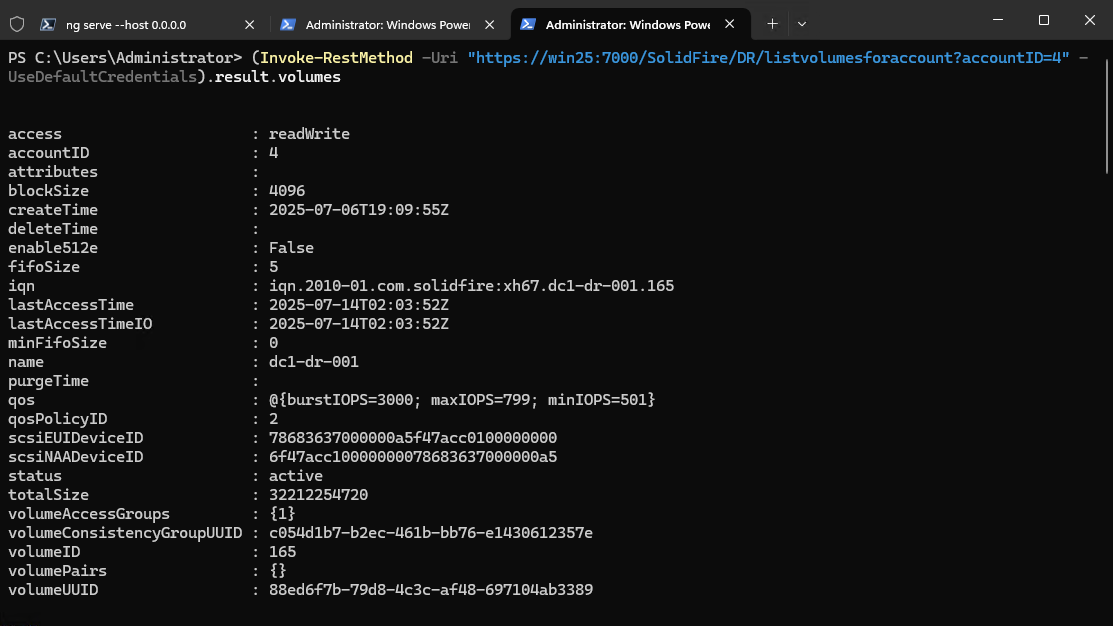
- "directly" from any RESTful client such as this example:
Invoke-RestMethod -Uri https://win25:7000/SolidFire/.... -UseDefaultCredentials
In the highly unlikely case you are a SolidFire user who doesn't see any point in all this, let's do a quick "ELI 5":
- If I load my Angular UI into Windows Admin Center (WAC) as a WAC Extension, I can manage SolidFire from WAC
- I can run any other RESTful client against the improved SolidFire API endpint (this is important, so keep it in mind)
All right, since this is about front-end i.e. SolidFire Extension (UI), let's remind ourselves how the official SolidFire Web UI looks like.
I'll mention just two things (I'm sure SolidFire users know them, so I'm trying to keep this brief):
- I'd like my SolidFire users to manage just one (own) SolidFire tenant (or "account") - "pve" for example - but I can't. As a cluster admin I see all volumes (and more) from all storage tenants. See (1) in screenshot below.
- The SolidFire UI allows incompetent and/or negligent admin to create a mess of "customization" in terms of object (Volume, Snapshot, QoS Policy) name conventions, QoS settings and more. Enablement that existed when SolidFire was still shipping didn't help make this better. See (2).
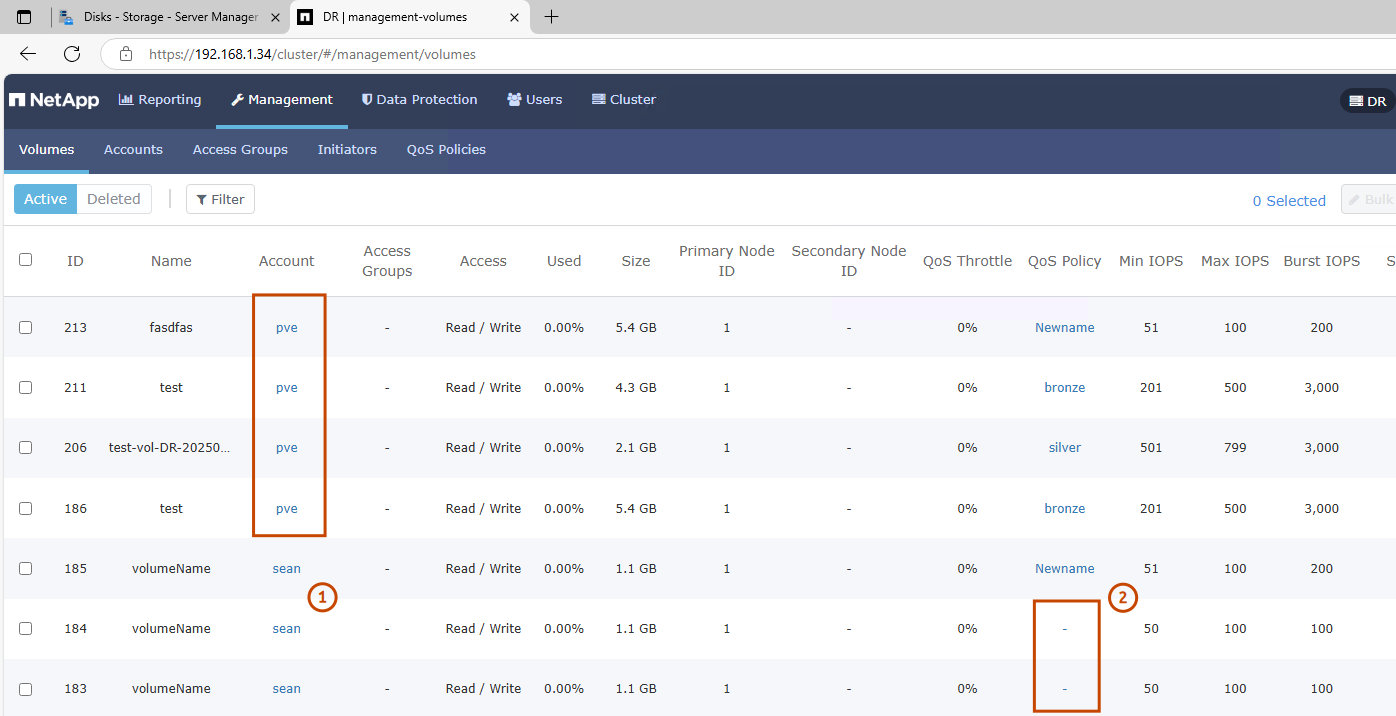
It's similar in Snapshots. Notice I'm not even mentioning the horizontal scrolling thing.
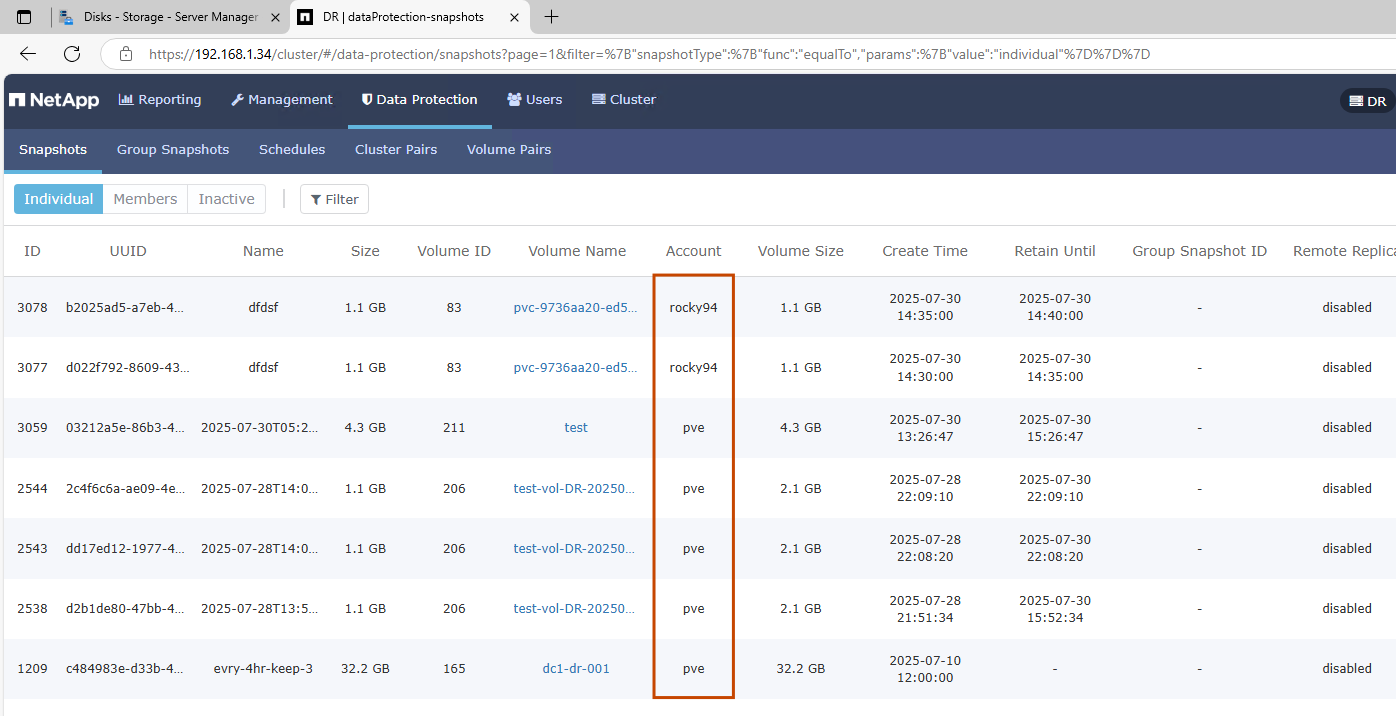
Everyone's snapshots are exposed to every cluster admin with Volumes (management) role and the UI is not easy to use (both viewing and filtering).
I didn't even take any screenshot from Accounts, but that suffers from the same problem: any cluster admin who can see Accounts can see any account's details. One of the reasons I don't want to talk about the Accounts UI is I chose to not enable it on the gateway.
Going back to the poor enablement and evangelism: automation and best practices around (snapshot and other) Schedule objects also result in arbitrary names, random retention schedules and so on. It's all right if the UI gives everyone the freedom to do a lot of stuff, but if you have admins who don't know better, that won't work well.
At the very least, proper Snapshot Schedules should (a) exist (to avoid the need for regular on-demand only snapshots) and (b) they should be named properly (even though in SolidFire automation only ids matter), and (c) they should be well-crafted.
This example shows 2 well-crafted schedules and two random-named ones.
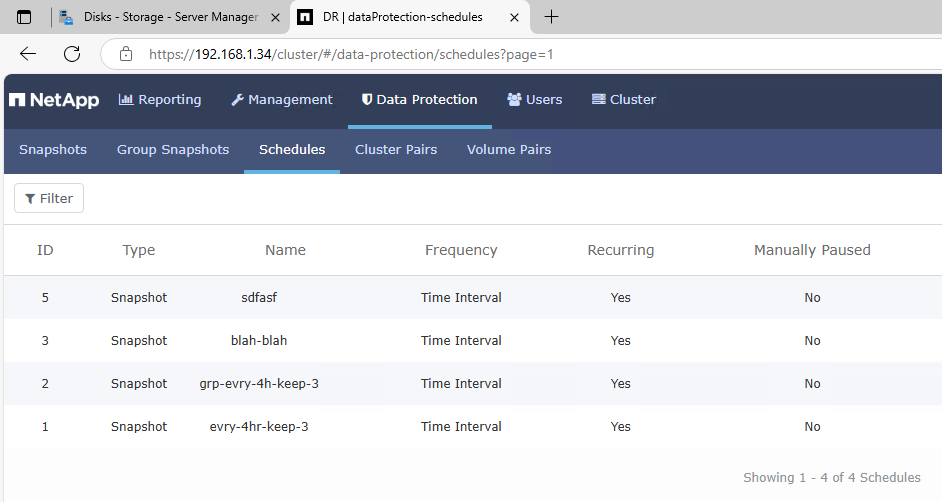
So there are a few things ("features"?) in the API and UI and there was poor enablement (when the product used to be sold). All together they damaged otherwise excellent value proposition of SolidFire which, despite these challenges, is still the best NetApp storage arrays (in my opinion).
My SolidFire WAC Gateway fixes that and it can work with any platform (Windows, Linux, whatever).
What I mean by that is not that you can now "route" your SolidFire VMware plugin through it (that won't work because although it could be done, why do it?), but that you can fix or mitigate problems by using WAC Gateway's APIs and possibly squeeze a bit of extra from your existing SolidFire clusters. For example, you may be able to enable multi-tenancy or more flexible self-administration in existing environments (especially Windows, but also Linux).
I get it: 70% of SolidFire users may be on VMware and they can't take advantage of this, while 9 in 10 among the rest don't want to waste time on it. And that's okay.
My purpose isn't to encourage you to spend 3 months developing to an unproven API gateway that works only with a product that won't be around for much longer, but rather to show that if you want to, it is possible. And has been possible for close to a decade despite "experts" telling us how very complicated this is (or "has been" until now that we know it's not hard).
OK, onto the gateway API:
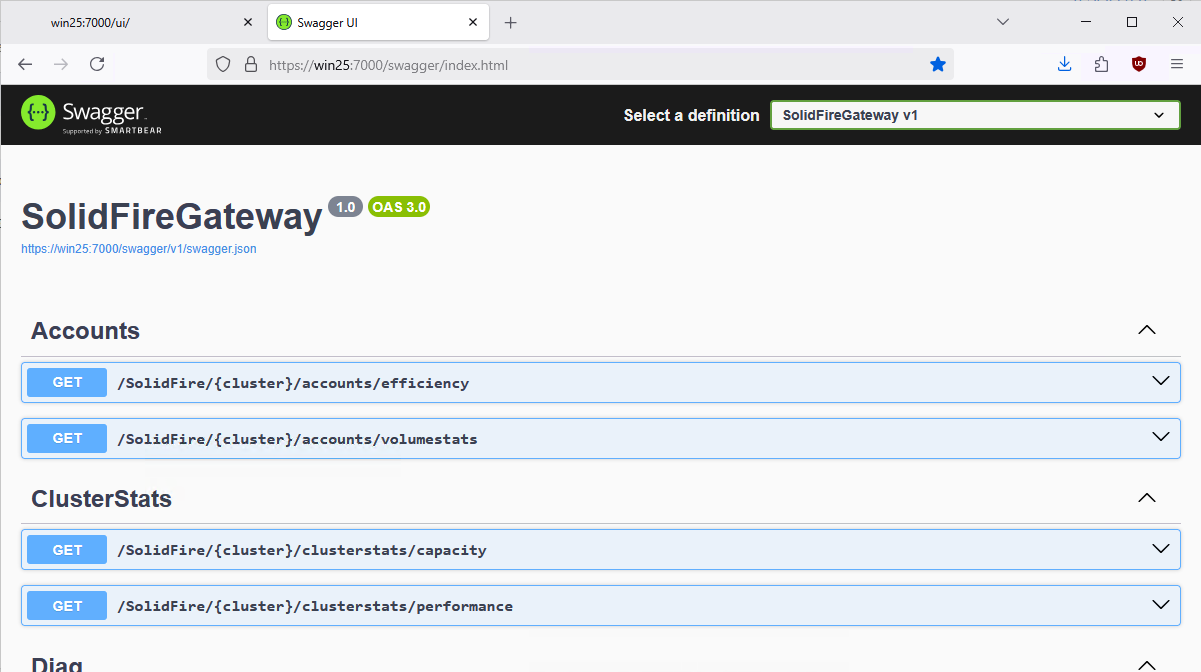
As you can immediately see, there are fewer methods available here than you might remember from the native SolidFire API or "HCC" in NetApp HCI.
For example, I don't want "volume-scoped managers" to be able to clone volumes just because they can. So there's no CloneVolume.
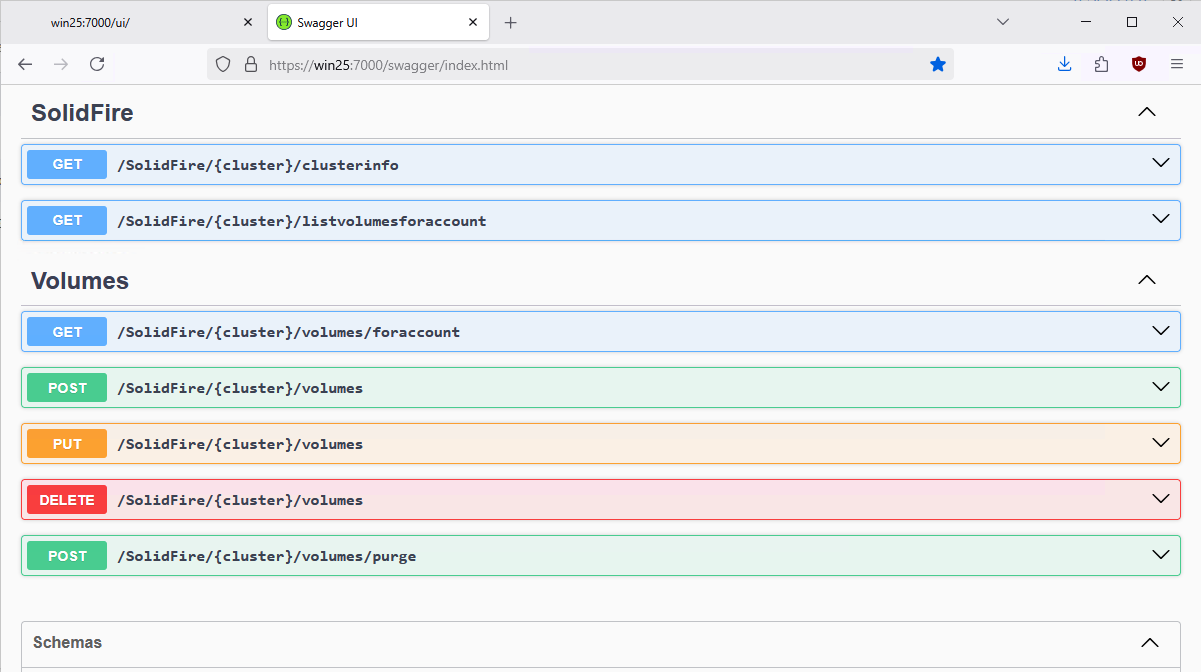
One of the key methods is visible here, ListVolumesForAccount, which happens to be the same as the SolidFire API call with the same name.
The reason I highlight it is that if the gateway is configured to allow DOMAIN\guy to manage volumes-related stuff for AccountID 4, than we filter objects that we can to make sure that's the only thing the guy sees. (For now I implement that in Extension UI, but each API gateway can be locked to one Account ID, so it's also achievable by deploying multiple gateways (which are just IIS Web sites), although before publishing the code I'd like to implement multi-accountID segregation within a gateway as well).
Another point - which I was oblivious to for a week and realized only as I was writing this blog post: multi-cluster view (and not just View).
It's not hard and it's useful. But we never had this done well with SolidFire plugins, including on VMware with"linked mode" vCenter bloatware.
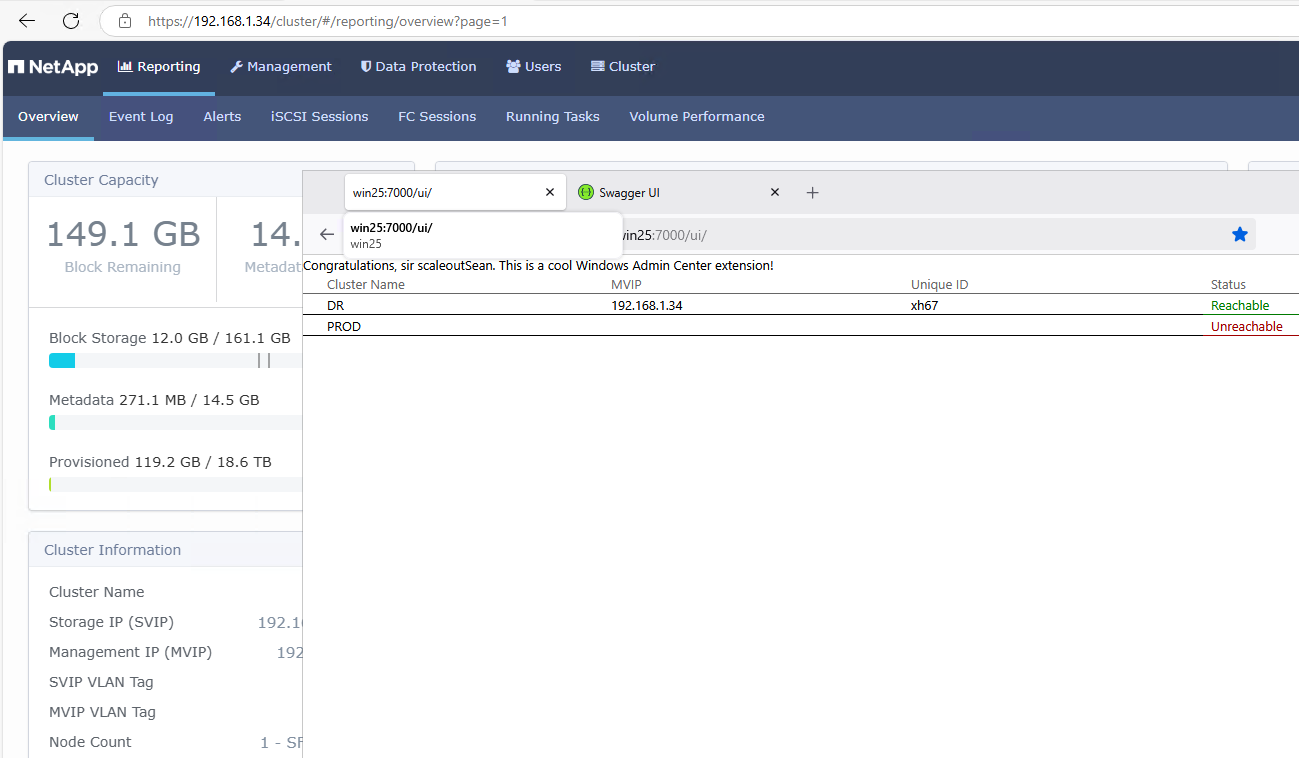
You may think: well, you can just see 2 rows of text -there's nothing you can do with that.
Yes, there's not much I can do with it (I can see my PROD cluster is still unreachable, which is something) because I don't want to do it in this context of an Extension/Web UI for a user with a "volume-scoped" role, and not yet anyway. But it could be done - easily.
For example, remember SolidFire's SRA which provided site fail-over for VMware? I could do this easily on with Extension and API gateway by adding just one button: Flip (from PROD to DR, or in reverse).
This below is Cluster Details view.
I just dump some stuff from the API into a table. It's not really that important at this stage and obviously "in production" we'd show just a selection of key-value pairs that matter and in a much more compact view.
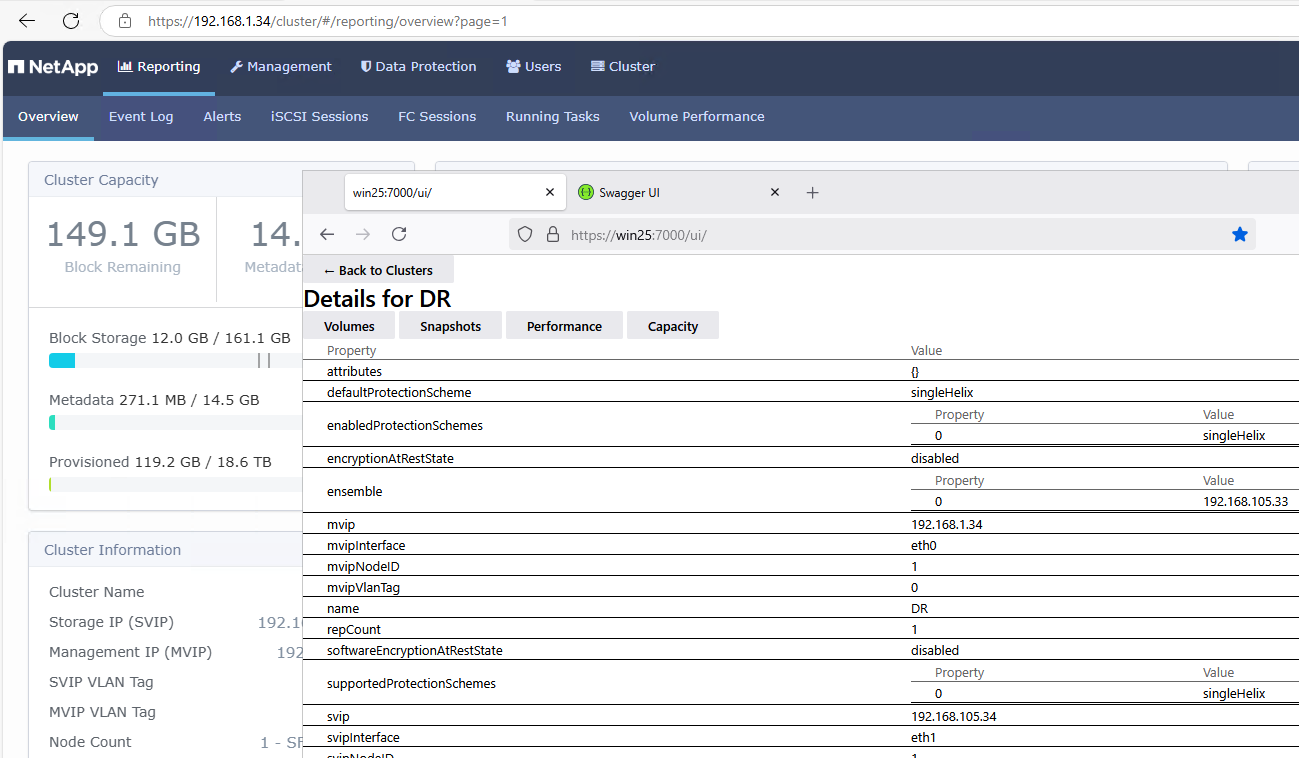
Similarly for capacity and performance - we could show these in fancy pie charts and whatnot.
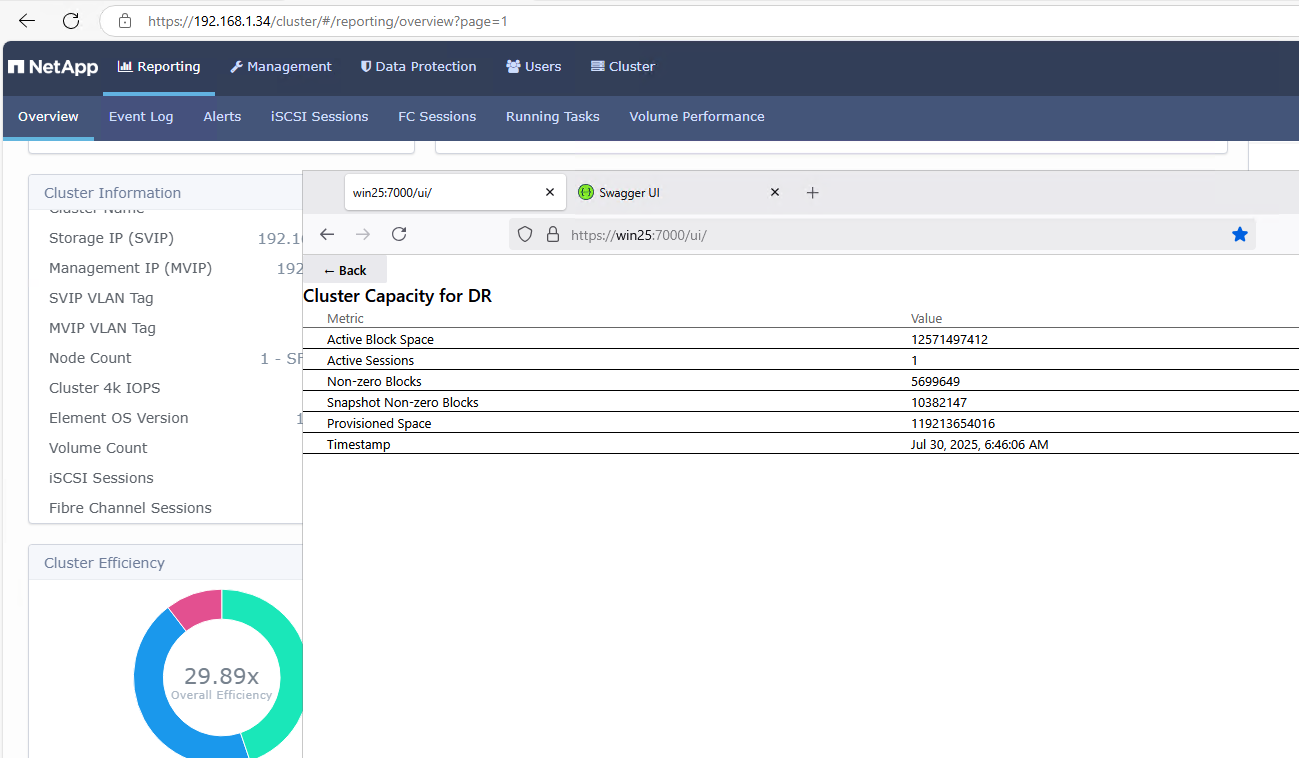
I'd probably eliminate Thin Provisioning from cluster and account efficiency calculation (9 years old annoyance!) for starters.
Now this is where things get more interesting.
Most of these screenshots below show views of my SolidFire WAC Extension laid over SolidFire UI showing similar content.
The main - almost only - thing that matters: SolidFire WAC Extension shows you only your objects (volumes, snapshots, etc).
Meaning accountID 4 (pve) in these screenshots. More security, less accidental deletion, lower risk of malicious administration, ransomware and so on.
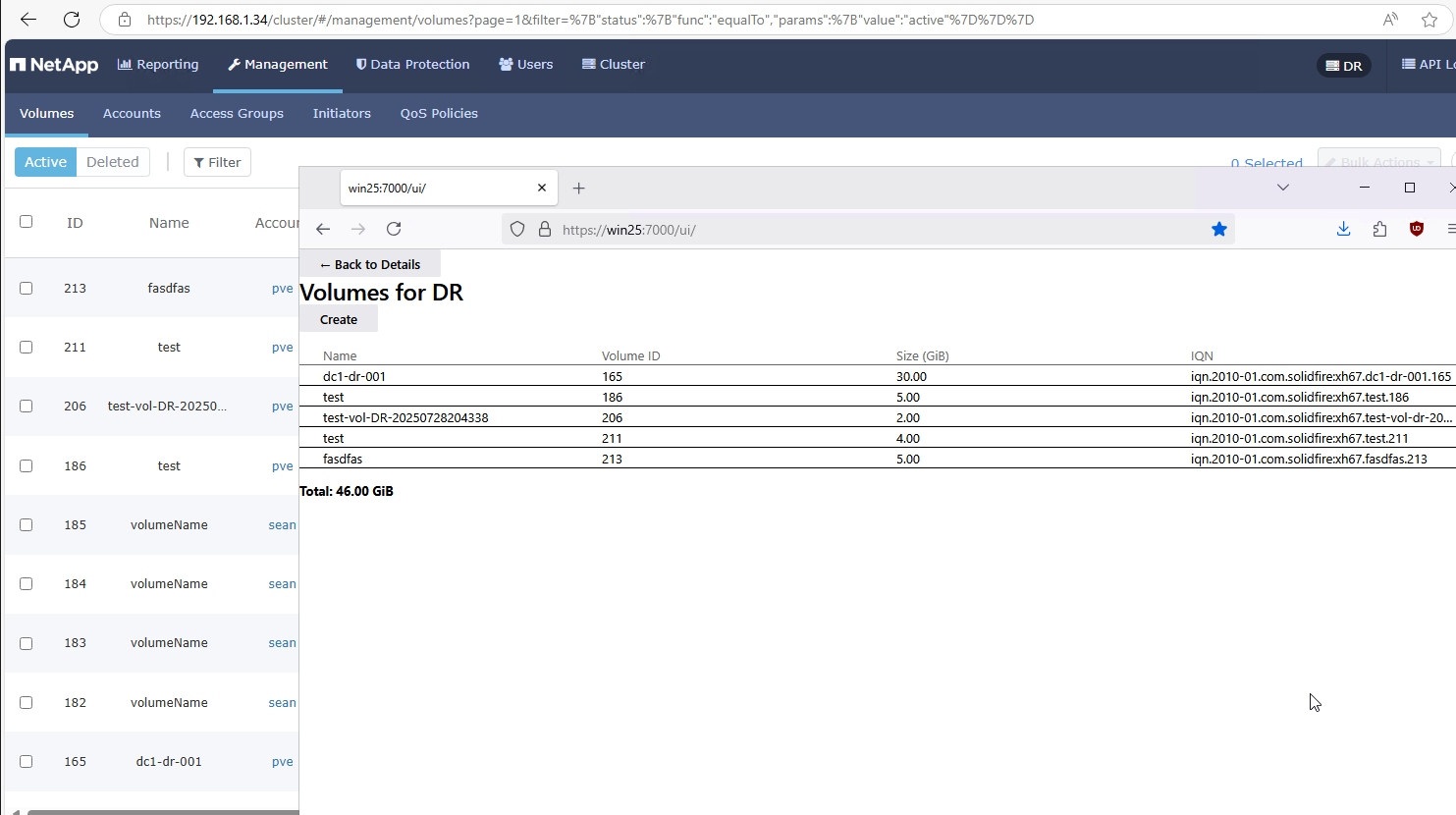
I also don't like how the official UI lists volumes, by the way, but that's a matter of preference whereas the security on the gateway is objective and quantifiable.
Of course, I know that running a gateway on IIS also adds new security risks, but if you want to manage storage from integrated environments, you already have a "management domain" where clients access the SolidFire API directly.
It's easy to see how volumes can be easily shown on the same page and provide required details without scrolling, clicking twice or thrice, etc.
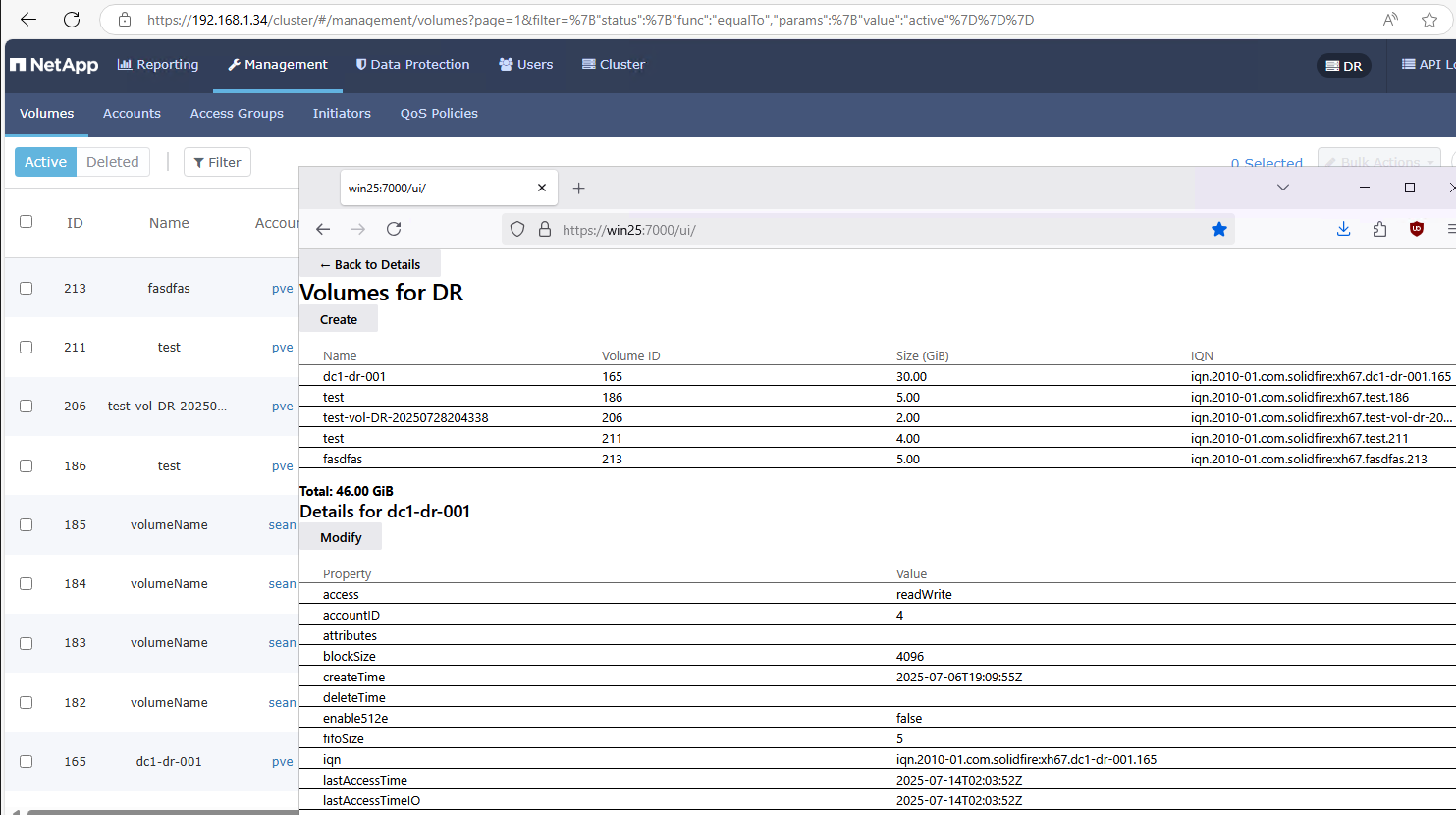
Next, ModifyVolume:
- You can't see any volumes that aren't yours, so you won't even attempt to modify them either. And even if you tried, ABAC on API gateway would return
Forbidden. - You may be authenticated to List/View, but not authorized to Modify. In this case, the user is authorized to
ModifyVolume. - When you are authorized to modify, you're limited in what you can do. For example, you won't flip from a QoS Policy ID to some random QoS settings just because it felt right.
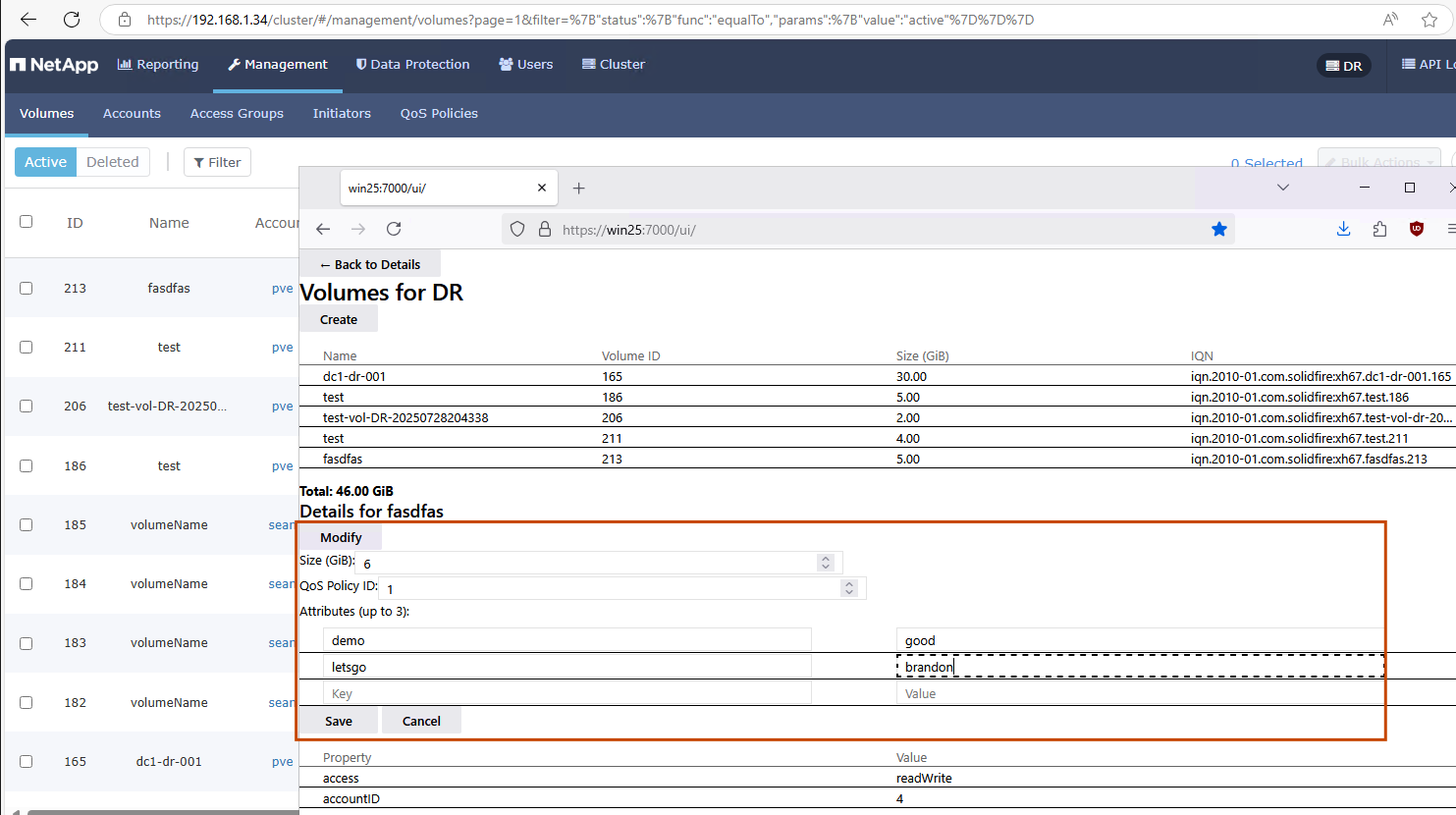
Each of these three points protects SolidFire clusters from accidental or deliberate mal-administration.
While my Extension's UI is crowded (it uses WAC SDK and Angular defaults - I haven't tried to make any CSS improvements), you can see that ModifyVolume lets you:
- Increase volume size
- Re-type it in terms of QoS Policy ID (which is why not all users are authorized to ModifyVolume)
- Add or remove attributes (very useful but SolidFire UI won't let you do this and the related enablement, evangelism and tooling all failed to make this exposed to many users)
The same volume after modification. We can view the new tag and size (summary table at the top), but QoS Policy ID was changed as well.
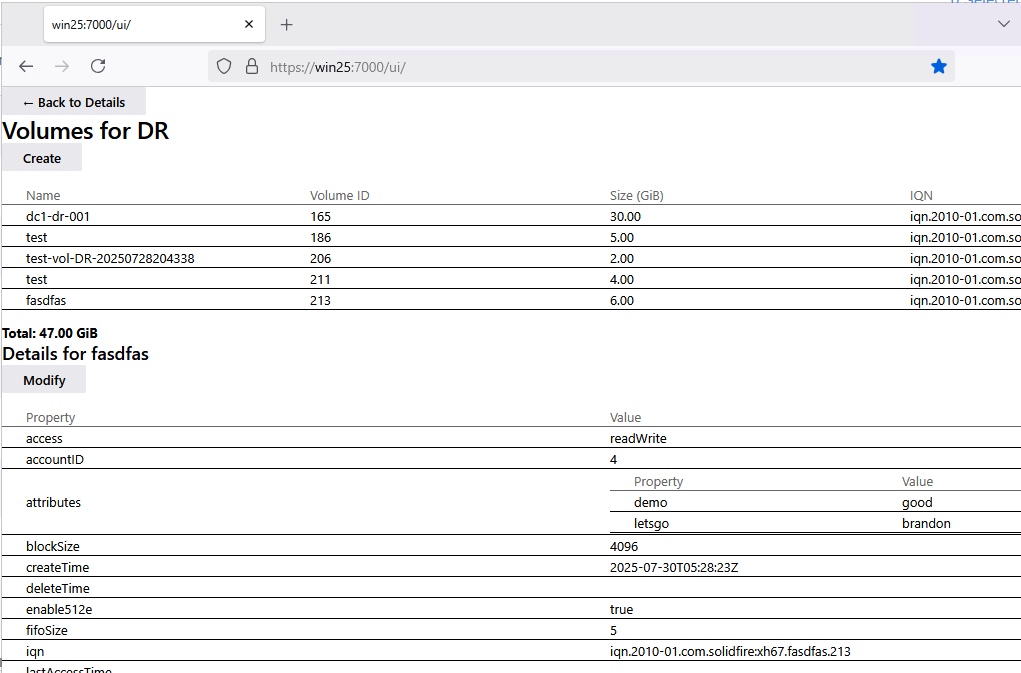
The same is done for CreateVolume. Look ma, no razors!
- dimmed AccountID (volume can't be created for another user)
- size (GiB only, no GB nonsense)
- Enable512e (default
false, appropriate for Windows users) - QoS Policy ID (for consistency in management, monitoring, planning, etc.) - QoS settings aren't directly exposed to users
- up to 3 KVs in attributes per volume, so that you can tag your volumes if you wish to automate certain workflows (backup, DR, cloning, etc.). This isn't available in SolidFire UI.
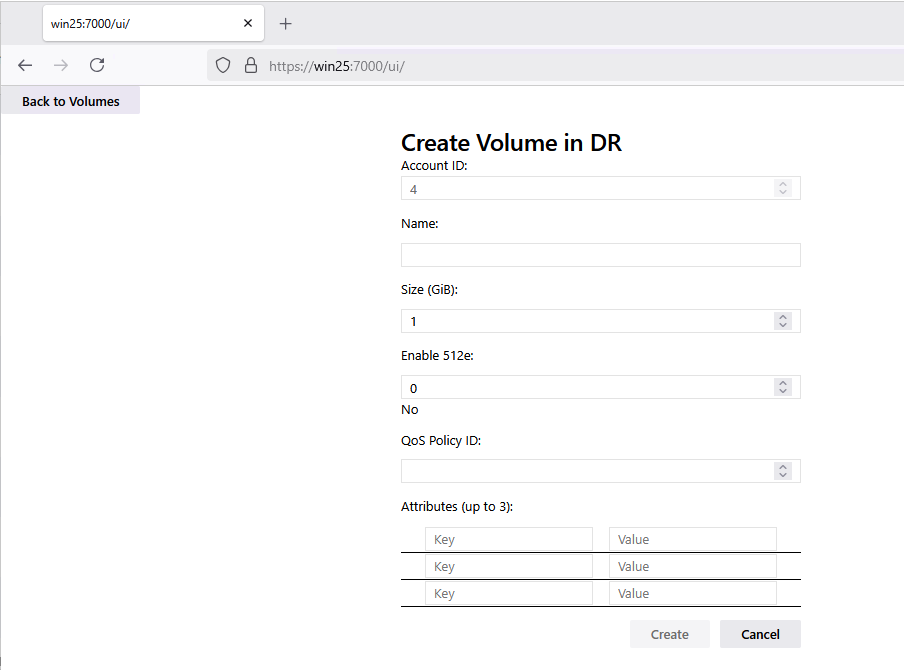
Like with ModifyVolume, you may be authorized to List/View, but not to Create. DeleteVolume I haven't even exposed to Extension Users (the API gateway does have it and only SolidFire and Domain Admins are by default authorized to access it).
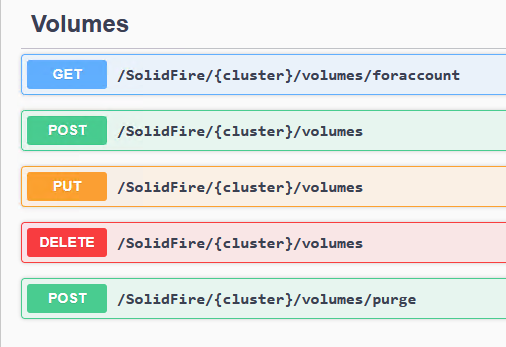
Delete should be restrictive. For example, I'd allow DOMAIN\HyperVAdmins to CreateVolume, but only DOMAIN\SolidFireAdmins to DeleteVolume… Because SolidFire admins are more likely to use the native API, I haven't yet implemented DeleteVolume in the Extension. But it's trivial to add.
Some people tell me that would be inconvenient. Really?
This is how DeleteVolume should work in an environment without workflow forms: ModifyVolume, tag it with delete=true. SolidFire or HyperV administrator runs a scheduled job that deletes such volumes hourly or daily. Done.
How PurgeVolume should work if you don't have workflows and don't want to have that exposed in WAC at all
- Use SFC to watch deleted volume count/capacity, or set InfluxDB or Grafana alert for when deleted volume count hits 5 or more than 5 TB
- Review the situation and delete them. Done.
What exactly is inconvenient in these workflows?
Next: snapshots. We solve the same problems that we have with volumes in native SolidFire UI and API:
- Show snapshots in ways that are easier to view
- Don't see snapshots that don't belong to accountID 4 (security, etc.)
- Disable carelessness and incompetence
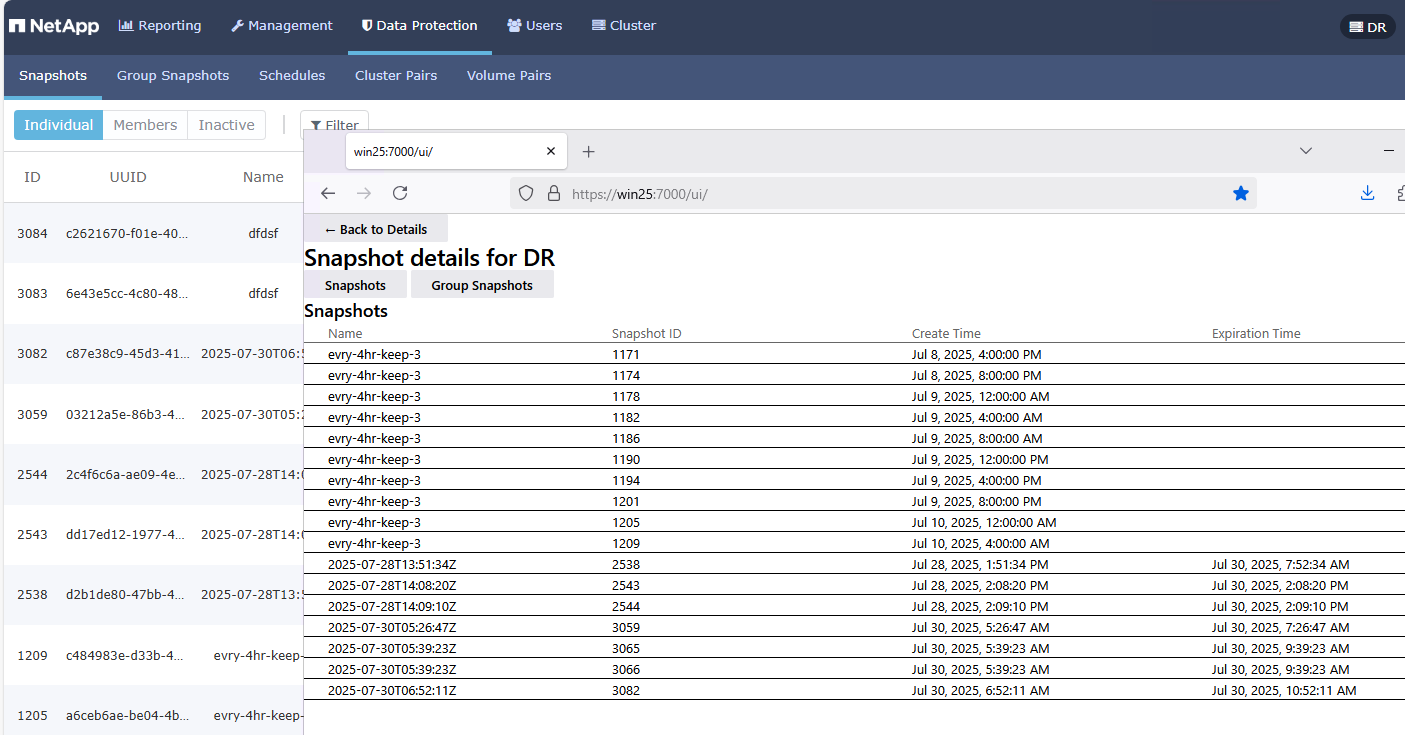
How do we put an end to carelessness and incompetence? Look at the snapshot names…
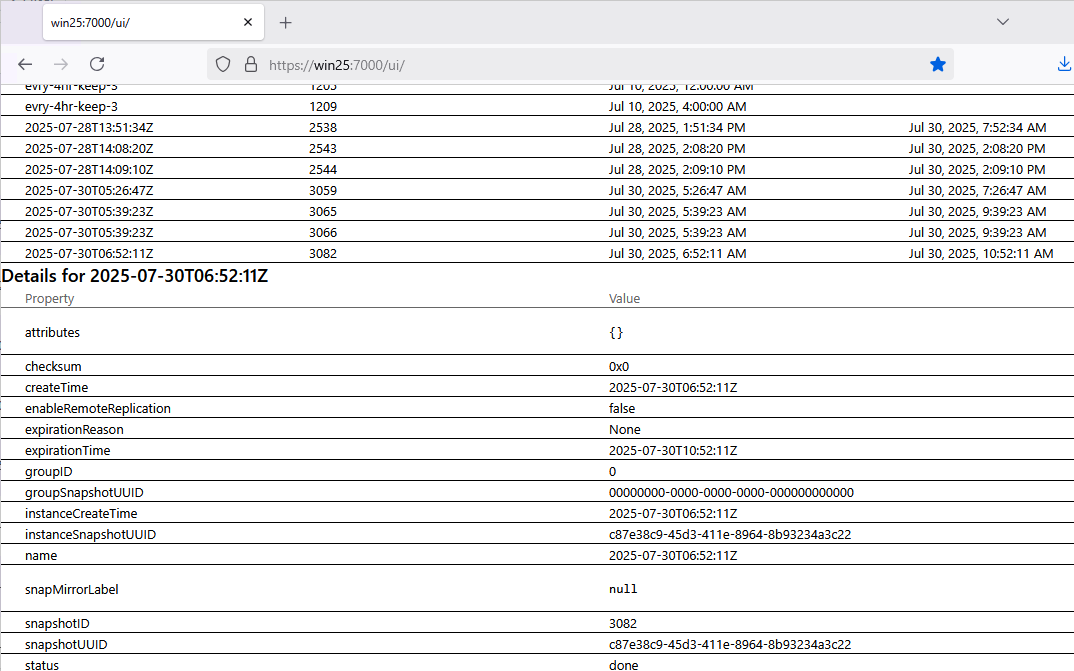
- Snapshots scheduled on SolidFire (or somewhere else) run on SolidFire schedules - nothing to do in WAC but to watch them and know you're covered.
every-4hr-keep3,every-15m-dr-keep-4, etc. - On-demand snapshots (
2025-07...) that one can take from WAC or on the API gateway are limited and restricted:- Won't let you pick a name - there's a template (in this case a simple timestamp) which helps us avoid arbitrary and confusing snapshot names
- Won't let you take a snapshot that doesn't ever expire (I set an artificial upper limit of 100 hours so you can pick between 5 min and 100 hours 59 minutes and 59 seconds). If you have a problem, get the storage admins to create a proper schedule for you!
Unlike in the official UI, it's also easier to view snapshot details. Again, all snapshots you see in Extension UI belong to accountID 4. No mess, no ability to clone someone's snapshot to yourself or delete it.
I haven't created DeleteSnapshot and RestoreSnapshot because:
- Snapshots taken through WAC API gateway always expire. You could take 32 per right away and max out, but it'd be on you and we have audit logs on IIS. We could control this by counting snapshots before we allow new ones, too, which you can't do on SolidFire, but
- Carefully designed snapshot schedules won't use more than say 20-26 snapshots, leaving about half a dozen for on-demand, and few for emergencies
- "Restore snapshot" API and UI is easy to create, but I wouldn't expose it just like that, so I didn't rush to implement it. I would probably authorize a selective group to do it, not generic volume- and account-scoped users.
My API and UI for group snapshots is also better. I see only my own (one, as opposed to two group snapshots seen in the SolidFire UI) and I can show the details I need (although currently it's just very basic details).
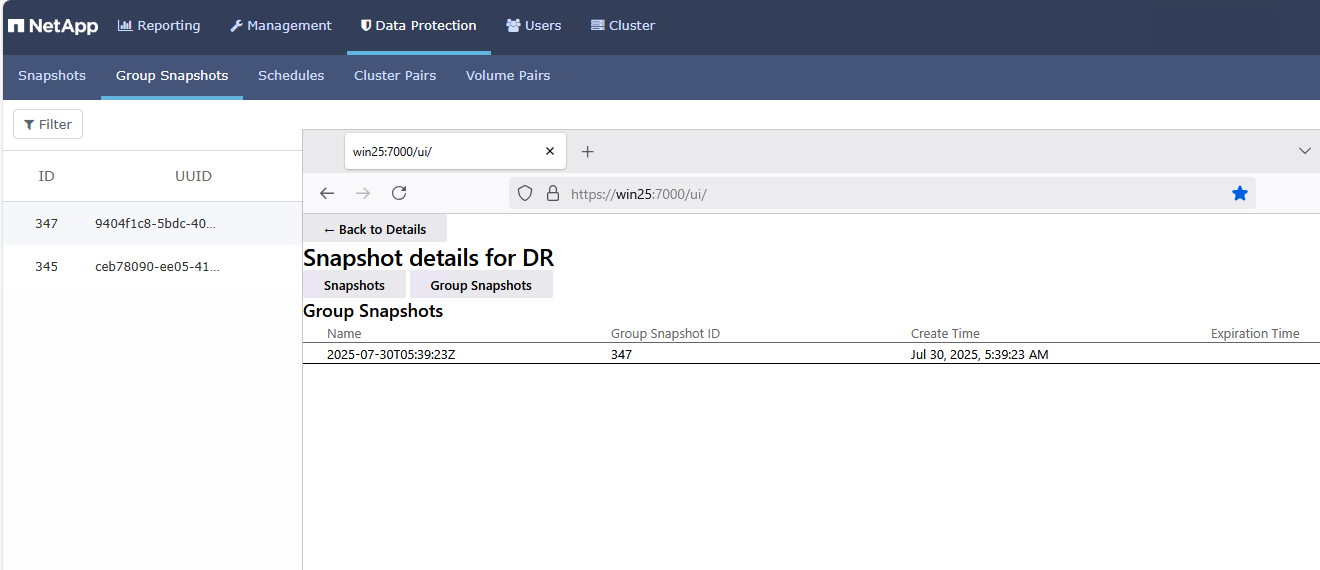
Group snapshot details are also better, in my subjective opinion. See by yourself:
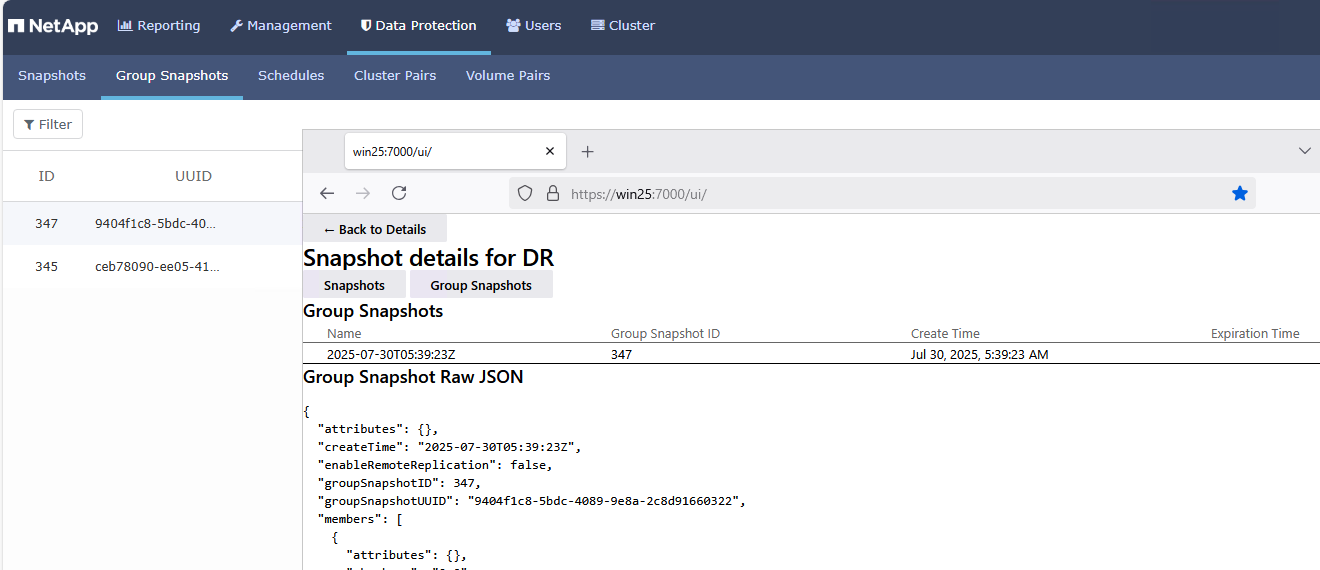
Yep, I spit that list out as raw JSON!
Why? Because in individual snapshots you'll have one table with a handful of rows. But in group snapshots you will have 2 or 12 volumes in that sucker and you won't be able to see anything anyway.
At least with JSON you can paste it anywhere (Excel? AI?) and do something with it there.
Of course, I could show them in a nice summary table followed by raw JSON… But "raw JSON" is much better, so I did that first.
A few comments on other SolidFire objects and APIs as implemented (or not) in Gateway and Extension:
- The Gateway APIs for QoS objects are limited (List (Get) in the UI, with Modify (or Put, as Swagger calls it) and Delete in the Gateway API but not in the UI/Extension, as that should be done by SolidFire admins and they don't need a gateway for that). Generic/custom QoS is banned. I'm not going to implement it, ever! Need a fancy QoS policy? Talk to the SolidFire admin!
- There's no DeleteVolume and CloneVolume (for similar reasons) and absolutely no PurgeVolume exposed to to Extension users, while for API gateway it's implemented (and is restricted and account/tenant-scoped)
- There's no Accounts object at all. No one using SolidFire from WAC has any business dealing with tenant accounts. It can and should be done in a separate view for SolidFire and Domain Admins. Personally I'd prefer to not even have it (which is why it hasn't been implemented) - it's a rarely used feature (create account, delete account, change CHAP credentials) that shouldn't be exposed in this extension, in my opinion.
As you can see from the Swagger screenshot and the opinionated comments just above, I didn't want to expose much to WAC Users, because it increases the attack surface. Exposing too much also "undoes" the simplification and makes it hard to follow the best practices (as I see them).
I view this as a way to achieve departmental and user RBAC/ABAC in a semi-trusted environment, not as a way to make fancy APIs for DevOps people who should continue using the native API - and they know how to make own API gateways, too.
But the Gateway will be open-sourced, so whatever you can add to it is possible…
And now…
SolidFire Extension for Windows Admin center!
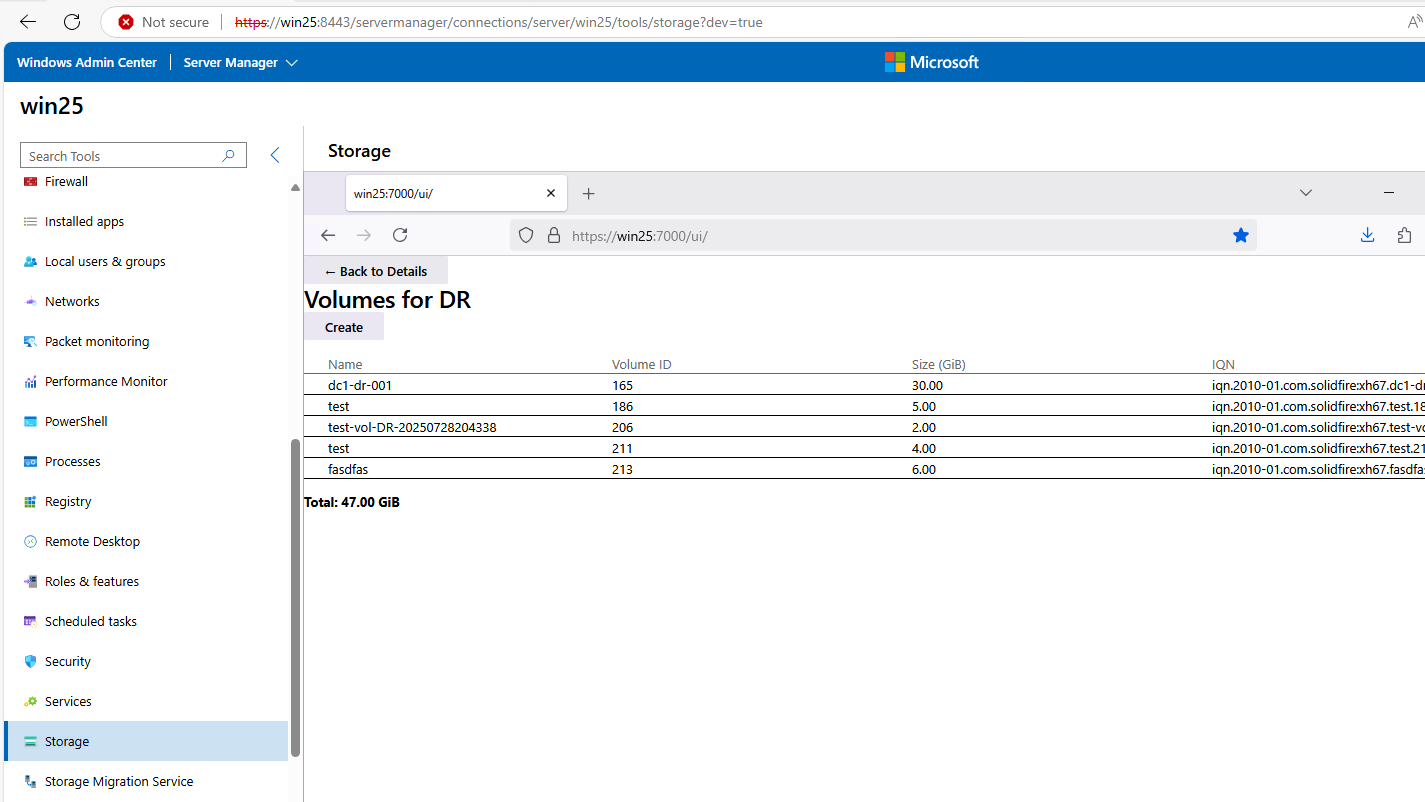
That was a joke, sorry!
I overlaid a browser with WAC SolidFire Extension over WAC for this same system…
But that's how it'd look like when packaged as WAC extension and imported to WAC. Its appearance would be slightly improved as WAC uses better CSS styles, and some fancy HTML elements could be used. I was planning to start working on that next. But it already looks "WAC-like" because WAC Development SDK is used to create these extensions.
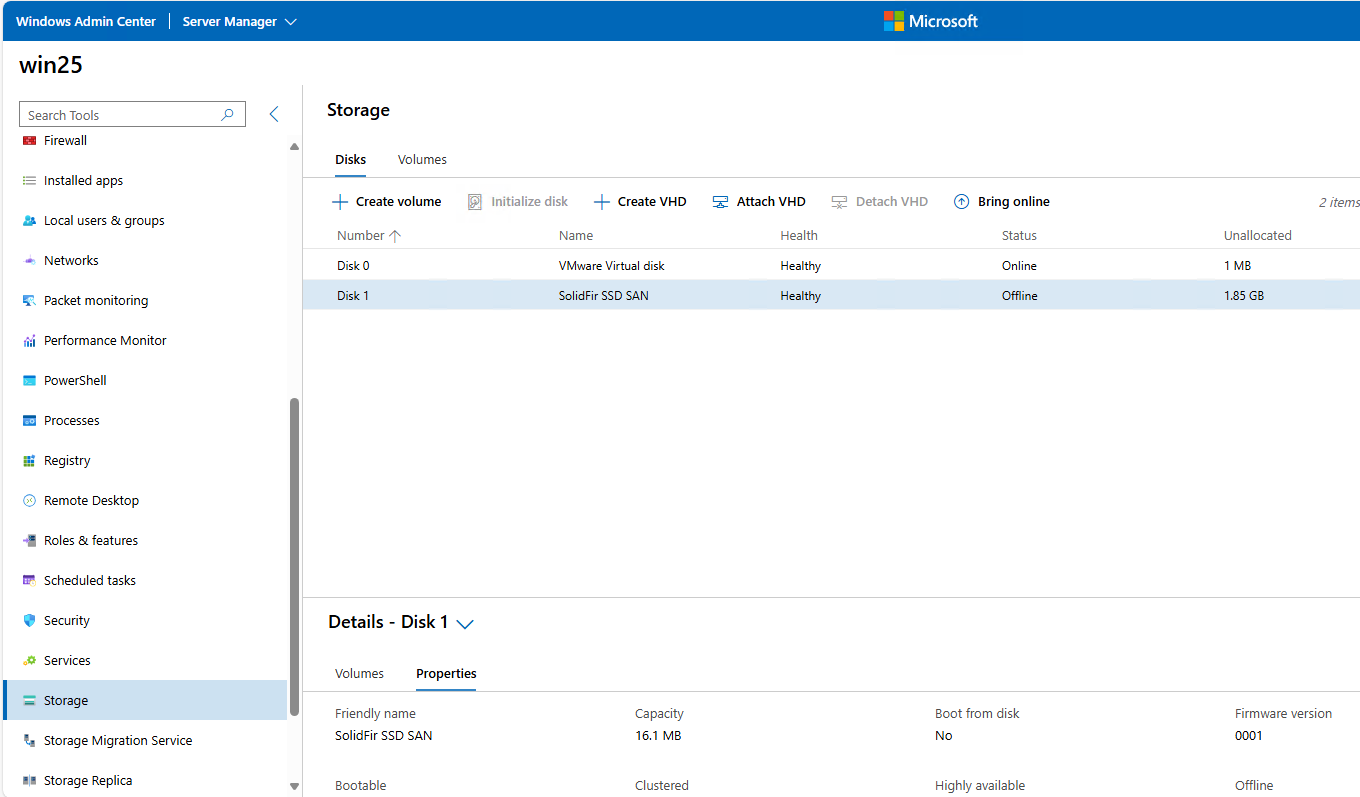
This is the real WAC v2 on this development system (the lower window from screenshot above):
Conclusion
This work on SolidFire WAC Gateway and Extension is probably one of the most fulfilling experiences I've had working with SolidFire, because I was able to find solutions for a bunch of problems in a single PoC.
And not only that: I'd always known they were solvable but I didn't have a proof. Year in and year out, I was told it was difficult and complicated. Well, now we all know that it wasn't. I did this in days.
So… when I'm going to release SolidFire Extension for WAC? Never.
I wanted to do it until last night, but here's why I won't: Microsoft doesn't give a crap about WAC.
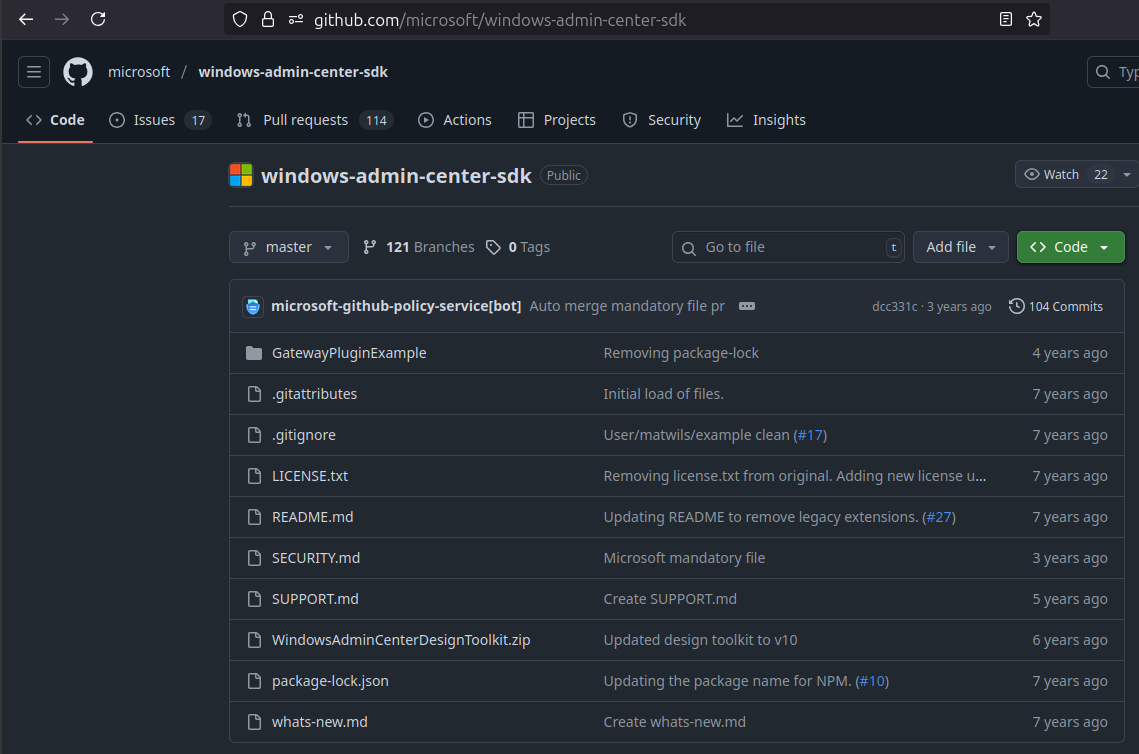
Check the WAC SDK updates in the right-most column: yep, 0 updates in 4 years.
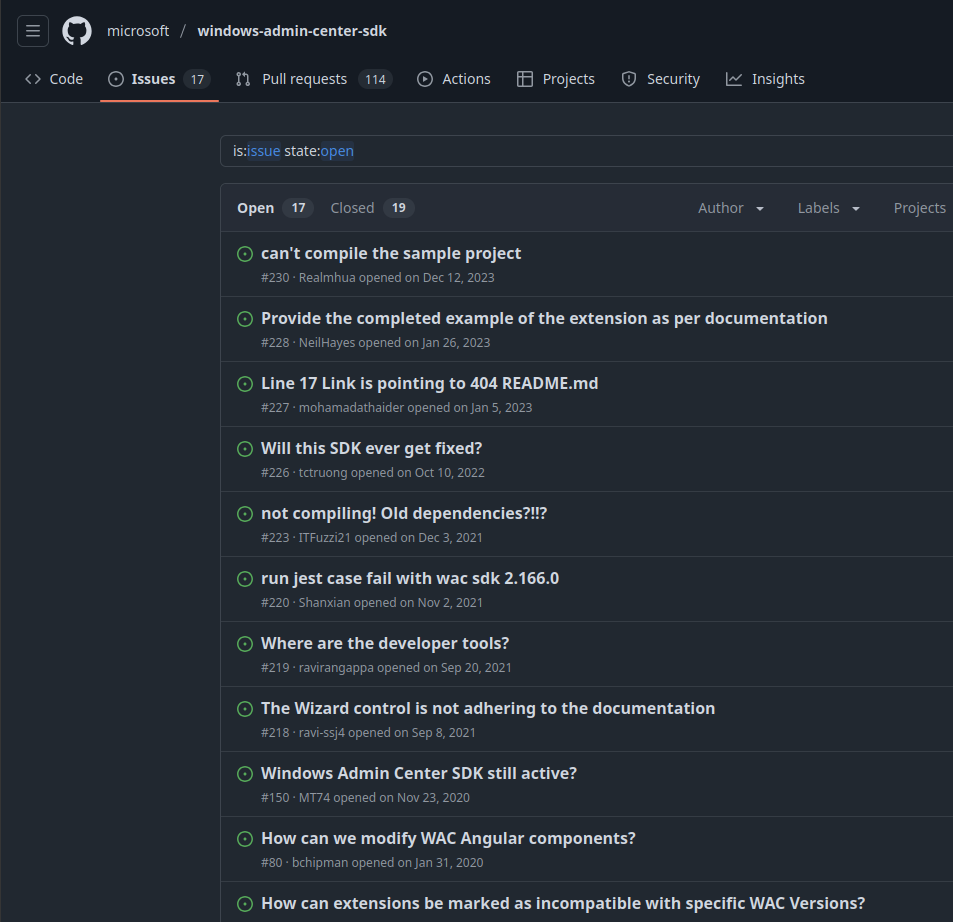
This is how happy WAC SDK developers are (taken today in WAC SDK issues on Github): "stuff doesn't work at all" issues reported between 2020 and 2023 (by that time everyone gave up) are still open.
As I'd almost finished SolidFire WAC Gateway and Extension (to the extent you can see in the screenshots - ready for community testing, I think) and was about to start improving the look of SolidFire Extension inside of WAC itself, I hit a bunch of issues realized there's no reason to bother with that.
This is the same conclusion I reached when looking at Proxmox integration last month.
Packaging and integration for WAC are a nightmare. After I'd spent a ton of time I got to the point where I could load the extension but still had to deal with a bunch of WAC bugs, missing documentation, shitty logging, old Angular/NodeJS (LTS 16 - LOL!) bugs, etc. WTF… It takes more more to integrate and package than to develop!
Incredibly, Microsoft ships WAC in Windows Server 2025. It's hard to believe that is a current product.
But, when I look at the list of available extensions, it is clear people no longer bother - there's just a handful of them, most developed years ago. If SolidFire got its WAC extension on in time (2018-2019), we'd probably still have it as most older extensions can work in "legacy mode".
Anyway, Microsoft partially let let me down (ASP.NET good, IIS so-so, WAC bad), so here's what I plan to do next:
- Release SolidFire WAC API Gateway code - so that anyone can improve it and use it if they will (I'll use it as well). It may help those who want to build a WAC Extension for SolidFire
- Not release SolidFire WAC Extension - I'd have to spend some extra time to improve it, but integration and packaging is a freaking nightmare while more pleasant work awaits
- Build a CLI tool for Windows with SolidFire to make use SolidFire WAC Gateway
At the top I said one of the key points is that any client can use the WAC gateway, not just some extension running in Windows Admin Center.
When I looked at Proxmox, I gave up on building a plugin, but I built my own console tool (Firemox) that is a native SolidFire API client.
Here, though, I've built a SolidFire API gateway which I think adds value (at least to me personally) and I think it'd be well worth to Windows-focused users to deliberately "restrict" a Firemox-like console tool to this "crippled" API gateway of mine.
Yes, that kind of a console would "force" one to run my API gateway, but it gives you RBAC and other goodies that don't require anything that Windows users don't already have: Active Directory Service, Windows Authentication, IIS. At the same time, you can expose SolidFire to more users and improve storage and compute utilization for free.
Anyone who doesn't see value in that can modify Firemox for Hyper-V, so that's possible as well. Or you can embark on your own adventure with SolidFire Tools for PowerShell.
If someone out there wants to build a SolidFire Extension for WAC with the SolidFire API gateway, let me know on X (@scaleoutSean) if you need help. Otherwise just grab the API gateway code on Github and use it as you wish. I plan to release it soon (need to tidy up the code, write the documentation…).
Appendix A: demo
Animated GIF (no playback control)
You may open it in a new tab - native resolution of this animated GIF is quite good.
It shows SolidFire WAC Gateway/App, API Gateway's Swagger, my development setup for SolidFire Extension (reverse proxy with WAC SDK) and the Extension UI in action. It loops so don't try to watch it "until it ends".