Trident QoS policy sucker for SolidFire backend
- Pull QoS policy from SolidFire into Trident back-end configuration for solidfire-san
- Exercise care
- What does the IOPS really do?
- What does all this mean?
- Conclusion
- Appendix A - sample run
Pull QoS policy from SolidFire into Trident back-end configuration for solidfire-san
This isn't some huge idea, but I just thought of it and quickly wrote a script that does it.
Recently I've been looking at NetApp Trident and musing about the ways to make use of SolidFire's QoS policies within it, rather than rely on what Trident does out of the box.
Then today I thought about the other direction as well.
The idea is to get from whatever you have, to (1).
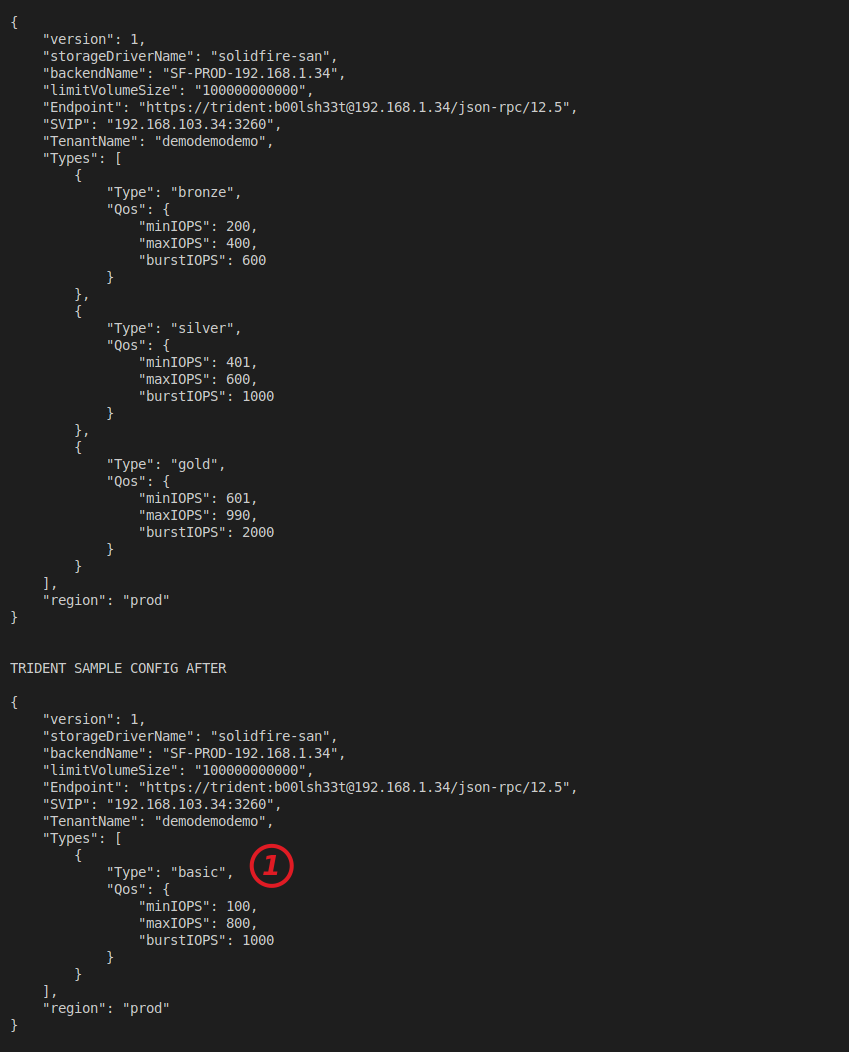
In other words:
- Take your current back-end configuration file for SolidFire SAN back-end
- Patch it to reflect your QoS policies on SolidFire
- Profit, or maybe lose less money
One of the benefits is that you can sort-of-transplant your SolidFire QoS policies into your Kubernetes environments.
The script:
$ ./solidfire-qos-policy-id-to-trident-qos.py -h
usage: solidfire-qos-policy-id-to-trident-qos.py [-h] -m MVIP -u U [-p P] -q
                                                 QOS_POLICY_ID
                                                 [-o OUT_FILE_PATH_NAME]

Gather SolidFire QoS policies by IDs and save to trident.conf.

options:
  -h, --help            show this help message and exit
  -m MVIP, --mvip MVIP  MVIP of the SolidFire cluster.
  -u U                  Username for the SolidFire API.
  -p P                  Password for the SolidFire API.
  -q QOS_POLICY_ID, --qos-policy-id QOS_POLICY_ID
                        QoS policy ID to gather.
  -o OUT_FILE_PATH_NAME, --out-file-path-name OUT_FILE_PATH_NAME
                        Output file path and name.
Output (plus to console, which you can see in Appendix A):
$ dir -lat *.new
-rw------- 1 sean sean 511 Jun 19 00:54 solidfire-backend.json.new
Now you may say "well, that's a one-off thing, who cares". And that's fine.
But it's a necessary step towards what I discussed in that other post.
If I can retype volumes on SolidFire and update back-end JSON configuration and Trident doesn't complain, what's bad about it?
I can also occasionally "update" QoS policies or add new ones in my Trident configuration file and let the Kubernetes admins to use policies 11, 14 and 25 and I don't have to email them what they are, and they don't have to learn how to figure it out.
Now if we could also create Kubernetes Storage Classes from that… Sure. I've added that, too.
I've uploaded the script to Awesome SolidFire (solidfire-qos-policy-id-to-trident-qos.py in scripts directory).
Exercise care
I'm not suggesting you should just go ahead and create a cronjob that simply overwrites your Trident back-end configuration file. Test and like I said in that post, you'd have to test again every time before upgrading Trident. Trident currently still does not support volume retyping (issue). Of course, this script doesn't retype volumes, it just sucks out the config so that it reflects some QoS Policy IDs. But it could be used in a retyping workflow (which is not supported).
In my sample file you may notice that QoS policy ranges [Min, Max] do not overlap among QoS types. See Trident issue #281.
If you have SolidFire but haven't used Kubernetes, check out "Kubernetes with SolidFire" to get started. (The TLD .dev is a free domain popular among spammers, so nobody knows about that site. Other than that, I've no reason to mention it as it has neither any meaningful analytics and it's ads-free).
If you just use this script to generate the initial configuration for new clusters, there's not much to be careful about as long as you create a working configuration file.
If you want to update existing back-end which already has some volumes, that may not be supported and while you can still try, do some testing.
I haven't tried updating Trident back-end configuration file, but here's how that is done. Note the first is a backend name, not existing backend file.
tridentctl update backend ${backend-name} -f ${backend-file} -n trident
If updating Trident back-end config doesn't help refresh storage classes, another way would be to reinstall Trident and reimport volumes, but that's not a great idea.
What does the IOPS really do?
That's a good question. I'm not 100% sure (again, see Trident issue #281 lined above).
TFM says:
The last StorageClass (solidfire-silver) calls out any storage pool which offers a silver performance. Astra Trident will decide which virtual storage pool is selected and will ensure the storage requirement is met.
But that's when Pools are specified. If you don't have any pools then what?
It appears that a stand-alone IOPS setting in a Storage Class also picks a matching (Min-to-Max range) Type from back-end configuration used by the Storage Class, which is why I don't overlap them when it matters (they do overlap in the example in Appendix A, but that's a random example.)
Here's an example which I think comes from a SC which had the QoS range 601/800/1,000. Presumably a slower one was 401/600/800 or something like that.
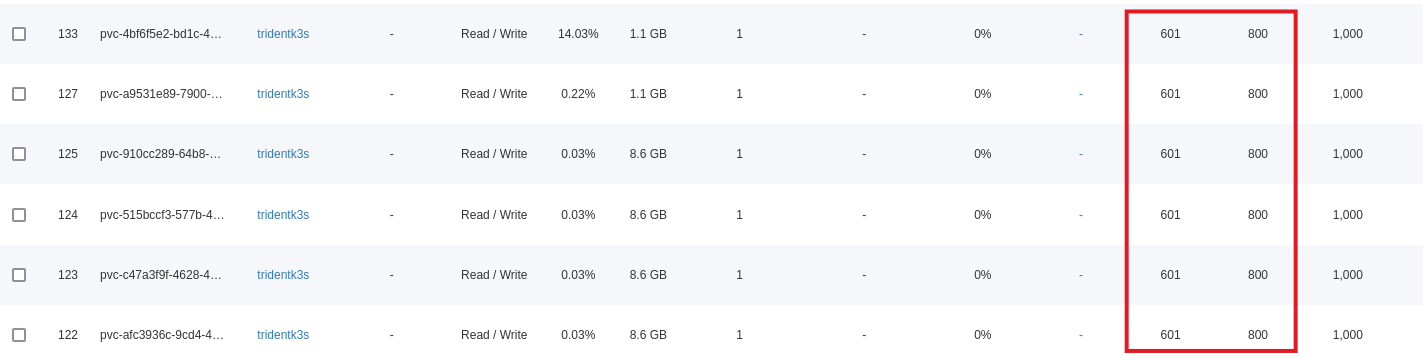
What I'm not 100% sure if Burst impacts the selection. TFM doesn't say so we should check the solidfire-san's driver source code to find out.
Also noteworthy is this: in TFM Silver and Gold both can be used for a SC "goldsilver" that specifies 6000 IOPS.
"Types": [{"Type": "Bronze", "Qos": {"minIOPS": 1000, "maxIOPS": 2000, "burstIOPS": 4000}},
              {"Type": "Silver", "Qos": {"minIOPS": 4000, "maxIOPS": 6000, "burstIOPS": 8000}},
              {"Type": "Gold", "Qos": {"minIOPS": 6000, "maxIOPS": 8000, "burstIOPS": 10000}}],
If one has half a dozen such volumes, it's not a big deal (except that creating 3 "goldsilver" SC-based volumes for Elasticsearch or Cassandra may result in one node being slower than the other two).
But if there's 50 of them, then it may start mattering as you may be guaranteeing (6000-4000) * 50 PVs * 50% chance of getting "Gold" = 50,000 IOPS or 0.5 SolidFire H610S node. Again, I don't know if that's possible and what the odds of getting Sold or Silver are, but in issue 281 I spotted such behavior when Min-Max ranges overlapped between back-end QoS settings.
What does all this mean?
Related to this screenshot just above - notice that having a matching QoS policy wouldn't auto-magically make the QoS setting a Policy setting.
Trident would still create "custom" QoS settings for each volume, but the settings would match a QoS policy that Trident downloaded from SolidFire using this script.
First, the basic benefit is that although those QoS settings would be "custom", they would match a SolidFire QoS Policy as long as it's retained on the cluster.
Second, it would be easy to "map" and account for Kubernetes' use of SolidFire resources, because if you had 200 bronze, 100 silver and 50 gold PVCs, it's easy to tell how many Min IOPS (for example) is guaranteed to that Kubernetes cluster/tenant (as every cluster presumably uses a different storage account).
Third, Kubernetes admins would save time configuring and updating back-end configuration. It may be a one-time activity, but some do this weekly or monthly.
Four - and this is the gray area, so caution is advised - with Trident using custom settings to reflect SolidFire QoS policy IDs, we could retype volumes to the same SolidFire QoS Policy ID. Even if Trident checked, which I don't think it does, QoS settings would be exactly the same as they were. The only difference is on SolidFire those PVs would be set to SolidFire QoS Policy (similar to below) rather than a "custom" range (screenshot above).

Five - this is unsupported, but might work (we'll find out in a future post) - we could retype all Trident classes by updating QoS policies on SolidFire. Then we'd also update/refresh Trident back-end with updated values. In the post linked at the top I explore some use cases for doing this often (i.e. before a backup, before running a long-running database report, etc.).
Conclusion
Automating Trident deployments - with Helm or whatever - is nice, but a more advanced integration with SolidFire arrays is even better.
Templating for back-end and Storage Class brings users closer to that goal.
We can probably do that with Ansible without writing own scripts, but if you dislike Ansible or waiting for it to finish then Python or PowerShell scripts may be the right answer for your automation workflows.
Additional steps could also create the SolidFire tenant account for Trident to completely automate the entire Trident configuration file. Maybe in one of the future posts.
Appendix A - sample run
I want to update my Trident Types to be in sync with my SolidFire QoS policies 1 and 2, so I run the script with -q 1,2.
./solidfire-qos-policy-id-to-trident-qos.py --mvip '192.168.1.30' -u admin -p ******** -q 1,2

TRIDENT SAMPLE CONFIG BEFORE:

{
    "version": 1,
    "storageDriverName": "solidfire-san",
    "backendName": "SF-PROD-192.168.1.34",
    "limitVolumeSize": "100000000000",
    "Endpoint": "https://trident:b00lsh33t@192.168.1.34/json-rpc/12.5",
    "SVIP": "192.168.103.34:3260",
    "TenantName": "demodemodemo",
    "Types": [
        {
            "Type": "bronze",
            "Qos": {
                "minIOPS": 200,
                "maxIOPS": 400,
                "burstIOPS": 600
            }
        },
        {
            "Type": "silver",
            "Qos": {
                "minIOPS": 401,
                "maxIOPS": 600,
                "burstIOPS": 1000
            }
        },
        {
            "Type": "gold",
            "Qos": {
                "minIOPS": 601,
                "maxIOPS": 990,
                "burstIOPS": 2000
            }
        }
    ],
    "region": "prod"
}


TRIDENT SAMPLE CONFIG AFTER:

{
    "version": 1,
    "storageDriverName": "solidfire-san",
    "backendName": "SF-PROD-192.168.1.34",
    "limitVolumeSize": "100000000000",
    "Endpoint": "https://trident:b00lsh33t@192.168.1.34/json-rpc/12.5",
    "SVIP": "192.168.103.34:3260",
    "TenantName": "demodemodemo",
    "Types": [
        {
            "Type": "basic",
            "Qos": {
                "minIOPS": 100,
                "maxIOPS": 800,
                "burstIOPS": 1000
            }
        },
        {
            "Type": "backup",
            "Qos": {
                "minIOPS": 100,
                "maxIOPS": 1500,
                "burstIOPS": 3000
            }
        }
    ],
    "region": "prod"
}
I've added some Storage Class samples as well.
SAMPLE KUBERNETES STORAGE CLASSES:

**NOTE:** the IOPS setting for each sample class is set to in-between Min and Max IOPS for given QoS Policy ID. Adjust if necessary.

Creating sample SC: basic

apiVersion: storage.k8s.io/v1
kind: StorageClass
metadata:
  name: basic
  annotations:
    storageclass.kubernetes.io/is-default-class: "true"
provisioner: csi.trident.netapp.io
reclaimPolicy: Retain
parameters:
  allowVolumeExpansion: true
  backendType: "solidfire-san"
  clones: "true"
  fsType: "xfs"
  IOPS: "450"
  snapshots: "true"


**NOTE:** if a QoS policy name is *basic*, sample config gets annotated as the default storage class.

Creating sample SC: backup

apiVersion: storage.k8s.io/v1
kind: StorageClass
metadata:
  name: backup
  annotations:
    storageclass.kubernetes.io/is-default-class: "false"
provisioner: csi.trident.netapp.io
reclaimPolicy: Retain
parameters:
  allowVolumeExpansion: true
  backendType: "solidfire-san"
  clones: "true"
  fsType: "xfs"
  IOPS: "800"
  snapshots: "true"