Use Velero with NetApp Verda and Trident CSI
What is Verda
This project aims to help users protect popular Kubernetes applications with NetApp Astra Control by taking app-consistent snapshots, backups, and other techniques.
Verda has hook scripts for several popular applications and it works best with NetApp Astra Control.
The scripts from the permissively licensed Verda repository can be used according to the repository license which means NetApp Trident users who have SolidFire arrays can take advantage of Verda scripts to enhance their backup integrations.
That way, even as Astra Control doesn't support SolidFire backend, SolidFire users can benefit from Verda.
Example with Redis
Appendix D of my previous post gives an example of using Velero v1.13 with pre and post-hoooks based on a sidecar container with fsfreeze.
That isn't the best way for applications that can benefit from application-specific hooks. The other extreme is applications that don't need any hooks at all.
RedisDB is one of the applications that belong to "all of the above" categories.
If you don't want to persist data, you probably don't even need to back it up.
If you want to back it up, you can still ignore its data because Redis cache will rebuild from scratch. Or you can mind the data and use Redis-specific commands to properly protect it so that upon restart it doesn't start from scratch.
Before I showed a basic example with Velero and BeeGFS CSI, where CSI snapshot can be used to create a crash-consistent point-in-time copy of data.
Verda gives you the ability to perform a smarter backup by using Redis-specific pre and post snapshot hooks. According to its README.md:
pre: For persistence mode RDB, run BGSAVE command creating dump.rdb in Redis data directory. For persistence mode AOF, turn off automatic rewrites (set auto-aof-rewrite-percentage 0)post: For persistence mode RDB, delete dump.rdb in Redis data directory. For persistence mode AOF, turn on automatic rewrites again (set auto-aof-rewrite-percentage to original value)
In Velero we create pre and post hooks as explained in the post linked at the top (and in the Velero documentation).
What's supposed to happen?
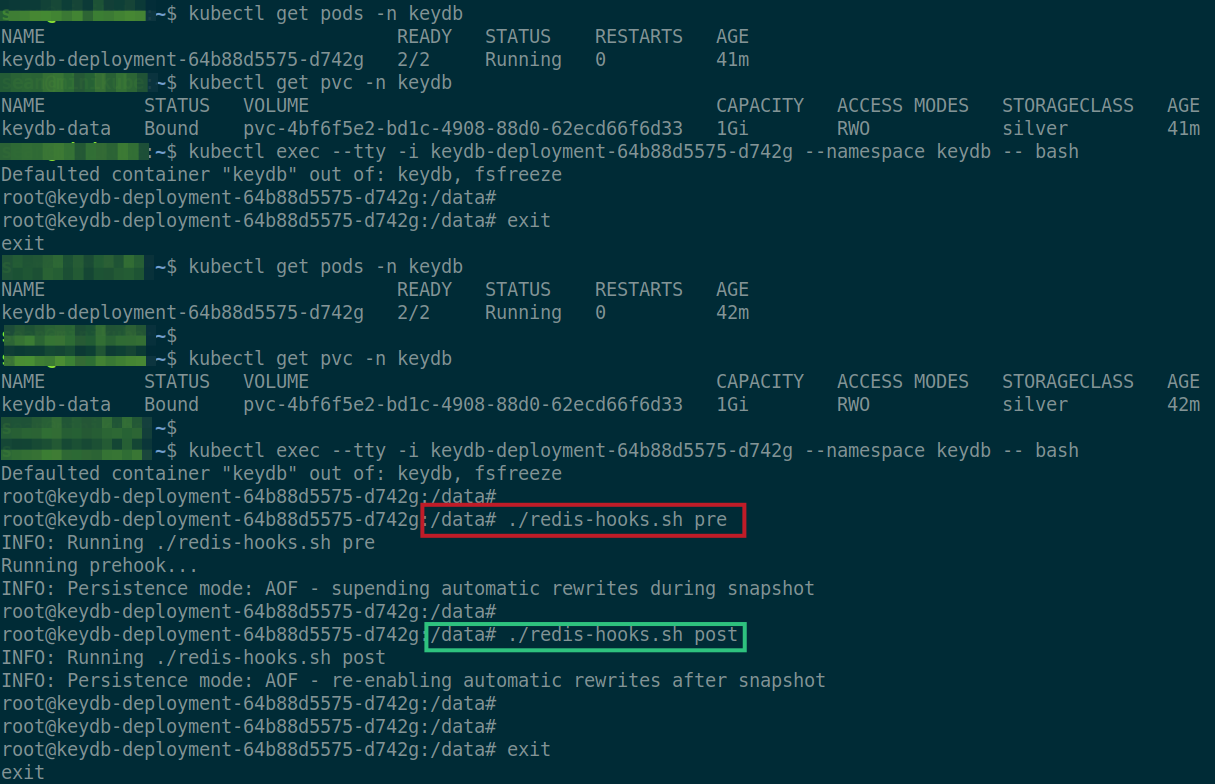
Before taking a snapshot, redis-hooks.sh is executed with pre.
root@keydb-deployment-64b88d5575-d742g:/data# ls -lat
total 3684
-rw-r--r-- 1 root root 2523615 Mar 23 09:13 appendonly.aof
drwxr-xr-x 2 root root      66 Mar 23 09:12 .
-rw-r--r-- 1 root root  219444 Mar 23 09:10 dump.rdb
-rwxr-xr-x 1 root root    5397 Mar 23 09:07 redis-hooks.sh
drwxr-xr-x 1 root root    4096 Mar 23 09:05 ..

root@keydb-deployment-64b88d5575-d742g:/data# ./redis-hooks.sh pre
INFO: Running ./redis-hooks.sh pre
Running prehook...
INFO: Persistence mode: AOF - supending automatic rewrites during snapshot

root@keydb-deployment-64b88d5575-d742g:/data# ls -lat
total 3688
drwxr-xr-x 2 root root      98 Mar 23 09:13 .
-rw-r--r-- 1 root root       3 Mar 23 09:13 redishook_rewritepct.txt
-rw-r--r-- 1 root root 2523615 Mar 23 09:13 appendonly.aof
-rw-r--r-- 1 root root  219444 Mar 23 09:10 dump.rdb
-rwxr-xr-x 1 root root    5397 Mar 23 09:07 redis-hooks.sh
drwxr-xr-x 1 root root    4096 Mar 23 09:05 ..


root@keydb-deployment-64b88d5575-d742g:/data# cat redishook_rewritepct.txt
100
redishook_rewritepct.txt indicates our pre-hook completed - current rewrite value was saved to this file, while in RedisDB it was set to 0%.
Then Velero continues with Trident CSI snapshot and after backup the same script is executed with post:
root@keydb-deployment-64b88d5575-d742g:/data# ./redis-hooks.sh post
INFO: Running ./redis-hooks.sh post
INFO: Persistence mode: AOF - re-enabling automatic rewrites after snapshot

root@keydb-deployment-64b88d5575-d742g:/data# ls -lat
total 3684
drwxr-xr-x 2 root root      66 Mar 23 09:13 .
-rw-r--r-- 1 root root 2523615 Mar 23 09:13 appendonly.aof
-rw-r--r-- 1 root root  219444 Mar 23 09:10 dump.rdb
-rwxr-xr-x 1 root root    5397 Mar 23 09:07 redis-hooks.sh
drwxr-xr-x 1 root root    4096 Mar 23 09:05 ..
Post hook sets rewrite back to the saved value (100%).
To use this approach you need to get the script into the container. By default Redis uses /data and if that's your PVC you can put it there. The script has no hard-coded secrets, so I think it's safe to keep it there. Alternatively, assign another PVC just for this script or do something you think is even better.
Pre and post hooks can be defined using velero or provided as deployment annotations. The key part of such a deployment file (see a complete example for NGINX in my previous post) would look like this:
---
apiVersion: apps/v1
kind: Deployment
metadata:
  name: redis-deployment
  namespace: redis
spec:
  replicas: 1
  selector:
    matchLabels:
      app: redis
  template:
    metadata:
      labels:
        app: redis
      annotations:
        pre.hook.backup.velero.io/container: redis
        pre.hook.backup.velero.io/command: '["/usr/bin/bash", "-c", "/data/redis-hooks.sh", "pre"]'
        post.hook.backup.velero.io/container: redis
        post.hook.backup.velero.io/command: '["/usr/bin/bash", "-c", "/data/redis-hooks.sh", "post"]'
I first tested the script itself using KeyDB (a Redis fork) and that worked seamlessly.
Notes related to redis-hooks.sh
- redis-hooks.sh has some hard-coded paths (to Bash and such), and you may need to fix those to reflect the correct paths in your Redis container or the script may fail
- to get this hook to work from Velero we'd need to deploy Redis pod with ENV variables (REDIS_PORT, REDIS_PASSWORD) that the script requires. For testing purposes in a closed environment you could run Redis server without authentication, or even hard-code the variables into the script
If you encounter a problem make sure it's Verda-related. That is, execute your Verda script in stand-alone mode. If you find a suspected bug and create a Github issue or else you may post your problem to the section General Discussion (for non-product questions) on NetApp Community forums. If it's a suspected Velero problem, try a simple "sleep 1 && exit" hook. I mention this so that you don't burden the wrong community with unrelated issues.
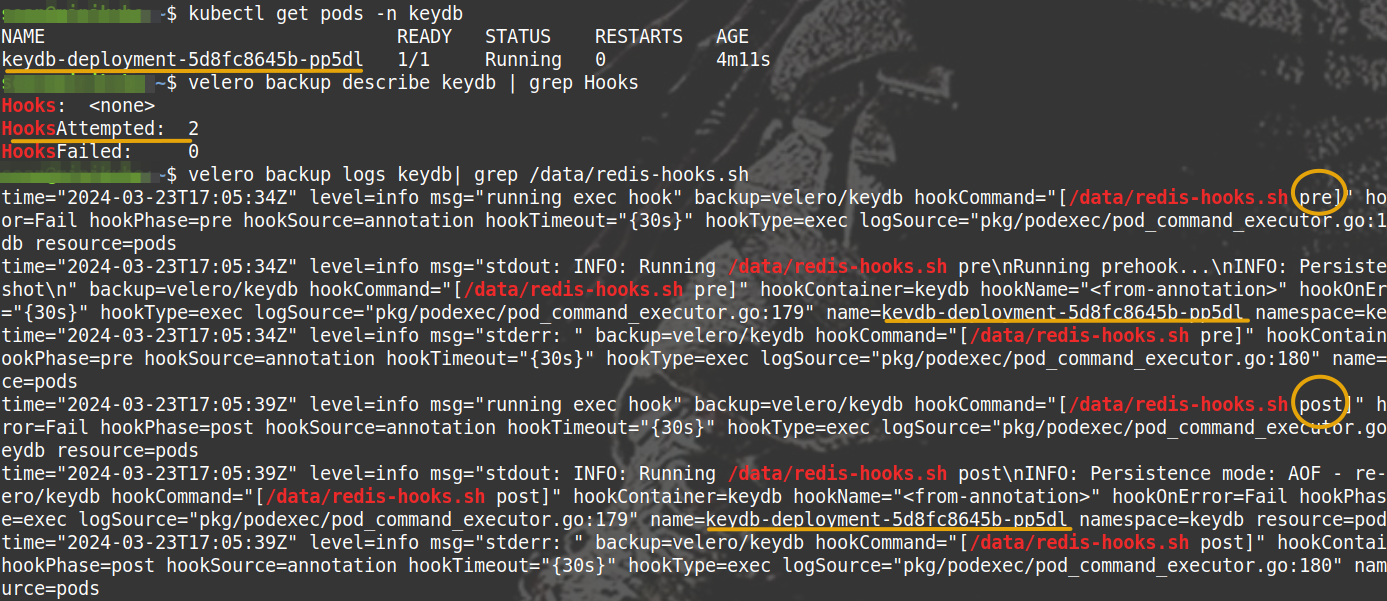
With the shell script confirmed to work, I then created a new, clean Kubernetes deployment based on the annotations shared above, and followed that by a new Velero backup, which worked without any problem.
Conclusion
Third party backup tools - in this case Velero - can use user-defined hooks to enhance backup (and restore) workflows for various applications.
Users of NetApp SolidFire (with Trident CSI and solidfire-san driver) and E-Series (with BeeGFS and BeeGFS CSI driver) may use Verda scripts to improve their data protection workflows with tested pre- and post-hooks.
Verda scripts are permissively licensed and while community contributions are appreciated, they are not required.