Velero 1.9 with AWS and CSI plugins for ARM64
- Introduction
- Non-CSI with Restic and NetApp BeeGFS CSI
- CSI with NetApp Trident
- What's new in 1.9 and 1.8
- Velero on ARM64
Introduction
See how to prepare the S3 credentials file in this post. Then install after inserting your own S3-related values in the below. AWS S3 users can install without the complex backup-location-config - the below is useful for on-premises S3.
velero install \
  --features=EnableCSI \
  --provider aws \
  --bucket ${BUCKET} \
  --secret-file ./credentials-velero \
  --backup-location-config region=${REGION},s3ForcePathStyle="true",s3Url=${API_ENDPOINT} \
  --plugins velero/velero-plugin-for-aws:v1.5.1,velero/velero-plugin-for-csi:v0.3.1
This time I used HTTP (not even HTTPS) connection to S3. BeeGFS CSI doesn't support snapshots which is one of the reasons I enabled Restic. For Trident I enabled CSI.
If you want to use CSI, as that is more complex please read the documentation for Velero 1.9. If planing to use snapshots with Trident install volume snapshot CRDs and snapshot controller.
Non-CSI with Restic and NetApp BeeGFS CSI
With this setup I did a simple test - backup a pod from the default namespace.
The pod had a BeeGFS PVC, but since there's no CSI and no snapshots involved, that was easy. Backup status:
$ velero backup get
NAME                 STATUS      ERRORS   WARNINGS   CREATED                         EXPIRES   STORAGE LOCATION   SELECTOR
csi-beegfs-dyn-app   Completed   0        1          2022-09-30 10:26:39 +0000 UTC   29d       default            <none>
Backup job description:
$ velero backup describe csi-beegfs-dyn-app
Name:         csi-beegfs-dyn-app
Namespace:    velero
Labels:       velero.io/storage-location=default
Annotations:  velero.io/source-cluster-k8s-gitversion=v1.23.5
              velero.io/source-cluster-k8s-major-version=1
              velero.io/source-cluster-k8s-minor-version=23

Phase:  Completed

Errors:    0
Warnings:  1

Namespaces:
  Included:  default
  Excluded:  <none>

Resources:
  Included:        *
  Excluded:        <none>
  Cluster-scoped:  auto

Label selector:  <none>

Storage Location:  default

Velero-Native Snapshot PVs:  auto

TTL:  720h0m0s

Hooks:  <none>

Backup Format Version:  1.1.0

Started:    2022-09-30 10:26:39 +0000 UTC
Completed:  2022-09-30 10:26:50 +0000 UTC

Expiration:  2022-10-30 10:26:39 +0000 UTC

Total items to be backed up:  927
Items backed up:              927

Velero-Native Snapshots: <none included>
As you can see there's nothing about snapshots in there.
In the backup bucket, Velero created two top level "directories": one for Restic itself ($BUCKET/restic) and another for this backup ($BUCKET/backups):
===> velero/restic/default
[2022-09-30 18:26:49 CST]   155B STANDARD config
[2022-09-30 18:28:05 CST]     0B keys/

===> velero/backups/csi-beegfs-dyn-app/
[2022-09-30 18:26:50 CST]    29B STANDARD csi-beegfs-dyn-app-csi-volumesnapshotclasses.json.gz
[2022-09-30 18:26:51 CST]    29B STANDARD csi-beegfs-dyn-app-csi-volumesnapshotcontents.json.gz
[2022-09-30 18:26:50 CST]    29B STANDARD csi-beegfs-dyn-app-csi-volumesnapshots.json.gz
[2022-09-30 18:26:50 CST]  30KiB STANDARD csi-beegfs-dyn-app-logs.gz
[2022-09-30 18:26:50 CST]    29B STANDARD csi-beegfs-dyn-app-podvolumebackups.json.gz
[2022-09-30 18:26:50 CST]  12KiB STANDARD csi-beegfs-dyn-app-resource-list.json.gz
[2022-09-30 18:26:50 CST]    29B STANDARD csi-beegfs-dyn-app-volumesnapshots.json.gz
[2022-09-30 18:26:50 CST] 150KiB STANDARD csi-beegfs-dyn-app.tar.gz
[2022-09-30 18:26:50 CST] 2.1KiB STANDARD velero-backup.json
Restores are logged to the restore "subdirectory" in the bucket as ${BACKUP}-${DATE}:
===> velero/restores
[2022-09-30 19:47:30 CST]     0B csi-beegfs-dyn-app-20220930103620/
[2022-09-30 19:47:30 CST]     0B csi-beegfs-dyn-app-20220930103837/
[2022-09-30 19:47:30 CST]     0B csi-beegfs-dyn-sc-20220930104253/

===> velero/restores/csi-beegfs-dyn-sc-20220930104253
[2022-09-30 18:42:54 CST] 1.6KiB STANDARD restore-csi-beegfs-dyn-sc-20220930104253-logs.gz
[2022-09-30 18:42:54 CST]    49B STANDARD restore-csi-beegfs-dyn-sc-20220930104253-results.gz
CSI with NetApp Trident
To recap, I enabled Restic, but not by default. If you did enable Restic as default backup method, you can disable it for individual backup jobs or schedules.
I also enabled CSI plugin. Once you install Velero like that, you should have a crapload of CSI related plugins. Your Volume Snapshot Class should have a Velero snapshot label.
$ velero plugin get| grep csi
velero.io/csi-pvc-backupper                     BackupItemAction
velero.io/csi-volumesnapshot-backupper          BackupItemAction
velero.io/csi-volumesnapshotclass-backupper     BackupItemAction
velero.io/csi-volumesnapshotcontent-backupper   BackupItemAction
velero.io/csi-volumesnapshot-delete             DeleteItemAction
velero.io/csi-volumesnapshotcontent-delete      DeleteItemAction
velero.io/csi-pvc-restorer                      RestoreItemAction
velero.io/csi-volumesnapshot-restorer           RestoreItemAction
velero.io/csi-volumesnapshotclass-restorer      RestoreItemAction
velero.io/csi-volumesnapshotcontent-restorer    RestoreItemAction

$ cat snapshot-class.yaml
apiVersion: snapshot.storage.k8s.io/v1
kind: VolumeSnapshotClass
metadata:
  labels:
      velero.io/csi-volumesnapshot-class: "true"
I created a Redis pod with this PVC:
$ kubectl get pvc -n web
NAME          STATUS   VOLUME                                     CAPACITY   ACCESS MODES   STORAGECLASS   AGE
redis-basic   Bound    pvc-eee553c4-4f21-4b55-be6a-a9e042e41fbb   1Gi        RWX            basic          139m
Backup of this pvc-eee PV with Restic disabled:
$ velero backup create redis-backup --default-volumes-to-restic=false --include-namespaces web
Snapshot:
$ kubectl get volumesnapshots
NAME             READYTOUSE   SOURCEPVC  RESTORESIZE   SNAPSHOTCLASS       SNAPSHOTCONTENT                                    CREATIONTIME   AGE
basic-snapshot   true         basic      300Ki         csi-snapshotclass   snapcontent-a2d6aebd-fdbc-4978-b2c3-594d25997d37   3h24m          3h24m
Result:
$ velero backup get
NAME                 STATUS      ERRORS   WARNINGS   CREATED                         EXPIRES   STORAGE LOCATION   SELECTOR
redis-backup         Completed   0        0          2022-09-30 16:18:27 +0000 UTC   29d       default            <none>

$ velero backup describe redis-backup --details
Name:         redis-backup
Namespace:    velero
Labels:       velero.io/storage-location=default
Annotations:  velero.io/source-cluster-k8s-gitversion=v1.23.5
              velero.io/source-cluster-k8s-major-version=1
              velero.io/source-cluster-k8s-minor-version=23

Phase:  Completed

Errors:    0
Warnings:  0

Namespaces:
  Included:  web
  Excluded:  <none>

Resources:
  Included:        *
  Excluded:        <none>
  Cluster-scoped:  auto

Label selector:  <none>

Storage Location:  default

Velero-Native Snapshot PVs:  auto

TTL:  720h0m0s

Hooks:  <none>

Backup Format Version:  1.1.0

Started:    2022-09-30 16:18:27 +0000 UTC
Completed:  2022-09-30 16:18:41 +0000 UTC

Expiration:  2022-10-30 16:18:27 +0000 UTC

Total items to be backed up:  10
Items backed up:              10

Resource List:
  snapshot.storage.k8s.io/v1/VolumeSnapshot:
    - web/velero-redis-basic-scklx
  snapshot.storage.k8s.io/v1/VolumeSnapshotClass:
    - csi-snapshotclass
  snapshot.storage.k8s.io/v1/VolumeSnapshotContent:
    - snapcontent-f1db5b43-7910-4153-9ba9-57a64d199539
  v1/ConfigMap:
    - web/kube-root-ca.crt
  v1/Namespace:
    - web
  v1/PersistentVolume:
    - pvc-eee553c4-4f21-4b55-be6a-a9e042e41fbb
  v1/PersistentVolumeClaim:
    - web/redis-basic
  v1/Pod:
    - web/redis
  v1/Secret:
    - web/default-token-q7x6h
  v1/ServiceAccount:
    - web/default

Velero-Native Snapshots: <none included>

CSI Volume Snapshots:
Snapshot Content Name: snapcontent-f1db5b43-7910-4153-9ba9-57a64d199539
  Storage Snapshot ID: pvc-eee553c4-4f21-4b55-be6a-a9e042e41fbb/snapshot-f1db5b43-7910-4153-9ba9-57a64d199539
  Snapshot Size (bytes): 344064
  Ready to use: true
Right here in CSI Volume Snapshots section, which was empty when Restic was used, has the original volume (pve-eee) and its snapshot (snapshot-f1db) which is a Trident CSI snapshot.
Backup contents in my S3 bucket:
===> velero/backups/redis-backup
[2022-10-01 00:18:42 CST]   365B STANDARD redis-backup-csi-volumesnapshotclasses.json.gz
[2022-10-01 00:18:42 CST]   688B STANDARD redis-backup-csi-volumesnapshotcontents.json.gz
[2022-10-01 00:18:42 CST]   578B STANDARD redis-backup-csi-volumesnapshots.json.gz
[2022-10-01 00:18:41 CST] 5.1KiB STANDARD redis-backup-logs.gz
[2022-10-01 00:18:41 CST]    29B STANDARD redis-backup-podvolumebackups.json.gz
[2022-10-01 00:18:41 CST]   291B STANDARD redis-backup-resource-list.json.gz
[2022-10-01 00:18:41 CST]    29B STANDARD redis-backup-volumesnapshots.json.gz
[2022-10-01 00:18:41 CST] 7.0KiB STANDARD redis-backup.tar.gz
[2022-10-01 00:18:41 CST] 2.2KiB STANDARD velero-backup.json
What's new in 1.9 and 1.8
If you haven't kept an eye on this and wonder what's new in recent versions of Velero, you can check velero.io and their Github, but here are some highlights:
- Backup improvements
- Backup storage locations (BSL's) can be two
- Restic can be used backup to multiple storage locations
- It's possible to backup on one cluster for the purpose of restoring on another (see Restore below)
- Restic may use
--insecure-skip-tls-verifyif you can't avoid dealing with Snake Oil TLS certificates
- CSI improvements
- CSI volume snapshot uses the v1 API
- No VolumeSnapshot is left in the source namespace of the workload after a backup finishes (I think I spotted this when I used Velero 1.5.2 with CSI)
- Velero now reports metrics for CSI snapshots including number of snapshots attempted
- CSI snapshots are (officially) supported for AKS/EKS clusters; with NetApp Astra Trident you're on your own but it costs nothing
- Restore improvements
restoreStatusspec allows to pick a resource or resources to be restored--preserve-nodeportsmay be used to preserve Service nodePorts, but this may fail if the ports are already allocated or outside of the node port range on target clusterExistingResourcePolicygives flexibility to deal with slightly different versions of Source and Target. For example we may restore to a slightly newer cluster and use the same (slightly older) API, or pick the new API version as long as it's not different by more than .1 (e.g. 1.1 can be restored to 1.2beta1). See this for more.
As the number of features has increased, it seems the complexity of figuring out how to use them has followed. The documentation doesn't seem easy to use or complete enough - it's hard to tell, but I struggled installing Velero 1.9.2 despite having previous experience with multiple releases of Velero.
Later I may do a post on cross-cluster restore from S3. At this time my clusters are on different versions and architectures, so I suspect it may take a few hours of troubleshooting.
Velero on ARM64
Indeed, installing on ARM didn't go that well. On one of the workers, Restic container couldn't start and it turns out Velero plugins aren't built for non-x86_64 architectures at this time.
It seems I picked the wrong time (Saturday afternoon) to use Velero 1.9 on ARM64…
What needs to be done for the plugins is build an ARM64 version. After some trial and error I built the plugins for ARM64, but continued to have strange problems with the CSI container refusing to run - it appears plugin itself was fine, but the container was not.
Then three hours into this, as I was planning to build own containers, I discovered that Velero has started building their AWS plugin for ARM64. But Velero CSI plugin is not yet built for ARM64.
I chose the easy way out: install Velero using latest plugin for AWS and without CSI.
Restic (ARM64)
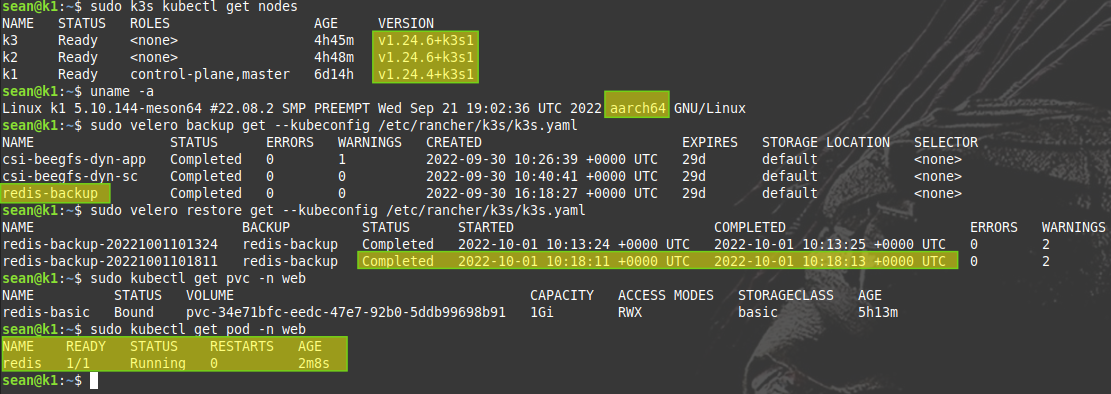
That worked fine and with Velero on Kubernetes v1.24 (ARM64) I was able to:
- View backups made on Kubernetes v1.23 (AMD64)
- Restore a backup from AMD64 to ARM64
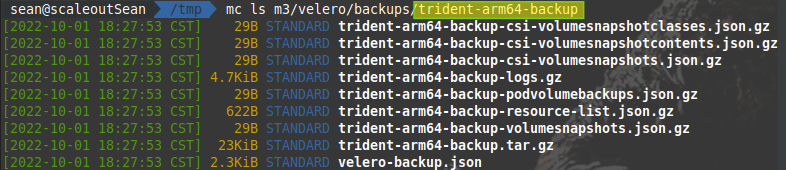
- Backup a namespace (using Restic) from ARM64 to the same S3 repository
Restore worked:
Restic-based backup worked as well:

Velero bucket with backup data from ARM64:
CSI (ARM64)
I eventually managed to build a good Velero CSI (ARM64) container as well and you can get it here.
If you want to use both Restic and CSI on ARM64 and there's nothing official yet, try to install the same way as at the very top, just use these plugins:
# use velero-plugin-for-aws:latest if you need to, but check Velero compatibility information before that
--plugins scaleoutsean/velero-plugin-for-csi:v0.3.1,velero/velero-plugin-for-aws:v1.5.1
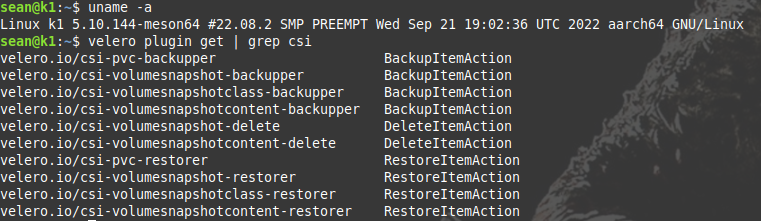
If you install it properly, you'll notice Velero was installed with CSI plugins.
If everything works out, when you create a backup a snapshot will be taken as seen here (the new one is at the top taken at 2:17 PM):
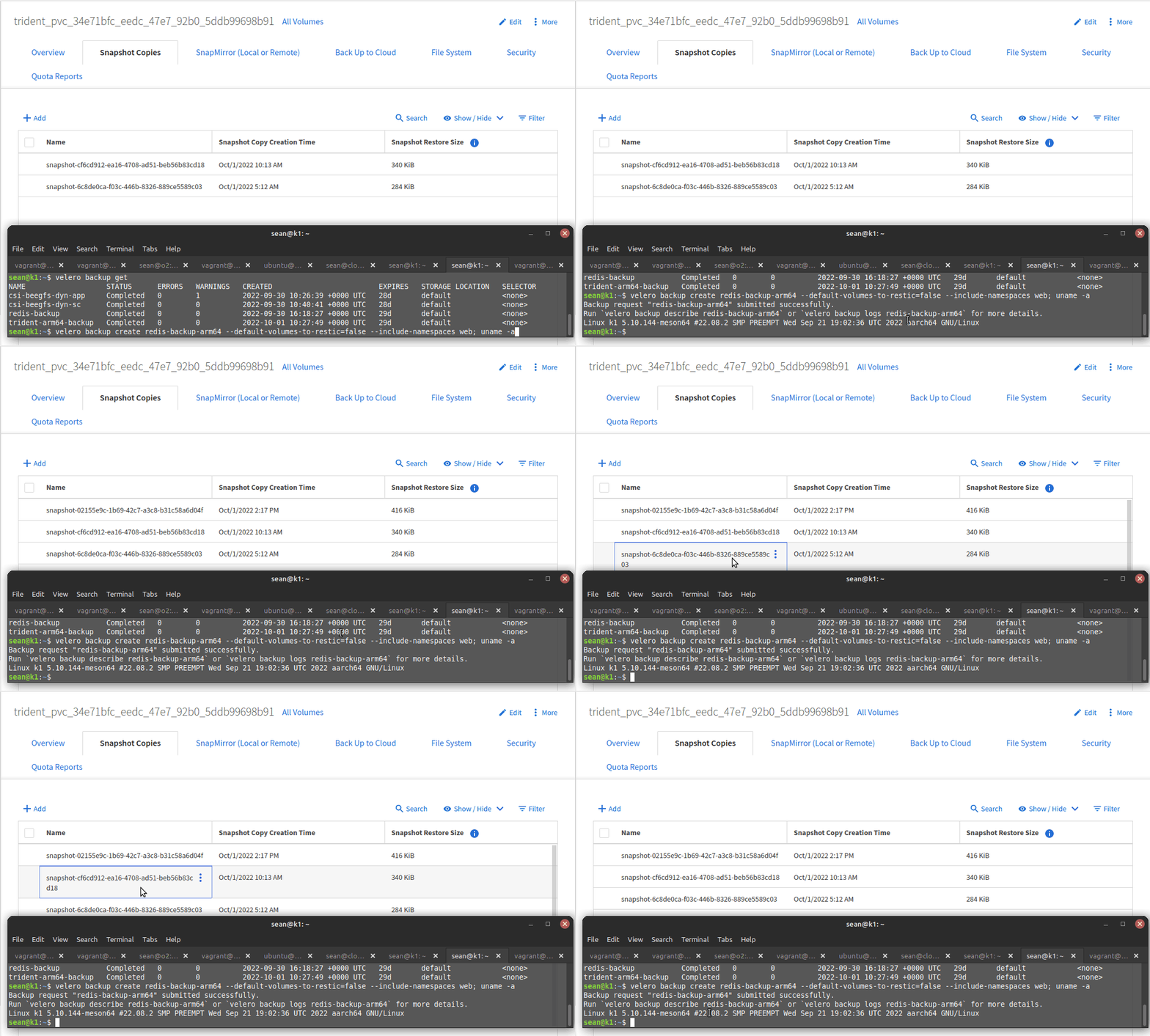
It's interesting that job log doesn't show CSI details like it does on AMD64. This needs additional checking.
As far as PV data is concerned as long as the snapshot is there, PV data can be restored with CSI from Kubernetes. That snapshot got removed after I executed velero backup delete redis-backup-arm64 as expected.
Both NetApp BeeGFS CSI and Trident CSI have an (unofficial) ARM64 build, so now you can use these providers and back them up with Velero using both CSI snapshots (Trident CSI PVCs) and Restic (both BeeGFS CSI and Trident CSI PVCs).
There are likely bugs involved, but if you spot any please highlight them in the Velero Community (not all architectures are officially supported, so in some cases architecture-specific bugs may not be appropriate for Issues).