Rocky Linux 8, 9 with NetApp Trident for Docker and SolidFire 12
The official Trident documentation is okay, but it mentions no Rocky Linux.
The other problem is Red Hat-like distributions tend to default to Podman, but I couldn't install Trident Docker volume plugin with Podman. At this time the plugin seems to work only with Docker.
Trident Docker volume driver for also SolidFire works with Hashicorp Nomad environments, by the way.
Environment
- Rocky Linux 8.6 or 9.0
- External IPv4: 192.168.1.187
- iSCSI IPv4: 192.168.103.187
- Docker-CE 20.10.17 (automatically chosen by following the official Rocky Linux documentation)
- SolidFire 12.3
- Management IPv4: 192.168.1.30
- iSCSI IPv4: 192.168.103.30
Configure SolidFire
- Create an account (e.g. 'rocky' and remember the CHAP password you set)
- Create a test volume (e.g.
rocky01)
Configure Rocky Linux
- Make sure you can ping the SolidFire iSCSI IP and set the same or smaller MTU on Rocky Linux
- Install iSCSI packages (I'd skip multipath and configure LACP if I needed HA on iSCSI network)
sudo dnf install -y lsscsi iscsi-initiator-utils sg3_utils device-mapper-multipath
sudo vim /etc/iscsi/iscsid.conf
- You only need to enable CHAP (two places), provide the credentials (also two places, one for session, another for discovery), and - if you have SolidFire < 12.5 - enable MD5 CHAP alogrithm:
node.session.auth.authmethod = CHAP
node.session.auth.chap_algs = MD5
node.session.auth.username = rocky
node.session.auth.password = testtesttest
discovery.sendtargets.auth.authmethod = CHAP
discovery.sendtargets.auth.username = rocky
discovery.sendtargets.auth.password = testtesttest
I did not change the rest of iscsid.conf.
- Rocky 8 and 9 should be able to work with that line unchanged when SolidFire version is 12.5 or higher:
node.session.auth.chap_algs = SHA3-256,SHA256,SHA1,MD5
I used SolidFire 12.3 and although a comment in iscsid.conf says these algorithms should be tried in order they're given in, discovery failed I had to edit /var/lib/iscsi/send_targets/192.168.103.30,3260/st_config (path varies based on SolidFire SVIP) and replace those with MD5 to be able to log in - merely editing iscsid.conf and restarting was not enough.
- Enable, start and discover test volume using the SVIP IPv4 address:
sudo systemctl enable iscsid multipathd
sudo systemctl start iscsid multipathd
sudo iscsiadm -m discoverydb -t st -p 192.168.103.30 --discover
sudo iscsiadm -m node -p 192.168.103.30 --login
- Access the volume (format, do some IO, etc.) and log out
- Enable and start iSCSI
sudo systemctl enable iscsi
sudo systemctl start iscsi
Install Docker-CE
- I followed these instructions from the Rocky Linux documentation:
sudo dnf config-manager --add-repo https://download.docker.com/linux/centos/docker-ce.repo
sudo dnf -y install docker-ce docker-ce-cli containerd.io docker-compose-plugin
sudo systemctl enable docker
sudo systemctl start docker
sudo docker info
Configure Trident Docker volume plugin
If you want to work by the official docs, they're here.
- You can name the JSON file any way you want
sudo mkdir /etc/netappdvp
sudo touch /etc/netappdvp/solidfire.json
sudo chmod 0770 /etc/netappdvp/solidfire.json
sudo vim /etc/netappdvp/solidfire.json
- solidfire.json should have a set of cluster admin credentials (Endpoint), an iSCSI IPv4 (SVIP), a tenant account to use for Docker plugin (TenantName), so modify those. Other details can be customized. I recommend to create a dedicated SolidFire cluster admin for Docker (e.g. docker-admin) for easier tracing and handling of password rotation of SolidFire credentials.
{
    "version": 1,
    "storageDriverName": "solidfire-san",
    "Endpoint": "https://SAMPLEadmin:SAMPLEadminPASS@192.168.1.30/json-rpc/12.0",
    "SVIP": " 192.168.103.30:3260",
    "TenantName": "rocky",
    "InitiatorIFace": "default",
    "Types": [
        {
            "Type": "Bronze",
            "Qos": {
                "minIOPS": 100,
                "maxIOPS": 200,
                "burstIOPS": 400
            }
        },
        {
            "Type": "Silver",
            "Qos": {
                "minIOPS": 300,
                "maxIOPS": 500,
                "burstIOPS": 700
            }
        },
        {
            "Type": "Gold",
            "Qos": {
                "minIOPS": 500,
                "maxIOPS": 800,
                "burstIOPS": 1000
            }
        }
    ],
    "storagePrefix": "docker",
    "size": 10G
}
- Deploy NetApp Trident Docker volume plugin and remember to use the configuration file name you created in /etc/netappdvp. NOTE: you can use
trident-plugin:latestto get latest version rather than install v21.07 that I did.
$ sudo docker plugin install --grant-all-permissions --alias solidfire netapp/trident-plugin:21.07 config=solidfire.json

$ sudo docker volume list
DRIVER             VOLUME NAME
solidfire:latest   rocky01
rocky01is our test volume created manually in the SolidFire Web UI. Create another one with Trident and then delete both:
$ sudo docker volume create -d solidfire --name rocky02 -o size=2G -o fileSystemType=xfs -o type=Silver
rocky02

$ sudo docker volume list
DRIVER             VOLUME NAME
solidfire:latest   rocky01
solidfire:latest   rocky02

$ sudo docker volume rm rocky01
rocky01

$ sudo docker volume rm rocky02
rocky02

$ sudo docker volume list
DRIVER    VOLUME NAME
Upgrade Docker volume plugin
- If you installed v21.07 (as per my example above), here's how you can upgrade it to latest: disable the plugin (you may need to force it if existing volumes are found), uninstall and install a newer release:
$ sudo docker plugin ls
ID             NAME               DESCRIPTION                             ENABLED
e4b3b5e5e370   solidfire:latest   Trident - NetApp Docker Volume Plugin   true

$ sudo docker plugin disable solidfire:latest
solidfire:latest

$ sudo docker plugin rm solidfire:latest
solidfire:latest

$ sudo docker plugin install --grant-all-permissions --alias solidfire:v22.07 netapp/trident-plugin:22.07 config=solidfire.json
22.07: Pulling from netapp/trident-plugin
Digest: sha256:2c1fd6089173fa11efa647f0b12453dc4d51792e98f17c79804c9731ee1a77df
a79a708a6927: Complete
Installed plugin netapp/trident-plugin:22.07

$ sudo docker plugin ls
ID             NAME               DESCRIPTION                             ENABLED
02899e1b2f71   solidfire:v22.07   Trident - NetApp Docker Volume Plugin   true
Notic how I used a different plugin alias (solidfire:v22.07) whereas I could have used "solidfire:latest" as release 22.07 is currently in fact latest. You can use any tag you like, just remember what you used or look it up with plugin ls, or no tag at all. Tags can be useful to know what you've installed without inspecting the plugin, or when you have several different plugin versions installed at the same time (which may be necessary for a variety of reasons).
- Referencing volume plugin with the correct tag, create another volume and use it in a container (service is exposed on port 13306!):
sudo docker volume create -d solidfire:v22.07 --name rocky01 -o size=2G -o fileSystemType=xfs -o type=Silver
sudo docker run --name mysql -e MYSQL_ALLOW_EMPTY_PASSWORD=yes -p 13306:3306 -v rocky02:/var/lib/mysql -d mysql/mysql-server:5.7
- Inspect the container's Mounts section:
[
            {
                "Type": "volume",
                "Name": "rocky02",
                "Source": "/var/lib/docker/volumes/rocky02/_data",
                "Destination": "/var/lib/mysql",
                "Driver": "local",
                "Mode": "z",
                "RW": true,
                "Propagation": ""
            }
        ]
The above procedure worked exactly the same on Rocky Linux 9.0:
$ cat /etc/redhat-release
Rocky Linux release 9.0 (Blue Onyx)

$ sudo docker info | grep Version
 Server Version: 20.10.17
 Cgroup Version: 2
 Kernel Version: 5.14.0-70.22.1.el9_0.x86_64

$ sudo docker plugin ls
ID             NAME               DESCRIPTION                             ENABLED
6007c6d68075   solidfire:latest   Trident - NetApp Docker Volume Plugin   true

$ sudo docker volume ls
DRIVER             VOLUME NAME
solidfire:latest   rocky01
solidfire:latest   rocky02
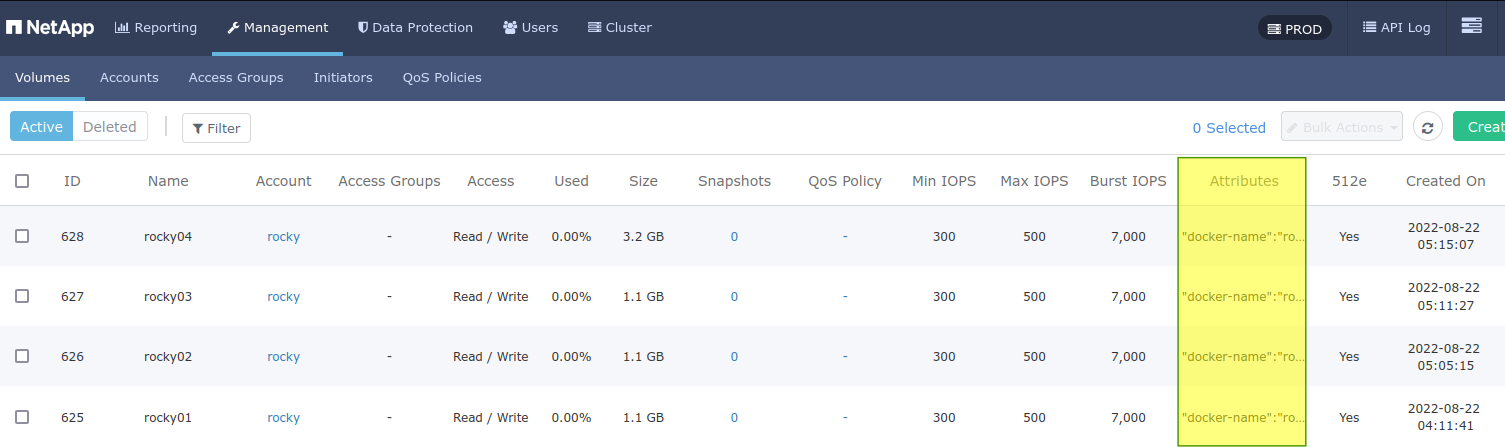
Trident volume plugin tags volumes by inserting KV pairs in SolidFire volume attributes, so they're easy to recognize: