Elasticsearch 8 with NetApp storage
NOTICE: all credentials and tokens on this page are samples, not leaked.
- Elasticsearch and NetApp storage systems
- Install Elasticsearch with iSCSI-backed data store on ONTAP or SolidFire
- Static provisioning with external volumes
- Dynamic provisioning with external volumes
- Elastic on Kubernetes with Trident CSI and Cinder CSI
- Demos
- Appendix A: Docker Compose setup with Trident Docker plugin
- Appendix B: Kubernetes Helm Chart for Trident and Cinder CSI
I've written several posts on Elasticsearch (look for ELK and Elasticsearch posts in Archive). This article is about getting started with Elasticsearch 8 and focuses on integration with NetApp block storage in physical, virtual, Docker and Kubernetes environments.
It's also about the new Elasticsearch version 8 (previous articles were about version 7) and opinionated in the sense that it's not necessarily based on the official NetApp documentation.
Elasticsearch and NetApp storage systems
Generally speaking - and this is where "opinionated" comes in - one can use Elasticsearch with any NetApp storage (even NetApp object storage, for ILM).
Which one should you use? There are too many buts, ifs and "it depends", so I won't try to cover them all and "prove" that my opinion is correct.
Here's a couple of general criteria I'd consider and (below that) why for Hot Tier:
| ONTAP | E-Series | SolidFire | |
|---|---|---|---|
| Docker, K8s proto | iSCSI | iSCSI, | iSCSI |
| Protocol | block; file only for small | block | block |
| Media | TLC flash | TLC flash | TLC flash |
| Docker | Trident | LVM, Terraform Provider | Trident |
| Kubernetes | Trident CSI | TopoLVM, SANtricity CSI | TopoLVM, Trident CSI, SolidFire CSI |
| Rel. cost of perf | $$ | $ | $$$ |
| Rel. cost of cap | $$ | $ | $$$ |
| Rec. replicas | 1 | 1 (S,M) or 2 (L+) | 1 |
| Rec. vol size | 2-4 TiB | > 2 TiB | 1 TiB |
| Rec. thruput | <= 6 GB/s | any | < 1 GiB/s |
| Rec. scale | S, M | M, L, XL, XXL | S |
(Rel. = relative; Rec. = recommended)
This is highly subjective, of course, and doesn't consider any individual or special circumstances. Maybe I'd make a different recommendation in individual cases.
Several points (updated in May 2026):
- SolidFire from the first to the last column
- Now it's clarified these are meant for Hot Tier and "flash" has been changed to "TLC flash"
- Not much has changed in version 9; Elastcisearch snapshot-to-S3 is becoming more popular, as is ECK (Elasticsearch on Kubernetes)
- E-Series used to be weakest in the Kubernetes row due to being kicked out of Trident, but the ECK documentation mentions TopoLVM as a viable option making E-Series a highly qualified contender. There are other CSI options, too, including static PVCs which we can provision with Terraform Provider SANtricity
- Number of data copies: it's confusing what's considered a "copy" is. Here a replica assumes there's the original, so "1 replica" means 2 copies of same data, what's commonly known as RF2. RF2 is the minimum because a filesystem may get corrupt and one is not supposed to roll-back (and lose minutes or hours of events) to recover from that. What we avoid with all three systems - being protected storage - is the need to use RF3 that one might default to with unprotected "JBOD" storage
- Considering Elasticsearch requirements and E-Series' viability in the Kubernetes space and price/performance leadership, E-Series systems are top contender;
Sizing and management
I discussed the relative cost of performance above, so this is purely about performance and capacity sizing as well as some high level management aspects:
- ONTAP clusters scale to >10 nodes. Depending on the model you can get GB/s per each appliance but at large scale this becomes expensive. We'd want at least one data volume per controller (so at least 2 per appliance)
- E-Series doesn't scale out but the fastest model (currently that's EF600) can deliver tens of GB/s which means many customers wouldn't need to scale out at all
- SolidFire gets you few hundred MB/s per node and scales out to 40 nodes; additional nodes can be added in increments of one. It's best to have two to four volumes per each SolidFire node
Scale-out storage isn't necessary for Elasticsearch - it can scale out on application level - but in smaller and medium Elasticsearch environments it makes storage provisioning easier, which is why some users like to use enterprise storage for Elasticsearch.
Storage efficiency features aren't needed by recent Elastic releases (7 and 8 store data in a compressed format), so when sizing for capacity on SolidFire and ONTAP we need to assume storage efficiency of 1x (i.e. no savings from compression and deduplication). The same applies to E-Series, but E-Series doesn't have these features so no one would assume any storage efficiency anyway.
If you decide to make 2 copies on Elasticsearch, then assume efficiency of 0.5x if the sizer can take it, or just divide usable by two. As mentioned above, I think it doesn't make sense to have two or three copies on redundant and protected storage like these arrays - if you want to have a redundant replica, then it's better to have another disk array with E-Series attached to one or more Elastic nodes in DAS fashion.
Precise storage sizing
New storage systems (ONTAP, E-Series, SolidFire) can be sized for required level of performance.
I don't know what units or specs Elastic uses in sizing recommendations for external storage, but when we size storage we usually need a read-write ratio (50/50?) and I/O request size (128kB?). There's some variance in Elasticsearch workload patterns depending on what data being indexed and searched and how, so I suspect there may be 3-4 workload profiles for medium and large configurations.
For small environments with 1-2 month retention (say, your first Kubernetes cluster with few dozen apps) 200 MB/s (or ~2,000 IOPS in 128kB requests per second) and few TB of capacity should be enough.
You can ask your Elastic partner or representative to help you with detailed sizing.
Update (Feb 2023): blog post on Elasticsearch performance with E-Series can be found here.
Use cases for "enterprise" storage features
Earlier I mentioned easy-to-use snapshots and clones as one example of "nice to have" features you can get on ONTAP and SolidFire.
JBOD and KISS used to be - back in the early days of Hadoop - a way to avoid unnecessary storage costs and very large Hadoop users possibly do. But it must be done at scale which many on-premises users do not have, and unsurprisingly many have discovered it's more cost effective to subscribe to Elastic Cloud or switch to enterprise-grade on-prem storage. What does the later really mean?
If you want to test latest version of Elastic, for example, SolidFire and ONTAP allow you to thin-clone your 20 TB Elasticsearch cluster in minutes and spin a new test cluster with on a clone production data in no time.
Enterprise-level storage also lowers barriers to entry. Instead of buying three JBODs and spending weeks to put this (oversized) configuration in production, you can provision VM or container-based storage on existing ONTAP or SolidFire in 5 minutes. And if your Elasticsearch cluster grows, it's easy to expand it with E-Series based nodes and evacuate or tier data from ONTAP or SolidFire if you want to release that capacity.
Anther advantage of enterprise-grade storage is that it lets you easily consolidate workloads: because both SolidFire and ONTAP have QoS management features, it's possible to share existing capacity and performance but at the same time ensure that other workloads do not get starved. And we can allocate more - or less - IOPS and bandwidth to Elasticsearch nodes.
Let's consider this situation: Elasticsearch is provisioned in three VMs, each with a single 512 GiB volume (elk01, elk02, elk03). Due to data growth each volume needs to be expanded to 1024 GiB and we'd also like to increase IOPS from 3,000 and 15,000 (Min/Max, respectively) to 5,000 and 15,000 (the latter pair on SolidFire translates to 35 and 105 MB/s in sequential IO, respectively).
This performance adjustment used to require careful "design" of RAID groups and whatnot, but now can be easily done in software via the API.
On SolidFire this entire procedure takes 1 second. Ok, it took more than that - 1.092 seconds (I measured).
Get-SFVolume -Name elk* | Set-SFVolume -TotalSize 1 -TiB -MinIOPS 5000 -MaxIOPS 15000 -Confirm:$False
Or, you prefer to not resize filesystems in ELK hosts, you could add three more volumes of the same size using same QoS characteristics as existing volumes.
For ($i = 4; $i -le 6; $i++) {
  New-SFVolume -Name elk0$i -AccountID 1
  -TotalSize 512 -GiB -Enable512e:$True
  -MinIOPS 3000 -MaxIOPS 10000 -Confirm:$False
}
Or, if you prefer to do the above but offload replication to SolidFire clone feature, you may be able to clone existing Elastisearch volumes and import them with Trident. I haven't tried this to see if it actually works, but clone & import would make it possible to complete scale out in minutes rather than hours. SolidFire Operator could be used to prepare clone volumes before Elasticsearch scale-out, for example.
With VMs or physical hosts you'd rescan targets, login to new targets and modify Elasticsearch configuration to use the new volumes.
ONTAP iSCSI also provides storage QoS and similar ease of use.
The above is specific to SolidFire and the examples are in PowerShell, but ONTAP and SolidFire can also be automated with Ansible or Python. Whether you use ONTAP or SolidFire, it only takes a minute to take care of most storage management tasks. Even with E-Series you can still eliminate a lot of storage management tasks with automation.
Asymmetric configurations
Elasticsearch replication works with asymmetric configurations so having a fast E-Series EF600 array for main ELK workload and a white box JBOD for DR replica is fine as well as long as the JBOD can keep up.
It's also possible to use a fast tier for hot data (e.g. ONTAP A700) and a lower cost HDD-based E-Series E5760 for cold data and have Elasticsearch take care of ILM.
To NFS or not to NFS?
NFS file shares (that is, file shares on ONTAP systems) should not be used to store Elasticsearch indexes for busy and large Elasticsearch clusters.
It's perfectly fine to use them for small Elasticsearch clusters especially when they are all-flash (C190, all A and AFF models, all cloud-based ONTAP file services based on flash storage, all partner-based services such as FSxN in AWS, ANF in Azure, CVO-SW in GCP, etc).
The same approach that works well for Oracle RAC and IO-hungry NVIDIA DGX A100 can work well for Elasticsearch clusters.
If you have a small HDD-based NetApp FAS storage system and try to run a medium sized or busy ELK cluster on it, you'll have a miserable experience. That won't work for Oracle RAC and Deep Learning workloads either. And while I'm at it - avoid pouring hot coffee on your crotch area.
Object storage (S3 flavor)
Elasticsearch can also use object storage for ILM and "snapshots" (which are basically "dumps" or backups).
NetApp StorageGRID works well for Elasticsearch snapshots to S3, but smaller Elasticsearch clusters may not need dedicated S3 appliances.
As far as using S3 service on the same storage product considered in this post:
- ONTAP S3 service, in my opinion, is not yet suitable for Elasticsearch (Elasticsearch 8.11.1 is quirky with ONTAP 9.12.1), while E-Series and SolidFire don't have their own S3 service
- StorageGRID VMs or MinIO S3 in VMs or containers can be used with ONTAP, E-Series, and SolidFire block devices
MinIO on SolidFire would be expensive, but on E-Series it can be affordable (e.g. free MinIO on NL-SAS backed volumes) and fast. With E-Series we can get several GB/s from a single MinIO VM. You'd need 8-12 cores (HT OFF) and enough NL-SAS disks to drive that performance.
If we can rely on vSphere for HA of VMs, a single MinIO VM (MinIO on Ubuntu LTS or Rocky Linux) can provide a decent level of uptime and performance on a single site (same as vSphere's uptime, plus a few annual restarts of OS and MinIO when/if those get updated and require a restart). If you need an even more reliable solution, deploy multiple VMs or containers with EC:1 (see the same post which talks about MinIO performance on E-Series) - it would cost a bit more due to erasure coding storage overhead, but provide a higher uptime and reliability as containers could be restarted in a rolling fashion and without service downtime.
Install Elasticsearch with iSCSI-backed data store on ONTAP or SolidFire
Where to get the NetApp software required to test this?
Both of these require a NetApp support account. If you have problems with any of these, reach out to your NetApp account team or (for partnersA) Technical Partner Manager.
- For on-premises and ONTAP, download ONTAP Select 90-day Evaluation and deploy it on vSphere
- For on-premises SolidFire, get Element Demo VM which can be deployed on ESXi and even Virtualbox (use bridged interfaces)
- For major hyperscalers, try Cloud Volumes ONTAP in the cloud of your choice. Note that this assumes you run your own Elasticsearch (Elastic Cloud is a managed service not related to Cloud Volumes ONTAP)
The remainder of this post is based on SolidFire which I find easier to use for folks who haven't used either, but Docker plugin virtualizes storage behind it so once Trident is in place these instructions become generic and unless noted, apply to all three environments.
Deploy either of these and configure it just enough so that it can present iSCSI LUNs/Volumes to Elasticsearch host and the rest is all Trident configuration.
Physical or virtual Elasticsearch servers
With Linux and Windows VMs and physical servers, you'd simply create iSCSI volumes and present them to the ELK server(s). For that simply follow SolidFire, ONTAP or E-Series documentation. If these servers run as VMs, first create a new vSwitch to let them get to iSCSI targets, and then create volumes and present to the servers over this iSCSI network.
For VMs there's another way - or two - to provision storage to Elasticseach. If you want Elasticsearch to indirectly (through VMFS) consume iSCSI or NFS storage from these storage systems and have a storage plugin for VMware or Openstack in place:
- Provision VM disks (VMware disks, Openstack Cinder volumes, or VMware vVols) and assign one or more to each Elasticsearch VM
- Use block devices such as /dev/[v,s]db (Linux) or D: (Windows) inside of your VM
The good thing about is you don't need to know anything about back-end storage, but:
- There will be some performance overhead (single digit %)
- You'll get the benefits, but also the responsibilities of virtualization management. That means you'll be able to easily snapshot and backup your ELK cluster (not sure how valuable that is, but maybe people will smaller ELK clusters back them up) and create test clusters from production clusters. But you'd have to maintain that virtualization layer (VMware or Openstack storage integration and plugins) to ensure its trouble-free operation
VM-based Elasticsearch clusters perform well and if you find value in not having to setup or manage Elasticsearch servers differently from the rest of your infrastructure, consider this approach.
- this post shows performance of a VM-based Elasticsearch 7 cluster running 3 VMs on just 1 x86_64 server with E-Series EF280 (compare those charts against your own cluster)
- this post shows the entire configuration workflow for Cloud Volumes ONTAP iSCSI with VMs or physical hosts (on-prem ONTAP has a different UI, System Manager)
Containerized Elasticsearch service
For Elasticsearch version 8.0, RTFM here. This link - current - should work as well, but this can take you to version 8.7 or 9.2 depending on when you click on this link.
With local or "host-internal" storage (which could live on ONTAP or SolidFire if the Docker host such as VM was using storage provisioned on these arrays), just follow the steps from the official documentation.
$ sudo docker network create elastic
f1ca1fe012d739bb297b01cec05c08dade508092720d66663c46a00e05787eb1

$ sudo docker pull docker.elastic.co/elasticsearch/elasticsearch:8.0.1
8.0.1: Pulling from elasticsearch/elasticsearch
4fb807caa40a: Pull complete
939e6d6de1cd: Pull complete
c6e272a692c1: Pull complete
c35cf7d81655: Pull complete
00b951a3ddcb: Pull complete
c1686887c5ec: Pull complete
c9c4cd9d9e71: Pull complete
ff28b3874cac: Pull complete
d8fe9cb3f525: Pull complete
8287b1c3b76d: Pull complete
Digest: sha256:4d048cdee0f077666a299a4d11b85146dc8ec8d8a821bf3ea8b11e31b4189845
Status: Downloaded newer image for docker.elastic.co/elasticsearch/elasticsearch:8.0.1
docker.elastic.co/elasticsearch/elasticsearch:8.0.1

$ sudo docker run --name es01 --net elastic -p 9200:9200 -p 9300:9300 -it docker.elastic.co/elasticsearch/elasticsearch:8.0.1
By default, elasticsearch container will store data in /usr/share/elasticsearch/data unless you override that in Elasticsearch configuration.
This approach works, but it doesn't allow us to separate Docker container from Elasticsearch data, and makes it hard to recover from Docker host failures (while this can be solved with Elasticsearch replication, that results in a higher cost of capacity and, compared to VM or container failover, takes more time to recover from the loss of a replica).
Static provisioning with external volumes
With SolidFire, ONTAP and E-Series we could keep data on a dedicated volume or volumes.
With static provisioning we create and assign a LUN to the host, use OS commands to access that volume, create a filesystem on it, and modify filesystem permissions to allow Docker to access that location (/esdata01). (NFS shares would work similarly, just without host-side formatting step because NFS is a network file system formatted on NFS server).
If you created that es01 container earlier, stop it and then delete it. Then create another one just like it, but with Elasticsearch data in /esdata01:
sudo docker run --name es01 --net elastic \
  -v /esdata01:/usr/share/elasticsearch/data \
  -p 9200:9200 -p 9300:9300 \
  -it docker.elastic.co/elasticsearch/elasticsearch:8.0.1
We could also create a small volume for configuration files and another one for TLS certificates or have multiple data volumes (not shown to keep the configuration simpler to read and, as mentioned earlier, that would require a custom Elaticsearch config file).
Why use static provisioning when we can use dynamic provisioning? One use case could be for large ELK deployments with E-Series, especially with physical servers - in those cases you may have Elasticsearch servers directly attached (no SAN) to E-Series arrays and there would be no need to dynamically provision storage. Also Elastic may do its own replication (RF2) so the ability to failover storage would not be required either (hence DAS, rather than SAN). Another way to take advantage of static provisioning is to use Kubernetes and something like Rancher Local Path Provisioner.
Dynamic provisioning with external volumes
Dynamic provisioning from Docker or Kubernetes makes using external storage easier as most of the extra steps (rescan, login, mount, format, change permissions) are taken care of by the plugin.
For that use Astra Trident plugin for Docker here because it's best supported plugin for ONTAP iSCSI and SolidFire.
Kubernetes users would use Astra Trident CSI, which is the same thing as Trident volume plugin for Docker, but for CSI environments. Kubernetes-on-Openstack users could also use Cinder CSI which proxies requests to standard Cinder driver (if you're interested in that approach, see two posts in this series).
The Elasticsearch documentation mentioned earlier has an example of a Docker Compose file. To keep this post shorter, I'll just show the relevant changes that we'd use with Docker and Trident volume plugin:
es01:
  depends_on:
    - es01
  image: docker.elastic.co/elasticsearch/elasticsearch:8.0.1
  volumes:
      - esdata01:/usr/share/elasticsearch/data
volumes:
  esdata01:
    driver: trident
Above we instruct Docker to use volume esdata01 for container es01. We also tell it that esdata01 should be created by the plugin named trident (it's just a name/alias we give the plugin when we install - we could have named it shampoo, solidfire, ontap-iscsi or something else).
Since recently Astra Trident has a new documentation site, but the outdated old site is still better to use. We need to make sure our client has iSCSI client software and can reach storage service (iSCSI) and management IPs.
Then we follow these steps for v21.07 to install a recent version of Trident for Docker:
$ sudo mkdir /etc/netappdvp
$ sudo touch /etc/netappdvp/config.json
$ sudo chmod 0600 /etc/netappdvp/config.json # protect this file from "others"
We need to edit this file (/etc/netappdvp/config.json). You could have multiple config files - for example ontap01.json for one ONTAP appliance, and ontap02.json for another.
For ONTAP iSCSI you'd use a storageDriverName for iSCSI (ontap-san - check all options and config file examples in latest Trident documentation; the old site has some samples for ONTAP here and for SolidFire here). For SolidFire, we use solidfire-san and other SolidFire specific options.
{
    "version": 1,
    "storageDriverName": "solidfire-san",
    "endpoint": "https://admin:admin@192.168.1.34/json-rpc/12.0",
    "tenantName": "elk",
    "svip": "192.168.103.34"
}
Endpoint is SolidFire cluster's management IP ("MVIP") and SVIP is where iSCSI service is exposed. ONTAP config files have Management LIF and Data LIF for the same purpose. Volumes provisioned by this plugin will be assigned to a newly created storage tenant account "elk".
As you can see there's a SolidFire cluster password in plaintext there. That can be stored in secrets, but even so - it's a good idea to not allow users (such as ELK stack operator) login to the guest VM or host/worker running that container. ELK admins who are also entrusted with storage management could use Docker volume plugin, but don't necessarily need to be able to read that configuration file. A best practice is to have some "admin" dude who manages storage, while Elasticsearch administrators can only deploy workloads.
Tenant name (here we use "elk") can be preexisting (manually created on SolidFire or ONTAP), but if it does not exist it will be created by Trident via the storage API. Because you've presumably prepared your iSCSI client for Docker host, you probably also created a new CHAP (tenant, storage) account on ONTAP/SolidFire at that time, but if you're going to create iSCSI client configuration later, you must visit the ONTAP or SolidFire UI and find out what random password Trident config gave to this user in config.json, and populate your iSCSI client's iscsid.conf with that account and credentials.
If we get everything right we can install that plugin and give it an alias (or name) that I mentioned earlier.
sudo docker plugin install netapp/trident-plugin:latest --alias trident --grant-all-permissions config=config.json
Note how config file name is specified at the end - that's optional if the config file is named "config.json" but mandatory if it's not. If you used a different name (such as ontap.json) earlier, provide that file name name here, too. If you need to undo mistakes in config.json, use "docker plugin" commands to disable and enable the plugin to refresh its settings.
When you use the driver, remember the alias you gave it because it's required to tell Docker which back-end to use (Docker defaults to local volume driver).
$ sudo docker plugin ls
ID             NAME             DESCRIPTION                             ENABLED
8ea75dac1aab   trident:latest   Trident - NetApp Docker Volume Plugin   true
Create a test volume to see if everything works.
$ sudo docker volume create -d trident --name dockertest --opt size=2G
$ sudo docker volume ls
DRIVER           VOLUME NAME
trident:latest   dockertest
This command doesn't use iSCSI network - it only uses Docker plugin and management API of storage array. It should work and you should see the new volume in the storage UI.
Before we attempt to use the new volume to store data we must ensure our iSCSI client can access it. Configure iSCSI according to ONTAP or SolidFire documentation and KB's, access the new volume and make sure you can use it. Once that is confirmed to work, unmount it, logout from iSCSI target and delete the volume with (sudo) docker volume rm.
If it didn't work, troubleshoot your network, iSCSI client, or Trident until you fix it.
We're now ready to deploy Elasticsearch with Trident. Delete previous container with the same name, create a new volume, and run the now familiar command with a small change (--volume-driver).
$ sudo docker volume create -d trident --name esdata01 --opt size=2G --opt fileSystemType=xfs

$ sudo docker run --name es01 --net elastic \
  --volume-driver trident \
  -v esdata01:/usr/share/elasticsearch/data \
  -e discovery.type='single-node' \
  -e xpack.security.http.ssl.enabled=false \
  -e xpack.security.enabled=false \
  -p 9200:9200 -p 9300:9300 \
  -it docker.elastic.co/elasticsearch/elasticsearch:8.0.1
The extra -e stuff is there to allow the container to restart (if you stop it and want to start it again without recreating Elasticsearch data).
The volume-related lines do the same thing as before, but now using a specific plugin (trident) which creates a volume on the back end defined in Trident's config file (config.json).
To create a multi-node cluster, we need to have multiple "esdata" volumes and start multiple containers. But Docker commands for subsequent nodes would have to be changed. That can get complicated, so if you want to run multiple nodes I recommend to instead modify original multi-node Docker Compose file from the Elasticsearch 8.0.1 documentation (linked earlier). It's easier to add appropriate Trident volume settings to that compose file, than figure out how to create long Docker commands.
Using Elastic's original Docker Compose I encountered a Docker Compose problem (see this question - these workarounds didn't work for me).
I finally worked around that problem by modifying Elastic's Docker Compose file, but it only works when Trident volumes be created beforehand (before Compose runs). You can find my modified Docker Compose file in Appendix A. I removed Elasticsearch nodes 2 and 3 from it because I didn't want to overload my SolidFire Demo VM.
- single node Elasticsearch 8.0.1 with Docker Compose: use file from Appendix A (trimmed down and modified from Elasticsearch 8.0.1 documentation)
- three node Elasticsearch 8.0.1 with Docker Compose: create volumes beforehand, use original Docker Compose from Elasticsearch 8.0.1 documentation but adjust its
volumesrelated settings by referencing sample modifications I made in Appendix A
Elastic on Kubernetes with Trident CSI and Cinder CSI
Kubernetes is a special case of dynamic provisioning with external volumes, but I mention it separately because … it's complicated.
First, even though Trident CSI is most popular provision for NetApp, it's not the only provisioner. As noted above you could also use BeeGFS CSI or Rancher Local Path Provisioner with E-Series. Second, even NetApp Astra Trident has a version for CSI which is different from what we used earlier (Trident Docker volume plugin). That's why I decided to separate Kubernetes from Docker.
I happen to have two Kubernetes clusters at hand, so I'll also split this Kubernetes section in two parts:
- arm64-based with Trident CSI (three smaller nodes)
- amd64-based with Cinder CSI (single larger node)
Trident CSI
Most NetApp customers use Trident CSI so we'll start with that (I should mention that Trident still doesn't officially support ARM64 - I built it on my own for my ARM64 cluster and you can download several 2022 releases patched for ARM64 here). This cluster has three nodes, all Ubuntu 20.04-based, running vanilla Kubernetes 1.23.4. (These screenshots can be opened in a new tab.)
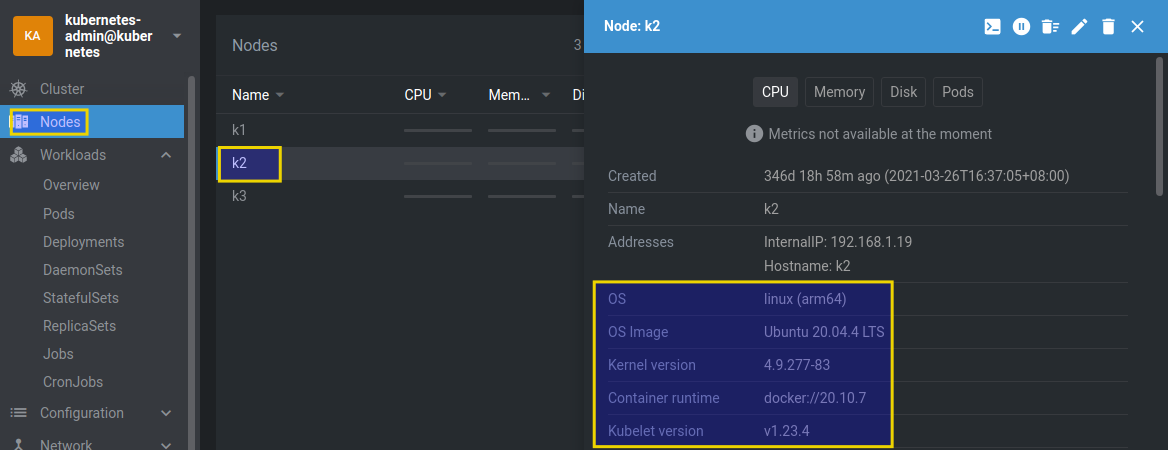
We'd first install and configure Trident CSI. Once Trident CSI is in place we need to create a Storage Class (SC) - or a volume "profile" - that makes use of a Trident back-end. The process of installing Trident CSI and creating a storage class part is similar to deploying and configuring Trident Docker plugin. In this example below Trident CSI uses ext4 filesystem (with Trident Docker plugin earlier we specified to use XFS).
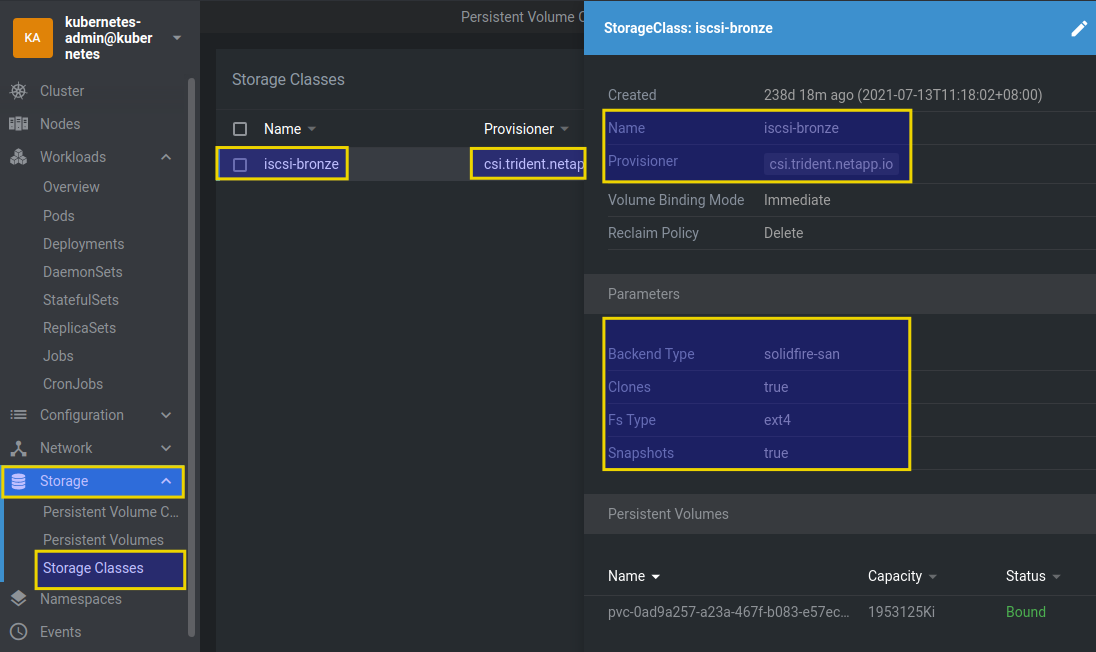
Various Storage Class examples for ONTAP and SolidFire can be found in the Trident CSI documentation.
With that ready, we can install Elasticsearch using one of the official Elastic Helm charts. Pick one you like and check its settings.
For this cluster the only difference from default Elastic Helm chart settings was storageClassName name needed to request a Trident CSI backed storage class. On this cluster that is "iscsi-bronze".
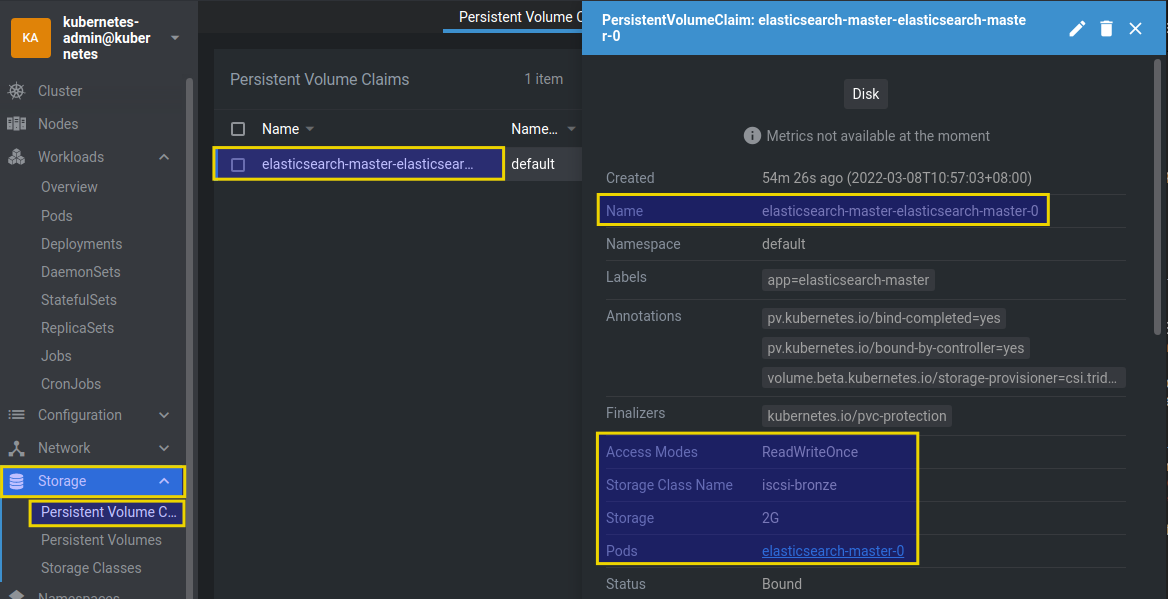
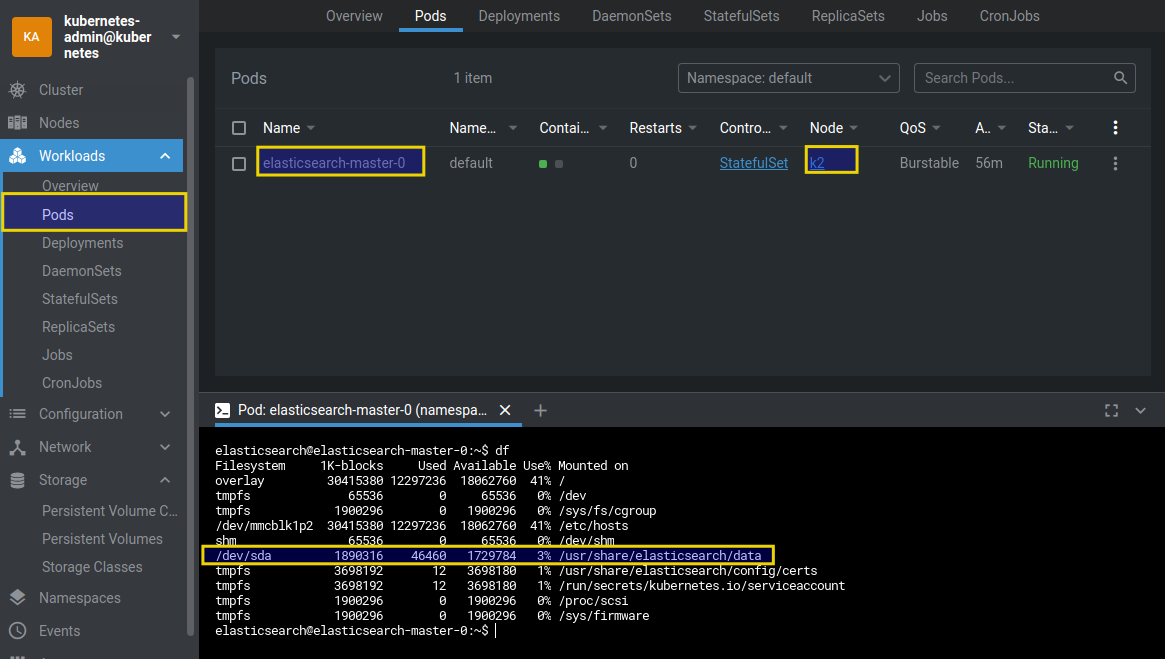
I used Helm to deploy this chart, and Kubernetes deployed a Stateful Set with one Elasticsearch 8 pod onto the second node ("k2") of this cluster. (Normally, we'd use a non-default namespace).
Container shell at the bottom shows a PV mounted to /usr/share/elasticsearch/data.
The Storage UI on the back-end should show the same PV.
$ kubectl get pvc
NAME                                          STATUS   VOLUME                                     CAPACITY    ACCESS MODES   STORAGECLASS   AGE
elasticsearch-master-elasticsearch-master-0   Bound    pvc-0ad9a257-a23a-467f-b083-e57ece06b1bc   1953125Ki   RWO            iscsi-bronze   89m

$ kubectl get pv
NAME                                       CAPACITY    ACCESS MODES   RECLAIM POLICY   STATUS   CLAIM                                                 STORAGECLASS   REASON   AGE
pvc-0ad9a257-a23a-467f-b083-e57ece06b1bc   1953125Ki   RWO            Delete           Bound    default/elasticsearch-master-elasticsearch-master-0   iscsi-bronze            89m
In the SolidFire Web UI, the name matches. On the right-hand side we can see that Storage Class used for this volume had non-default QoS settings. These settings come from Trident back-end configuration file used when we installed Trident (refer to the Trident docs for back-end settings and parameters).
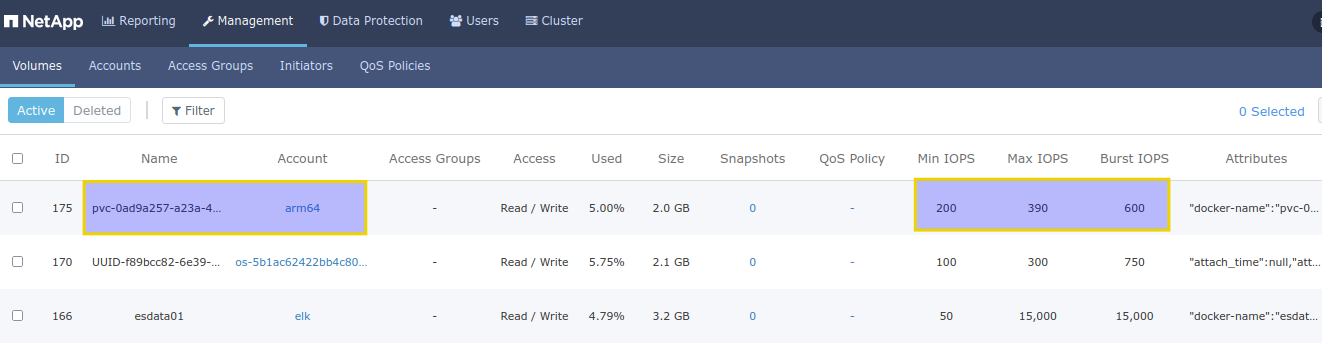
The only change from the official Helm chart template values was a custom Storage Class, in this case "iscsi-bronze" (shown three screenshots ago) at the bottom of the Help values file:
volumeClaimTemplate:
  accessModes: [ "ReadWriteOnce" ]
  storageClassName: "iscsi-bronze"
  resources:
    requests:
      storage: 2Gi
Appendix B has a sample values file for Cinder CSI which also has the same change made for Cinder CSI using its own SC name.
One thing I want to mention is Elastic Helm charts allow the use of unused existing volume claims (PVC's) which could be pre-created for Helm using simple PVC YAML templates. This could also be useful if you wanted to create volumes with different settings, which would not be possible if we were to use one storage class which would result in the same back-end and same Storage Class for all volumes.
Here's how to pre-create a PVC for a specific Storage Class (here "iscsi-bronze"). It's like a Kubernetes version of "docker volume create -o Type=Silver" for solidfire-san back end with Trident Docker volume plugin:
$ kubectl get sc
NAME           PROVISIONER             RECLAIMPOLICY   VOLUMEBINDINGMODE   ALLOWVOLUMEEXPANSION   AGE
iscsi-bronze   csi.trident.netapp.io   Delete          Immediate           false                  237d

$ cat pvc-esdata01.yaml
---
kind: PersistentVolumeClaim
apiVersion: v1
metadata:
  name: esdata01
  namespace: default
spec:
  accessModes:
    - ReadWriteOnce
  resources:
    requests:
      storage: 1Gi
  storageClassName: iscsi-bronze

$ kubectl apply -f pvc-esdata01.yaml
persistentvolumeclaim/esdata01 created

$ kubectl get pvc
NAME       STATUS   VOLUME                                     CAPACITY   ACCESS MODES   STORAGECLASS   AGE
esdata01   Bound    pvc-7759cb6a-9884-45f0-bc51-ee589bda8c94   1Gi        RWO            iscsi-bronze   3s
That PVC name (esdata01) could then be specified in your Helm chart. Of course, you'd need several PVs for a larger Elasticsearch cluster. And we'd likely use some other namespace (not "default").
Because Helm charts differ from source to source and change over time, it's recommended to use official Helm charts provided by Elastic in order to have a supported environment and eliminate problems with maintenance and upgrades.
Cinder CSI on Openstack VM
The cluster is also vanilla Kubernetes.io installed with kubeadm and uses Cinder CSI to provision storage on Openstack which in turn consumes storage via Openstack Cinder driver of which I have two - one LVM (for local storage in Nova compute instances aka K8s workers) and another SolidFire Cinder driver configured to use external storage - SolidFire iSCSI. If you are interested in Cinder CSI, see this post where I explain
- how Cinder CSI differs from Trident CSI (Part 1),
- how to configure Cinder QoS (Part 1) and Cinder CSI Service Class (Part 2), and
- discuss supportability of Cinder CSI
Some details about this environment:
- Debian 10 x86_64
- Kubernetes 1.23.4
- Cinder CSI driver 1.3.9
- Storage Class tied to Cinder Volume Type in Openstack cluster
- Helm v3.8.0
- Official Elastic Helm charts and used the minikube example
- Volumes-related variables (see Appendix B for values.yaml) edited to use Cinder CSI SC for SolidFire
Helm chart installation was smooth, following the exact same process as with Trident CSI (and using values.yaml from Appendix B).
$ make install
helm upgrade --wait --timeout=1200s --install --values values.yaml helm-es-minikube ../../
Release "helm-es-minikube" has been upgraded. Happy Helming!
NAME: helm-es-minikube
LAST DEPLOYED: Mon Mar  7 17:45:49 2022
NAMESPACE: default
STATUS: deployed
REVISION: 3
Moments later Cinder CSI created a PV on Cinder SolidFire back-end:
$ kubectl get pvc
NAME                                          STATUS   VOLUME                                     CAPACITY   ACCESS MODES   STORAGECLASS                    AGE
elasticsearch-master-elasticsearch-master-0   Bound    pvc-7e42dbfe-df6d-4272-a950-7a96a3e23955   2Gi        RWO            csi-sc-cinderplugin-solidfire   87m
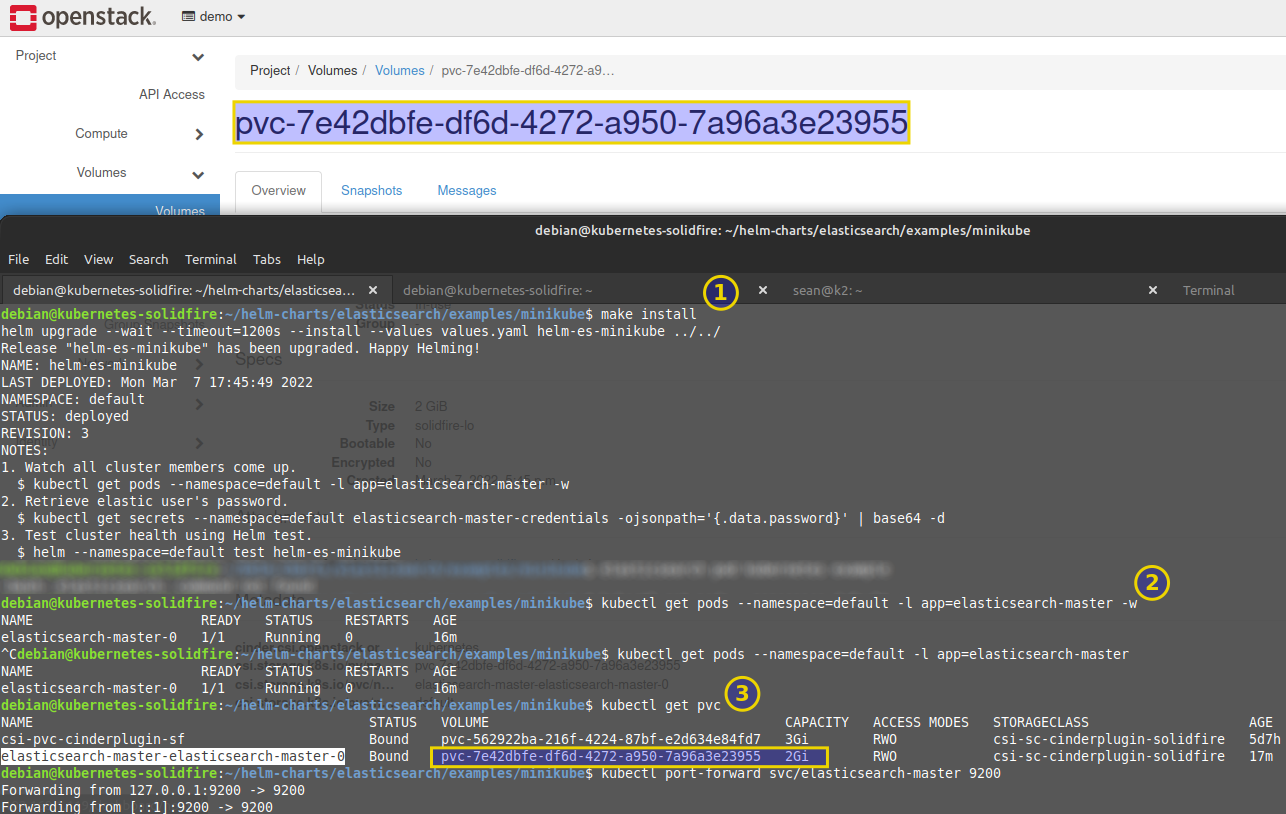
That was step (1) in screenshot below (open it in new tab for better view). In step (2) I confirmed service was up and in step (3) I checked if PV was created with the SC that uses SolidFire Cinder driver. In the background you can see the Cinder volume in Openstack corresponds to the Kubernetes PVC name.
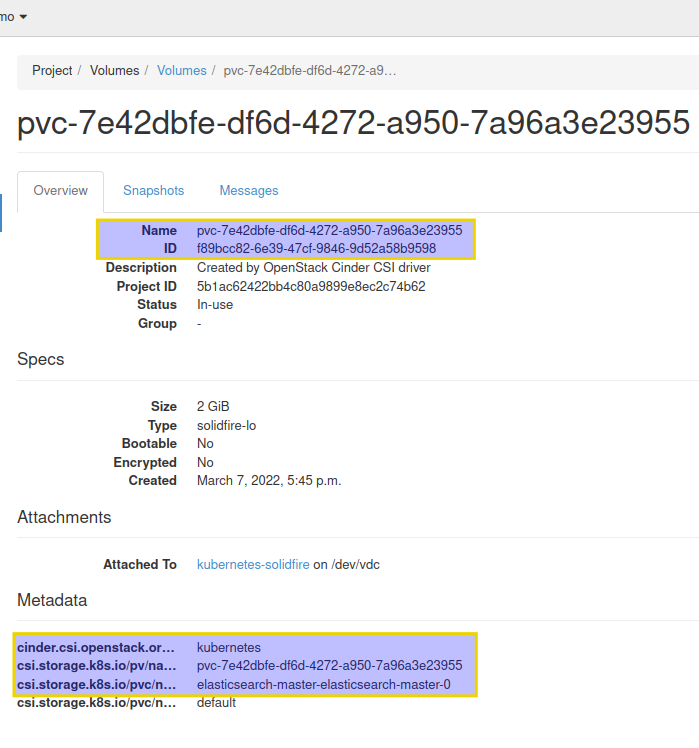
In Openstack dashboard we can find the mapping between Cinder Volume Name and Cinder Volume ID. Further below we see Kuberntes metadata related to this volume.
Cinder Volume ID f89bcc82-6e39-47cf-9846-9d52a58b959 maps to SolidFire Volume Name UUID-f89bcc82-6e39-47cf-9846-9d52a58b959:
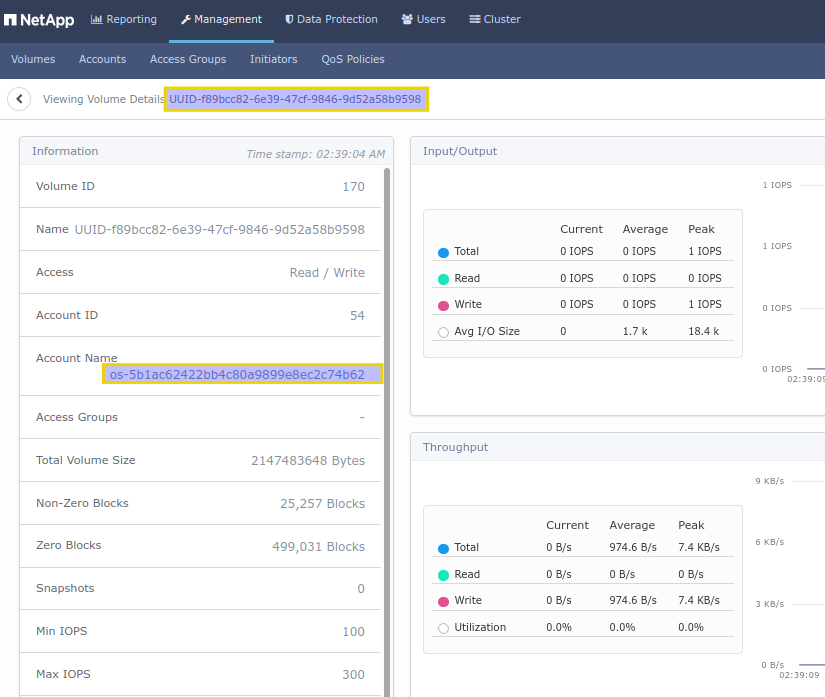
Unlike with Docker-Compose, storage account name is auto-generated as well as is based on Openstack Cinder settings (I configured Cinder to use a prefix ("os"), while Openstack appended Project ID).
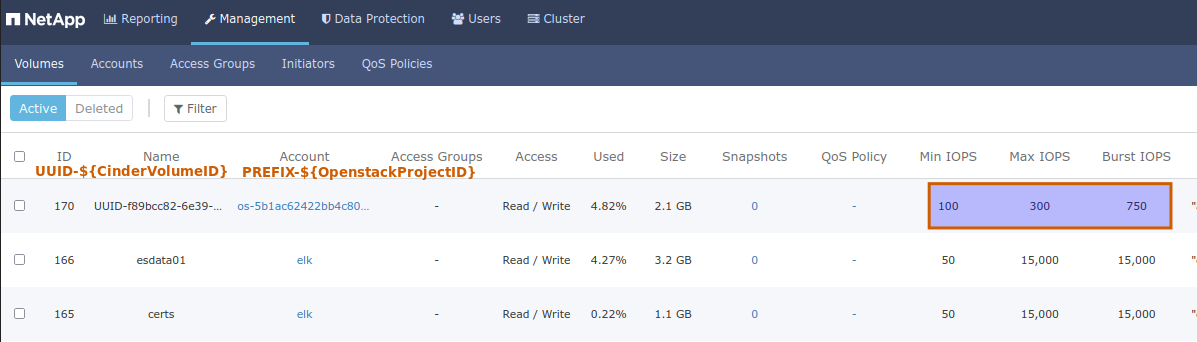
Notice the rectangle on the right-hand side contains "unusual" QoS settings (Min 100/Max 300/Burst 750). I set those in Openstack's Cinder Volume Type which was used as the base for Cinder CSI in Kubernetes. This is similar to back-end specification in Trident CSI demonstrated earlier. (Recall that we didn't specify storage QoS settings in Trident Docker plugin in order to keep it simple.)
Other CSI resources for NetApp storage
There are many Trident CSI demos out there, for both ONTAP and SolidFire. One SolidFire-related demo with Rancher (RKE) can be found here.
Cloud Volumes ONTAP has a Web management UI (Cloud Manager) with an integrated installer for Trident, so if you haven't used ONTAP, doing a test in the cloud may be easier if you don't have anyone to help you with ONTAP.
Demos
- Elasticsearch 8 in Docker containers with Docker Trident plugin - 2m57s
- Elasticsearch 8 on Kubernetes with Trident CSI (by NetApp) and Cinder CSI (by Openstack) - 3m46s
Appendix A: Docker Compose setup with Trident Docker plugin
- Create Trident volumes (in this demo the Kibana volume was left out to be created on-demand locally for the sake of a demonstration, but you can change the configuration if you want all volumes on a Trident back-end). Both all-flash ONTAP and SolidFire volumes are thin-provisioned, so having a 1Gi large certs volume won't result in wasted capacity. Syntax for QoS policies and other settings slightly differs between SolidFire and ONTAP, so that's not addressed in these examples to make these examples generic.
$ sudo docker volume create -d trident --name certs --opt size=1Gi --opt fileSystemType=xfs
$ sudo docker volume create -d trident --name esdata01 --opt size=5Gi --opt fileSystemType=xfs
-
Create
.envfile as per the Elasticsearch example and modify as you wish -
Run (sudo)
docker-compose upwith.envand docker-compose.yml (below) in the same directory:
version: "2.2"

services:
  setup:
    image: docker.elastic.co/elasticsearch/elasticsearch:${STACK_VERSION}
    volumes:
      - certs:/usr/share/elasticsearch/config/certs
    user: "0"
    command: >
      bash -c '
        if [ x${ELASTIC_PASSWORD} == x ]; then
          echo "Set the ELASTIC_PASSWORD environment variable in the .env file";
          exit 1;
        elif [ x${KIBANA_PASSWORD} == x ]; then
          echo "Set the KIBANA_PASSWORD environment variable in the .env file";
          exit 1;
        fi;
        if [ ! -f certs/ca.zip ]; then
          echo "Creating CA";
          bin/elasticsearch-certutil ca --silent --pem -out config/certs/ca.zip;
          unzip config/certs/ca.zip -d config/certs;
        fi;
        if [ ! -f certs/certs.zip ]; then
          echo "Creating certs";
          echo -ne \
          "instances:\n"\
          "  - name: es01\n"\
          "    dns:\n"\
          "      - es01\n"\
          "      - localhost\n"\
          "    ip:\n"\
          "      - 127.0.0.1\n"\
          > config/certs/instances.yml;
          bin/elasticsearch-certutil cert --silent --pem -out config/certs/certs.zip --in config/certs/instances.yml --ca-cert config/certs/ca/ca.crt --ca-key config/certs/ca/ca.key;
          unzip config/certs/certs.zip -d config/certs;
        fi;
        echo "Setting file permissions"
        chown -R root:root config/certs;
        find . -type d -exec chmod 750 \{\} \;;
        find . -type f -exec chmod 640 \{\} \;;
        until curl -s --cacert config/certs/ca/ca.crt https://es01:9200 | grep -q "missing authentication credentials"; do sleep 30; done;
        echo "Setting kibana_system password";
        until curl -s -X POST --cacert config/certs/ca/ca.crt -u elastic:${ELASTIC_PASSWORD} -H "Content-Type: application/json" https://es01:9200/_security/user/kibana_system/_password -d "{\"password\":\"${KIBANA_PASSWORD}\"}" | grep -q "^{}"; do sleep 10; done;
        echo "All done!";
      '
    healthcheck:
      test: ["CMD-SHELL", "[ -f config/certs/es01/es01.crt ]"]
      interval: 1s
      timeout: 5s
      retries: 120

  es01:
    depends_on:
      setup:
        condition: service_healthy
    image: docker.elastic.co/elasticsearch/elasticsearch:${STACK_VERSION}
    volumes:
      - certs:/usr/share/elasticsearch/config/certs
      - esdata01:/usr/share/elasticsearch/data
    ports:
      - ${ES_PORT}:9200
    environment:
      - node.name=es01
      - cluster.name=${CLUSTER_NAME}
      - cluster.initial_master_nodes=es01
      - ELASTIC_PASSWORD=${ELASTIC_PASSWORD}
      - bootstrap.memory_lock=true
      - xpack.security.enabled=true
      - xpack.security.http.ssl.enabled=true
      - xpack.security.http.ssl.key=certs/es01/es01.key
      - xpack.security.http.ssl.certificate=certs/es01/es01.crt
      - xpack.security.http.ssl.certificate_authorities=certs/ca/ca.crt
      - xpack.security.http.ssl.verification_mode=certificate
      - xpack.security.transport.ssl.enabled=true
      - xpack.security.transport.ssl.key=certs/es01/es01.key
      - xpack.security.transport.ssl.certificate=certs/es01/es01.crt
      - xpack.security.transport.ssl.certificate_authorities=certs/ca/ca.crt
      - xpack.security.transport.ssl.verification_mode=certificate
      - xpack.license.self_generated.type=${LICENSE}
    mem_limit: ${MEM_LIMIT}
    ulimits:
      memlock:
        soft: -1
        hard: -1
    healthcheck:
      test:
        [
          "CMD-SHELL",
          "curl -s --cacert config/certs/ca/ca.crt https://localhost:9200 | grep -q 'missing authentication credentials'",
        ]
      interval: 10s
      timeout: 10s
      retries: 120

  kibana:
    depends_on:
      es01:
        condition: service_healthy
    image: docker.elastic.co/kibana/kibana:${STACK_VERSION}
    volumes:
      - certs:/usr/share/kibana/config/certs
      - kibanadata:/usr/share/kibana/data
    ports:
      - ${KIBANA_PORT}:5601
    environment:
      - SERVERNAME=kibana
      - ELASTICSEARCH_HOSTS=https://es01:9200
      - ELASTICSEARCH_USERNAME=kibana_system
      - ELASTICSEARCH_PASSWORD=${KIBANA_PASSWORD}
      - ELASTICSEARCH_SSL_CERTIFICATEAUTHORITIES=config/certs/ca/ca.crt
    mem_limit: ${MEM_LIMIT}
    healthcheck:
      test:
        [
          "CMD-SHELL",
          "curl -s -I http://localhost:5601 | grep -q 'HTTP/1.1 302 Found'",
        ]
      interval: 10s
      timeout: 10s
      retries: 120
volumes:
  certs:
    external: true
  esdata01:
    external: true
  kibanadata:
    driver: local
Appendix B: Kubernetes Helm Chart for Trident and Cinder CSI
- Unlike the Docker example from Appendix A, this particular example has no Kibana - it's just Elasticsearch (I didn't have a lot of RAM) but Elastic has Helm charts for larger configurations
- To use this with Trident CSI, identify Trident Storage Class to be used used by Elasticsearch, and configure Helm storage class name accordingly. Then the chart should work with Trident CSI without other changes
- Cinder CSI Storage Class configured to use SolidFire Cinder driver was named "csi-sc-cinderplugin-solidfire":
$ kubectl get sc
NAME                            PROVISIONER                RECLAIMPOLICY   VOLUMEBINDINGMODE   ALLOWVOLUMEEXPANSION   AGE
csi-sc-cinderplugin             cinder.csi.openstack.org   Delete          Immediate           false                  6d
csi-sc-cinderplugin-solidfire   cinder.csi.openstack.org   Delete          Immediate           false                  5d13h
- values.yaml from official Elasticsearch Helm chart for minikube modified for Cinder CSI Storage Class as configured above:
---
# Permit co-located instances for solitary minikube virtual machines.
antiAffinity: "soft"

# Shrink default JVM heap.
esJavaOpts: "-Xmx128m -Xms128m"

replicas: 1
minimumMasterNodes: 1

# Allocate smaller chunks of memory per pod.
resources:
  requests:
    cpu: "100m"
    memory: "512M"
  limits:
    cpu: "1000m"
    memory: "512M"

image: "docker.elastic.co/elasticsearch/elasticsearch"
imageTag: "8.0.0-SNAPSHOT"
imagePullPolicy: "IfNotPresent"

protocol: https
httpPort: 9200
transportPort: 9300

# Request persistent volumes of appropriate storage class.
volumeClaimTemplate:
  accessModes: [ "ReadWriteOnce" ]
  storageClassName: "csi-sc-cinderplugin-solidfire"
  resources:
    requests:
      storage: 2G