Elasticsearch on NetApp HCI H615C with EF-Series EF280
- Summary
- Configuration
- Workload description
- Performance-related observations
- Management
- Advantage of disaggregated HCI
Summary
In this post I laid out my arguments on why shared core HCI, although it can run structured log management applications, is inherently unsuitable for anything but small scale deployments of such workloads.
Shared core HCI (VxRail, Nutanix) and general purpose DAS servers ("white box" servers with internal storage) are require relatively more hardware, software and management effort. White box servers become cost effective at scale not commonly found in Enterprises, but disadvantages of shared core HCI grow with its footprint.
A short (1m26s) video with highlights: https://youtu.be/A3o_j9M1UsY
Test results
After that post I examined my preferred approach for medium-to-large deployments (NetApp HCI Compute with EF Series storage) using Elasticsearch and found that:
- Three-node Elasticsearch cluster running on a H615C server attached to EF280 array can easily bulk-load uncompressed JSON-formatted structured logs at approximately 80 MB/s (> 6 TB/day). This ingest speed was observed by monitoring NFS network throughput from NFS server where JSON log was ingested from.
- Testing was done without concurrent search workloads and performance monitoring (Elasticsearch cluster had only one workload), but EF280 was only moderately loaded and based on performance testing results with H615C and EF280 iSCSI we should be able to get approximately twice as much from this storage system (10-15 TB/day, perhaps)
- Data (index) was split in 9 shards and one replica (i.e. two copies) was created for additional data protection, as many users would do in production when Elasticsearch data is stored on protected storage. Due to sharding and replication, bulk loading at 80 MB/s resulted in approximately 1 GB/s throughput to back end storage (close to 100 MB/s was read from NFS server but the rest was Elasticsearch).
Configuration
- 1 x NetApp HCI H615C server (dual Xeon Gold 6242 with 512 GB RAM; HyperTheading is ON (64 CPU cores seen by ESXi 6.5U3)) running ESXi 6.5U3
- 1 x NetApp EF-Series EF280 array (24 SSDs in DDP (RAID 6-like array)) with FC interface
- Workload VMs
- 1 x NFS VM with > 100 GB of uncompressed JSON data to ingress
- 1 x Elasticsearch client VM reading JSON data and performing bulk upload to Elasticsearch cluster VMs
- 3 x Elasticsearch VMs (index with 9 shards and 1 replica (i.e. two copies))
Elasticsearch data protection with EF-Series
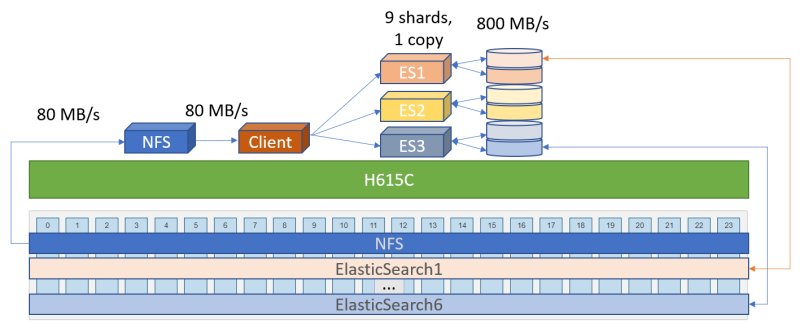
When a group of physical disks in an E/EF Series array is protected with DDP, data is striped across all pooled disks, allowing for a high usable-to-raw ratio, easy expansion and quick recovery from disk failures. Image below attempts to show how data in two STRIPE's, one blueish and another redish, get spread across different, but not necessarily across all, disks in the pool (which a RAID6 schema would do, and when 24 disks-wide it would randomize sequential writes). You can find more about DDP in NetApp TR-4652.

Elastic has a very nice post on storage options for Elasticsearch. While EF-Series supports DDP as well as different RAID levels, we used DDP which isn't explicitly covered in the Elastic blog post, so I'll only explain how it avoids the disadvantages ("cons") of RAID 6 from that post:
- Small to medium capacity loss (vs. RAID 0): the price of data protection is still to be paid, but DDP pays a smaller price than RAID 6; instead of paying the overhead of 2 disks over 10 (8+2 or 8D2P RAID 6), we put aside two disks worth of capacity from a pool of 24
- Potentially long recovery: when a disk in a 8+2 RAID 6 array fails, 9 remaining disks rebuild lost data to a hot spare. In our case, 23 disks join DDP data reconstruction ("rebuild" in RAID speak)
- During a recovery the array's performance is reduced: that's always the case, but DDP deals with this much better. These last two points unfortunately require a longer explanation. TR-4652 has the details, but for those skimming this post, here's a comparison of DDP reconstruction vs to RAID 6 rebuild speed (I expect this would be for HDDs, not SSDs, but couldn't find that detail):
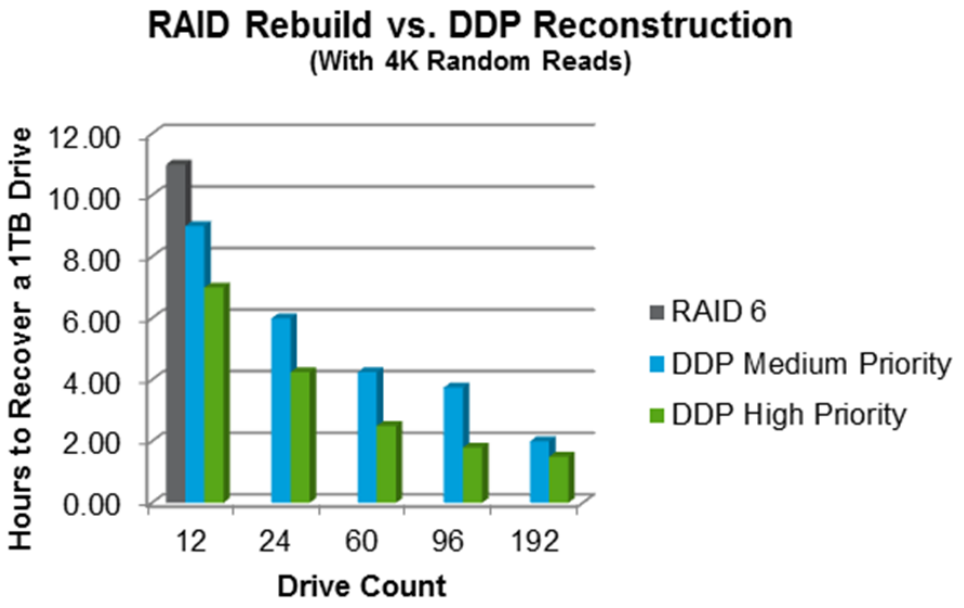
One key point - apart from the obvious - is that with 24 SSDs we'd reasonably use two 12-disk groups to protect data with RAID 6. Then, if a disk failed, it'd take some 10 hours (less with sequential workload, but the TR doesn't have that chart) to rebuild that group during which time both RAID 6 groups would perform slower. Why? Because you'd likely have similar workloads such as index replicas using these groups, and the healthy group couldn't run faster than the one that's rebuilding without impacting the health of Elasticsearch replicas.
Whereas with 24 disks in a DDP you'd lose 30% performance-wise (Figure 14 in the TR, for 24-disk DDP) compared to a 40% loss with a 12-disk RAID 6 - a 25% lower impact on the impacted group that likely translates to a relative 40% percent drop in performance across both RAID 6 groups. And you'd also recover 60% faster (10 vs 4 hours from the image above).
RAID 6 doesn't "suck" - sometimes it's more suitable than DDP (even for Elasticsearch), and you can use both RAID 6 and DDP in the same array - for example, if you had 72 or 180 disks, or used a hybrid E-Series array with HDDs and SSDs and wanted to optimize RAID/DDP levels for Elasticsearch workload patterns specific to your environment. But DDP is a nice overall choice for an array with 1-3 dozen SSDs. I hope this adds to that nice Elastic post comparing pro- and contra-arguments regarding different data protection techniques.
Elasticsearch cluster configuration:
- Each VM has 16 vCPUs (8 cores, 16 HT cores) and 32 GB RAM
- All VMs boot from same EF280 volume, VM OS swap is disabled
- Each Elasticsearch VM has 2 x 256 GB data volumes, each volume is on a separate Datastore (and each Datastore a separate EF280 volume)
- Each VM uses LVM to combine two data volumes into one striped volume group with logical volume mounted at
/elastic - One index configured with 9 shards and 1 replica (resulting in some 80 GB of "on-disk" data)
Because I had only one server at my disposal, all the VMs were running on it. All the EF280 volumes (one Datastore for NFS data, one for all VM OS images, and six for indice data belonging to three Elasticsearch VMs) were created within the same DDP pool.
Data set:
- SIEM logs in the JSON format
- Compressed log size (tar.gz): 4.5 GiB
- Uncompressed size (JSON): 110 GiB (60 million "documents")
- Elasticsearch on-disk data size (2x due to 1 replica copy):
- 9 shards (2 full copies with "1 replica" setting): 130 GB (67 GB data + 1 replica)
Workload description
- Elasticsearch client reads data off NFS server share and bulk-submits data to three VMs in Elasticsearch cluster using 8 workers. This results in approximately 80 MB/s read from NFS server
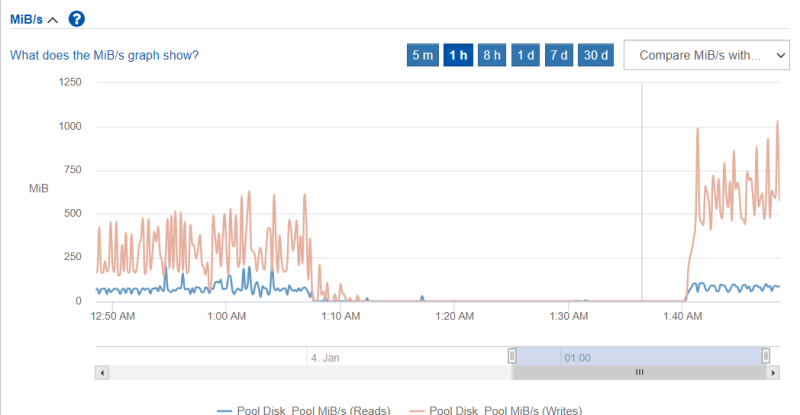
- Three VMs in Elasticsearch cluster index, shard, replicate, compress and write two copies of data to storage. Storage-wise this results in approximately 800 MB/s aggregate write throughput to six EF280 volumes (10x from uncompressed JSON). Another 100 MB/s (read) can be attributed to NFS server which was using another Datastore on the same EF280 to store JSON data. In another test, same data set with 0 copies (i.e. just the original) resulted in a 50% lower (up to 400 MB/s) aggregate write throughput.
Reads (NFS server serving JSON data) and writes (combined throughput from three Elasticsearch VMs indexing JSON data using 9 shards, 1 replica) as seen from EF280 Web UI at 01:40:
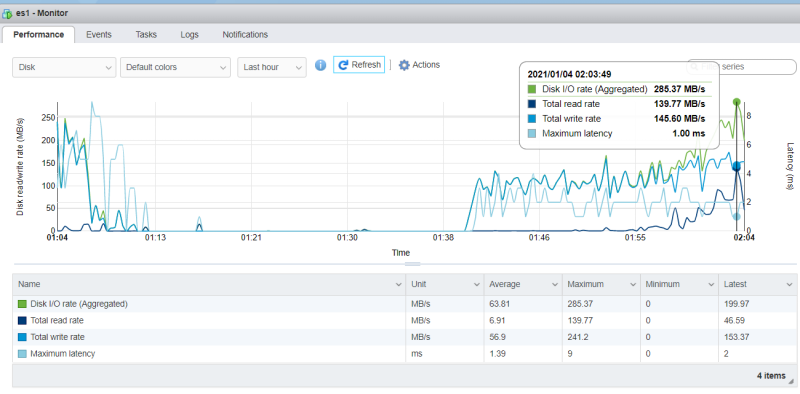
Disk throughput of individual Elasticsearch node (VM) as seen by ESXi where all three Elasticsearch VMs were running:
I didn't have time to optimize anything, and I didn't want to optimize anything because I just wanted to get a feel for this workload.
Performance-related observations
No particular bottleneck stood out. Some observations regarding subsystems or components are provided below.
Client
Client could probably submit data faster. At times individual client CPUs cores were spending 10% of their time waiting for NFS data (Linux VM running NFS server wasn't "slow", but wasn't perfectly responsive).
I had only one H615C server at my disposal, so configuring multiple (or bigger) bulk uploaders could impact Elasticsearch VMs and only increase wait time in client OS.
Bulk upload requests used HTTP but no compression (as bandwidth within ESXi was "free"), but bulk requests were submitted in batches of 5,000 so increasing that number is something that I wish I had time to explore (also having JSON files copied to local VMs and avoid the use of NFS).
Elastisearch VMs
Elasticsearch VMs' CPUs were quite busy (70-80% CPU utilization on H615C).
Even with default compression and the same workload directed at just one large Elasticsearch VM (32 vCPUs) all CPUs would get maxed out at only a small increase in performance (10-15%) in ingress rate
Almost no tuning was performed. Elasticsearch VMs were set to use MTU 9000, but network traffic was confined to one system (storage was unusually custom-configured with Fibre Channel) so network wasn't nowhere near saturated.
I did not test larger VM memory (64 GB, 128 GB) configurations because I did not want the benefit of OS cache, but users with heavy reporting or search activity would probably benefit from it. On this particular model (512 GB RAM), each of three VMs could be configured with up to 168 GB of fully reserved RAM, and after deducting 30 GB for JVM heap that'd be 138 GB for OS. Some H615C models have much more RAM, some as little as 384 GB.
Based on tests with singleton (with multiple shards and no replicas) and three (6 and 9 shards with varying (0 and 1) number of replicas) VM node Elasticsearch clusters, it appears that with this configuration H615C server CPUs would become a performance bottleneck before storage. Running complex tests we see that CPUs (in this case, 3 VMs with 16 vCPUs (total: 24 physical cores)) can be busy even when disk I/O is low.
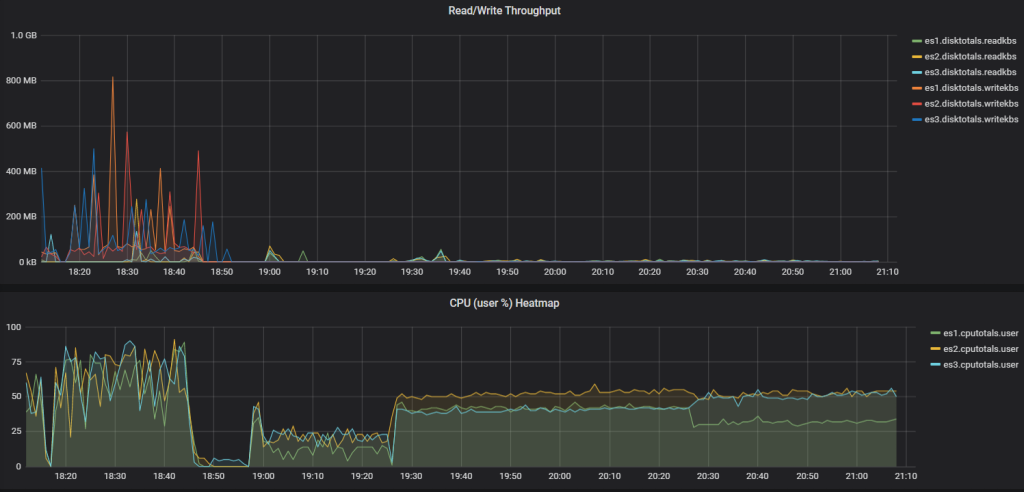
When you see that busy Elasticsearch goes through CPUs like a hot knife through butter even when disk activity is small, you probably realize that shared core HCI platforms like Nutanix or VxRail, where every CPU comes bundled with a thick software stack and a bunch of SSDs, may not be the best way to run mid-sized and especially large Elasticsearch clusters in Private Cloud.
Network
Network traffic on Elasticsearch VMs (used for ingress and node-to-node replication) was less than 1 Gbps (< 100 MB/s).
EF280 storage performance
Write I/O workload to EF280 peaked at close to 1 GB/s, result of several thousands IOPS (average I/O request size > few hundred KB).
HCI H615C vs H410C, Bare Metal vs VMs
The H410C models have more bandwidth, but for this workload CPU is the limiting factor, so the H615C looks like the right choice.
If you were to run particularly large Elasticsearch nodes, or didn't need the manageability Hybrid Cloud Control (ESXi server deployment, ESXi monitoring, firmware and BIOS upgrades), you could run those Elasticsearch nodes on bare metal, but you'd also lose access to VMware HA which makes it possible to failover VMs (in the case of a server failure) and avoid automated recovery of replica data by Elasticsearch.
I did not have enough time to run Elasticsearch in containers (whether on bare metal or in VMs), but I also had a non-retail storage configuration (FC HBAs) which diminished potential value of such testing.
Elasticsearch-focused articles often talk about RAM to Disk ratios and such. A lot of that doesn't apply here, because they assume servers with only internal storage. You do not have to buy low-memory servers for your slow tier - just create smaller VMs and attach them to E-Series with HDDs! Or attach the same - fastest - ESXi hosts to both EF- (SSD) and E-Series arrays (or buy hybrid E-Series with SSD and HDD disk groups).
NetApp HCI server-to-EF-Series array ratio
It appears that it would take at least three H615C to saturate one EF280 without changing other variables, while for larger models (EF300, EF570, EF600) we could have half a dozen H615C servers, if not more, per each EF-Series array.
For comparison, just two mid-sized shared core HCI nodes usually have the same number of SSDs as the EF280 system used to run these tests.
Management
OS (VM) deployment
Elasticsearch VMs were deployed from OS (VM) templates in minutes. OS updates can be done by performing targeted package updates to live VMs, by refreshing VM templates and performing rolling OS upgrades, or some other way.
Elasticsearch could also be deployed in containers. NetApp HCI comes with Rancher, but other Kubernetes solutions are available as well and Kubernetes can use NetApp Trident to automatically provision iSCSI storage from both NetApp HCI and EF-Series array.
Elasticsearch deployment
Initially I configured Elasticsearch cluster with Ansible and that worked fine, but the module documentation wasn't detailed enough so I later used simple shell scripts to deploy Elastisearch configuration files to VMs (basically just upload customized elasticsearch.yaml and change Java heap (Xmx, Xms) settings in jvm.options).
Those used to running Elasticsearch in Kubernetes or Docker would probably prefer to use Rancher on NetApp HCI with NetApp Trident, and just add EF Series back-end to Trident.
Storage management
Because our EF280 was configured in a very generic way (one large DDP pool), we can carve new volumes and present them to vSphere as long as there is available capacity in the pool. EF280 volumes are automatically balanced across storage controllers.
We could use a different approach (e.g. different, standard RAID groups, or a mix of DDP and standard RAID groups) if we wanted to, although I wouldn't do that for small and medium deployments because it complicates things: if you are very familiar with your Elasticsearch workloads and data management requirements, you can do better than DDP (given enough disks), but if you have just 24 SSDs, and don't intimately know your Elasticsearch, it may be better to simply create one DDP pool and move on.
We add capacity to Elasticsearch VMs by adding new VMware disks (VMDKs) and growing existing volume groups. Note that our Elasticsearch uses RAID 0 (striped) Logical Volumes (that live on two physical VMDKs on two VMware Datastores), so they should be grown by adding the same number of disks every time. But other approaches - such as concatenated - are possible as well.
Some environments - depending on workload and preferences - would choose a "building block" approach (add a VM with two or four disks on the same number of Datastores), which is easy to automate end-to-end (from EF-Series to VMs to Elasticsearch), but creates more cross-node network traffic than "fat" nodes.
Elasticsearch can also spread data across multiple data paths and migrate index data. It is also possible to have asymmetric Elasticsearch nodes (or node groups), so even if you have to change, move and reorganize storage layout, with EF Series that is relatively easier because:
- New VMs with new disks can replace old VMs by copying data within one HCI compute node (reduced East-West traffic)
- EF-Series volume clones don't require physical migration of data to be presented to any VM in same vSphere cluster, regardless of volume or data size
- Apart from iSCSI client traffic from HCI Compute to EF Series array(s), I/O is confined to EF-Series, so the impact of I/O peaks is not amplified across compute nodes (which is the case with shared core HCI)
- With hybrid E-Series arrays, "tiering" from SSD to HDD can be confined to individual HCI server and E-Series array, so a properly designed cluster can move 10-20 TB of data from SSD to HDD tier with little impact on the rest of the cluster and network.
- Different Elasticsearch nodes (ESXi servers) attached to different disk tiers on different E/EF-Series arrays would create East-West traffic, and that's fine if the benefits of doing that justify it (example: fast replica in Rack A used for loading, indexing & searching, "slow" replica in Rack B just stores replica data)
In terms of backup and data protection, common Elasticsearch patterns apply: you could have a replica of your data at another site, in another rack, or EF-Series array.
Monitoring
In addition to the usual (SNMP and maybe ActiveIQ, which I didn't examine as my systems weren't connected to ActiveIQ), E/EF-Series has a free Grafana/InfluxDB monitoring project here. I didn't have time to figure it out, so I simply did this:
- Install Docker-CE on a "management workstation"
- Download HCI Collector, run setup script and randomly configure SolidFire and vCenter settings (as I didn't have either in this environment)
- Delete VMware and SolidFire Collector containers from
docker-compose.yaml, rundocker-compose up -d - Install
collectlto Elasticsearch VMs, start collectl and send output to Graphite DB of HCI Collector IP (my management workstation)
That gave me a way to get basic VM information (CPU, Disk, Network) and in less than 30 minutes I had a simple dashboard for OS-level monitoring of Elasticsearch cluster nodes.
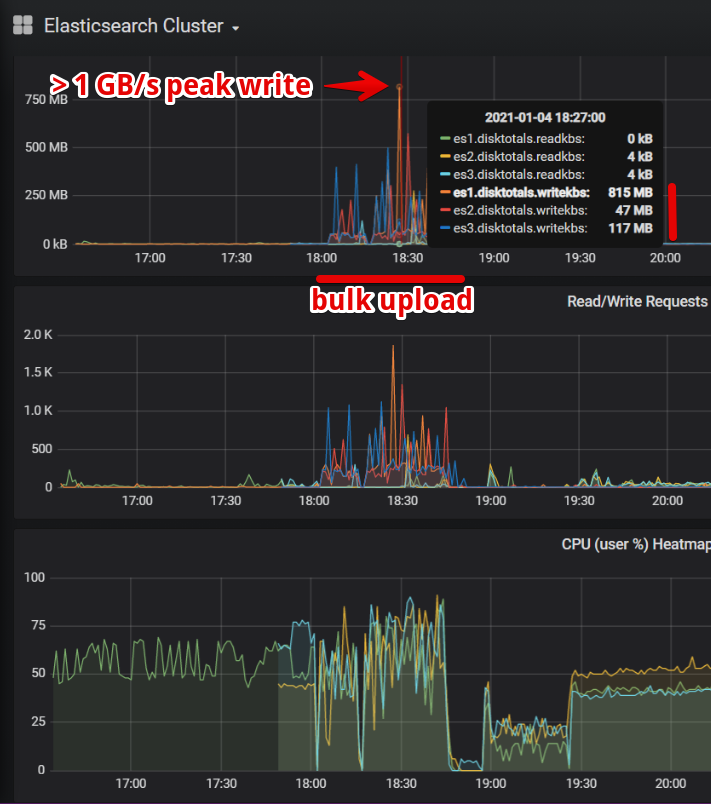
As mentioned earlier 80 MB/s uncompressed JSON upload to this three node cluster didn't generate a lot of network traffic, even with a replica copy my "in" traffic was < 100 MB/s per node, and "out" half of that. Of course, this isn't all there is to Elasticsearch network traffic (there's also index merging, tiering, cross-node group replication, etc), but considering how relatively small it was compared to disk I/O, it made it hard for me to imagine that someone could run out of network (2 x 25 G) before CPU resources even if storage I/O was to use iSCSI rather than FC SAN (our unusual testbed).
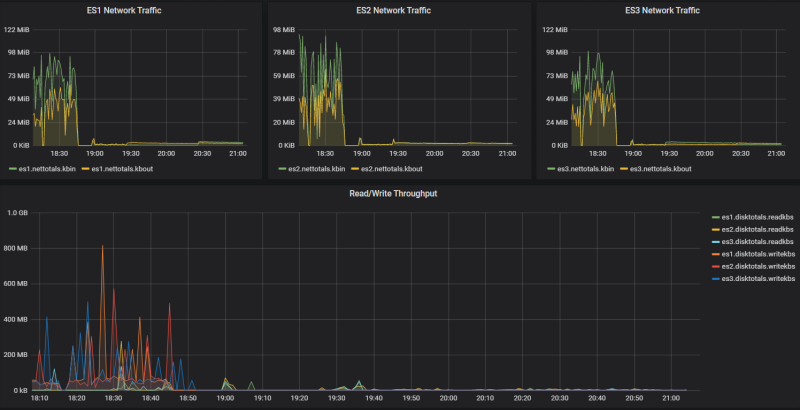
In vSphere environments HCI Collector could get ESXi and VM performance from vCenter, but we didn't have a vCenter. HCI Collector can also monitor Bare Metal H615C servers (see the HCICollector (v0.7 branch) for additional details) via IPMI or SNMP, if you decide to take that path (Bare Metal).
Kibana can of course monitor Elasticsearch nodes, service and index metrics, but it's not supposed to be used on Elasticsearch cluster which is being benchmarked, so while I used it a little to correlate its data with my DIY approach, I refrained from running it all the time.
Advantage of disaggregated HCI
Even with EF-Series in the picture, NetApp HCI Compute nodes maintain access to HCI Storage (iSCSI) and can use it at the same time.
NetApp HCI (Compute & Storage ) is still deployed, scaled and upgraded the same way it's normally done (using NetApp Deployment Engine and NetApp Hybrid Cloud Control), which solves server, VI/K8s and storage management problems inherent to VI/K8s workloads. Even if your main workload is Elasticsearch you still need to store OS and services (infrastructure services, Kibana, etc.) on efficient storage meant to manage VMs and containers, and NetApp HCI Storage clusters start at just two nodes, which is just enough. Secondly, if you want to run Elastic stack in containers, you can do that in minutes with Rancher deployment wizard for NetApp HCI.
EF-Series storage attached to NetApp HCI cost-effectively addresses performance and storage management challenges different from those solved by HCI storage: you don't need to deduplicate or automate Elasticsearch storage. You need a fast storage system to quickly and cost-effectively ($/IOPS and $/MB/s) ingress, egress and protect many TBs of compressed data. EF-Series provides exactly that, while shared core HCI does not. Shared core HCI also forces you to over-provision compute resources and software licenses, which NetApp HCI with EF-Series can avoid.
In this way NetApp HCI Compute nodes serve as a Private Cloud deployment pattern for VMs or Containers used to run Elasticsearch as well as other virtualized workloads. This frees you from management and maintenance tasks common to regular servers, as well as hardware and license bloat associated with shared core HCI.
Attached to two iSCSI back-ends (NetApp HCI Storage and EF-Series), NetApp HCI Compute nodes give you the right mix of compute and storage for both light (VI/K8s) and heavy (Big Data, Analytics) workloads.