Data pipeline with BeeGFS FS Event Notifications and Versity S3 Gateway
Background
For the context, see "Improved pipelines with BeeGFS FS Event Notifications in v8" where I build on top of an earlier approach to scalable S3 anti-virus scanning from some time ago, and discover that BeeGFS file-system event notifications in version 8 are very fast, useful and convenient.
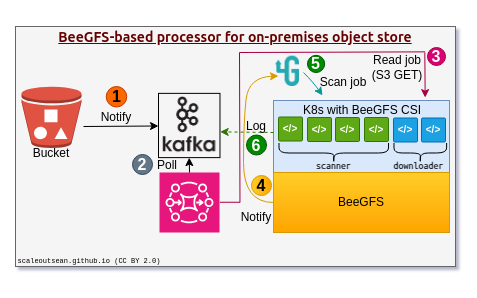
Where does BeeGFS come in play here? It is a parallel file-system, so scanning and/or downloading can be done from different BeeGFS nodes, and notifications from version 8 can be used for this.
Well, it has occurred to me that the Versity S3 Gateway can also run on BeeGFS. I blogged about it years ago.
And it has also occurred to me that, since it's an S3 gateway, as soon as S3 PUT requests complete and object content are flushed to BeeGFS file-system, I don't have to deal with Kafka or Web hooks and arrange for S3 downloads in order to scan those files.
As objects land on Versity S3 Gateway server in the form of S3 PUTs, BeeGFS file-system event notifications kick off automatically.
If you don't want a complex stack, it doesn't get simpler than this:
- Receive gRPC notifications and send AV scan jobs to a job scheduler. That's it!
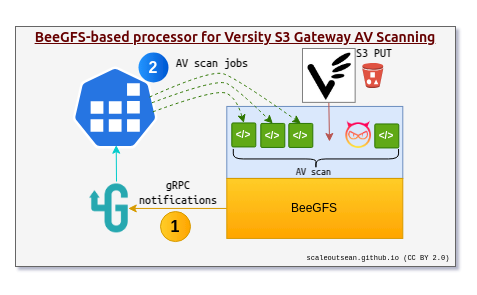
If you want to persist job queue, pick a scheduler that does it, if not, pick a simpler one. I used a memory-based outgoing queue in gRPC, but I could have used a kind that persists outgoing queue to disk.
You can make your stack more complex and add Kafka or NATS back into the picture, but I don't think it'd add much value.
Versity S3 Gateway supports Web hook notifications, NATS and Kafka so you could duplicate the complex design from the top with Versity S3 Gateway, too.
Why this is cool
There are some niche use cases I can think of (such as, S3 metadata-related scanning or when we only ever use S3 to create content) where scanning based on Versity Web hooks would be better, but relying on underlying BeeGFS notifications - although they're not super full-featured yet - gives you the following advantages:
- No need to download S3 objects to containers or VMs with AV software to scan uploaded content (may save a lot of time for large objects!)
- Scale-out scanning of Versity S3 Gateway uploads from any BeeGFS client that can access (ACLs, etc.) that file-system location
- Two-in-one event notifications for both file-system and S3 scanning (let's not forget - the reason we use S3 gateway and not an S3-only service (like MinIO) is that we probably upload data via both file and object services)
- Very simple stack, easy to understand, operate, maintain and monitor
- You can still use Versity event notifications for whatever other stuff you need
In the previous posts related to this topic I mentioned "decide & dispatch" location (e.g. maybe a messaging service or right there on the gRPC server, if it wouldn't add too much complexity to it), so regarding that - you could keep that decider logic for S3 on Versity.
Or you could take a step back and centralize logic and rules in a messaging service (step (3)) where both BeeGFS (file-system-only, via steps (1) and (2)) and Versity S3 Gateway (S3-only, via Web hooks) send their notifications.
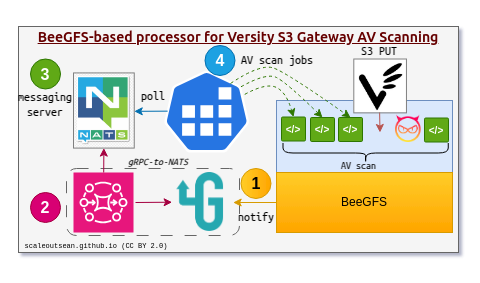
This has advantages and disadvantages, depending on the situation, but notice that even if Versity S3 Gateway sends Web-hook notifications to NATS, the advantages of being able to scan objects as files remains and step (4) can remain unchanged: it should be advantageous to scan S3 PUTs as file-system objects, even if we got notified about it by a Versity Web hook notification.
- Web hook: https://s3/bucket/obj.ect - when we are about AV-scan this, we know that object can be found at /mnt/beegfs/bucket/obj.ect and can "translate to POSIX path & scan" on file-system
- FS event: we'd get notified about LAST_WRITER_CLOSED on bucket/obj.ect and we'd prefix those with the BeeGFS mount point such as '/mnt/beegfs/'
Either way, regardless of where notifiations are coming from we can scan the file/object on BeeGFS - there's no need to "download" it.
We'd just need to be careful to avoid scanning the same file twice if both gRPC and S3 Web hook notifications are active.
We can't "exclude" certain file-system paths on BeeGFS gRPC client in 8.0.1, so we should build "drop duplicates" and similar rules in our job scheduler, for example, or drop bucket paths in Step (2) or (4) above.
A simplified depiction of a setup that uses both Versity S3 Gateway and BeeGFS gRPC notifications.
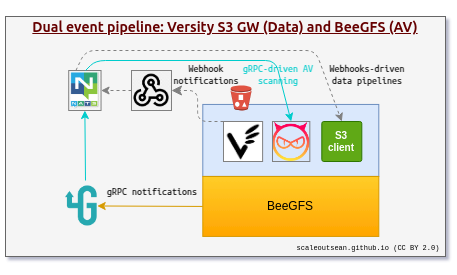
These event sources could also "cross-pollinate", so to speak, as we could (for example) use S3 web hooks to initiate non-AV on-file-system processing.
Or we could use BeeGFS gRPC notifications to kick off data pipelines processing on file-system level. Example:
- On new S3 PUT, we receive gRPC notification and update embeddings for the "object-file" in a vector DB
- We then "touch" the object over S3 (new tag:
embeddings=ok) - That triggers a new S3 Web hook notification
- Some Web hook event subscriber out there sees that vector DB has embeddings for latest version of the documents and selectively prunes outdated KV cache for an AI chat bot
Catches
I did a generic demo of the approach with BeeGFS and gRPC in the linked post, but I also did one with Versity S3 Gateway today.
I first blogged about the (not original) approach to AV scanning on premises in early 2024, but I kept this on my "to-do" list as the PoC I did in that post was extremely basic.
The recent ones were more real and I've discovered several unexpected things. I'm always happy to discover problems and ""gotchas".
With this stack, I've found two problems, neither of which is a show-stopper for most people.
The first was I had to use a non-BeeGFS volume (which can be a stand-alone E-Series LUN or a PVC on such LUN, for example) for Versity S3 metadata (so in effect Versity S3 Gateway container starts with 2 "volumes", one local directory (metadata) and one BeeGFS directory). What this means is that I can't scale out individual instances of Versity S3 Gateway on BeeGFS: if I did, each gateway's metadata could be different.
This isn't a big deal for most cases as each "bucket" on BeeGFS, as the smallest unit of metadata allocation, can't go beyond a few GB/s. But that is plenty for a bucket and would be limiting to very few users.
Another workaround - also not great, but may be acceptable, is to start several Versity S3 Gateway instances each on own sub-directory below the BeeGFS data path we want to "scale-out". Also, consider the "classic" approach where everything has to be downloaded from S3 to a file-system - that's far from "free" and scalable. If your "classic" external S3 object store ingests at 5GB/s, you'd' need the same throughput on your NAS or other storage used to download and AV-scan new objects from S3, so other ways wouldn't necessarily be easier or cheaper.
In fact, even without BeeGFS your Versity S3 Gateway's metadata would be single-instance only, unless you had a file-system that supported "shared metadata volumes" (I don't know of any, and "metadata volume" feature of Versity S3 Gateway is experimental in any case, so it's great enough that it works as-is at this time).
The second gotcha was I had to modify my gRPC server to drop BeeGFS events related to Versity's temporary files (used during S3 PUT and "housekeeping" Versity S3 Gateway operations). I modified my gRPC server to ignore events related to temporary files, and that fixed it.
File/object duality considerations
I've mentioned this in other posts, but I'll say it again because it's necessary.
The user needs to consider what to do with infected objects/files.
I've mentioned before: in "classic" (no file/object duality) scenarios some approaches include moving infected object to a quarantine, in others deleting it, and there's also a "temp bucket" approach in which objects first go to a temporary bucket and only get moved to the intended destination if they are clean.
I think the right way is to send AV scan results to a message store and let bucket owners figure it out. As long as they have access (and as owners, they should) to the bucket, they can wipe the objects or squirrel them away seconds later. There's no need for storage layer to get involved here.
But, if you do get involved, work on infected files through S3 gateway: that's where it came from, and that's how it should be (re)moved. Messing with objects from file-system side may be risky:
- Risky for S3 gateway cache and metadata (I'm not saying it is, but it could be)
- Risky for S3 users who may count on S3 web hooks to track what's going on with the object. It's nicer to tag the object with "
infected: true" than just yank it or "chown 0400" it from BeeGFS side.
Conclusion
Versity S3 Gateway on BeeGFS is a good stack for scanning incoming data for viruses and malware before you process it.
Unlike AV scanning with "external" S3 storage, any S3 PUT is a BeeGFS write which automatically drives gRPC notifications, eliminates at least one layer of complexity, eliminates the downloading of S3 data to a file-system for scanning, and allows scale-out in AV scanning.