Virtualized Splunk on NetApp HCI and EF Series iSCSI storage
- Things are getting interesting
- Does EF-Series for Splunk on NetApp HCI make sense
- How does it work
- How does that compare with other HCI
- How hard is it to manage NetApp HCI-attached E/EF-Series iSCSI arrays
- This comparison doesn't apply to my situation
- Conclusion
- Resources
Most of my work is NetApp HCI-related, but NetApp HCI also happens to be the "youngest" NetApp hardware platform so I haven't had many opportunities to engage in Splunk-related opportunities.
Another reason is that TR-4778 (NetApp HCI and Splunk Enterprise Solution) demonstrated that a minimal NetApp HCI cluster is sufficient for up to 300 GB/day, that medium-sized Splunk deployments can run on 6-8 node clusters (page 24), and explained how to leverage E-Series for cold data.
Where things still get challenging is large Splunk deployments and the use of tiering (Splunk SmartStore). I haven't had a chance to get involved in these yet but things may change in 2021.
Things are getting interesting
Since last month NetApp has released these two documents:
- NVA-1152-DESIGN, which shows that price/performance of E-Series and EF-Series can add value to many NetApp HCI deployments (perhaps not much to VDI, but a lot to many other workloads and use cases). Personally I've known this since NetApp HCI came out and I've designed several "NetApp HCI with E/EF-Series" solutions, but this combination didn't receive much attention before.
- TR-4869, which shows how Splunk SmartStore can take advantage of NetApp StorageGRID S3 object storage, which may be of interest to all large Splunk users who archive Splunk data on-premises
Does EF-Series for Splunk on NetApp HCI make sense
Those who have HCI - not just NetApp HCI - and know a little about EF-Series intuitively know why: because of its excellent price-performance. But don't all all-flash HCI products also deliver great performance? Not necessarily when it comes to Splunk and similar workloads.
With shared core HCI (same nodes provide compute and storage resources), if you need more storage for your Splunk Hot Tier, you need to add one or more powerful nodes with at least the right amount of both storage and compute (because shared core HCI nodes run Splunk indexers on "storage nodes"). Usually you can't size each (compute and storage) resource just right, so you end up over- or under-sizing one or the other (or both). Over-sizing is wasteful, while under-sizing creates risks and service quality issues, so most users pick the former and choose to over-size.
Secondly, distributed storage has many advantages, but those do not apply to all workloads. Distributed storage usually works well for virtualized or containerized workloads because it manages to get ahead due to its efficiency (deduplication, compression, thin provisioning), small-increment scale-out, as well as good manageability. But Splunk compresses its data and doesn't need much in terms of storage management, so why "manage" its storage on a shared core HCI platform that's bound to create waste or performance problems?
Splunk-on-NetApp HCI customers likely feel less pain than other HCI owners because they can minimize over-provisioning (when you need more compute resources, you can add only compute resources). Another factor that works in favor of NetApp HCI is its ability to provide storage QoS to individual volumes (VMware datastores or Virtual Volumes), so users don't have to create Splunk-only data and management islands, which is what other HCI vendors usually recommend.
Still, if you are designing a medium or large Splunk environment you might as well introduce EF-Series storage to your Splunk-on-NetApp HCI environment on Day One.
How does it work
NetApp HCI (Compute + Storage) with iSCSI-attached EF-Series isn't "HCI" - it's NetApp HCI attached to non-HCI storage (E/EF-Series).
If you're not familiar with NetApp storage products, E/EF series are "traditional" disk arrays focused on price/performance and very popular in AI, CCTV, HPC and similar workloads. E-Series are hybrid (SSD and HDD) while EF-Series are all-flash (SSD/NVMe).
Just like you can attach an ONTAP array to your NetApp HCI when it doesn't make sense to store VDI profiles or SMB shares on NetApp HCI Storage (for example, if you have 1,000 VDI users), you can attach an EF-Series array to your NetApp HCI when that makes sense from a Splunk perspective (for example, you build a Large or fast-growing Medium Splunk environment).
To attach NetApp HCI compute nodes to E/EF-Series we use iSCSI:
- Provision HCI compute & storage with NetApp Deployment Engine: 1 hour to deploy, 30 minutes to scale or update
- Include NVIDIA (Mellanox) SN2100 or SN2700 switches
- Keep infrastructure VMs and containers on NetApp HCI Compute and Storage, and deploy lighter, smaller and agile workloads on NetApp HCI Storage (which can also provide storage to Splunk search heads)
- Attach EF-Series iSCSI storage to NetApp HCI compute for heavy Splunk workloads: Splunk indexers, heavy forwarders, SC4S VMs, etc. You could also a hybrid E-Series systems for Hot/Cold Tiers or a backup target for HCI Storage
- If you plan to use Splunk SmartStore and want to use a hybrid E-Series array (SSDs for Hot Tier, HDD for Backup and Splunk SmartStore), you can start small with several StorageGRID VMs running on NetApp HCI Compute nodes, their Data on E-Series HDDs, and add StorageGRID appliances later, when you outgrow VM-based StorageGRID environment. If you want to start with a 300TB SmartStore Tier or bigger, get NetApp StorageGRID appliances on Day One
How does that compare with other HCI
I haven't done the math and I don't have first-hand experience with large Splunk deployments, but my guess for the smallest EF-Series iSCSI model, EF280 (see NVA-1152-DESIGN), would be:
- its cost is comparable to the cost of a compute/storage node from a Tier 1 HCI vendor (when non-Splunk software is included in the price)
- it gives you twice as much usable storage capacity (unlike with normal VI/K8s workloads, here we care only about usable capacity, because Splunk compresses its own data), and
- it gives you more performance
To be clear, I do not know how much Splunk performance one can get from a "mid-range" HCI node based on shared core approach. Sizing details, even when available, are based on the assumption that these nodes provide both compute and storage resources, so it's hard to say which limiting factor (CPU or storage resources) necessitates such sizing.
But we can at least compare the capacity. For example, a competitor's - let's call them Vendor X - mid-range HCI node comes with 13.5 TB of raw capacity. For Splunk they prefer to use RF2 (mirroring) data protection, which means that 13.5 TB raw becomes 6.75 TB usable. We know an EF280 with 24 800GB SSDs in a DDP (RAID 6-like) pool provides 13.6 TiB usable capacity. Some will say "but Vendor X can compress Splunk data and EF280 cannot". That is true, but:
- How much capacity can Splunk users save by compressing Splunk data on HCI nodes by Vendor X?
- How much does storage-level compression impact the performance of mid-range nodes by Vendor X?
If we don't have that information, why not assume no savings and/or a significant performance impact when compression is enabled? We do know that they don't recommend it for Splunk Hot Tier, so forget about it on the most expensive (NVMe) media.
Other EF-Series models (EF300, EF570) should give large customers even more value because they help you replace even more shared core HCI nodes, accompanying "infrastructure software" licenses, management and maintenance effort.
Can we get to the point and see those bonnie++ results
Yes and no. I can't give you the official NetApp performance results or sizing guidelines for NetApp HCI with EF-Series (only NetApp can and this isn't a NetApp blog), but I have anecdotal information based on having access to an idle lab environment during this holiday season (and yes, I did all the testing and wrote this post while on vacation).
- One VMware ESXi 6.5U3 on NetApp HCI H615C (dual Intel Gold 6242 (16 cores, 2.8 GHz), 512 GB RAM)
- One mid-sized Linux VM (8 vCPU)
- Four "workload" Datastores (mapped to four volumes on EF280)
- 4 instances of bonnie++, each exercising a 16 GB data set (this wasn't necessary VM-wise, but EF280 array controllers had to be maxed out too)
- One EF280 with 24 SSD disks with DDP configuration (RAID 6-like disk pool spread over 24 disks)
- Volumes presented to H615C via Fibre Channel (FC HBA was inserted for "protocol comparison testing" vs. iSCSI, and iSCSI wasn't connected at the time; see NVA-1152-DESIGN for iSCSI vs. FC performance comparison)
Random Seeks (per second) is the main performance indicator we're after (which is why I used only one VM, as I figured it shouldn't impact seek performance).
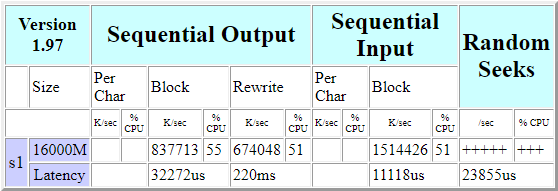
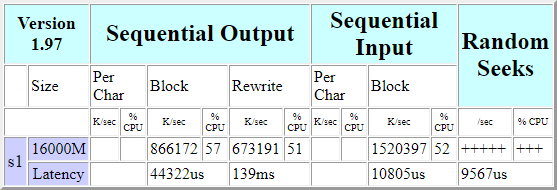
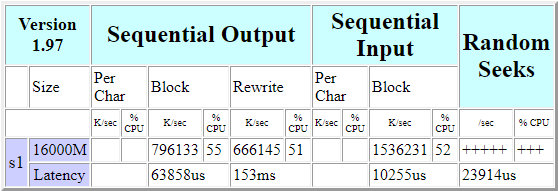
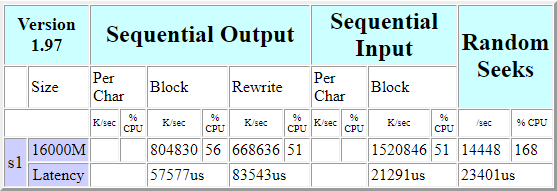
Why does only one run has a Random Seeks/sec result (run #4, 14,448/sec)? Let's RTFM, shall we?
"If a test completes in less than 500ms then the output will be displayed as "++++". This is because such a test result can't be calculated accurately due to rounding errors and I would rather display no result than a wrong result."
In other words: only the last of the four instances was slow enough.
Bonnie++ results with EF280 iSCSI should be similar. I remind of this again because these tests were done on a H615C system with FC HBA, which isn't a H615C configuration one can buy but that's how the remote hardware system was configured.
We should also consider this:
- The H615C and VMware weren't tuned (both host and ESXi were set to "Balanced" power utilization, for example)
- The filesystems (VMFS, but more importantly ext4 on top of it) were created with default options
- VMware ESXi 6.5 was used (ESXi 7.0U1 is likely faster)
- Only one VM with four disks was used; this configuration should be able to do better with eight VMs and eight disks/volumes for workload testing (you can see that the last Random Seeks test consumed almost 200% CPU - 4 instances executed in parallel occasionally max out 8 vCPUs)
- Data set size was more than the capacity of EF280 controller cache, so workload did not fit in it
- RAID 6-like DDP data protection was used; if we wanted more IOPS for Splunk indexers or heavy forwarders, we could get more performance with RAID 1 (see [2], page 13, in the Resources section below) at the expense of capacity (perhaps feasible for Hot Tier, whereas DDP could be used for Warm Tier and other data)
- Last week I found an old NetApp TR from which I learned that E-Series with SSDs was able to deliver identical performance back in 2015 (see [3], pages 16-19)
On this last point:
- In that TR they got about the same "bonnie++ IOPS" from 4 bare metal servers connected to an E2724 array populated with SSDs (that's an older, hybrid model (similar to the EF280) which supports both SSDs and HDDs), which is almost identical to my results
- The EF560 (no longer available, it was replaced by the EF570) was able to deliver 135,000 "bonnie++ IOPS" using 16 volumes presented to 16 bare metal servers ("Splunk indexers"). From NVA-1152-DESIGN we know the EF280 is capable of similar, if not better, performance. And yes, the EF560 used to obtain that result also had 24 SSDs in a DDP pool, so its disk count and data protection configuration was identical to the EF280 I used in my tests
But what does all that really mean for Splunk-with-EF280 sizing with NetApp HCI?
Again, I haven't had a chance to evaluate Splunk and don't have any official results to work with, but NVA-1152-DESIGN demonstrated 50,000 IOPS (write performance, using 1 x H615C and 1 x EF280 (24 SSDs, iSCSI)) which at 4kB request sizes equals 200 MB/s, so we have something to work with:
- Make that 180 MB/s (leave 20-30 MB/s to search and tiering of a fraction of Splunk data that has to be retained) - that's 15 TB/day
- Assume a 2x peak in Splunk ingest and search workload, which gives us 7-8 TB/day
- EF280 with one expansion shelf (so that the controller shelf and one expansion shelf occupy 4 rack units and have 24 SSDs each) is slightly faster than 7-8 TB/day - let's say it's good for 10 TB/day
- With 800 GB SSDs and two 24-drive DDP pools the EF280 would deliver 24 TiB of usable capacity and eliminate the need to buy two-three mid-range shared core HCI nodes
- Two: performance-wise, if we assume ingest performance of 5 TB/node/day (I could not find Splunk-specific performance information for the mid-range HCI node by Vendor X, but if cannot do 10 TB/day, then it's at least two nodes)
- Three (or four): capacity-wise, because a Vendor X mid-range node has 7 TiB usable, they'd need at least three to store 24 TiB
This is merely a personal guess that could be off by a lot, but this is why I expect that NetApp HCI with EF-Series can do a better job serving large Splunk deployments at a lower cost.
How hard is it to manage NetApp HCI-attached E/EF-Series iSCSI arrays
It's not hard at all. As I mentioned above, Splunk (Hot and Warm Tier), Backup (if you backup HCI storage to E-Series) and Archive (if you use StorageGRID VMs and E-Series for SplunkSmart store) workloads are data-heavy and stable. You configure these once and you let them be until you need to add more or refresh. There's little or no CI/CD, DevOps, DRS, Storage vMotion, cloning and other fancy stuff.
When it comes to performance scaling, all HCI vendors make that easy so I agree that to add an HCI node is easier than to add a new EF-Series array. I know Nutanix and vSAN have storage-only nodes, but it doesn't look like they recommend those for Splunk Hot or Warm Tier and you'd still need to buy a bunch of software licenses.
And while you can smoothly scale out your VxRail or Nutanix HCI cluster by adding a beefy mid-range node or two once every six months, if one EF-Series array replaces two or three such nodes you won't need to add another in the first year and you'll still save both time and money.
If you need to add a storage shelf to your existing EF-Series array, that is just as easy as it is to add a shared core HCI node to your HCI cluster, except that you'll save more time by not having to deal with performance issues and monthly "infra software" updates that shared-code HCI is famous for.
This comparison doesn't apply to my situation
There are various approaches to HCI - not just "shared core" vs. "disaggregated" - so exact comparisons are almost impossible as perspectives depend on technology, preferences, values and business priorities. This one is no exception. Maybe this resonates with you, maybe it doesn't.
But there's no doubt in my mind that shared core HCI has poor economics compared to NetApp HCI. Consider a very recent comparison for MS SQL Server consolidation with HCI (see [1] in the Resources section below) or search the Web for earlier ones for VDI/EUC. And it gets worse for shared core HCI when it comes to medium and large Splunk deployments.
Conclusion
I think shared core HCI is unsuitable for large Splunk deployments because:
- When it comes to heavy workloads, shared core HCI clusters lead to data and management islands, and distributed Splunk-on-HCI is no exception. Not many people run distributed Splunk and VDI on same HCI cluster and shared core HCI vendors don't recommend that either (you end up with Splunk-only clusters)
- Data efficiency is done at the application layer and there's little to "manage" Splunk storage-wise (except to patch and troubleshoot those shared core nodes, perhaps). There must be few users who tear down and stand up their production Splunk indexers or heavy forwarders every week, and I don't think they run them on HCI in any case
- Splunk VMs and applications are fairly consistent in their requirements and don't use fancy storage features (Storage vMotion, Storage DRS, etc.). Why not use storage that does very well what's necessary, and not more?
- You may need to deploy a new forwarder fairly often, and new indexers slightly less often, but you can (should?) keep your deployment templates and configuration in a source code repository and use Terraform or Ansible to deploy or destroy new Splunk VMs. Some HCI vendors highlight their integrated workflows for Splunk provisioning - I'll give them that - but if you deployed Splunk as a compute, storage and management island, there's little need for that. Generic, HCI-independent automation workflows will do.
I don't deny that many Enterprise users run distributed Splunk on shared core HCI and are happy with it. It's easy to buy and scale, and if you throw enough money on it, it works. But personally I think it is expensive, inefficient, and in fact harder to manage.
Hadoop on "white box" servers also works, but many Enterprise users have abandoned that approach in favor of using dedicated storage, and I think the same will happen to many large Splunk deployments on shared core HCI, as these users increasingly adopt SmartStore and outgrow and retire their "Splunk on Shared Core HCI" clusters. White box servers have their place, but with a thin and affordable software stack. Shared core HCI doesn't come at those price points.
NetApp HCI with E/EF Series offers better value to large Splunk deployments than shared core HCI, especially as large, enterprise Splunk users deploy SmartStore S3 object tier, which NetApp does better than other HCI vendors.
Resources
[1] TR-4870, Deploying MSSQL Database Workloads on NetApp HCI - Quants and Claims for MSSQL Workloads
[2] TR-4652, SANtricity OS Dynamic Disk Pools for E/EF Series
[3] TR-4260, NetApp Architecture for Splunk from 2015
[4] TR-4869, NetApp StorageGRID with Splunk SmartStore
[5] TR-4778, NetApp HCI and Splunk Enterprise Solution
[6] NetApp EF-Series data sheet
If any of these links dies, select its TR code (TR-xxxx), right-click and search the Web.