BeeGFS on NetApp HCI with EF280 for high-speed VM file sharing
- Summary
- Why and when run BeeGFS in NetApp HCI VMs
- Aren't shared file systems complex to deploy and manage
- How do automation and virtualization help
- Performance
- What next
- References
- Update (Jan 05, 2021)
Summary
- If you need fast sequential access from NetApp HCI VMs to a shared data pool in a NetApp HCI environment, take a look at BeeGFS
- BeegGFS data can reside on VMware Datastores or iSCSI Raw Devices provided by NetApp HCI or E/EF Series storages
- Externally-attached E/EF Series iSCSI arrays are most suitable for high-throughput or large scale applications, especially those that have own efficiencies (compressed file formats)
Why and when run BeeGFS in NetApp HCI VMs
Sometimes multiple VMs need to quickly access medium and large files. Examples:
- Access one file from one or several VMs at over 1 GB/s (single file performance)
- Access 10 files from 10 VMs at 10 GB/s (aggregate performance to one file or one filesystem)
When you need this and don't have complex data management requirements, take a look at BeeGFS.
What kind of workloads are we talking about?
Think video streaming or image processing, or technical computing with simple data management and loose filesystem compatibility requirements: generally you may have a copy of such data elsewhere (in an S3-based media archive, for example), and your applications don't use fancy filesystem features or have specific support requirements (example: Oracle RAC).
One popular example is AI/ML workloads that read or process videos and images. You can read about that application in [3] (see References). The BeeGFS/E-Series Solution Brief ([1], in References) has some other examples (keep in mind,however, that High Performance Computing workloads aren't suitable for BeeGFS on NetApp HCI).
Aren't shared file systems complex to deploy and manage
That is the case with bare metal servers and physical networking used in HPC environments. For VM-based BeeGFS you still need skills, but:
- There's no hard-to-get hardware and you can test, prototype and deploy using existing skills
- Automation and virtualization solve 80% of the problem: you can deploy BeeGFS in minutes (more on that later) and virtualization on NetApp creates predictability because your vSphere network layout and settings are fairly fixed (there are only three network layout options as of today with NetApp Deployment Engine 1.8P1, and all are plain TCP/IP on top of VSS or VDS networks)
- You can sync (replicate) data to BeeGFS for processing, and copy the results back to your primary storage, eliminating the need to have a replication and DR strategy for BeeGFS in place. For primary data on BeeGFS you can use data mirroring feature of BeeGFS.
- If you need help with design, implementation and support, you can purchase BeeGFS implementation and support services from NetApp
How do automation and virtualization help
First, you create VM templates using any tool you like, from VMware or any other vendor or open source project. You can even create these manually. You can pre-install BeeGFS packages (free download) and use one "common" VM template for all types of BeeGFS nodes, or two (client/server), or even three templates (client, metadata server, storage server VM - and yes, I'm using incorrect BeeGFS terminology here).
Then you deploy these VMs and configure them with freely available Ansible modules for BeeGFS, either from community or NetApp (see [3] in References). This can be done in less than 10 minutes.
This 90s (animation will auto-loop so don't get stuck watching for more than 2 minutes) animated GIF shows a deployment done with one client, one metadata and two storage nodes (c1, m1, s1, s2). We start at 10:16 and finish by 10:24.
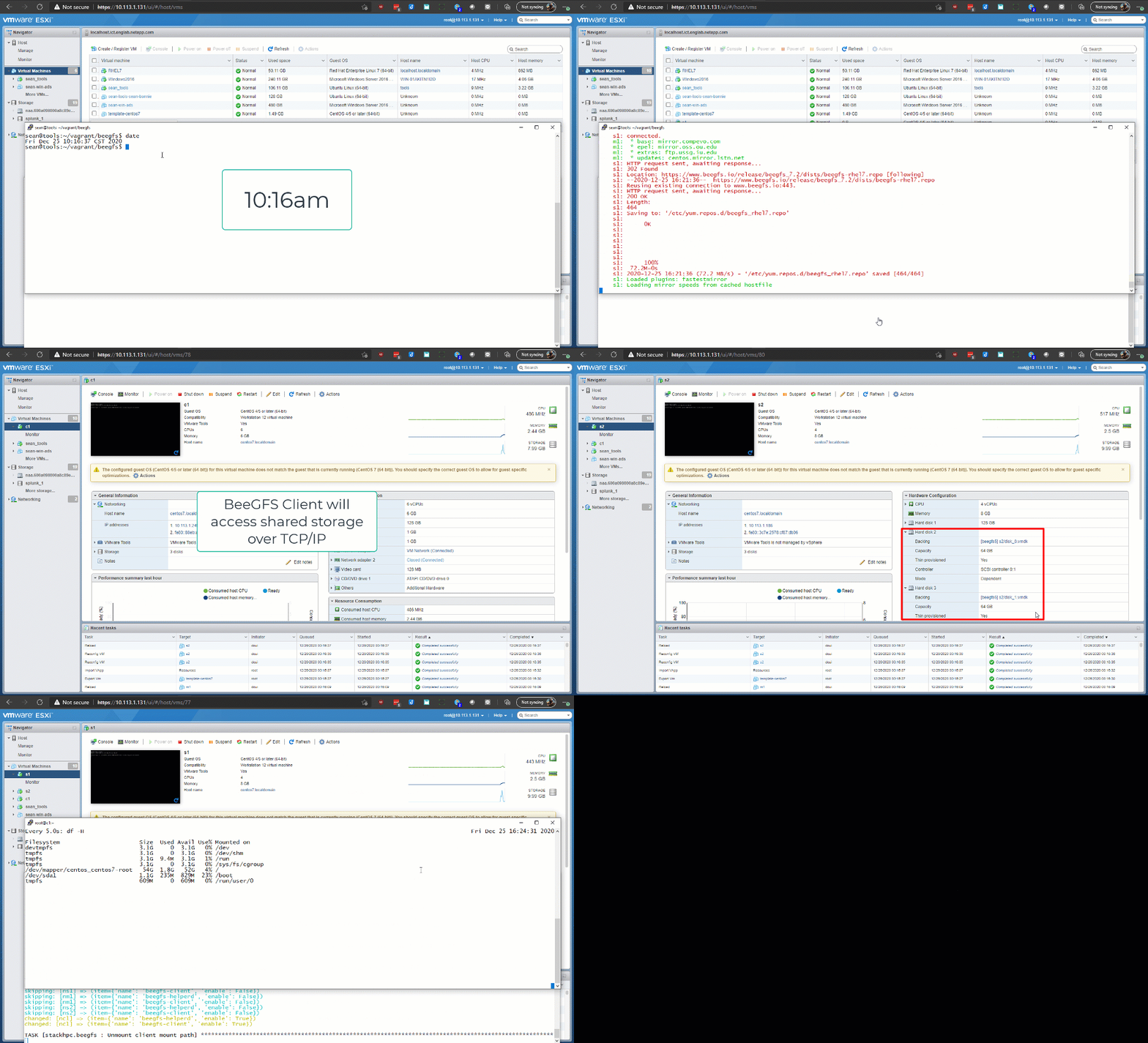
I cheated (in terms of the speed of deployment) because EF280 storage was already presented to ESXi and ESXi Datastores used by BeeGFS created, but if you had E/EF Series storage for BeeGFS applications, you'd likely configure it once and leave it.
Or, if you choose to use VMware Datastores (rather than iSCSI access to Raw Devices on E/EF Series or NetApp HCI storage), you could use PowerCLI or other tool to automate that as well - that wouldn't add more than 60 seconds to this process.
If you need to get external data in or copy results out you can use freeware (rsync, wget and other), the fast and gratis NetApp XCP or - especially in cross-protocol and cross-location data copy/sync scenarios - NetApp CloudSync.
In the case you're not familiar with BeeGFS, all the software used in my demo can be downloaded for free and without registration, so it's very convenient to give it a try. Before you install BeeGFS get familiar with the license(s) and for production use consider getting proper support.
Performance
I haven't tried to "read 10 files from 10 VMs at 10 GB/s" because I don't have access to that kind of hardware (10 GB/s - I'd need one any other EF-Series model for that), but I suspect that is possible. I did try to read one file at 1 GB/s, though.
- 1 BeeGFS client VM (used to run I/O)
- 1 BeeGFS metadata server VM (with 1 small VMDK-based volume for metadata)
- 2 BeeGFS storage nodes serving data (each had 2 VMDK-based volumes)
- Hardware: 1 x ESXi 6.5U3 on H615C (Xeon Gold 6242) attached to 1 x EF280 via Fibre Channel SAN (both H410C and H615C models are sold only with 25G iSCSI, so server-side protocol support isn't available as-tested - iSCSI is the only option)
Client access was distributed across two storage nodes, each of which had two disks, which in effect striped client workload over four Datastores and four EF280 volumes.
The first screenshot I captured shows storage-side throughput created by BeeGFS client.
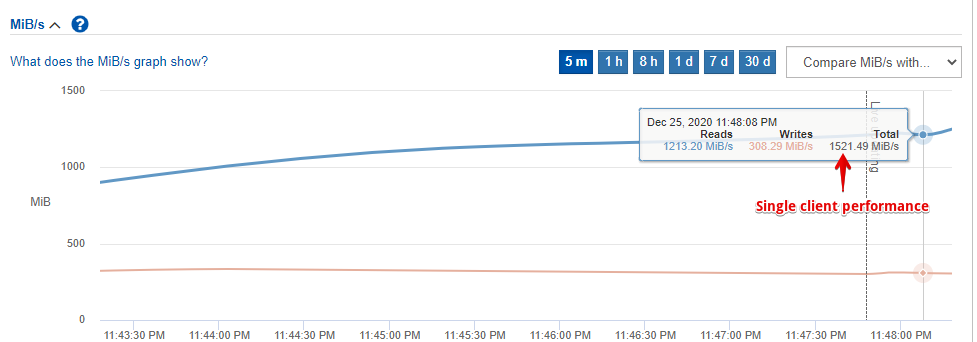
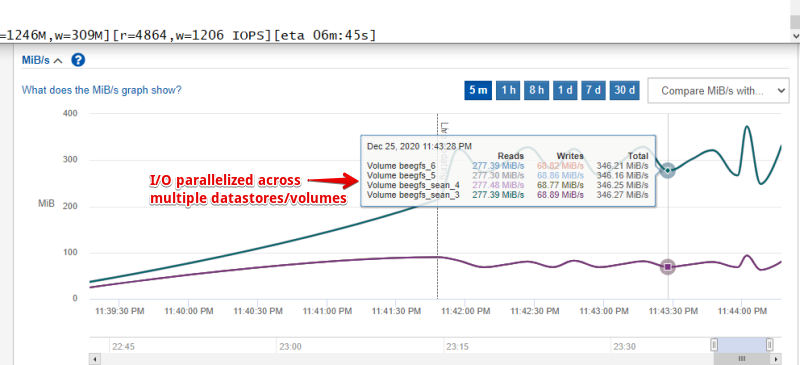
That result is also reflected in fio output at the very top of the screenshot below, which I included for reference purpose while trying to keep image size small. This image includes per-volume performance that shows how client I/O is evenly distributed among all servers and volumes.
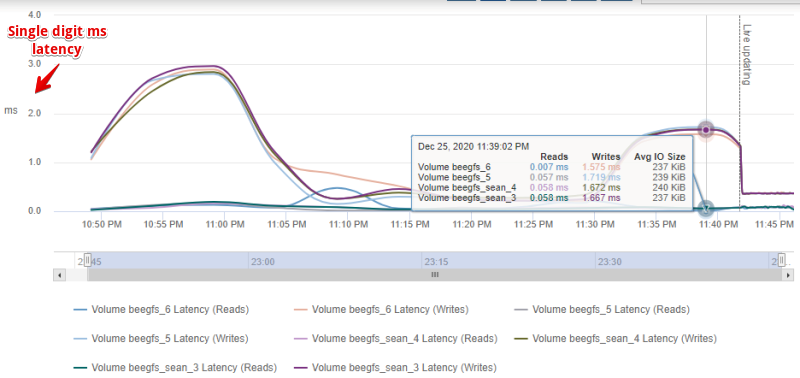
Storage latency remained low throughout, especially for reads (this is that moment where you squint to verify).
Based on DiskSpd tests I did in this same environment yesterday, I know that close to 1 GB/s per EF280 volume is possible, so I figure if I deployed nine BeeGFS VMs (4 clients, 4 storage servers, 1 MD server) and used 512kB request sizes, aggregate client throughput of 3-4 GB/s ought to be possible.
If you're not familiar with EF-Series, the EF280 is the smallest (slowest) EF Series model curerntly available. All of the EF models' specifications can be seen on the last page of this PDF.
Considerations
You won't get a good performance with MPI, shared-memory workloads with NetApp HCI-based BeeGFS because NetApp HCI uses TCP/IP networking. But non-parallel workloads that consume medium and large files should work similar to what I described above.
Rapid access to a changing set of very small files or many KB-sized I/O requests probably wouldn't work great without BeeGFS and VM tuning (or maybe even with) because of the relatively more (compared to a regular file server) network round-trips involved in each request.
BeeGFS servers and clients rely on a properly functioning network. If you run BeeGFS on your NetApp HCI cluster, pay attention to network planning so that you do not impact other workloads or fail to provide sufficient performance to BeeGFS. When buying new switches for BeeGFS on NetApp HCI, get NVIDIA Mellanox SN2100 or SN2700 switches from NetApp and have it all delivered, deployed and tested together.
What next
If you have a virtualized workload that could potentially benefit from parallel access with BeeGFS, give BeeGFS and E/EF Series a try. NetApp HCI customers can evaluate BeeGFS with NetApp HCI (SolidFire) storage, and one BeeGFS cluster can be attached to multiple storage back-ends at the same time.
You can start with a virtual BeeGFS cluster attached to NetApp HCI storage and later expand or even migrate some of that data to E/EF Series.
E/EF Series storage does not provide storage efficiency and automation features of NetApp HCI (SolidFire), but is suitable for high-throughput and high-performance applications where $/MB/s or $/IOPS matter and files either large or already compressed. Once you provision E/EF storage, the rest is virtualization and automation - you can create a large cluster in minutes and even provision and destroy clusters on demand.
References
[1] Solution brief: NetApp E-Series Storage with BeeGFS
[2] TR-4856, BeeGFS High Availability with NetApp E-Series Using Red Hat Enterprise Linux Server
[3] TR-4785, AI Deployment with NetApp E-Series and BeeGFS
[4] Ansible scripts for automated deployment of BeeGFS with NetApp E/EF Series. For community scripts, see Ansible Galaxy
Update (Jan 05, 2021)
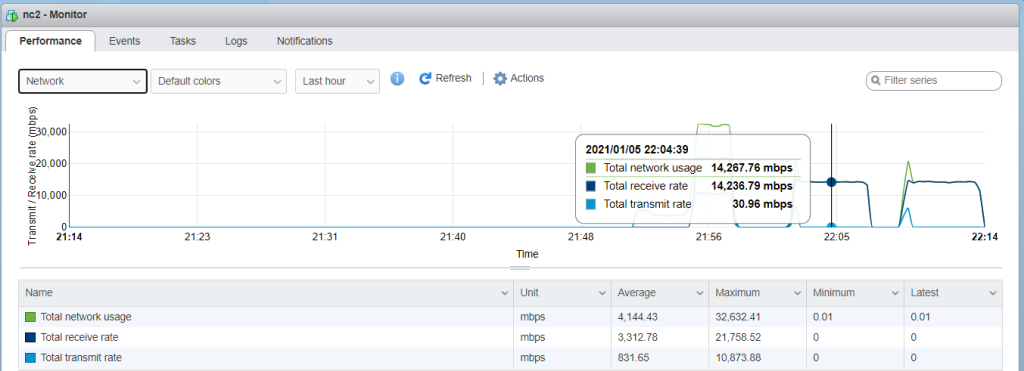
Just before I lost access to this environment I manged to run a test to check throughput of two BeeGFS clients. Originally I hoped to test two clients, four servers, eight volumes, but I was running out of time so I settled for two clients and three servers. Given the unexpected loss of one server and a lack of time, in order to maximize client throughput I used 128kb sequential read (16 jobs, queue depth 4) on each client:
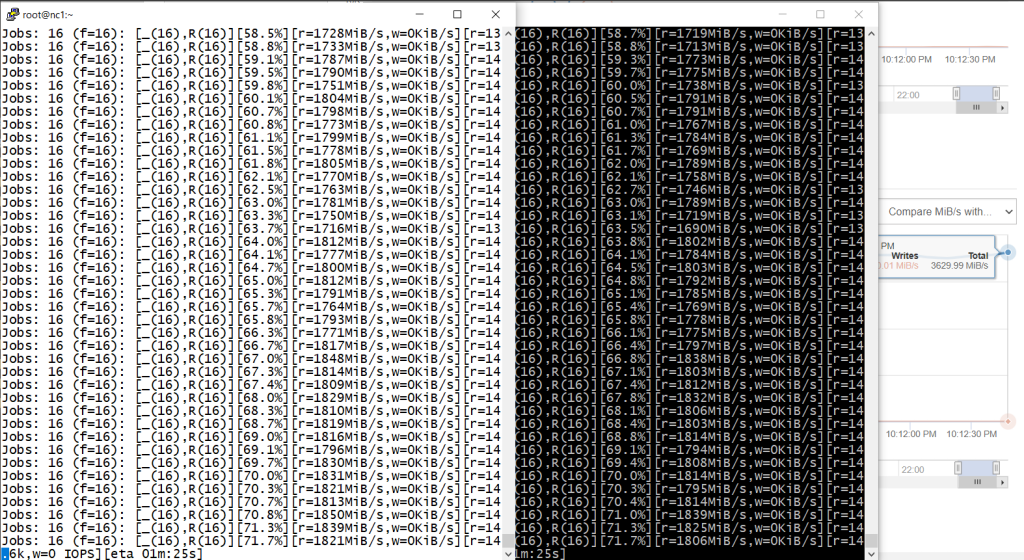
Total data set size was 64 GB per job, 128 GB total. The total of EF280 controller cache and BeeGFS servers' RAM was less than half of that.
On the host, ESXi observed network traffic peaks on the clients in excess of 2 GB/s (2 GB/s on one, 3 GB/s on another client) which shows that 3-4 clients should be able to read at over 5 GB/s.
Video recording (1m34s): https://youtu.be/XdxqZmAkdKE